Outages and Disruptions: Toast Online Ordering
Last updated: Jun 30, 2026, 6:39 PM
What happens to Toast Online Ordering during an outage, what guests see, and how to recover online orders when your connection is restored.
When your Toast system loses its connection and enters Offline Mode, Toast Online Ordering behaves differently from your in-store POS. This article explains what happens to online orders during an outage, what your guests see, what to do while you are offline, and how to recover online orders once your connection is restored.
- What happens to Toast Online Ordering during an outage
- What your guests see
- What to do while you are offline
- When your restaurant comes back online
- Before you contact Toast Customer Care
- Frequently asked questions
- Related articles
What Happens to Toast Online Ordering During an Outage
Toast Online Ordering does not work the way your in-store POS does during a disruption. While your Toast POS can keep taking orders and card payments in Offline Mode, Toast Online Ordering is unavailable because online orders cannot reach a restaurant that is not connected to the Toast cloud.
There are two distinct situations that affect online ordering, and they look different to you and your guests.
The first is your own restaurant being in Offline Mode. This happens when your Toast devices lose connection to the internet, your local network, or the Toast cloud. When your restaurant is in Offline Mode:
- Your Toast devices will not receive any orders placed from your online ordering page.
- Once the system detects that orders are not getting through to your restaurant, your online ordering page stops accepting new orders. This can take up to five minutes.
- Adding delays — such as turning on order throttling or adjusting your quote time strategy — will not affect online orders that were placed shortly after Offline Mode was activated, while the system was still accepting orders. Any orders accepted during that brief window will still come through once your connection is restored.
A related cause that often looks like a full outage is your auto-fire device dropping offline on its own. If the device set to auto-fire loses its connection to the Toast cloud for more than about five minutes, the system pauses online ordering availability so guests cannot pay for orders your kitchen would not see, even when the rest of your restaurant appears to be working normally. The fix for this is described in the “When your restaurant comes back online” section below.
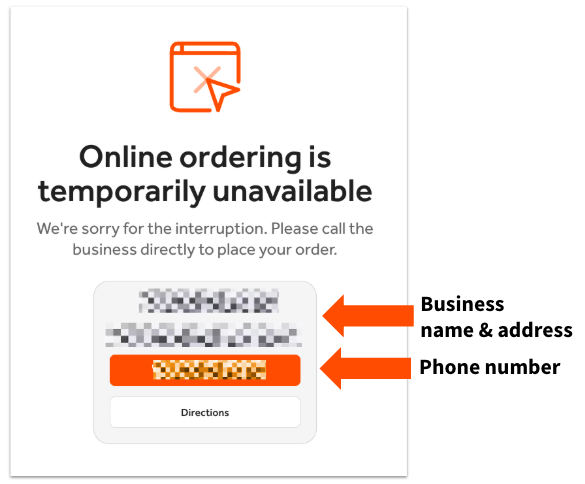
The second situation is a widespread Toast outage, meaning the entire Toast Online Ordering service is down for over an hour. During a widespread outage, your Toast Online Ordering page is automatically updated to notify guests that orders cannot be placed online, and your restaurant address and phone number are displayed so guests can contact your business directly.
Note: If you have a limited-time menu configured before Offline Mode begins, the menu availability settings still apply. Toast recommends that you do not attempt to create a limited-time menu while in Offline Mode, because menu changes will not take effect until your system is back online.
What Your Guests See
What a guest sees depends on when they try to order and which situation is in effect.
A guest who reaches checkout after your page has stopped accepting orders sees a message that the restaurant is currently offline, or that their payment was not accepted. Guests commonly describe this as “the restaurant is currently offline” or “it won’t let me place an order.”
If manual approval is enabled and an online order has not been approved within five minutes of being placed — which can happen during Offline Mode — guests may receive an automated email stating the order has not been approved and suggesting they contact the restaurant to check on the order status. This email is only sent when manual approval is selected, and it is the only automatic way a guest is notified that an online order placed during Offline Mode was not received by the restaurant. You can disable the approval email for manual approval mode on your Online Ordering settings page in Toast Web. To change which approval mode your restaurant uses, see Change Your Approval Mode With Toast Online Ordering.
During a widespread Toast outage, guests see the automatic “online ordering is unavailable” page with your restaurant’s contact information instead of the ordering menu.
What to Do While You Are Offline
If a guest who placed an online order calls your restaurant, use the opportunity to explain the disruption. The guest may want to cancel the online order, but you can still take their order information over the phone and enter the order on the POS, which continues to work in Offline Mode.
Keep in mind that if your restaurant uses Toast Delivery Services and relies on DoorDash Drive or Uber Eats drivers for delivery, DoorDash Drive and Uber Eats will not receive any orders while you are offline.
For everything your Toast devices can and cannot do during a disruption — taking POS orders, accepting card payments, KDS behavior, and shift review — see Use Toast in Offline Mode. For third-party channels such as DoorDash, Uber Eats, and Grubhub during an outage, see Outages and Disruptions: Third-Party Ordering.
When Your Restaurant Comes Back Online
Once your connection is restored, online orders that were placed during Offline Mode do not simply flow through on their own. There is currently no way to sort or queue online orders as they arrive once your connection returns. You may wish to snooze orders for the next 20 or 40 minutes to give your kitchen time to catch up on online orders placed during the disruption.
How those orders are handled depends on your auto-fire setting.
If you have auto-fire disabled, any online orders placed during Offline Mode must be approved once your internet connection is restored. You will find them in Pending Orders mode. Until you approve them, these orders will not fire and cannot be closed, and an unapproved order left in this state can itself cause online ordering availability to pause again.
If auto-fire is turned on, the system automatically approves and fires any online orders that came in during Offline Mode. If you use a Kitchen Display System (KDS), the orders appear on it automatically once the connection is re-established. In this case you can choose to void an order depending on your situation. Because some of these orders may be old, it is often best to contact the guests and verify they still want the order before preparing it. To opt out of auto-firing during an outage, contact Toast Customer Care.
If your page is still not accepting orders after your connection returns, the most common cause is the auto-fire device. Confirm that the device set to auto-fire is back online and that a user is actively logged in to it, because online ordering availability stays paused while the auto-fire device is disconnected or has no one logged in. Then clear any orders that arrived during the disruption from Pending Orders mode so a stuck order is not holding availability off.
Before You Contact Toast Customer Care
Most online ordering disruptions clear on their own once your connection and auto-fire device are back online and any pending orders are approved. Before contacting Toast Customer Care, confirm the following:
- Your Toast devices are back online and no longer showing the Offline Mode banner.
- The device set to auto-fire is online and has a user logged in.
- Any online orders placed during Offline Mode have been approved or cleared from Pending Orders mode.
- Your online ordering status in Toast Web shows that you are accepting orders. To confirm this and resolve a status mismatch between Toast Web and your guest-facing page, see Check Online Ordering Status.
Contact Toast Customer Care if your guest-facing page continues to show that the restaurant is offline after your devices are back online, the auto-fire device is connected and logged in, and pending orders have been cleared — or if you want to opt out of auto-firing during outages.
Frequently Asked Questions
Does Toast Online Ordering work when Toast is offline?
No, Toast Online Ordering does not work when your restaurant is in Offline Mode. While your Toast POS can keep taking orders and card payments offline, your devices cannot receive orders placed from your online ordering page, and your page stops accepting new orders within about five minutes. Online orders resume once your connection is restored. See What Happens to Toast Online Ordering During an Outage above for the full behavior.
Why does my online ordering page say the restaurant is offline when Toast Web says online ordering is on?
Your online ordering page can say the restaurant is offline while Toast Web shows online ordering is on when your auto-fire device is disconnected or has no one logged in, when a recent change has not been published, or when an order placed during a disruption is stuck in Pending Orders mode. Confirm the auto-fire device is online and logged in, clear any pending orders, and select Publish all changes in Toast Web. For the full set of status-mismatch fixes, see Check Online Ordering Status.
What happens to online orders placed during the outage?
Online orders placed during the outage are held until your connection is restored, and how they are handled then depends on your auto-fire setting. With auto-fire disabled, they wait in Pending Orders mode until you approve them. With auto-fire enabled, they are approved and fired automatically once you reconnect. Because these orders may be old, it is often best to contact guests to confirm they still want the order. See When Your Restaurant Comes Back Online above.
Will my guests know their online order did not go through?
Your guests will only be notified automatically if manual approval is enabled. In that case, a guest whose order is not approved within five minutes may receive an automated email suggesting they contact the restaurant. If manual approval is not enabled, guests are not notified automatically, so it helps to explain the disruption to any guest who calls. See What Your Guests See above.
Does turning off Toast Online Ordering also stop DoorDash, Uber Eats, or Grubhub orders?
No, Toast Online Ordering and third-party ordering are separate. An outage or a change to your Toast Online Ordering page does not control your DoorDash, Uber Eats, or Grubhub channels. For how third-party orders behave during an outage, see Outages and Disruptions: Third-Party Ordering.
Related Articles
- Use Toast in Offline Mode
- Check Online Ordering Status
- Change Your Approval Mode With Toast Online Ordering
- Outages and Disruptions: Third-Party Ordering
- Prepare to Operate in Offline Mode During Service Disruptions or Outages