Configure Size Pricing for Modifier Groups and Modifiers
Last updated: Sep 17, 2026, 8:14 PM
- Size Pricing Overview
- Create Matching Sizes for Menu Items and Modifier Options
- Configure Size Pricing for Modifier Groups
- Configure Size Pricing for Individual Modifier Options
Size Pricing Overview
For modifiers, size pricing can be configured at either the modifier group level or the individual modifier option level:
- If you configure size pricing at the modifier group level, all modifier options in the group use the same size-based prices.
- For example, all of the toppings in a Toppings modifier group cost $0.50 for a small pizza, $1.00 for a medium pizza, and $1.50 for a large pizza.
- When you configure size pricing at the modifier group level, the size of the modifier option is always dictated by the size of the menu item it is applied to.
- For example, if you order a small pizza and add a topping to it, the small size price is used for that topping.
- If you configure size pricing at the individual modifier option level, modifier options in a group can set their own size-based prices. Note: Size modification at the individual modifier option level is not available for Online Ordering.
- For example, pepperoni costs $1.00 on a small pizza and $2.00 on a large pizza, while mushrooms costs $0.50 on a small pizza and $1.00 on a large.
- When you configure size pricing at the individual modifier option level, you can choose whether the size of the modifier is dictated by the size of the menu item it is applied to or if the size of the modifier can be specified independently from the menu item size on the Toast POS app.
You can also set modifier prices to depend on the sequence (first topping costs $0.50, second topping costs $0.75, all additional toppings cost $1.00), or a combination of size and sequence. This article will show you how to configure size pricing. For the other options, check out this Support Center article: Configure Special Modifier Pricing: Size and Sequence Pricing.
Back to top
For scenarios where the price of a modifier is determined by the size of the menu item it is applied to, you must specify sizes on the individual menu items and then create corresponding sizes for the modifier options themselves. The sizes on the menu items and modifier options must match exactly, both in the number of sizes and the text used for the size names. For example, this configuration is acceptable:
| Menu Item Sizes | Modifier Option Sizes |
| Small | Small |
| Medium | Medium |
| Large | Large |
| XLarge | XLarge |
This configuration is not acceptable because the size names don't match:
| Menu Item Sizes | Modifier Option Sizes |
| Small | Sm |
| Medium | Med |
| Large | Lg |
| XLarge | XL |
This configuration is not acceptable because XLarge is missing from the modifier option sizes:
| Menu Item Sizes | Modifier Option Sizes |
| Small | Small |
| Medium | Medium |
| Large | Large |
| XLarge |
Follow the instructions below to configure size pricing for a modifier group. All of the modifier options in the group follow the same size pricing rules. For example, all of the toppings in a Toppings modifier group cost $0.50 for a small pizza, $1 for a medium pizza, and $1.50 for a large pizza.
- Once you've created your menu items, under the Modifier section for the group, select +Add to add a new modifier group. Let's call it Pizza Toppings.
- For the Required? drop-down menu, select either Required, Optional - Force Show, or Optional, depending on whether you allow your guests to order pizzas without any or additional toppings. To learn more, see this Support Center article: Configure Modifier Behavior.
- Select the checkbox for the Multi-select? setting so guests can order multiple toppings if they'd like.
- Save your changes and select the modifier group to open the modifier group details page.
- If you allow your guests to select the same modifier (or pizza topping) multiple times, select By default the same modifier can be added more than once in this modifier group for the Duplicate Modifiers setting.
- Scroll down to the Pricing section and for the Pricing Provider setting, select Specify pricing on this item.
- Scroll down to the Pricing strategy setting, select Size Price.
- Enter in the pricing with the appropriate sizes in the Size Price table. Once again, make sure the size name for the modifiers matches the naming convention used for the size of the items.
- Under the Modifiers section, input each individual modifier (pizza topping, in this case) or use the Add Existing Modifiers option to use modifiers that already exist.
- Save and publish your changes.
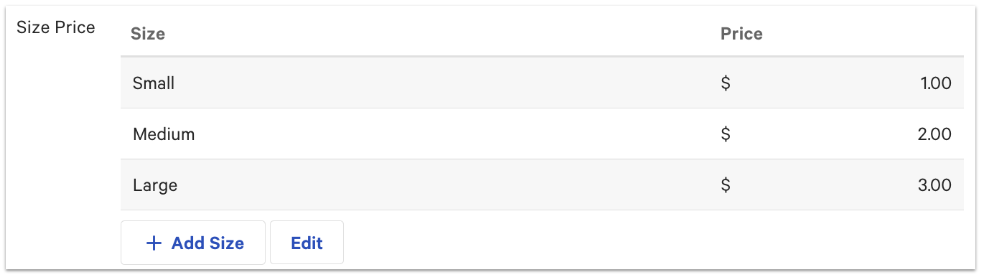
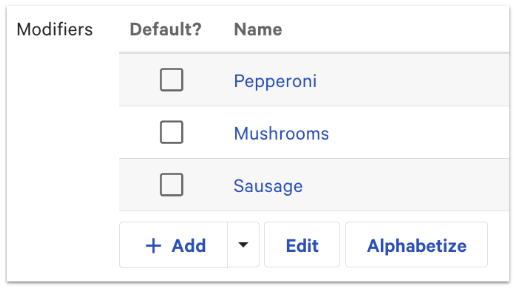
Note: The price editor tool does not yet support editing modifier group or modifier option prices. You can edit size prices for a modifier group on the modifier group's details page.
Follow the instructions below to configure size pricing for individual modifier options. When specifying size pricing for an individual modifier option, you actually configure the sizes and their associated prices on the modifier option's underlying item reference.
Size price matching at the individual modifier level is not compatible with third-party partners.
- Once you've created your menu items, under the Modifier section for the group, select +Add to add a new modifier group. Let's call it Pizza Toppings.
- For the Required? drop-down menu, select either Required, Optional - Force Show, or Optional, depending on whether you allow your guests to order pizzas without any or additional toppings. To learn more, see this Support Center article: Configure Modifier Behavior.
- Select the checkbox for the Multi-select? setting so guests can order multiple toppings if they'd like.
- Save your changes and select the modifier group to open the modifier group details page.
- If you allow your guests to select the same modifier (or pizza topping) multiple times, select By default the same modifier can be added more than once in this modifier group for the Duplicate Modifiers setting.
- Scroll down to the Pricing section and for the How are modifiers in this group priced? setting, select Each modifier has a unique price.
- Scroll down to the Size Configuration section and for the How should size priced modifiers behave setting, select the option that meets the needs of your restaurant:
- The size of the modifier can differ from the size of the item. If you choose this configuration, the sizes you specify for the modifier option's item reference do not have to match menu item sizes. Also, the Toast POS app will prompt you for a size after the modifier option is selected.
- Modifier automatically use the same size as the items they are applied to. If you choose this configuration, the sizes you specify for the modifier option's item reference must match the sizes specified for the associated menu items exactly, both in the number of sizes and the text used for the size names, as described earlier in this article.
- Enter in your modifiers or use the Add Existing Modifiers option from the drop-down menu to use existing modifiers (if the prices inside the modifier match the size pricing).
- After adding all of your modifiers for this group, save your changes so that you can select a modifier name and go to the modifier details page.
- Scroll down to the Pricing section and enter in the Size Prices (size and price) for this specific modifier. Once again, make sure the size for the modifiers matches exactly the naming convention used for the size on the items.
- Navigate back to the modifier group page and repeat step 10 for each specific modifier in the group. Once you're done, your modifiers will have the size icon next to each price.
- Save and publish all of your changes.
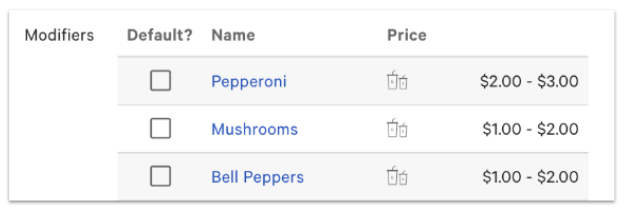
Note: The price editor tool does not yet support editing modifier group or modifier option prices, so size prices for a modifier option must be edited on the details page for the modifier option's item reference.