Configure Special Modifier Pricing: Size and Sequence Pricing
Last updated: Sep 17, 2026, 5:40 PM
- Special Modifier Pricing: Size Pricing and Sequence Pricing
- Configure Size Pricing
- Configure Sequence Pricing
- Configure Size/Sequence Pricing
- Video: Order Workflow for POS & Online Ordering
| The following features are available on POS, Online Ordering, and Toast Mobile Order & Pay™ only. Additionally, Toast does not recommend using pre-modifiers since they are only compatible with the POS at the moment. |
Special Modifier Pricing: Size Pricing and Sequence Pricing
Regardless if you are a pizzeria, a deli, or a fast-casual restaurant with BYO bowls, the features outlined below will help you streamline your menu and allow easy guest ordering.
For more basic modifier pricing options (no additional cost, cost set at modifier group, or cost set for individual modifier), check out this Support Center article: Configure Modifier Pricing Strategy.
Watch this video or follow the step-by-step instructions in this article to implement special modifier pricing strategies for your restaurant including size pricing, sequence pricing, and size + sequence pricing.
Configure Size Pricing for Modifiers
Size pricing can be used by restaurants when the cost of a modifier option changes based on the size of the menu item it is applied to. Size pricing can be used at both the modifier group level or the individual modifier option level.
- Modifier group level: All modifier options in this group use the same size-based prices. For example, you have one modifier group for Toppings and the prices for all modifiers depend on the size of the item:
- Small pizza: modifiers in the Toppings group cost $0.50 each
- Medium pizza: modifiers in the Toppings group cost $1.00 each
- Large pizza: modifiers in the Toppings group cost $1.50 each
- This feature best works on both Toast POS and Online Ordering.
- Individual modifier level: Modifier options in a group can set their own size-based prices. For example:
- Pepperoni costs $0.75 on a small pizza and $1.00 on a large pizza
- Mushrooms cost $0.50 on a small pizza and $0.95 on a large pizza.
- This feature best works on Toast POS. If your restaurant uses size pricing on the individual modifier level, your guests through Online Ordering would be able to add a small topping to a large pizza, for example.
| Modifier size pricing must be used with item size pricing. Toast recommends setting up item size pricing prior to following the steps below. Check out this Support Center article, Configure Size Pricing on Menu Groups and Items, to learn more. |
It is very important that the sizes for the modifiers match the size and naming convention for the items exactly (including spelling, capitalization, etc.). For example, if your menu item size is named "Small", then make sure that the modifier size is also "Small" (not "Sm" or "SMALL" or "small").
If your items are erroneously being grouped together and not being separated by size or modifier on your POS, select the three dot icon in the top right corner of your POS device and Resync all data.
For instructions on how to set up size pricing on the modifier group or individual modifier level, check out this Support Center article: Configure Size Pricing for Modifier Groups and Modifiers.
Back to top
Configure Sequence Pricing for Modifiers
Sequence pricing can be used when the price of modifiers in a modifier group is determined by the sequence in which they are added to a menu item. The price of the menu item is updated to reflect the guest's choices. For example, the first topping of a pizza is free, the second topping costs $0.50, the third topping costs $0.75, and all additional toppings cost $1.00
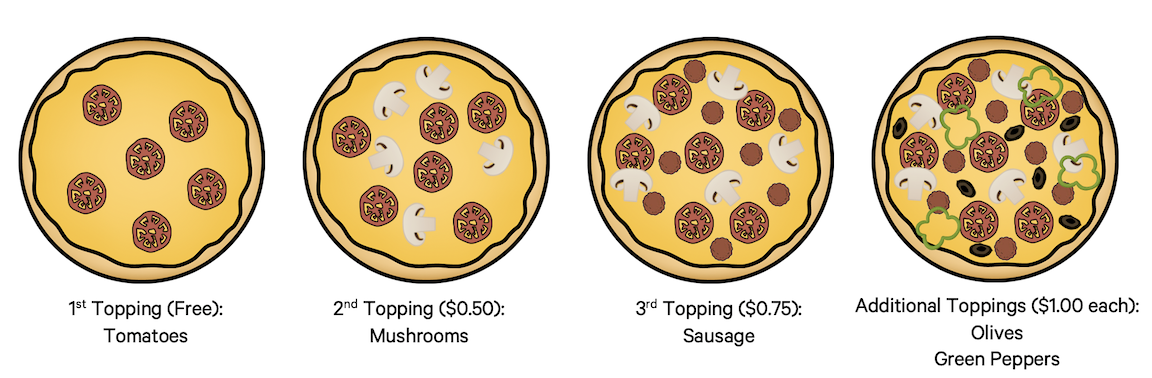
| In determining the sequence and the corresponding price for the modifiers, the system will use the sequence of the modifier in relation to the other modifiers within the group. For example, let's say there are two modifier groups - one for protein toppings and one for veggie toppings. The sequence pricing can be different for each modifier group and thus, if a guest wants to add two protein toppings they would trigger the price associated for the first and second topping within the protein toppings modifier group. By adding a veggie topping, the price for that topping would correspond to the first topping in the veggie modifier group. |
To set up sequence pricing in Toast Web:
- Once you've created your menu items, under the Modifier section for the group, select +Add to add a new modifier group. Let's call it Pizza Toppings.
- For the Required? drop-down menu, select either Required, Optional - Force Show, or Optional, depending on whether you allow your guests to order pizzas without any or additional toppings. To learn more, see this Support Center article: Configure Modifier Behavior.
- Select the checkbox for the Multi-select? setting so guests can order multiple toppings if they'd like.
- Save your changes and select the modifier group to open the modifier group details page.
- If you allow your guests to select the same modifier (or pizza topping) multiple times, select By default the same modifier can be added more than once in this modifier group for the Duplicate Modifiers setting.
- Scroll down to the Modifier Pricing Method section and for the Select where pricing is set setting, select Additional charge - price set by modifier group.
- Scroll down to the Modifier Group Pricing section and for the Select pricing for all modifiers setting, select Sequence Price. Note: You must select Additional charge - price set by modifier group under Modifier Pricing Method before Sequence Price will appear as a choice in the Modifier Group Pricing section. If you don't see Sequence Price as an option, check this setting first.
- Rows for 1st option and all additional options will appear. Select + Add Level to add additional options in the sequence. Enter the prices for each option.
- Scroll down to the Modifiers table and add the individual modifiers (toppings, in this example), or use the Add Existing Modifiers option to add the modifiers that were already created elsewhere on your menu.
- Save and publish your changes when you're finished.
Configure Size/Sequence Pricing for Modifiers
Size/sequence pricing can be used when the cost of a modifier depends on the size of the menu item it is applied to and the order in which it is applied to the item. For example, the first topping on a small pizza is $0.25 and additional toppings are $0.50, while the first topping on a large pizza is $0.50 and additional toppings are $0.75.
| Size/sequence pricing must be used with item size pricing. Toast recommends setting up item size pricing prior to following the steps below. Check out this Support Center article, Configure Size Pricing on Menu Groups and Items, to learn more. |
It is very important that the sizes for the modifiers match the size and naming convention for the items exactly (including spelling, capitalization, etc.). For example, if your menu item size is named "Small", then make sure that the modifier size is also "Small" (not "Sm" or "SMALL" or "small").
- Once you've created your menu items, under the Modifier section for the group, select +Add to add a new modifier group. Let's call it Pizza Toppings.
- For the Required? drop-down menu, select either Required, Optional - Force Show, or Optional, depending on whether you allow your guests to order pizzas without any or additional toppings. To learn more, see this Support Center article: Configure Modifier Behavior.
- Select the checkbox for the Multi-select? setting so guests can order multiple toppings if they'd like.
- Save your changes and select the modifier group to open the modifier group details page.
- If you allow your guests to select the same modifier (or pizza topping) multiple times, select By default the same modifier can be added more than once in this modifier group for the Duplicate Modifiers setting.
- Scroll down to the Modifier Pricing Method section and for the Select where pricing is set setting, select Additional charge - price set by modifier group.
- Scroll down to the Modifier Group Pricing section and for the Select pricing for all modifiers setting, select Size/Sequence Price.
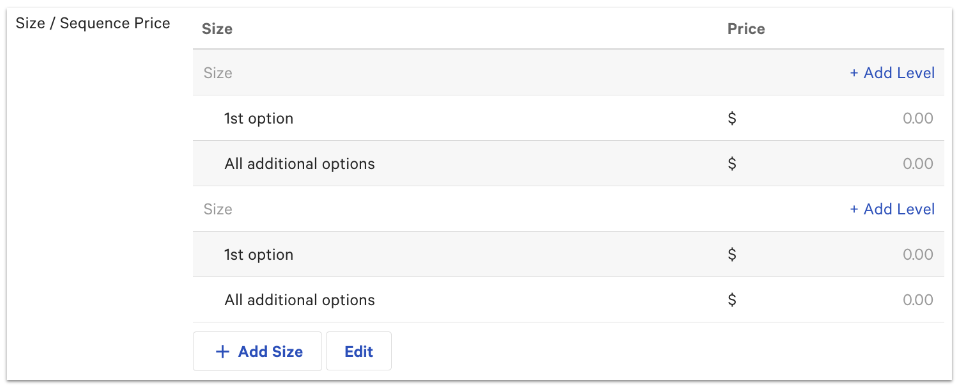
- A new Size/Sequence Price table will appear where you'll be able to add the different levels for each size. Select the first row at the top where the word "Size" is greyed out, and enter the name of the first size. If you need to add additional sizes, select the +Add Size button at the bottom of the table.
- Next, specify the pricing options for the size you just created. The 1st option and All additional options levels are already added by default, but you can select +Add Level to create additional levels in the sequence.
- Scroll down to the Modifiers table and add the individual modifiers (toppings, in this example) or use the Add Existing Modifiers option to add the modifiers that were already created elsewhere on your menu.
- Save and publish your changes.
Video: Order Workflow for POS & Online Ordering
Check out the video below and see how the features outlined above will appear on your POS and in Online Ordering.
Menu modifier pricing order workflow.
- Size pricing order workflow
- Select the size of the menu item on the POS.
- Each of the modifiers you add from the group is automatically priced using the size price that matches the menu item size you’ve selected.
- For example, all toppings added to a medium pizza are 75 cents. If you change the size of the pizza to a large one, the modifier prices adjust to the large prices as well.
- If you’ve set up size pricing on the individual modifier level rather than the group level, you’ll see the prices of each different modifier adjust to the item size you select.
- For example, pepperoni and mushroom prices will increase to their large size when the pizza size is changed to large.
- Sized price modifiers will behave similarly when guests place orders on your online ordering site.
- Sequence pricing order workflow
- When you add modifiers to the item on the POS, the prices will reflect the sequence pricing set for the modifier group.
- For example, for a pizza the price of the first topping added is 50 cents. The second is 75 cents, and any additional toppings are a dollar.
- Sequence pricing will behave similarly when guests place orders on your online ordering site.
- Size/sequence pricing order workflow
- If your modifier group is set up using size sequence pricing, any modifiers added to an item on the POS will reflect the sequence pricing set up for the item size selected.
- For example, the first topping added to a medium pizza is 75 cents. Any additional toppings are a dollar. If the size of the pizza is changed to a large one, the price of the modifiers updates to the sequence pricing set up for large items. Now, the first topping is $1, and any additional toppings are $1.25.
- Size/Sequence pricing will behave similarly when guests place orders on your online ordering site.