Configure Modifier Pricing Strategy
Last updated: Sep 30, 2026, 3:09 PM
Modifier Pricing Overview
When building your menu in Toast and adding modifier groups and modifiers, you may want to set different prices for modifier groups as a whole, or for each individual modifier. This article will cover the basic modifier pricing settings and how you might use them at your restaurant.
For pizzerias, delis, or restaurants selling BYO-style menu items like bowls or salads, you may prefer to use size pricing or sequence pricing for your modifiers. To learn more about these options, check out this Support Center article: Configure Special Modifier Pricing: Size and Sequence Pricing.
Note: Open pricing isn't supported for modifiers. Even though modifiers can be configured with an item reference set to open pricing and the modifier group set to individual pricing per modifier, the POS will not prompt you for a price. The closest solution to open priced modifiers would be using special requests (Add a Special Request to a Menu Item).
Back to top
Modifier Pricing Options
To adjust your modifier pricing options, follow these steps:
- In Toast Web, navigate to a specific modifier group. You can do this by navigating to Menus > Menu management > Menu manager, and opening a menu to get to the menu group or item that contains the modifier group you'd like to edit. Select the name of the modifier group to open the modifier group details page.
- Scroll down to the Pricing section, and select your desired pricing option from the How are modifiers in this group priced? setting. The options are:
- No charge: There is no charge for the modifiers in this group, so if any modifiers are added to a check, they will be free. This setting is commonly used for salad dressing modifiers for a salad item.
- Individual: Each modifier has a unique price.
- Group: All modifiers share the same price.
- Make sure to save and publish when you're finished making changes.
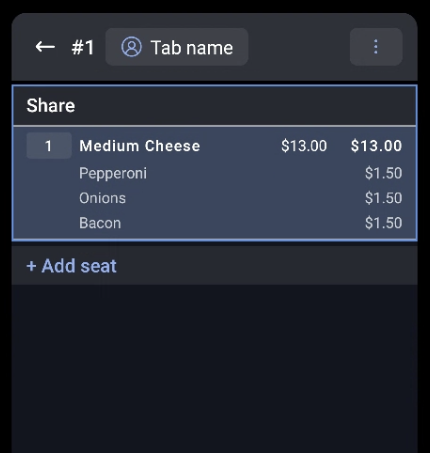
Once you've selected the pricing strategy for your modifier group, on your POS, upcharges or pricing for each modifier will show when added to a check.
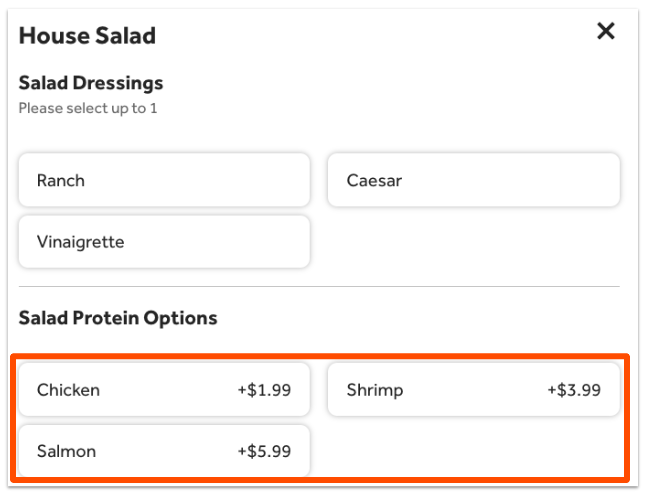
Additionally, you'll notice that your Toast Online Ordering and Toast Mobile Order & Pay® pages will clearly show your guests if there are any specific up-charges associated with the modifiers for the modifier group.
Note: A time-specific pricing strategy cannot be applied at the modifier level. To learn how to use this time-specific pricing for your menus and items, check out our platform guide: Time-specific price.
Back to top
Additional Resources for Modifier Configuration
- Configure Modifier Behavior
- Set Up and Use Modifier Multi-Select
- Configure Modifier Pricing for Pizzas, Delis, and BYO Menus
- Create and Manage Modifier Groups and Modifier Options- Learn how to create a new modifier and/or add existing modifiers to a modifier group, including how to set a negative pricing for a modifier.
Back to top