Reprint and Resend Receipts
Last updated: Oct 8, 2026, 12:23 PM
Reprint or resend a guest receipt from the Toast POS, or pull up a past receipt by date, check number, or credit card last 4. Covers open checks, closed checks, and voided checks.
- Before You Begin
- Looking for Something Else?
- Reprint a Recent Receipt From the Payment Terminal
- Find and Reprint an Older Closed Receipt From the POS
- Email or Text a Receipt to a Guest
- Reprint a Voided Check Receipt From Toast Web
- Frequently Asked Questions
- Related Articles
Before You Begin
Applies to: Toast POS, Toast Web
Permissions needed:
- 1.1 Table Service Mode, 1.2 Quick Order Mode and 1.4 Payment Terminal Mode is required to reprint a receipt on the POS.
- 3.30 Void/Refund Payments (Limited to Same Day Only) permission is required to access voided payments report. Please go to Toast Web > Reports > Cash and loss management > Voided payments in Toast Web to reprint a voided check receipt.
- 3.23 Find Checks is required to find a check in Toast Web and email or text its receipt.
What you'll accomplish: Reprint a guest receipt (open, closed, or voided) on your POS device, or email or text a copy of a past receipt to a guest.
Note: Tickets generated through auto-fire from a third-party app do not have a print button.
Looking for Something Else?
The word "check" is used for several different things in Toast. Use this table to find the right article for your task.
| What you need | Where to go |
|---|---|
| Reprint a guest receipt (open, closed, or voided) | Continue with this article |
| Reprint a kitchen ticket | |
| Reprint a server checkout or shift review | |
| Reprint a payroll paycheck with the wrong name | |
| Find a closed check without reprinting | See Find Checks |
| Void a check, item, or payment |
Reprint a Recent Receipt From the Payment Terminal
Use these steps when the receipt you need is still visible in the Payment Terminal — typically a receipt from the current shift or the last day or two.
- From the Table Service or Quick Order screen, select All checks at the top of the screen, or select Payment Terminal from the main menu of the Toast app.
- Use the tabs at the top of the screen to locate the check you'd like to reprint.

- Select your desired check, and then select Pay (S) to access the payment view.
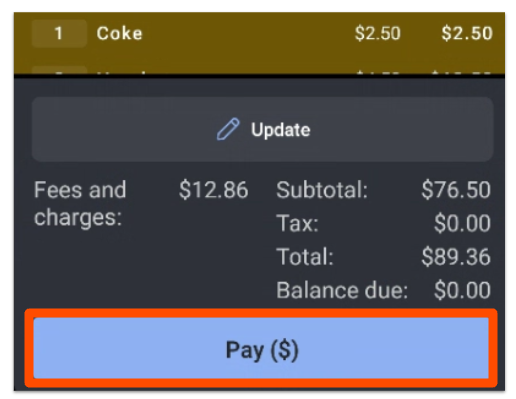
- Select the Receipt button that appears below the check in the payment view.
- Choose your desired receipt type and then select Done. You'll have the option to select:
- Itemized receipt — email, text, or print
- Signature receipt — print
- Itemized with signature — print
- Closed receipt — print
From any closed check in Toast Web:
- In Toast Web, navigate to Finance > Payments > Find checks & issue refund.
- Search for the check by Check Number, ID, Customer Info, Credit Card, or Advanced Search.
- Select the check to open it.
- Select the Actions drop-down and choose Email Receipt or Text Receipt.
- Enter the guest's email address or phone number and confirm.
Expected outcome: The receipt prints at your assigned receipt printer, or — if you chose email or text — is sent to the guest.
Find and Reprint an Older Closed Receipt From the POS
Use these steps when the receipt isn't visible in the Payment Terminal tabs — for example, a receipt from earlier in the week or from last month.
- From the Payment Terminal, tap the three dots (overflow menu) in the top right corner and select Advanced Check Search.
- Select one of the search methods at the top to search for the check in question. Find by Check Number and Find by Credit Card are the most commonly used.
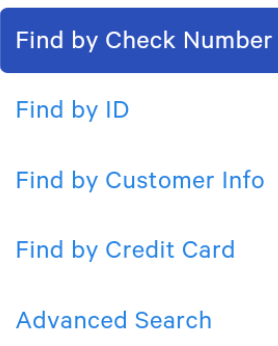
- Enter all of the requested information for your search method and select Search.
- Locate the correct check in the search results. The system pulls up every check that matches the criteria you entered, so use the date, time, total, and item details to confirm the right one.
- Select the Actions drop-down in the bottom-right corner and choose Print Receipt.
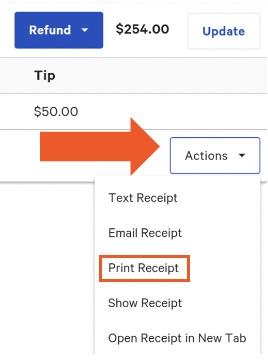
- Choose the printer you'd like the receipt to print at.
Expected outcome: The receipt prints at the printer you selected. If the print job does not appear, confirm the printer is online and select Print Receipt again.
Email or Text a Receipt to a Guest
Use these steps when a guest asks for a digital copy of their receipt — including credit card receipts, prepaid order receipts, online order receipts, and gift card receipts.
From a recent check in the Payment Terminal:
- Locate the check in the Payment Terminal and select Pay (S).
- Select the Receipt button below the check.
- Choose Itemized receipt and then select Email or Text.
- Enter the guest's email address or phone number and confirm.
From an older closed check using Advanced Check Search:
- From the Payment Terminal, tap the three dots and select Advanced Check Search.
- Find the check using Find by Check Number or Find by Credit Card.
- Select the Actions drop-down and choose Email Receipt.
- Enter the guest's email address and confirm.
Expected outcome: The guest receives the receipt at the email address or phone number you entered. If the guest reports they did not receive it, ask them to check their spam folder and confirm the address before resending.
Reprint a Voided Check Receipt From Toast Web
A voided check receipt is reprinted from the Voided Payments report in Toast Web — not from the POS Payment Terminal.
- In Toast Web, navigate to Reports > Cash and loss management > Voided payments.
- Select your desired report parameters (date range, employee, payment type, and so on) and then select Update.
- Locate the voided payment in the report.
- Select the receipt link in the row for the voided payment to open the receipt.
- Use your browser's print function to reprint the receipt.
Expected outcome: The voided receipt opens and prints from your browser. If the receipt link does not open or no print option appears, confirm you have permission to view the Voided Payments report and that pop-ups are allowed in your browser. The permission required is 3.30 Void/Refund Payments (Limited to Same Day Only). When you select the Receipt option within the Voided Payments report, you will be presented with three choices: Text, Email, or Show. Please feel free to select whichever method is most convenient for you.
Frequently Asked Questions
Can I Reprint a Receipt From a Previous Day or Past Date?
Yes. To reprint a receipt from a previous day or past date, use Find and Reprint an Older Closed Receipt From the POS. On the POS, open Advanced Check Search, search for the check by check number or credit card, and select Print Receipt from the Actions drop-down.
Also asked as:
-
- "how do i reprint a receipt from yesterday"
- "How do I reprint a receipt from March 26th"
- "can i reprint a check from a past day"
- "How do I get a receipt for a customer from last week"
How Do I Look Up a Receipt by the Last 4 Digits of a Credit Card?
To look up a receipt by the last 4 digits of a credit card, use Advanced Check Search on the POS and select Find by Credit Card. Enter the last 4 digits of the card and select Search. The system pulls up every matching check, so use the date, time, and total to confirm the right one before selecting Print Receipt.
You can also look up the receipt in Toast Web. Navigate to Finance > Payments > Find checks & issue refund, search for the check, and select it to open it. Select the Actions drop-down and choose Show Receipt, Email Receipt, or Text Receipt. See Email or Text a Receipt to a Guest for the full steps.
Also asked as:
-
- "How do I search for an old itemized receipt using the last 4 digits of a credit card"
- "I need to pull up a receipt using the last four digits of the card"
How Do I Email a Past Receipt to a Guest?
To email a past receipt, use either the POS or Toast Web. On the POS, find the check in Advanced Check Search and choose Email Receipt from the Actions drop-down instead of Print Receipt. In Toast Web, navigate to Finance > Payments > Find checks & issue refund, open the check, and choose Email Receipt or Text Receipt from the Actions drop-down. See Email or Text a Receipt to a Guest for the full steps.
Also asked as:
-
- "how do i email a gift card receipt"
- "how to send credit card receipt to customer"
- "How can I pull up a guest purchase history and email them a past receipt"
- "would like to send a customer a receipt"
Why Don't I See an Option to Email or Reprint a Receipt?
If you don't see an Email Receipt or Print Receipt option:
- Confirm you're using Advanced Check Search on the POS, not the standard Payment Terminal tabs — the Actions drop-down (where these options live) only appears in Advanced Check Search results.
- Confirm the check is closed. The Email Receipt option is for closed checks; open checks must be paid before a final receipt can be emailed.
- Confirm your user has the correct permissions.
- If the receipt is for a third-party order auto-fired from an integration, the Print button is not available. See the Note at the top of this article.
Also asked as:
-
- "i need to reprint and email a check to a guest from a month ago and i am in reports and orders and when i click into the order there is NO option to email or reprint"
Can I Reprint a Voided Check From a Couple Months Ago?
Yes. The Voided Payments report in Toast Web lets you select a custom date range, so you can pull voided checks from prior months. See Reprint a Voided Check Receipt From Toast Web. If the receipt link does not open or the pop-up is cut off, confirm pop-ups are allowed for your Toast Web browser session.
Also asked as:
-
- "How do I reprint voided checks from a couple months ago? It doesn't give me an option to print"
Can I Save a Receipt as a PDF?
Once we open the receipt in a new tab from Toast web, we can use the Print shortcut to Save the receipt as PDF. Excel format is currently not available.
Also asked as:
-
- "I need to save a receipt and it needs to be in PDF or Excel"
- "I need the PDF version of [date] check... so I can reprint"
Can I Reprint a Receipt That Was Never Paid?
Payment Terminal Receipt button is not available on unpaid checks. Customers must print the open check from the Table Service screen.
How Do I Reprint a Server Checkout or Shift Review?
A server checkout (also called a shift review) is a separate report from a guest receipt. Reprinting it does not use the steps in this article. In order to reprint a shift review, please use this article: Print a Shift Review.
Also asked as:
-
- "How can i reprint a server check out from last night?"
- "can i reprint a server checkout for the day before?"
How Do I Reprint a Kitchen Ticket?
To reprint a kitchen ticket, use the Toast POS overflow menu and select Reprint kitchen tickets. See Reprint Kitchen Ticket for the full steps. Kitchen tickets are separate from guest receipts and cannot be reprinted using the steps in this article.
Related Articles
- Find Checks
- Configure Your Receipts
- Reprint Kitchen Ticket
- Void Items, Payments, and Checks
- Customize Receipt Printing For Online Orders