Set Up and Apply Auto-Gratuity
Last updated: Oct 7, 2026, 3:32 PM
- Assign Auto-Gratuity to Different Service Areas
- Add Auto-Gratuity to a Table or Check
- Additional Resources
Assign Auto-Gratuity to Different Service Areas
| Auto-gratuity is calculated on the check total, so every menu item on the check is included, including retail items and any fees rung in as menu items. You can't exempt specific menu items from auto-gratuity.
To keep a fee, such as a room or equipment rental, out of the gratuity calculation, add it to the check as its own service charge that isn't set up as a gratuity, instead of as a menu item. To learn how to set up service charges, see Customize Service Charges and Mandatory Gratuity.
You can also set Auto-apply Gratuity? to No for a service area and add gratuity manually to the checks that need it, using the steps in Add Auto-Gratuity to a Table or Check. |
To assign auto-gratuity to specific service areas, follow these steps:
- In Toast Web, navigate to Front of House> Service areas & tables > Service areas.
- Select your desired service area, or select + Add Service Area to create a new one.
- Enter a Name for the service area, determine whether it's the primary service area, and assign a Revenue Center if desired.
- Scroll down to the Auto-Applied Gratuity section, and select Yes next to the Auto-apply Gratuity? setting.
- Next, select Select Service Charge to add one of your existing service charges that will apply to tables in this service area. You can also configure the minimum number of guests required at the table for the auto-gratuity to be added to the check.
- Save and publish your changes.
Add Auto-Gratuity to a Table or Check
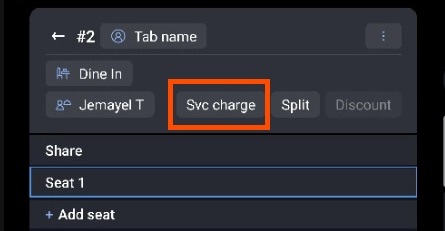
Depending on your restaurant's policy, there may be times when adding an automatic gratuity to a table is required. As a server, you may or may not have been granted permission to add the gratuity to the table yourself. If you have permission to do so, the steps below will teach you how to add the fee manually from inside the check. If you do not, the steps below will still be possible, but your manager's passcode will be required to complete the process.
- From the payment screen on your POS the check, select Service charge.
- A list of created service charges will appear. Select the charge, then select Done.
- The chosen service charge will be added to the check and can be seen on the payment screen.
- If you decide to split this check after auto-gratuity has been applied, the gratuity will be applied to each check appropriately. However, if a check is transferred to another individual, the gratuity may not automatically appear due to the employee's job or your tip pooling policy, so it's always a good idea to verify that the gratuity appears after splitting or transferring a check with auto-gratuity previously applied.
Additional Resources
- Get Started With Service Charges and Mandatory Gratuity
- Customize Service Charges and Mandatory Gratuity