Customize Service Charges and Mandatory Gratuity
Last updated: Aug 20, 2026, 3:34 PM
Learn how to add a service charge to a guest's check for things like large party gratuities, event fees, special menu upsell charges, and more.
| If you're attempting to use the service charge feature to assess credit card surcharges, you bear a risk of non-compliance. You shouldn't use the service charge feature to apply credit card surcharges. Non-compliance may result in card network fines or other liabilities under state law for which the customer is responsible.
Toast Credit Card Surcharging is the only way to apply credit card surcharges on the platform today in a manner that complies with card brand rules*. Please note that not all Toast customers are eligible. You can find more information about eligibility and how it works here: Get Started with Toast Credit Card Surcharging.
* - Toast's Credit Card Surcharging product helps merchants comply with card brand requirements. Merchants remain responsible for compliance with any additional disclosure or other legal requirements that may apply in their state. Not available in CT, ME, MA, OK. Merchants that have a direct Card Acceptance Agreement with American Express are not eligible. |
| Additionally, Toast merchants are solely responsible for compliance with all applicable laws and rules, including those applicable to imposing service charges. When you add a service charge using Toast functionality, during checkout, both you and your customers will see service charges as a line item on the transaction. Some jurisdictions may have additional requirements, such as requiring that any extra fees are included in advertised prices. If your local laws, regulations, or applicable card network rules have additional requirements that prevent your use of Toast’s existing service charge functionality, please remember to keep all of your operational costs in mind when implementing pricing to help promote sustainable margins. If you are unsure about the local laws, regulations, or applicable card network rules applicable to you, please consult an attorney or other professional for advice based on your unique circumstances.
At this time, Toast Credit Card Surcharging is only available to customers based in the U.S. |
- Get Started With Service Charges and Mandatory Gratuity
- Set Up Service Charges and Fees
- Add a Non-Automatic Service Charge to a Check
- Remove a Service Charge From a Check
- Reorder Your Service Charges
- Edit a Service Charge Label
- Archive a Service Charge
- Additional Resources
Set Up Service Charges and Fees
A service charge is an additional fee that is collected in exchange for a product or service on top of the cost of the goods. Restaurant owners may choose to add a service charge to a bill for various reasons, including:
- Large dining party fee (mandatory gratuity for parties with more than a specific number of guests)
- Special menu upsell fee
- Banquet event fee
- Cutlery fee
- Hotel room service charge
- Bottle service charge
- Mandated service charge for healthcare
| Unlike an optional tip, service charges are a required payment as part of a guest’s bill and do not always go to the employee who serves a guest. An important thing to note about a service charge is that they go directly to the restaurant or business to keep or allocate as they see fit. If you configure a service charge to go to an employee, the service charge is considered part of the employee’s non-tip wages. See Get Started With Service Charges and Mandatory Gratuity for more details. |
This article will reference two service charge terms that are separate and distinct in Toast:
- Employer-kept service charges: If a service charge is kept by the restaurant, it isn't considered income for an employee and is considered part of net sales for an employer.
- Mandatory gratuity: If a service charge or part of a service charge is given to employees, it is referred to in Toast as a mandatory gratuity. This is different from a tip and is considered non-tip income for the employee. The most common example is automatic mandatory gratuity.
Step-by-Step Guide: Service Charges
Follow these steps to create service charges in Toast Web.
- Log in to Toast Web and navigate to Finance > Related > Settings > Service charges & fees.
- Select + Add to create a new service charge.
- Configure these options on your screen:
- Name: Name of the service charge as it will appear on the POS and receipt, if applicable.
- Charge Type: Fixed Percent, Fixed Amount (dollar), or Open Amount (user enters dollar amount each time this service charge is applied) Note: Open Amount cannot be used if the service charge is for Takeout or Delivery.
- Charge Percent/Amount: How much will be charged. Its configuration depends on the Charge Type.
- Apply After Amount Threshold: Setting this to $0.01 or more will automatically apply this service charge to any order, regardless of dining option. Setting this amount to a higher value will automatically apply the charge to orders of a greater or equal pre-discount amount.
- Assign to check owner (Gratuity?):
- If you select Yes, this service charge will be configured as gratuity and will be paid out to the check owner (mandatory gratuity). When a service charge is assigned to the check owner like this, the digital receipt tip prompt will always show 3%, 5%, and 7% as the tip options.
- If you select No, this service charge will be included in net sales for the business (employer-kept service charge). Suggested tips will be calculated on the pre-service charge total.
- This setting will have an impact on how these charges appear in your general ledger (GL) accounts and codes, if applicable.
- Note: If Assign to check owner (Gratuity) is set to Yes, the amount will appear in Fees and charges at the bottom of your guest receipt. If it is set to No then the guest receipt will show the name of the service charge.
- Taxed?: For US customers: Selecting Yes here will include the service charge in the taxable amount of the check. Selecting No will keep the service charge from having tax applied.
Note: Customers in Australia, Canada, Ireland, and the UK will see a Tax Settings menu instead of a Yes/No toggle. This enhanced tax handling is currently in limited release and will be available for US customers in the future.
Choose the option that fits your local requirements:
-
-
- No tax: No tax will be added to the service charge.
- Tax inclusive: Tax is already included in the service charge amount.
- Tax exclusive: Tax is added on top of the service charge.
-
Example: If a service charge is $10 and the tax rate is 10%
-
-
-
- No tax: Guest pays $10
- Tax inclusive: Guest pays $10 (this already includes $0.91 tax and $9.09 service charge)
- Tax exclusive: Guest pays $11 ($10 service charge + $1 tax)
-
-
Note: If your tip settings in UI options are configured to calculate tip after tax, this will also apply to the tax configuration for non-gratuity percentage service charges. Please consult your tax advisor for guidance on your applicable tax obligations. Compliance with applicable tax laws is your responsibility.
-
- Calculated on pre-discount or post-discount total?: If your Tax settings are configured to apply tax to the service charge, this further customizes when the charge should be taxed. If no tax is applied, you can ignore this setting.
- Delivery?: Selecting Yes here will automatically assign this service charge to any checks with a Delivery dining option. This service charge will always show up on receipts as "Delivery Fee" on guest receipts and in reporting, regardless of the name it's given. Selecting No will not automatically apply this service charge.
- If multiple service charges have the Delivery? option set to Yes, they will be combined in to a single "Delivery Fee" on receipts and reports.
- Because of the "Delivery Fee" renaming structure, we do not recommend configuring a service charge with both Delivery? and Takeout? set to Yes. Doing this will cause these service charges on takeout checks to be categorized as "Delivery Fee".
- Instead, create separate service charges for Delivery and Takeout orders.
- Takeout?: Selecting Yes here will automatically assign this service charge to any checks with a Takeout dining option, including curbside pickup orders. Selecting No will not automatically apply this service charge.
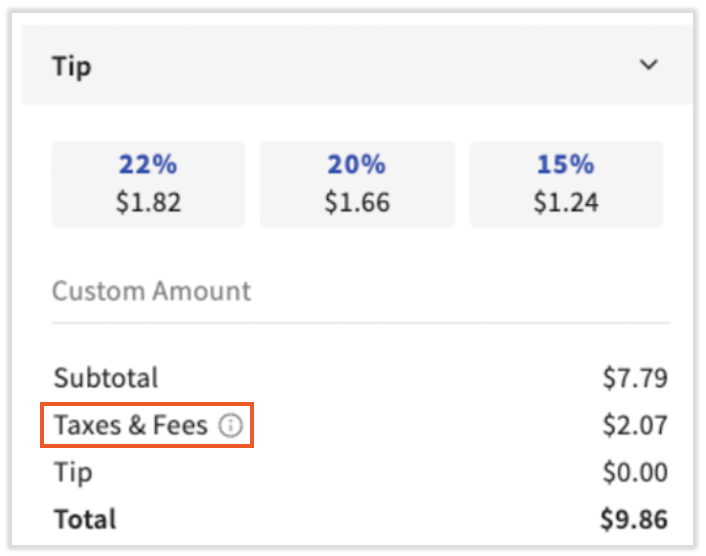
- Guests will see this on a digital receipt in a combined line called Taxes & Fees.
- Dine-in?: Selecting Yes here will automatically assign this service charge to any checks with a Dine In dining option. Selecting No will not automatically apply this service charge. Then, continue to the next step.
- Note: To create a service charge that should be applied manually, the Delivery?, Takeout?, and Dine-in? options must all be set to No.
- To distinguish between employer-kept service charges and mandatory gratuity, the most important setting is Assign to Check Owner (Gratuity?).
- Select Save and publish your changes.

Automatic Service Charge for Toast Mobile Order & Pay®
- Follow the steps listed above, but use the following settings in step 3:
- Choose either Fixed Amount or Fixed Percentage.
- Set the Apply After Amount Threshold to at least $0.01.
- Delivery?, Take Out?, and Dine-In? should all be set to No.
- Save and publish your changes.
- With those settings in mind, we still need to set the service charge to automatically apply to each Toast Mobile & Pay® order. Navigate to Front of house > Service areas & tables > Service areas.
- To add a new service area, select + Add Service Area.
- Configure the following settings:
- Name: Toast recommends including "OPT" or something that distinguishes it from the other existing service areas.
- Primary?: Select No, this is not the primary service area.
- Revenue Center: Optional
- Auto-apply Gratuity?: Select Yes, then select Select Service Charge and pick the service charge you created using the steps above.
- Minimum Party Size: Select 1. This will allow the service charge to be applied to all Toast Mobile Order & Pay® orders.
- Select Save and Publish Now.
- Select Service Areas from the gray bar at the top to return to that page.
- Select Edit Tables to add your tables to the service area you just created. Similar to the naming convention mentioned above, Toast recommends that letters or numerals be used to tell these tables apart from the main service area. Add your tables and configure the service area as your restaurant. Then, continue to the next step.
- Save and publish your changes.
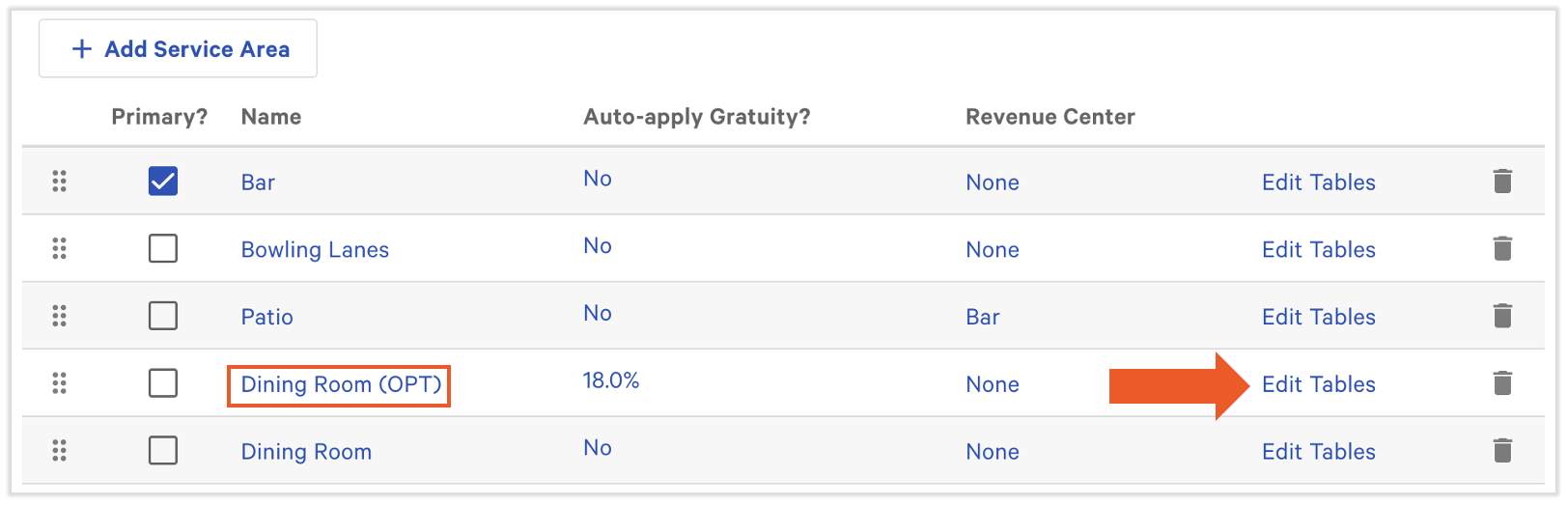
When generating and printing the QR codes for the tables using the setup steps outlined in Get Started with Toast Mobile Order & Pay® in Support Center, make sure to use this new service area and tables instead.
Service Charges for Online Ordering and Delivery
Note: Service charges cannot be applied to online orders exclusively. Any service charge created can be applied to applicable online and POS-entered orders. Takeout service charges are also be applied to curbside pickup orders.
- Follow the steps listed above, but use the following settings in step 3:
- Online ordering guests do not see the names of the service charges you create, but the individual charges will be separated out in Toast reporting.
- Choose either Fixed Amount or Fixed Percentage.
- Consider the Apply After Amount Threshold. After any order reaches this dollar amount, this service charge will be automatically added to the check.
- Configure different service charges for takeout and delivery. We do not recommend configuring a single service charge with both Delivery? and Take Out? set to Yes for reporting and usability purposes.
- Delivery with your own drivers: Any service charge created for the Delivery dining option will apply to orders you deliver with your own drivers. Read more about delivery minimums in Configure Delivery Fees Using Your Own Drivers.
- Toast Delivery Services: Unless you already have an existing delivery fee set up, an automatic delivery fee of $3.99 will be added to your delivery orders to subsidize the Uber Eats or DoorDash Drive charge for Toast Delivery Services. Find more details in Get Started with Toast Delivery Services Signup & Setup.
- Third-party delivery: Service charges created in Toast Web will not apply to orders placed with third-party delivery partners.
- Save and publish your changes.
- A service area does not need to be created for online ordering service charges since the dining option you selected already auto-applies the service charge.
A takeout service charge will appear to guests at checkout within the Taxes & Fees line item.
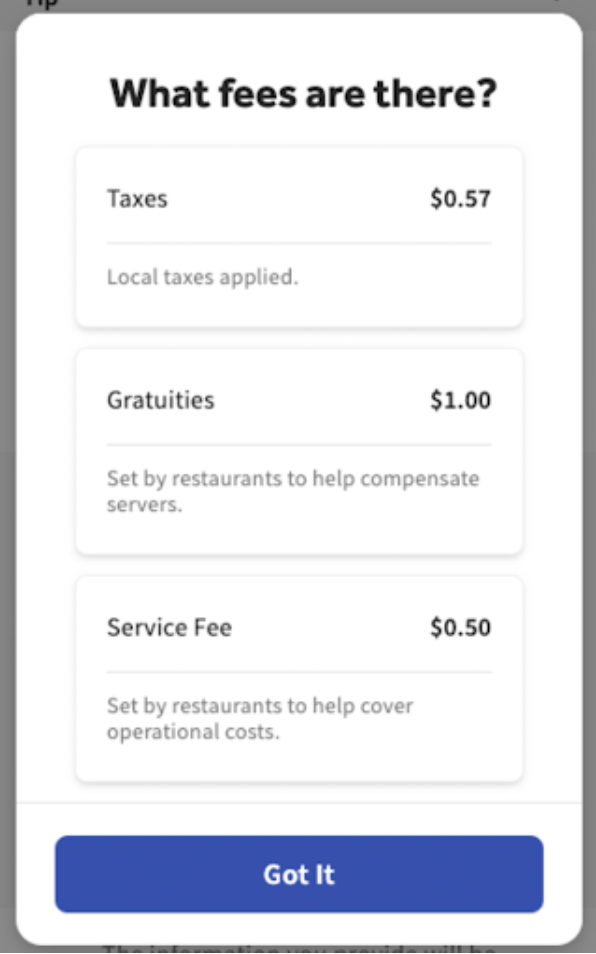
If the guest selects the ? button next to Taxes & Fees, they will see a screen similar to this. If an online ordering service charge was assigned to the owner of a check, it will appear in the Gratuities tile. If it's assigned to the restaurant, it will appear in the Service Fee tile.
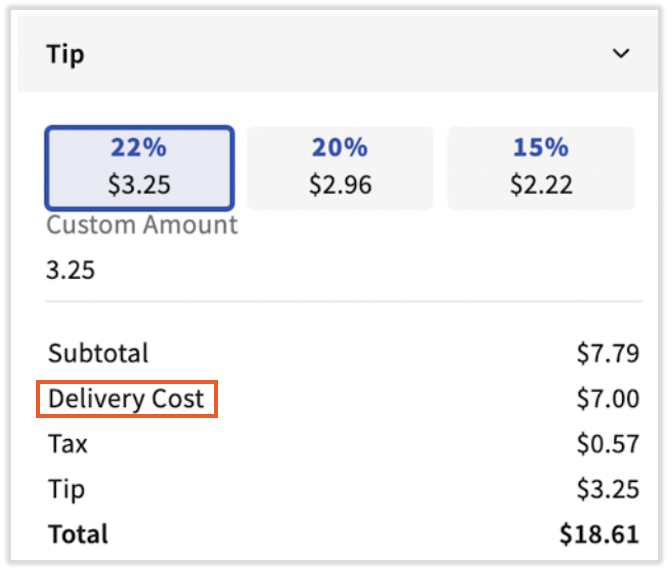
A delivery service charge will appear to guests at checkout as Delivery Cost, even if you named this service charge differently.
Service Charges for Credit Card Transactions
The service charge feature is intended to enable customers to add fees that restaurants customarily charge unrelated to a guest’s payment method, such as mandatory gratuity or fees for larger parties, and is not intended to add fees specifically for using a credit card. Fees specific to using a credit card are known as “surcharges” and the service charge feature was never designed or intended to support it. The use of service charges to add a credit card surcharge introduces a risk of noncompliance because service charges are unable to automatically distinguish between credit and debit cards. Noncompliance may incur fines from card networks, and customers bear responsibility for such fines. Toast may disable any service charge or other use of our platform that leads to noncompliant surcharging (or other noncompliance) at any time.
Additional details can be found in the Surcharging Overview.
Toast’s service charge workflow has built-in functionality to prevent the usage of certain fee names (learn more: Service Charge Naming & Labeling) that the card brands commonly view as credit card surcharges. More information on best practices for service charge configuration, see Services Charges Overview.
Note: Compliance tools available on our platform, such as the prevention of certain names or any action we take to remove a service charge, are intended to help our merchants comply and ensure our platform is not used in a noncompliant way. However, they do not guarantee compliance. You are responsible for any noncompliance that may result from your use of a service charge.
Toast Credit Card Surcharging is the only way to apply credit card surcharges on the platform today in a manner that complies with card brand rules*. Please note that not all Toast customers are eligible. You can find more information about eligibility and how it works here: Get Started With Toast Credit Card Surcharging.
* - Toast's Credit Card Surcharging product helps merchants comply with card brand requirements. Merchants remain responsible for compliance with any additional disclosure or other legal requirements that may apply in their state. Not available in CT, ME, MA, OK. Merchants that have a direct Card Acceptance Agreement with American Express are not eligible.
Add a Non-Automatic Service Charge to a Check
Once you've set up service charges in Toast Web, you can apply a service charge to a check by selecting Service charge from the payment screen and the appropriate service charge from the pop-up screen.
- Open the order on your POS and select Pay.
- Select the Service charge button at the bottom of the screen to reveal a list of applicable service charges.
- Select the checkbox to the right of the service charge name to apply it to the check.
- Select Done.
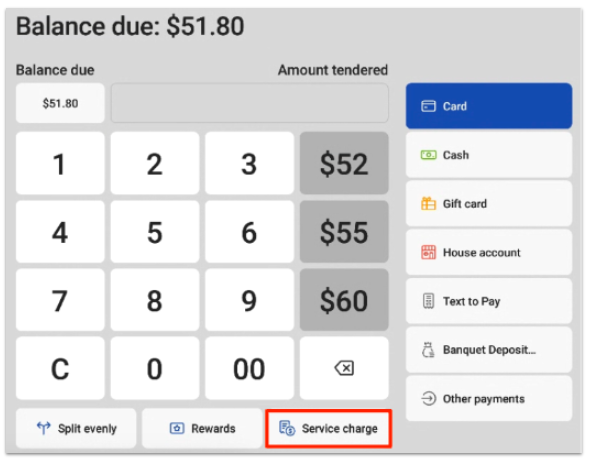
If you want to add multiple combined service charges to a check, you can do so. An example of this would be if your restaurant hosts events, you might implement a service charge for Room Rental, Corking Fee, 20% Auto-Grat, etc.
This also applies to combining a mandatory gratuity with an employer-kept fee. For example, if you offer room service and want both an automatic gratuity for the room-service server and a separate delivery/room-service fee retained by the house:
- Create a service charge for the gratuity with Assign to check owner (Gratuity?) set to Yes, following the steps above.
- Set this gratuity charge to auto-apply to your Room Service orders by creating a dedicated Service Area for Room Service and selecting this charge under that service area's Auto-apply Gratuity? setting.
- Create a second service charge for the house-kept fee with Assign to check owner (Gratuity?) set to No.
- Because a Service Area's Auto-apply Gratuity? setting can only point to one service charge at a time, add this second charge to each Room Service check manually using the steps above, rather than configuring it to auto-apply.
Remove a Service Charge From a Check
Sometimes it's necessary to remove an automatic service charge from a check.
- Open the order on your POS and select Pay.
- Select the Service charge button at the bottom of the screen.
- Tap the checkbox to the right of the service charge that's been applied to unselect it and remove it from the check.
- Select Done.
Reorder Your Service Charges
You can rearrange the order of your service charges to change the way they appear on your POS if you wish.
- In Toast Web, navigate to Finance > Related > Settings > Service charges & fees.
- Select Order at the bottom of the list.
- Enter a number next to each service charge to designate the order they will appear on your POS.
- Save and publish your changes.
Edit a Service Charge Label
- To edit a service charge, including changing the name of the service charge, select the link for the service change you want to rename from the Service Charges list (Finance > Related > Settings > Service charges & fees).
- Update the name of the service charge.
- Save and publish your changes.
Archive a Service Charge on Toast Web
To disable an active service charge, use the archive feature in Toast Web. Once a service charge has been archived, it will no longer be applied to orders and will not appear on the list of applicable service charges on the POS.
- Log in to Toast Web and navigate to Finance > Related > Settings > Service charges & fees.
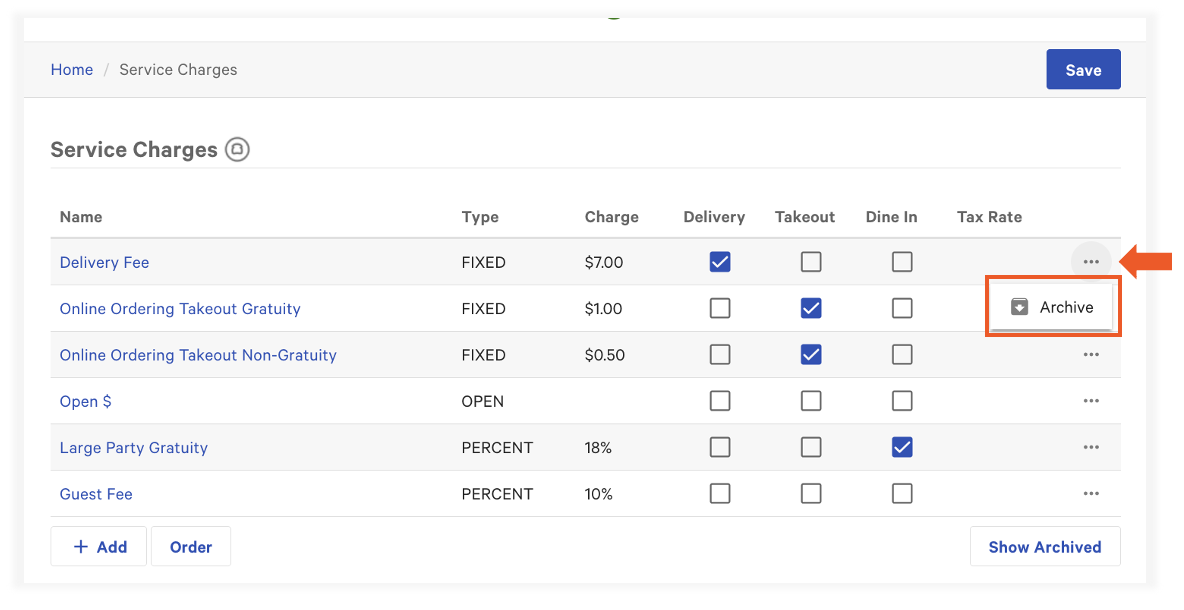
- On the service charge line item, select the overflow menu (three dots) and select Archive.
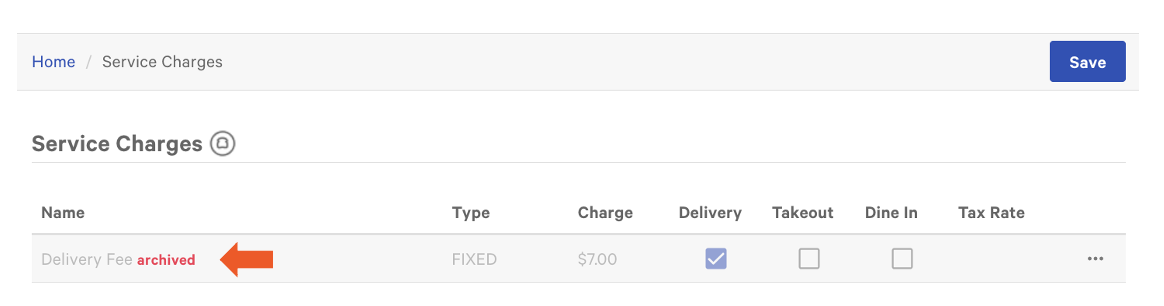
Once selected, you'll see it archived in red next to the service charge. You can show or hide archived service charges using the Show Archived button in the lower-right corner.
Additional Resources:
Back to top
This content is for informational purposes and is not intended as legal, tax, HR or any other professional advice. Please contact an attorney or other professional for specific advice based on your unique circumstances.