Tax Rates Setup for Restaurants in Ireland and the U.K.
Last updated: Nov 12, 2025, 12:36 PM
| This guide is available as a resource, but should not be construed or relied upon in any way as legal or tax advice. Per the terms of the Merchant Agreement between you and Toast, you acknowledge and agree that Toast has no obligation to determine whether taxes apply to your business or transactions, or to calculate, collect, report, or remit any taxes to any tax authority arising from any payment. |
- Create Tax Rates
- Edit Tax Rates
- Menu-Specific Tax Rates
- Item-Specific Tax Rates
- Itemized Tax Rate List
- Tax Rates Reporting
- Additional Resources
Create Tax Rates
To create tax rates, follow these steps:
- In Toast Web, navigate to Menus > Settings > Manage tax rates. The Tax Rates setup page allows you to create new tax rates or edit the rate and name of already established tax rates. Checking the Default? option will attach the tax rate to all newly created menus and menu items. Any tax rate changes that are updated and saved will be published automatically to your POS devices. This is where you'll create and adjust the value-added tax (VAT).
- To set up a new tax such as VAT, select + Add Tax Rate.
- On the setup page, you'll have options to configure this tax. Here you can name your tax (e.g. VAT, HST), choose what type of tax it is, and enter the rate. To learn about tax tables, check out .
- Some jurisdictions have different tax/VAT rates for different take-out items (e.g. cold items vs. hot items). In this instance, some restaurants prefer to create a new takeout-specific menu where taxes are attached to different items.
- In the Advanced Settings section, you can choose how pennies will be rounded in this tax. The tax will default to Half Even Rounding. Use the reference tables at the bottom of the section to see examples of how pennies will round with each choice and consult a tax professional to choose the correct penny-rounding method. This option is not available when building tax tables.
- Save and publish any changes.
Edit Tax Rates
You can edit tax rates by following these steps:
- In , navigate to Menus > Settings > Manage tax rates.
- To edit a tax, select the name of that tax. Several options can be edited on this page, but users may look to adjust the Type and/or the option immediately below it. That option will change depending on which Type is selected. For example, if Percent is the selected tax type, adjust the Rate field to update the tax percentage.
- Save and publish any changes.
Menu-Specific Tax Rate Settings
Follow these steps to access menu-specific tax rate settings.
- Navigate to Menus > Bulk management > Advanced properties.
- Select the name of the menu you want to edit. Scroll to the bottom of the page to locate the Taxes section.
- You can now enable the following settings:
- Inherit Tax Rates from Restaurant?
- If you select No, you'll have the option to select the applicable taxes for this menu.
- If you select Yes, the menu will use the tax rates you specified for the restaurant.
- Tax Inclusion Option
- Tax Included: The item's price does include tax, and Toast should not add any additional tax to the check. Toast will then calculate what portion of the menu price is the item cost and what portion is the sales tax and report accordingly, which is why it's important to still select which taxes should apply to this item. This allows you to present your customers with a flat price for the menu item (common with VAT). To learn more, check out .
- Check with a tax authority on how to use the other Tax Inclusion options in your jurisdiction.
- Dining Option Tax (Note: If you have Takeout Tax rates enabled, ensure that the Dining Option Tax is set to No Effect. These two settings cannot be enabled at the same time.)
- No Effect - The item has no dining option-specific tax exemptions. Toast will add tax to all orders regardless of the dining option selected. This means orders for Dine-In, Takeout, and Delivery are all taxed normally.
- No Tax for Takeout and Delivery - The item is tax-exempt when served for takeout and delivery.
- Inherit Tax Rates from Restaurant?
- Save and publish your changes.
Item-Specific Tax Rate Settings
Toast also has item-specific tax rate settings that are similar to . You can access item-specific tax settings by selecting the desired item from the Advanced Properties page and reviewing the Taxes section.
For each tax setting, you'll have the option to inherit settings from the menu group (default) or select the configuration for that specific item.
Itemized Tax Rate List
Toast provides a quick and easy way to view and modify basic tax settings for all menu items through the Advanced properties tool.
- Navigate to Menus > Bulk management > Advanced properties.
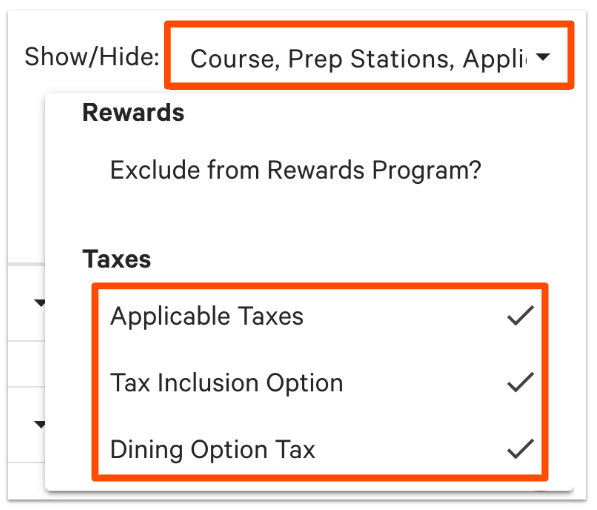
- Select the Show/Hide drop-down menu and enable the three Taxes columns located at the bottom of the list.
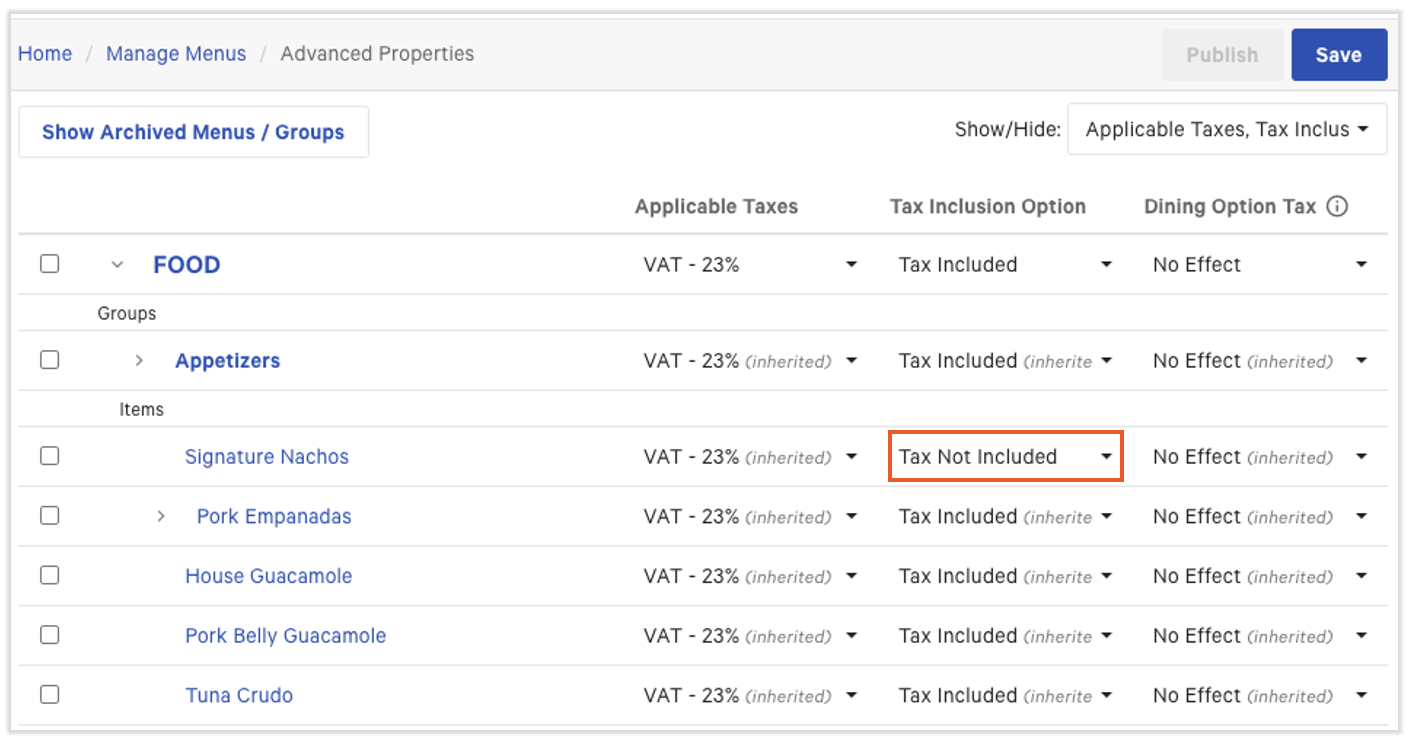
- You should now see the three tax-related settings columns on your Advanced properties page. Use the arrow > icons on the left side of the page to expand menus to view menu groups and items, if necessary.
- Use the drop-down menu to change a menu, menu group, or item's tax settings as desired. Tax included will be the inherited (default) setting. Menu groups and items will inherit settings from their parent unless otherwise configured. In the example below, the Tax Inclusion Option for Signature Nachos is changed from Tax Included to Tax Not Included.
- Save and publish any changes.
Tax Rate Reporting
It's recommended that you split up each separate tax rate so it's easy to look at reporting. For example, you might choose to set up two different VAT rates if that's the case in your area.
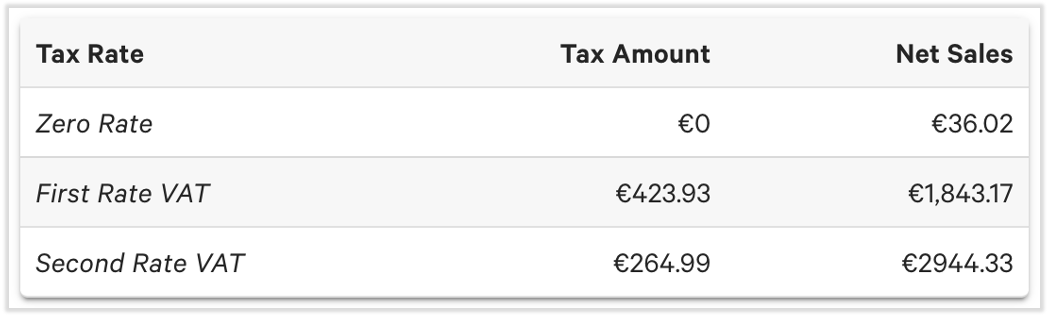
Once the tax rates are separate from one another, it will make it easier to look at reporting.
- In Toast Web, navigate to Reports > Sales > Sales summary.
- Adjust the date range for the report as desired. In the Tax Rate section, you'll be able to view the tax amount and net sales for each of the separate tax rates you have set up.
Additional Resources for Tax Rates