The MyToast App: Pay
Last updated: Oct 8, 2026, 2:46 PM
Use the Pay tab in the MyToast app to view paystubs and W-2s, update your payment method, order a Toast Pay Card, take PayOuts, and transfer funds.
- Quick Fix: Find What You Need on the Pay Tab
- Before You Begin
- View Your Paystubs in the MyToast App
- Download Paystubs and Access Tax Forms (W-2s)
- Update Your Payment Method From the Pay Tab
- Order Your Toast Pay Card
- Take a Toast PayOut Offer (Get Paid Early)
- Transfer Funds From the Toast Pay Card to a Bank Account
- Frequently Asked Questions
- Manager Troubleshooting for the MyToast Pay Tab
- Related Articles
Quick Fix: Find What You Need on the Pay Tab
Use this table to jump to the right section. The Pay tab has two pages — Paychecks and Pay Card — and most asks fall into one of the rows below.
| What you need | Where to go | Self-service? |
| View my paystub / paycheck / pay details | Pay tab > Paychecks page > select a pay period | Yes |
| Download or print my paystub | Pay tab > Paychecks > Download paystubs (opens Toast Payroll) | Yes |
| Get a copy of my W-2 / tax form | Pay tab > Paychecks > Access Tax Forms (W-2s) | Yes (current employees only) |
| Change my payment method (paper check, direct deposit, Toast Pay Card) | Pay tab > Paychecks > Update payment details (opens Toast Payroll) | Yes |
| Sign up for a Toast Pay Card | Pay tab > Pay Card page > Sign up | Yes (if your employer offers Toast Pay Card) |
| Get paid early / take a Toast PayOut | Pay tab > Pay Card page > Get paid | Yes (if your employer offers Toast PayOuts) |
| Transfer money from my Toast Pay Card to my bank | Pay tab > Pay Card page > Transfer funds | Yes (after one-time password verification) |
| My Toast Pay Card hasn't arrived yet | See "My Toast Pay Card Hasn't Arrived" in Frequently Asked Questions | Yes — then call (866) 218-6688 if past 10 business days |
| Toast Pay Card is lost, stolen, or damaged | Call (866) 218-6688 immediately | No — Cardholder support |
| My PayOut amount looks wrong, or "Get paid" is greyed out | Open Pay > Pay Card > Get paid, then select the ? info icon on the Available Toast Payout row | Yes |
Before You Begin
Applies to: MyToast app (iOS and Android), Toast Payroll, Toast Pay Card and Toast PayOuts (where offered)
Permissions needed:
- Employees: a Toast Web account and the MyToast app installed. See Get Started With the MyToast App to download the app and log in for the first time.
- Managers: permission 4.9 Employee Info is required to update an employee's verified phone number in Toast Web for bank-transfer verification.
What you'll accomplish: You will be able to view and download your paystubs and W-2s, update how you receive pay, and — if your restaurant uses the program — order a Toast Pay Card, take a Toast PayOut, and transfer your card balance to a bank account.
Note: The Pay tab only shows pay details for employees of restaurants that use Toast Payroll. The Pay Card page only appears if your restaurant participates in the Toast Pay Card and PayOut program.
View Your Paystubs in the MyToast App
Once your restaurant has run payroll and you've been paid, you can view paycheck details in the MyToast app. The paycheck details on the app contain the same information as your pay stubs on the Toast Payroll platform: gross and net pay, hours, earnings, deductions, and taxes.
- Open the MyToast app and select the Pay tab.
- You will land on the Paychecks page, where your paychecks are sorted by pay period.
- Select the > icon next to a paycheck to view that paystub's components.
- To see more detail within a paystub, select the v caret control on the Earnings, Taxes, or Deductions rows to expand that section.
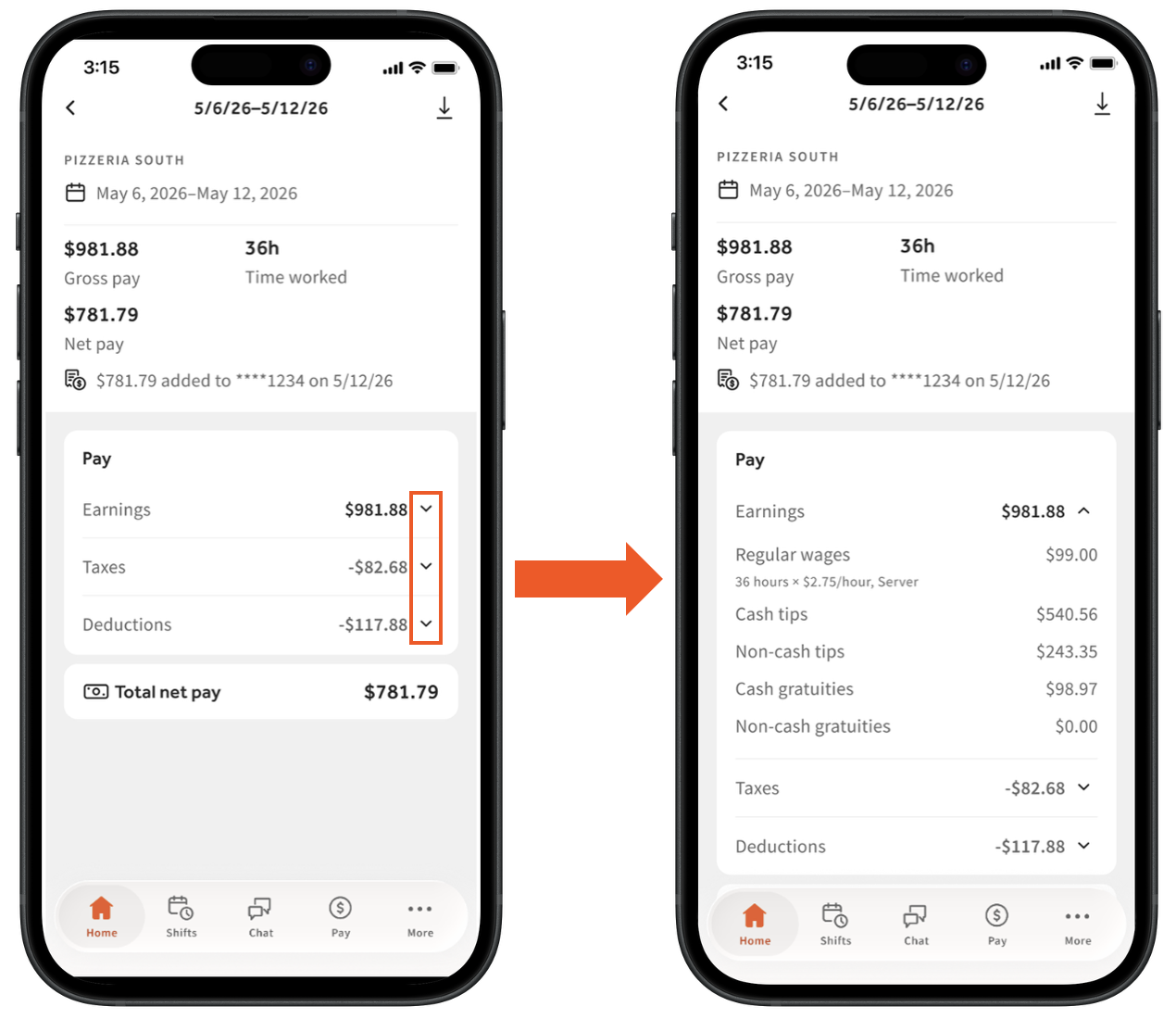
For illustration purposes
Expected outcome: You will see the gross and net pay, hours, earnings, deductions, and taxes for the selected pay period.
Note: If your restaurant uses Toast Tips Manager and you want the calculation breakdown of how the tip policy affected your shift's final tip amount, see the Restaurants With Toast Tips Manager section of The MyToast App: Shifts.
Download Paystubs and Access Tax Forms (W-2s)
The MyToast app shows paystub details, but the official, downloadable, printable paystub lives in Toast Payroll. There are three options at the bottom of the Paychecks page:
- Download paystubs
- Update payment details (paper check, direct deposit, or Toast Pay Card)
- Access Tax Forms (W-2s)
Download an Official Paystub
- In the MyToast app, select the Pay tab to open the Paychecks page.
- Select Download paystubs in the upper-right corner (or Download paystubs at the bottom of the page).
- You will be taken to Toast Payroll. Follow the steps in Toast Payroll: View Your Paystub or Timesheet to download or print the file.
Expected outcome: Toast Payroll opens to your paystub history. Only paystubs on the Toast Payroll website can be downloaded and printed.
Access Your W-2 (Tax Form)
Current employees can pull up Form W-2s right in the MyToast app.
- In the MyToast app, select the Pay tab.
- Select Access Tax Forms (W-2s).
- Select a form to open it. You can download the form to your device.
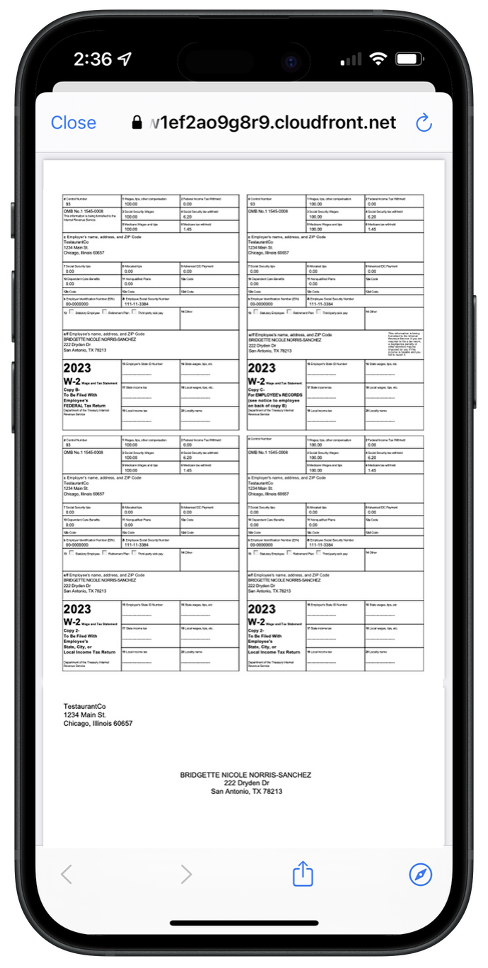
Expected outcome: Your available Form W-2s appear in the app. You can download a copy.
Note: 2025 Form W-2s will be available on January 19, 2026.
Important: Former employees do not have access to Form W-2s through the MyToast app. They must follow the Toast Payroll path described in Toast Payroll: Find Your Form W-2 (For Employees).
If you would like to print your W-2 rather than download it, we recommend accessing it through Toast Payroll. For more on year-end tax forms, see Toast Payroll: Manage the Form W-2 Experience.
Update Your Payment Method From the Pay Tab
You can change how you get paid (paper check, direct deposit, or Toast Pay Card, if applicable) directly from the Pay tab.
- In the MyToast app, select the Pay tab.
- Select Change payment method at the bottom in the Resources tile.
- On the next screen, you'll be able to select from your payment method options. Keep in mind that a payment method change can take up to 2 pay periods to take effect, so it's best to make this change at the beginning of a pay period for the quickest turnaround.
- If you select Direct deposit, you'll be led through Plaid. Plaid is an industry standard for bank account validation. See Toast Payroll: Set a Payment Method for more details about Plaid.
- If you select Direct deposit and add a second bank account, you can split your paychecks between two accounts.
- Select the %/$ toggle to choose how to split your deposits.
- Enter the amount or percentage for each account.
- If you choose %, the two fields must add up to 100%.
- If you choose $, enter the amount to be deposited in the first account; the remainder will be deposited in the second account. Select Swap to change the order of the two accounts.
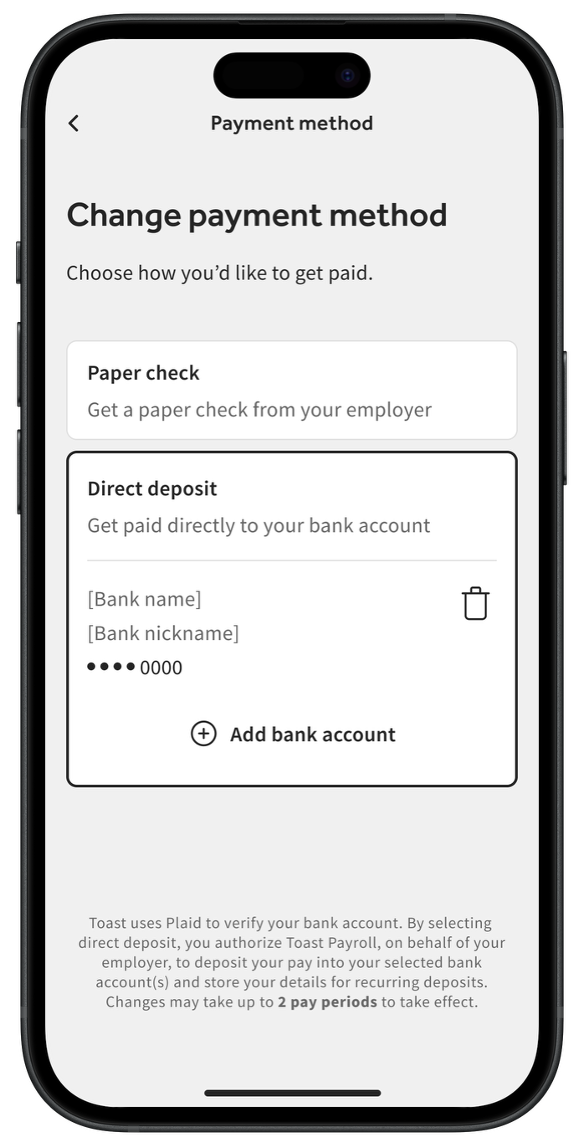
Expected outcome: Your new payment method is saved automatically in Toast Payroll. A green banner confirms the change.
Note: To change your payment method, you may need to verify your Toast email and password. This is a security feature so that only you can change your payment method. If you are adding, removing, or updating a direct deposit account, you will also be asked to verify your identity by entering a six-digit code that Toast texts to the phone number on your Toast account. Toast representatives will never ask you for this code.
Order Your Toast Pay Card
Employees of restaurants who are part of the Toast Pay Card and PayOut program can use MyToast to order your Pay Card, manage your account, and accept Toast PayOut offers, if applicable.1, 2
The Pay Card tab only appears for employees of restaurants that participate in the Toast Pay Card and PayOut program. The Toast Pay Card is a free physical debit card that you can use anywhere Mastercard® is accepted. Toast Pay Cards do not require a background check or a bank account.
- In the MyToast app, navigate to Pay > Pay Card and select Sign up.
- Fill in your name, email, phone number, and address across the four sign-up steps. Select Submit on the final step.
- Toast ships a complimentary Toast Pay Card to the address you entered. The Toast Pay Card typically takes 8 to 10 business days to arrive. Third-party shipping delays are possible.
- Watch the status tile in the middle of the Pay Card page for shipping updates.
- Once the card arrives, select Activate. The app calls an interactive phone system that walks you through the activation process.
- After activation, select Set up now to connect your card to Toast Payroll. This is a mandatory step — it lets your employer deposit your pay to the Toast Pay Card and, if your employer offers it, unlocks the Toast PayOut feature.
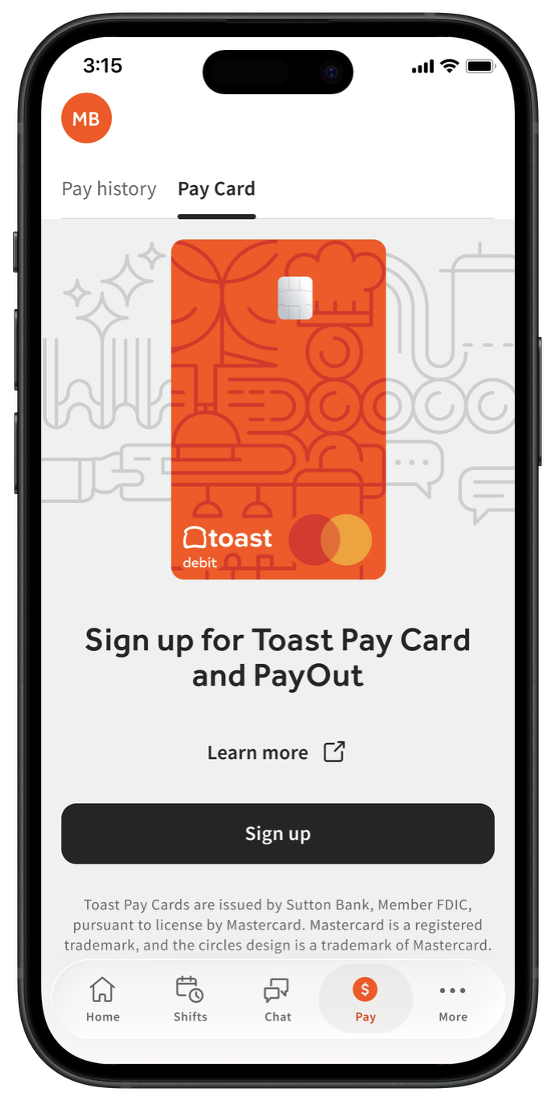
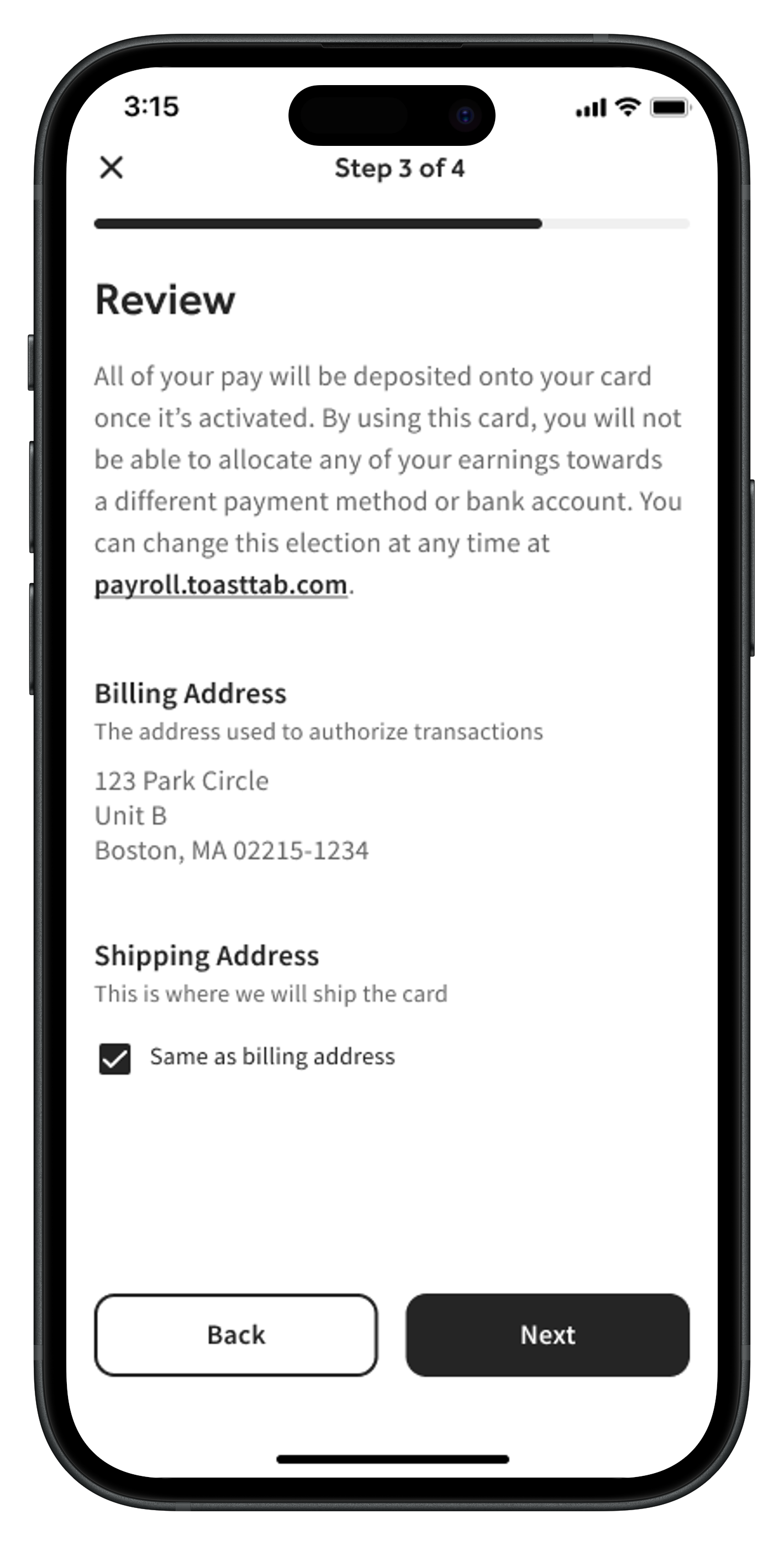
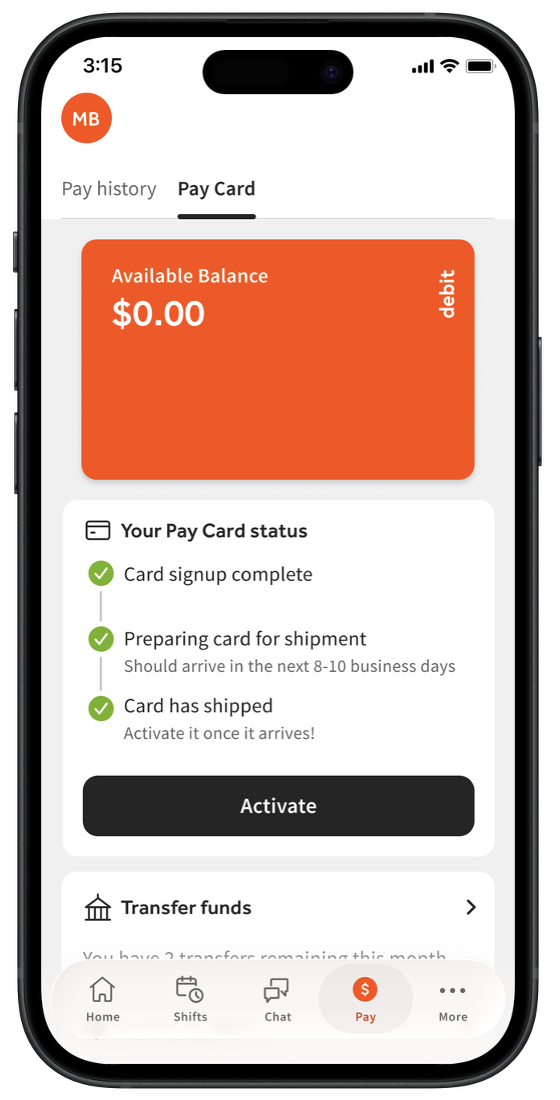
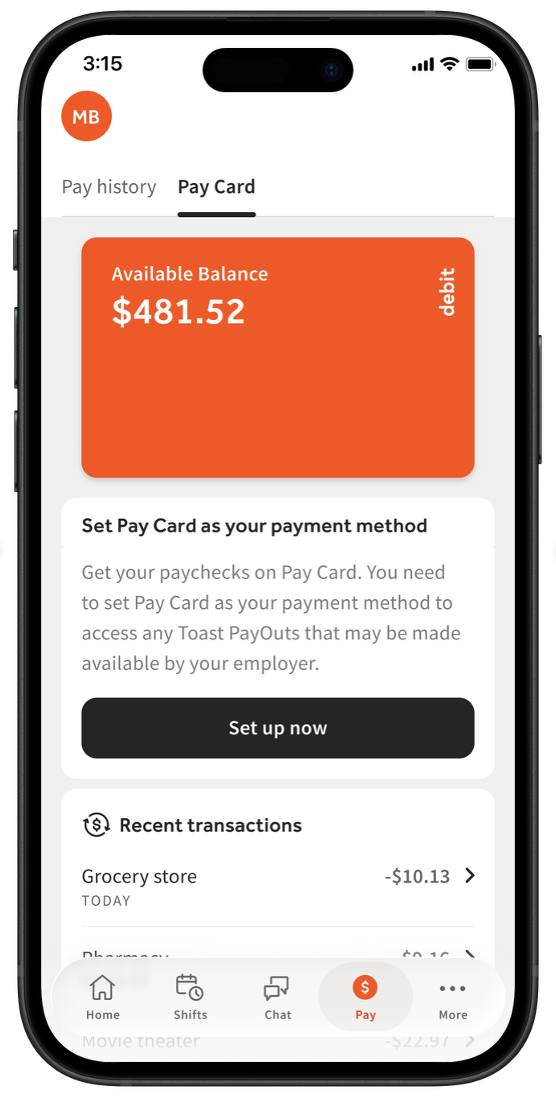
Expected outcome: Your activated Toast Pay Card is connected to Toast Payroll. You are ready to receive wages and/or tips on your card.
Note: If your phone is not compatible with the MyToast app (the app requires iOS 16.0 or later, or Android 11 or later), you can still select Toast Pay Card as your payment method from Toast Payroll on a computer or mobile browser. Open Toast Payroll by logging into payroll.toasttab.com. Then navigate to My Profile > Employment > Payment Method and select the Toast Pay Card tile. If you do not see My Profile on the left side of the screen, select Payroll from the Toast Web navigation rail on the left to make the Toast Payroll navigation rail appear.
To understand when you will receive your pay, how much you will be eligible for, and how you might be able to withdraw or transfer your pay, check your cardholder agreement, talk to your manager, and read Toast Pay Card: Employee FAQ for the applicable details.
Take a Toast PayOut Offer (Get Paid Early)
A Toast PayOut is the portion of your earnings that you can choose to receive on your Toast Pay Card before payday, if your employer offers PayOuts. PayOut offers come in three flavors — tips only, wages only, or both tips and wages — depending on your employer's settings.
Note for Employers: "Toast PayOut" (employee early-wage access) is different from a merchant payout (the credit card deposit your restaurant receives from Toast). This article covers Toast PayOuts. For credit card payouts to your business, see Pay Outs Overview and the Toast Credit Card Processing and Billing FAQ.
Before You See a PayOut Offer
Your wages and tips must sync from the Toast Web (POS) system to Toast Payroll before a Toast PayOut offer appears. Depending on when you clock out — and whether your restaurant uses Toast Tips Manager — the timing of your offer after your shift varies. In many cases, you will have a Toast PayOut offer within one hour of clocking out.3 If your restaurant pools tips using Toast Tips Manager, tip PayOuts become available after your manager has approved and sent the tip pool, typically the next calendar day. Your employer manages this process, so they can best describe the timing of your Toast PayOut offers.
Take a Toast PayOut
- In the MyToast app, select the Pay tab, then select the Pay Card page.
- If a PayOut is available, select Get paid to open the Toast PayOut screen.
- Slide the toggle for the funds you want to transfer (tips, wages, or both).
- If wages are included, select the checkbox to agree to the Wage Deduction Authorization. This authorizes your employer to pay the wage portion via your PayOut instead of on your paycheck on payday.
- Select Confirm Toast PayOut.
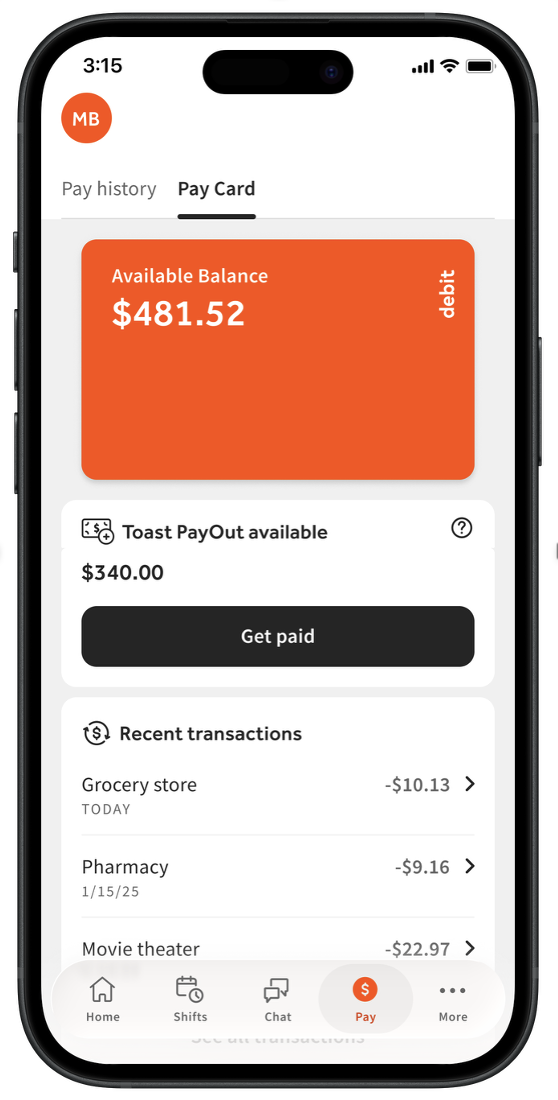
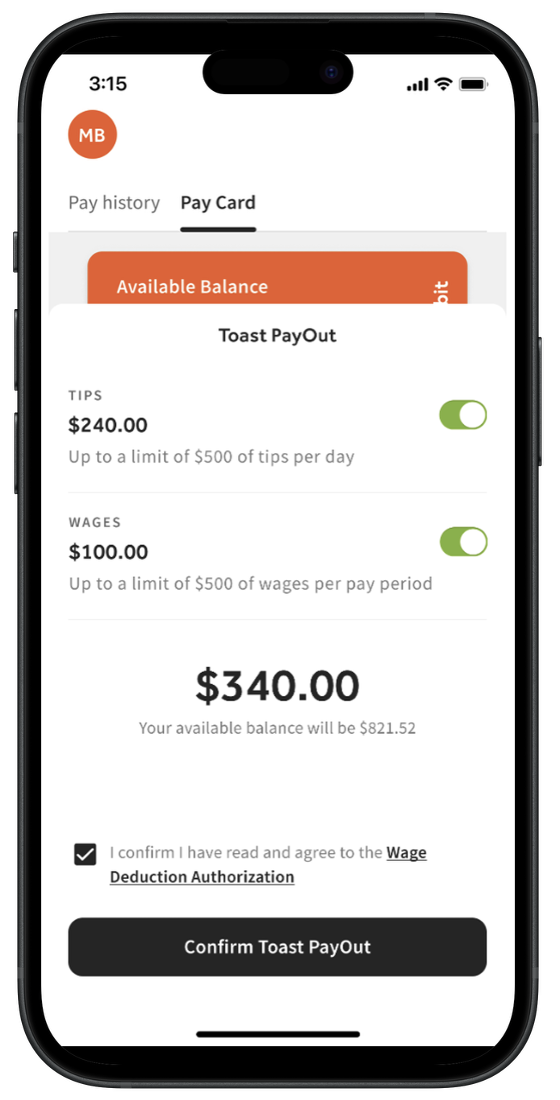
Expected outcome: Your Toast Pay Card balance updates immediately with the amount of your confirmed Toast PayOut.
How a PayOut Shows Up on Your Paystub
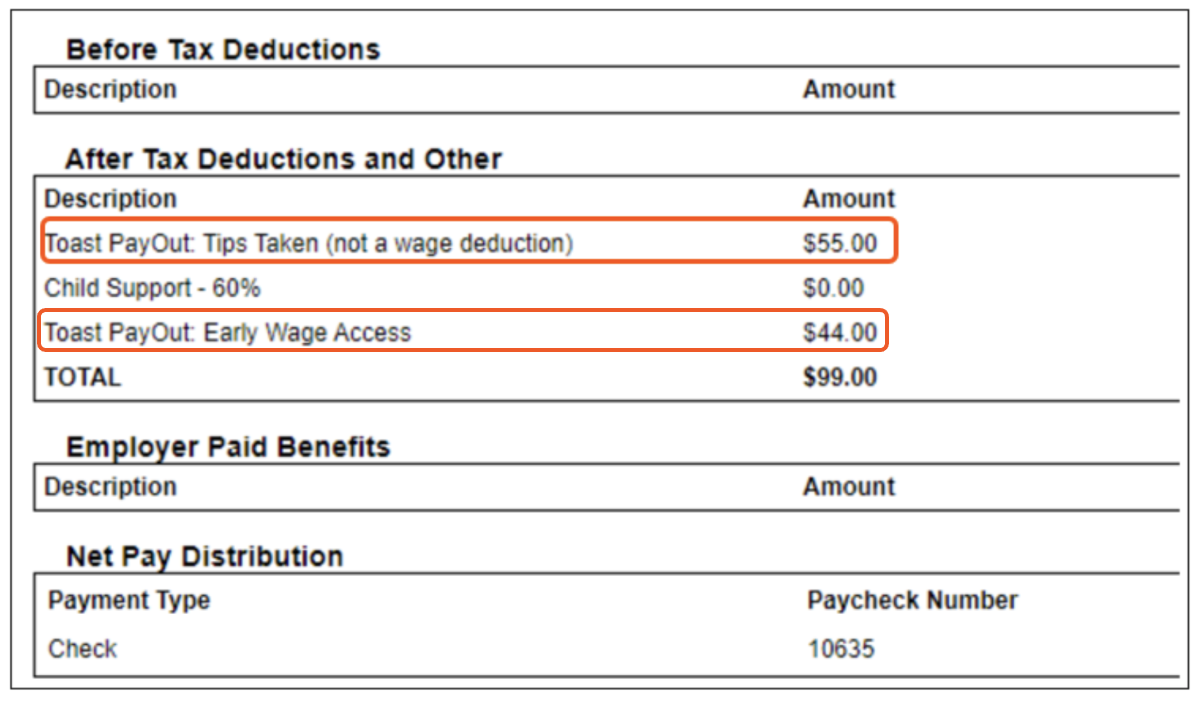
On payday, your paystub will show your PayOut activity:
- Toast PayOut: Tips Taken is not a wage deduction. It is the total tips you received via Toast PayOut, as though you had been paid those tips in cash.
- Toast PayOut: Early Wages Access is structured as a wage advance and appears as a wage deduction on your paystub.
- Your net pay will not include the tips or wages you already received as PayOuts.
Transfer Funds From the Toast Pay Card to a Bank Account
Once you have taken a Toast PayOut and your Toast Pay Card has an available balance, you can transfer a portion of your funds to a bank account of your choosing, if you like.4 Transfers cannot be scheduled for future dates.
| Important: Before you can transfer funds, you must have a verified phone number in Toast Web. If you do not have one yet, either you or your employer can add one.
|
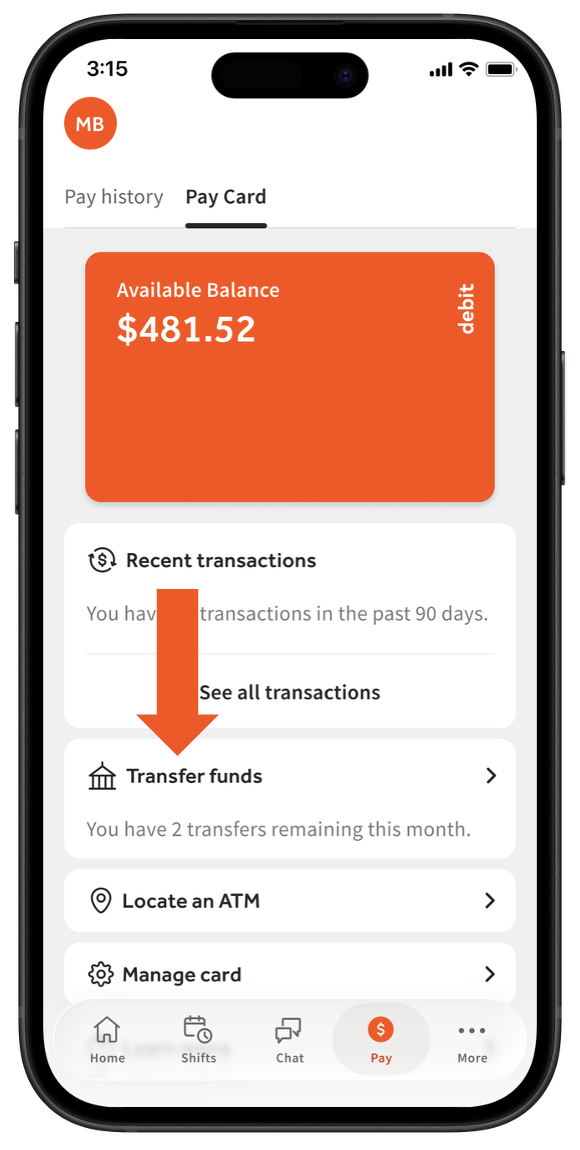
- On the Pay Card page, select Transfer funds. The tile also lists how many transfers you have left for the month.
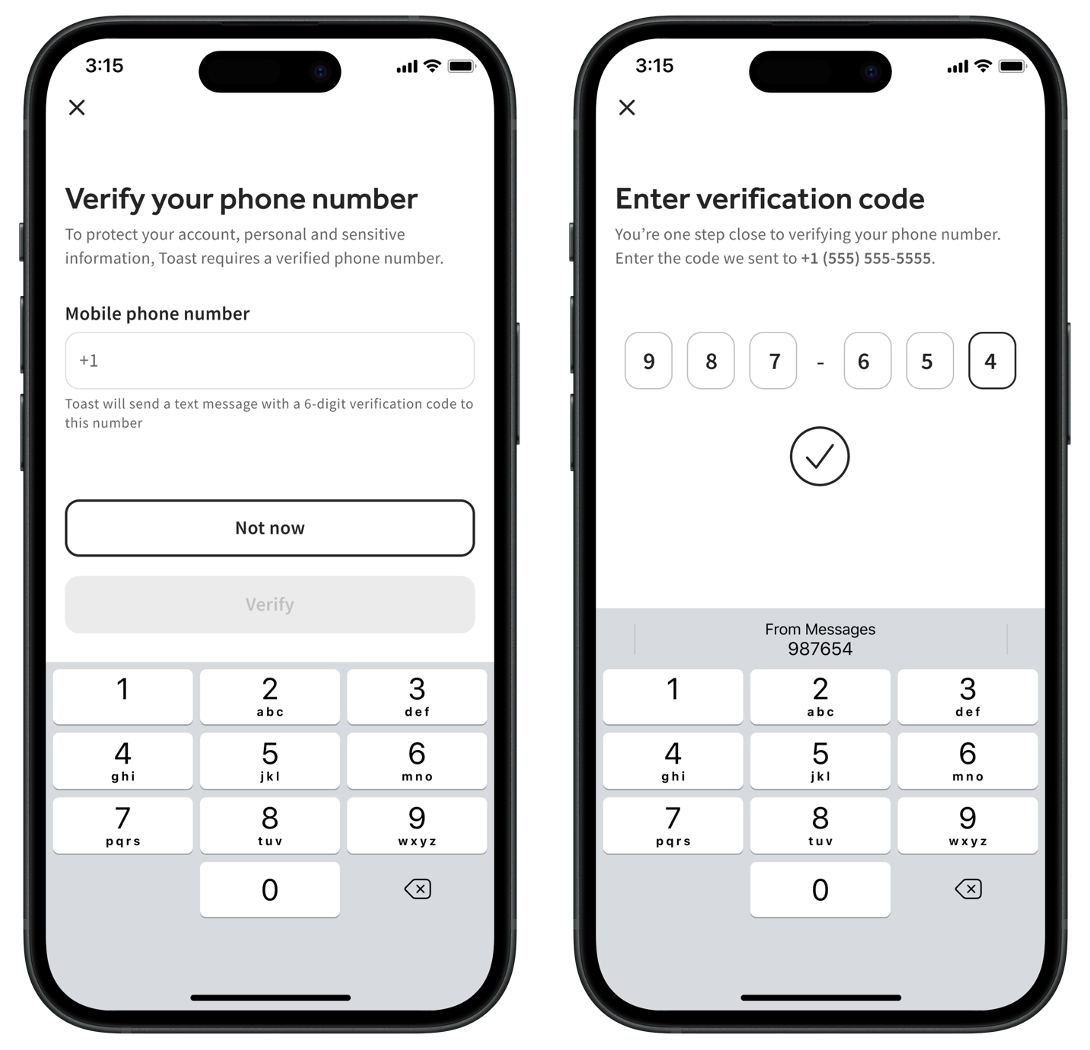
- Toast Payroll will ask you to complete a one-time password verification. Enter the phone number on your Toast Web profile, select Verify, then enter the six-digit code Toast texts to that phone.
- If you haven't already, select Add a bank account. Choose Checking or Savings, enter your routing number and account number, optionally nickname the account, and select Continue.
- Select Start transfer.
- Enter the amount you want to transfer. Your bank account is shown at the top, and the maximum balance you can transfer appears under the entered amount. Use the edit pencil to choose a different account if needed.
- Select Continue, review the details, and select Transfer $$ to initiate the transfer.
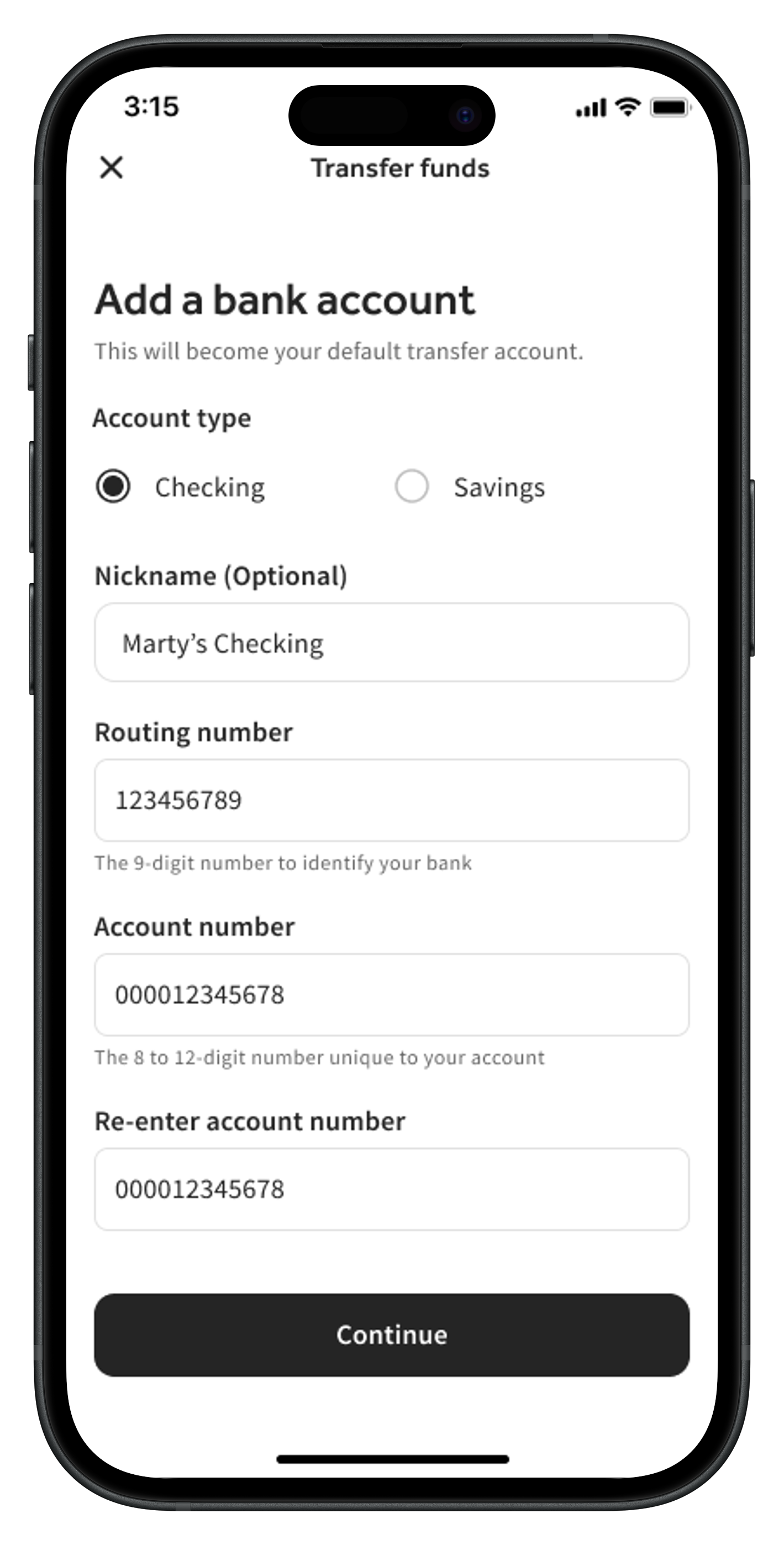
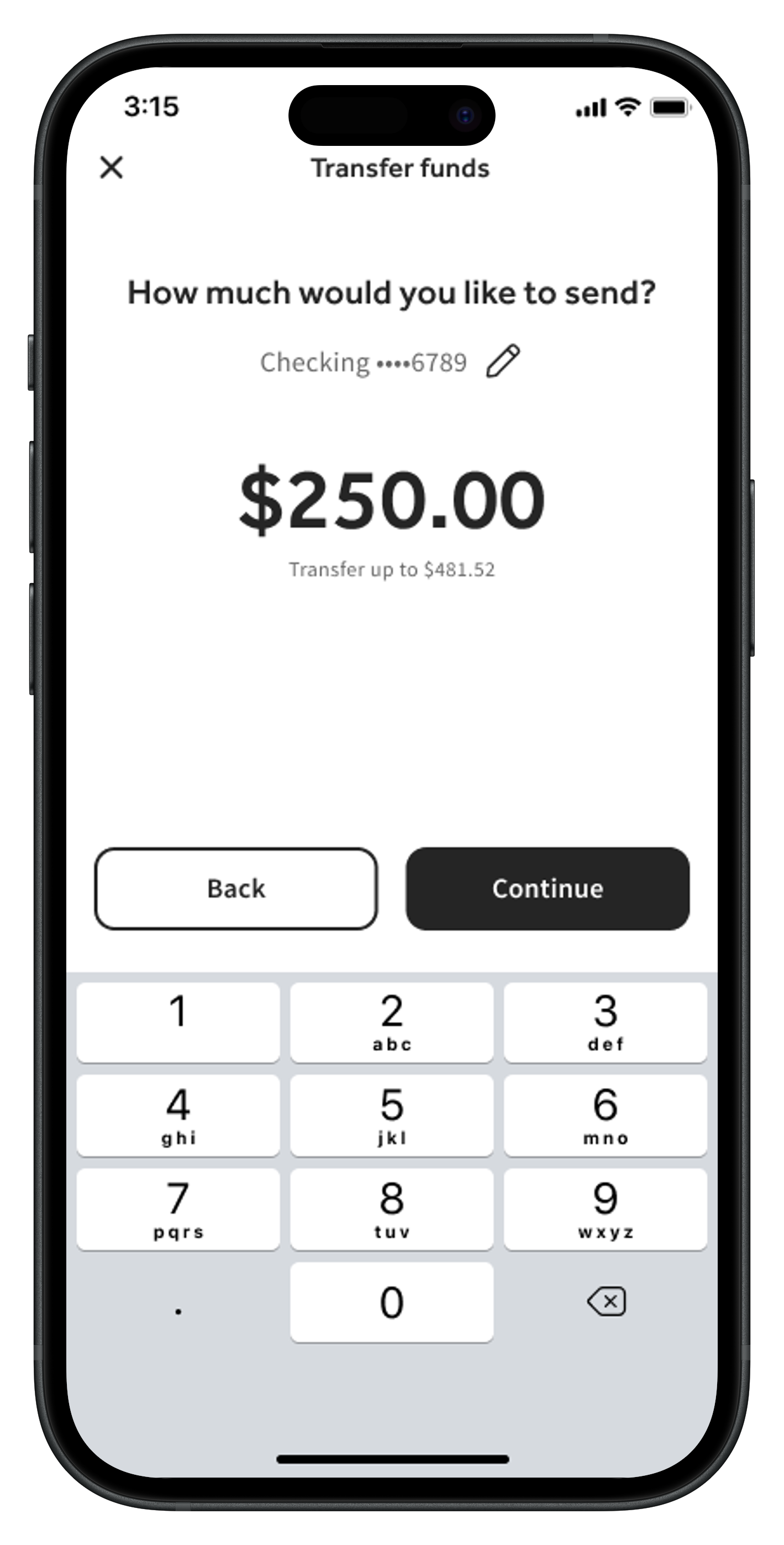
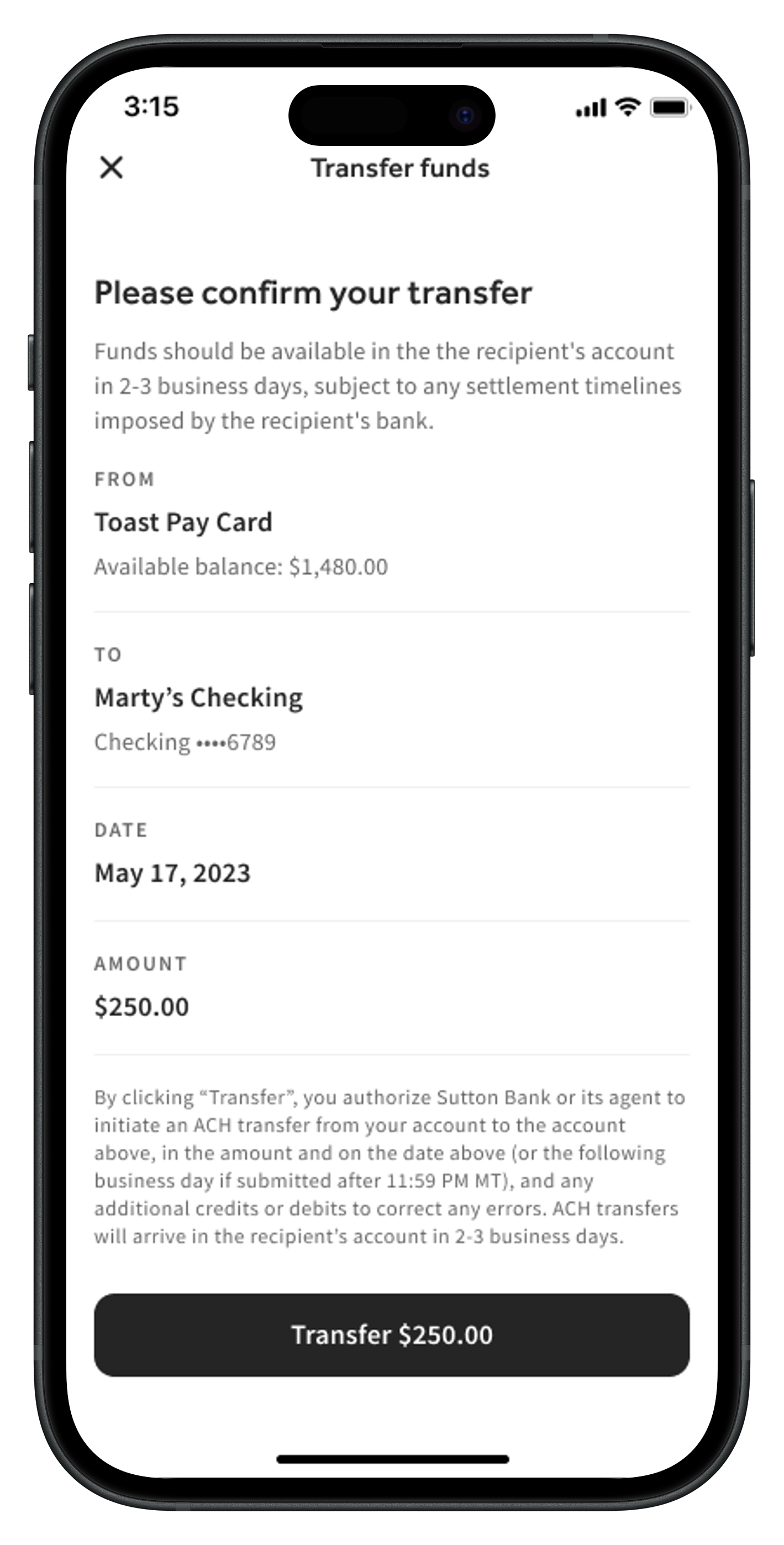
Expected outcome: A confirmation screen tells you the funds will be available in 2–3 business days.
Note: Two ACH transfers are allowed per calendar month, at no cost. You cannot exceed two transfers per month, even for a fee. Transfer limits: $2,500 per transaction, $5,000 per day, $5,500 per month. Limits are subject to change. See your Cardholder Agreement for details. If you receive an error during a transfer, review the limits in your Cardholder Agreement or Contact Customer Care at (617) 682-0225 for support.
Frequently Asked Questions
How Do I Find My Paystub in the MyToast App?
You find your paystub in the MyToast app by opening the Pay tab. The Paychecks page is the first page, and your pay stubs are sorted by pay period. Select a pay period to view the details, and tap the > icon to expand a section.
Also asked as:
-
- How do I view my paystub?
- How do I see my paystub?
- Where can I find my paystub?
- I need a copy of my paystub.
How Do I Download or Print My Paystub?
To download or print your paystub, you need to open it in Toast Payroll — the MyToast app only displays paystub details. In the MyToast app, select the Pay tab, then select Download paystubs in the upper-right corner of the Paychecks page (or Download paystubs at the bottom). You will be redirected to Toast Payroll, where the paystub file can be downloaded and printed. See Toast Payroll: View Your Paystub or Timesheet for the Toast Payroll steps.
Also asked as:
-
- How do I print my paystub?
- Where can I get a PDF of my paystub?
- How do I download paystub history?
Can I See My W-2 in the MyToast App?
Yes — current employees can see their W-2s in the MyToast app under Pay > Access Tax Forms (W-2s). Select a form to open and download it. If you want to print it, we recommend accessing it through Toast Payroll. Former employees do not have access to W-2s through the MyToast app — they must use Toast Payroll. See Toast Payroll: Find Your Form W-2 (For Employees) for the Toast Payroll path.
Also asked as:
-
- Where is my W-2?
- How do I get my W-2?
- How can a former employee get their W-2?
Can I Get Paid Early Through MyToast?
Yes — if your employer offers Toast PayOuts, you can receive a portion of your earned tips, wages, or both on your Toast Pay Card before payday. Open the Pay tab, go to the Pay Card page, and select Get paid when a PayOut offer is available. See Take a Toast PayOut Offer for the full steps. Toast PayOuts require a Toast Pay Card. If your employer does not offer Toast PayOuts or does not participate in the Toast Pay Card program, the Pay Card page will not appear.
Also asked as:
-
- How do I get paid early?
- How do I take a payout?
- What is a Toast PayOut?
- How does daily pay work?
How Do I Sign Up for a Toast Pay Card?
To sign up for a Toast Pay Card, your employer must already participate in the Toast Pay Card and Toast PayOuts program. If they do, open the MyToast app, navigate to Pay > Pay Card, and select Sign up. Fill out the four sign-up steps with your name, email, phone number, and address. Toast ships the card free of charge, and it usually arrives in 8 to 10 business days. See Order Your Toast Pay Card for the full steps. If your phone is not compatible with the app, see the Note in that section for the Toast Payroll workaround.
Also asked as:
-
- How do I order a paycard?
- How can an employee get a paycard?
- How to obtain a Toast Pay Card.
Why Is the Toast PayOut Amount Lower Than My Tip Total?
The Toast PayOut amount can be lower than your total tips because your employer's settings, tip pooling, and tax withholdings can reduce what is eligible for early access. To learn more, open the MyToast app, navigate to Pay > Pay Card > Get paid, and select the ? info icon on the Available Toast Payout row. Common reasons include:
-
- Your employer limited Toast PayOuts to tips only, wages only, both, or none.
- Your employer may adjust tip PayOuts for estimated tax withholdings and recurring deductions.
- Your tips or time entries may not be fully entered into Toast Payroll yet.
- If your restaurant tip pools, your manager must approve and send the tip pool to payroll.
- You may have reached the $500 per day tip limit or $500 per pay period wage limit.
See Toast Pay Card: Employee FAQ for the full PayOut calculation rules.
Also asked as:
-
- Why is the available payout less than my tips?
- Why are my tips not all available for payout?
- Why isn't my full tip amount eligible?
My Toast Pay Card Hasn't Arrived. What Should I Do?
Toast Pay Cards typically take 8 to 10 business days to arrive at the address you entered during sign-up. You can check the status tile on the Pay Card page of the MyToast app for shipping updates. If more than 10 business days have passed and you have not received the card, call (617) 682-0225 for shipping details.
Also asked as:
-
- I haven't received my paycard.
- Can I get tracking info on my paycard?
- When will my Toast Pay Card arrive?
- Pay card shipping status.
What If My Toast Pay Card Is Lost, Stolen, or Damaged?
If your Toast Pay Card is lost, stolen, damaged, or broken, call (866) 218-6688 immediately to avoid liability for unauthorized charges. A replacement is free. While you wait for your new card, change your payment method in Toast Payroll to paper check or direct deposit. Once your new card arrives, activate it and change your payment method back. Toast cannot track or locate a lost Toast Pay Card. For more details, see Toast Pay Card: Employee FAQ.
Also asked as:
-
- My paycard is lost.
- I need a new paycard.
- How do I report an unauthorized transaction on my paycard?
Why Can't I See the Pay Card Page in My App?
You won't see the Pay Card page in the MyToast app if your restaurant does not participate in the Toast Pay Card and Toast PayOuts program. Toast Pay Cards and Toast PayOuts are only available to Toast Payroll customers in eligible states. If your manager believes your restaurant should offer it, see Toast Payroll: Get Started With Toast Pay Card - Employer Guide.
Also asked as:
-
- Why don't I see Pay Card in MyToast?
- How do I add Toast Pay Card to my account?
- Is there an additional fee for Toast Pay Card?
Manager Troubleshooting for the MyToast Pay Tab
My Employee Is Not Seeing the Correct Amounts. What's Going On?
If amounts on an employee's Pay tab look wrong, the error is more than likely with an integration between employee profiles, Toast Payroll, Toast Tips Manager, and/or Toast Pay Card — not with the MyToast app itself. Start by checking:
-
- Employee mapping — confirm the employee is mapped between Toast Web and Toast Payroll. See Toast Payroll: Manage Employee Mapping.
- Data sync — confirm that data has synced from Toast Web to Toast Payroll for the affected pay period. See Toast Payroll: Sync Information With Toast Web.
Why Do the Totals of an Employee's Tips Vary Between the MyToast App and the Sales/Labor Summary Report?
The pay information on the Pay tab reflects the data in Toast Payroll. If there is an unexpected discrepancy, review your Toast Payroll tip settings:
-
- In Toast Payroll, navigate to Settings > Toast > Tips. Verify your tip sync selection and your earning code mapping on this page.
- If you use Toast Tips Manager, see Tips Manager With Toast Payroll for the relevant sync rules.
Where Can I Find More Information About the MyToast App?
For directions to download the MyToast app, log in, and troubleshoot common login scenarios, see Get Started With the MyToast App.
Why Don't My Employees See the Option to Sign Up for a Pay Card?
If your employees don't see the Sign up option on the Pay Card page (or do not see the Pay Card page at all), check the following:
-
- Your restaurant must be enrolled in the Toast Pay Card and Toast PayOuts program. See Toast Payroll: Get Started With Toast Pay Card - Employer Guide for setup.
- The employee must be non-salaried, age 18 or older, and located in an eligible state.
- The employee must have a smartphone that meets the MyToast OS requirements: iOS 16.0 or later, or Android 11 or later.
- Rehired employees or employees who previously closed a Toast Pay Card account require a new Toast Web profile created under a new email address. The employee will be able to see the Sign up option once logged in to the MyToast App under the new email address. Contact Customer Care for more information.
Related Articles
- Get Started With the MyToast App
- Toast Payroll: Set a Payment Method
- Toast Pay Card: Employee FAQ
- Toast Payroll: View Your Paystub or Timesheet
- Toast Payroll: Get Started With Toast Pay Card - Employer Guide
1 Toast Pay Cards are issued by Sutton Bank, Member FDIC, pursuant to license by Mastercard®. Mastercard and the circles design are registered trademarks of Mastercard International Incorporated. Toast PayOuts are funded by a 0% line of credit issued to employers by Toast, Inc., as set forth in the employer's Credit Agreement. Toast reserves the right to change or discontinue this program at any time. Toast Pay Card and PayOut is not available in all jurisdictions and is available to Toast Payroll customers only.
2 Availability of Toast PayOuts varies by employer. Visit the MyToast app to see if your employer offers Toast PayOuts. Tip PayOuts may be limited to a portion of pay to help account for estimated taxes, withholdings, and deductions. Tip PayOuts are not available at restaurants that tip pool without using Toast Tips Manager. Employees must receive wages via the Toast Pay Card in order to access Toast PayOuts. Tips will be paid to employees on their Toast Pay Card as though you were receiving them in cash. Wages will be advanced by employers during the pay period and deducted from your total wages paid to you on payday.
3 Access is typically available instantly after the employee's shift; however, if restaurants tip pool using Toast Tips Manger, Toast PayOuts of tips are available after the tip pool is approved and sent to Toast Payroll, typically the next calendar day.
4 Fees charged by the receiving financial institution are uncommon but may apply. Employees will receive two free ACH transfers per calendar month. It is not possible to exceed that limit, even for a fee. Employees cannot schedule transfers for future dates. There is a limit of $2,500 per transaction, $5,000 per day, and $5,500 per month. Limits are subject to change. Employees should see their Cardholder Agreement for details.
This content is for informational purposes and is not intended as legal, tax, HR, or any other professional advice. Please contact an attorney or other professional for advice.