Toast Delivery Services® Billing FAQ
Last updated: Oct 2, 2026, 11:25 AM
Frequently asked questions for Toast Delivery Services® billing.
Toast Delivery Services® (TDS) payments are automated by Toast. Once automated billing is active on your TDS module, Toast withholds all applicable TDS fees — including delivery fees, the Toast flat service fee, and driver tips — from your daily credit card payouts whenever a TDS order is delivered to your guest. You do not receive or pay a separate bill or invoice from Uber Direct, DoorDash Drive, or Toast.
Note: For orders in California, New York City, and Seattle, WA, you are charged a flat fee per delivery plus applicable regulatory fees. For the full fee breakdown, see Toast Delivery Services® Automated Billing Overview.
- General questions about TDS billing
- Reporting and reconciling your TDS withholdings
- Related articles
General Questions
What does "withholding fees and driver tips" mean?
Withholding fees and driver tips means Toast deducts your TDS delivery fees, Toast flat service fee, and driver tips from your daily credit card payouts. When your credit card sales are processed by your credit card processor, these amounts are deducted before the remainder is settled and deposited into your bank account.
For example, suppose your restaurant had ten $40.00 TDS orders within a 6-mile radius on Monday, with no regulatory fees, and each order was tipped $2.50:
-
- Order value before any deductions: 10 x $40.00 = $400.00
- TDS delivery fee and Toast flat service fee: 10 x $6.99 = $69.90
- Driver tips: 10 x $2.50 = $25.00
- Amount deposited into your bank account after deductions: $400.00 − $69.90 − $25.00 = $305.10
Note: The deposited amount shown above excludes credit card processing fees.
Who is TDS billing withholding enabled for?
TDS billing withholding is enabled for every restaurant using Toast Delivery Services®. All TDS restaurants are part of this automated withholding.
Can these fees be deducted monthly instead of daily?
These fees cannot be deducted monthly. At this time, withholding happens only on a daily basis.
When will my funds be deposited into my bank account?
Your funds are deposited into your bank account about 1–2 business days after the sale. Using the example above, funds from a Monday sale settle into your bank account by Wednesday at the latest. On your Finance reports, withheld TDS amounts appear in the Other column and include withheld TDS delivery fees, the Toast flat service fee, and tips from the previous 1–2 business days.
What happens when I cancel a TDS order?
To cancel a TDS order you no longer wish to fulfill, you must contact your delivery provider directly. Contact Uber Direct at (866) 987-3750 or DoorDash Drive at (855) 222-8111 to cancel the delivery.
Note: Uber Direct scheduled deliveries can only be canceled after the order becomes active. Orders cannot be canceled in advance, before the order is fired.
Cancellation fees with Uber Direct:
| Delivery status | Cancellation fee |
| Driver has not been assigned to the delivery | No cancellation fee |
| Driver has been assigned to the delivery | $5.00 cancellation fee |
| Driver has picked up the delivery | Delivery fee |
Cancellation fees with DoorDash Drive:
| Delivery status | Cancellation fee |
| Driver has not been assigned to the delivery | No cancellation fee |
| Driver has been assigned to the delivery | No cancellation fee |
| Driver has picked up the delivery | Delivery fee |
What happens when I re-dispatch a TDS order?
When you re-dispatch a TDS order, Toast withholds a delivery fee and driver tip each time the order is re-dispatched using the Redispatch button in the Orders Hub on the Toast POS. Each withheld amount appears in your TDS billing reports, along with its withholding and settlement dates. For timing details, see "When will my funds be deposited into my bank account?" above.
What happens when I receive a refund on a TDS order from my delivery provider?
When you receive a refund on a TDS order from your delivery provider, the refund is credited back to your restaurant through your credit card payouts. Continue to contact Uber Direct at uberdirect@uber.com or DoorDash Drive at drive-support@doordash.com to request a refund when their driver is at fault for an issue with a TDS order. Uber Direct or DoorDash Drive will offer refunds on the delivery fee, flat service fee, and/or driver tip if they are deemed at fault per their refunds matrix. Once the provider confirms the refund, they send the information to Toast, and Toast processes an order adjustment. Refund adjustments are credited against each subsequent order's withheld fees and tips until the full amount is refunded to your restaurant.
The refund process works like this:
-
- Your restaurant contacts the delivery provider to request a refund.
- The delivery provider reviews the refund request.
- The delivery provider issues a refund based on their refund matrix.
- Your restaurant receives the refund as a credit on its next credit card payout.
Note: Uber Direct and DoorDash Drive will never refund your guest directly. To refund your guest, you must process the refund on the Toast POS, and then separately request a refund for your restaurant from the delivery provider. For details on what is eligible for a refund, see the Uber Direct Refunds Matrix or DoorDash Drive Refunds Matrix, or see below.
Uber Direct Refunds Matrix
| Area | Category | Scenario description | Responsible party | Item(s) refundable?1,2 | Tip refundable?3 | Delivery service fee refundable?4 |
| Order Cancelled | Uber Cancelled Orders | Courier cancels after completing pickup for an unknown reason and the order is not delivered (nor returned) | Uber | 100% or cap | Yes | Not Invoiced |
| Order Cancelled | Uber Cancelled Orders | [If return eligible] Courier cancels en route to or at dropoff without prompting from the customer; courier initiates a return and the return is successful | Uber | 100% or cap | Yes | Yes |
| Order Cancelled | Uber Cancelled Orders | Courier cancels after waiting at the pickup location for more than 10 minutes | Merchant | No | Not Invoiced | Not Invoiced |
| Order Cancelled | Courier Not Found | Merchant is unable to find a courier and Uber marks the delivery as failed after accepting the order request (and no courier was assigned and waited more than 10 minutes at the pickup location). Includes (but is not limited to): Uber accepts the order request and one or more delivery persons cancel before arriving at the store, resulting in Uber being unable to find a delivery person; or Uber accepts the order request, a delivery person arrives at the store but cancels the trip within 10 minutes of arrival and Uber cannot find a new delivery person | Uber | 100% or cap (only if food is prepared) | Not Invoiced | Not Invoiced |
| Order Cancelled | Merchant/Customer Cancelled Order | Partner or customer cancels: no courier assigned | Merchant | No | Not Invoiced | Not Invoiced |
| Order Cancelled | Merchant/Customer Cancelled Order | Partner or customer cancels: after courier assigned but before pickup completed | Merchant | No | Not Invoiced | Cancellation charge applied at invoice level |
| Order Cancelled | Merchant/Customer Cancelled Order | Partner or customer cancels: after courier completed pickup | Merchant | No | Not Invoiced | No |
| Order Cancelled | Merchant/Customer Cancelled Order | [If return eligible] Merchant/customer cancels and initiates a return (or courier does so after attempting delivery) and the return is successful. Includes (but is not limited to): partner or customer cancels, pickup is complete, and courier returns the item; partner or customer cancels, courier reaches dropoff, and courier returns the item; or courier initiates a return trip because the end customer is not available at dropoff or unable to receive the item | Merchant | No | No | No |
| Order Late | Late Order – Merchant at Fault | Order is late by Uber's Estimated Time of Delivery (ETD) + 20 minutes and any assigned courier wait time at the pickup location is more than 10 minutes | Merchant | No | No | No |
| Order Late | Late Order – Uber at Fault | Order is late between Uber's ETD + 20 and ETD + 30 minutes and courier wait time at the pickup location is less than 10 minutes | Uber | 15% or cap | Yes | Yes |
| Order Late | Late Order – Uber at Fault | Order is late between Uber's ETD + 30 and ETD + 60 minutes and courier wait time at the pickup location is less than 10 minutes | Uber | 50% or cap | Yes | Yes |
| Order Late | Late Order – Uber at Fault | Order is late after Uber's ETD + 60 minutes and courier wait time at the pickup location is less than 10 minutes | Uber | 100% or cap | Yes | Yes |
| Never Delivered | Customer Not Found/Unavailable | Courier delivers to the wrong location because customer information is wrong, or it is not possible to hand items to the customer. Includes (but is not limited to): dropoff instructions did not give the courier enough information to be let into a gated community, apartment, complex, or condo; wrong address provided by the customer; courier cancels the order because the end customer is not available at dropoff after 8 minutes and the courier tried to contact them; or the customer fails to meet ID requirements or is too intoxicated to receive the order (and the trip is not return eligible) | Merchant | No | No | No |
| Never Delivered | Order Marked Completed but Never Received | End customer states the order was not delivered, but the courier has taken a photo proving the goods were delivered at the right location, or there is a barcode/signature/PIN code/ID check confirmation; or the customer's dropoff notes conflicted with the merchant's dropoff instructions (e.g., customer says “leave at my door” for a Meet at Door delivery) | Merchant | No | No | No |
| Never Delivered | Order Marked Completed but Never Received | End customer states the order was not delivered and the courier did not reach dropoff or gather proof if requested (or the courier does not return the item if the trip is return eligible). Includes: courier completed pickup but did not reach the dropoff location and the delivery shows as completed; courier did not reach the pickup location but the delivery shows as completed; or courier delivered but has no proof if requested | Uber | 100% or cap | Yes | Yes |
| Poor Quality | Damaged Items | Item(s) damaged, or all items partially damaged in transit but still functional/edible | Uber | No | Yes | No |
| Poor Quality | Damaged Items | Item(s) damaged, or all items partially damaged in transit and unusable/inedible, and the customer shows proof (a picture of the damaged item) | Uber | 100% items or cap | Yes | Yes |
| Poor Quality | Delivery Experience | Courier exhibited poor behavior and the customer would like to change the tip amount | Uber | No | Yes | No |
| Order Wrong/Missing Items | Order Wrong | Courier delivered the wrong order due to having multiple orders from the merchant and mixing them up (confirmed through the receipt on the food bag), or giving a different merchant's order | Uber | 100% or cap | Yes | Yes |
| Order Wrong/Missing Items | Order Wrong | Courier delivered the wrong order because it was a single order and it was the wrong order, or the contents in the packaging are wrong or substitute items do not meet customer requirements | Merchant | No | No | No |
| Order Wrong/Missing Items | Missing Items | Some item(s) missing from the right overall order | Merchant | No | No | No |
1 If refundable, the amount must be shared with Uber via the receipt or API. The refund amount does not include sales tax. 2 For refunds at the item level, the itemized amount associated with each item must be provided and shared with Uber through the receipt or API. 3 Tips are not refunded by Uber but should be adjusted by the final customer within the adjustment window. 4 The delivery service fee refers to the charges levied for delivery services rendered during the term, including return fees where applicable.
Unless otherwise specified, refunded amounts cap at $200 and cancellation fees are set at $5. Refund requests must be submitted within 14 days of the order creation date, and any claims about a refund decision must be raised within 14 days of the decision date; requests or claims submitted after these windows will not be considered. This policy is subject to change by Uber at its sole discretion.
DoorDash Drive Refunds Matrix
| Reason (level 1) | Reason (level 2) | Description | Reason (level 3) | Refund reason | Responsible party | Order value refunded | Drive delivery fee refunded | Tip refunded |
| Order Cancelled | DoorDash At Fault | Any DoorDash-related failure resulting in an order cancellation, including: order running late; DoorDash outage; low Dasher supply leading to the order not being assigned or being assigned very late; no Dasher assigned; order picked up by the incorrect Dasher; or wrong delivery time/date due to a technical issue | DoorDash fault – food not made | Cancelled by DoorDash | DoorDash | 0% | Not invoiced | Not invoiced |
| Order Cancelled | DoorDash At Fault | Any DoorDash-related failure resulting in an order cancellation, including: order running late; DoorDash outage; low Dasher supply leading to the order not being assigned or being assigned very late; no Dasher assigned; order picked up by the incorrect Dasher; or wrong delivery time/date due to a technical issue | DoorDash fault – food made | Cancelled by DoorDash | DoorDash | 100% | Not invoiced | Not invoiced |
| Order Cancelled | Merchant Requested | The customer or merchant no longer needs the order delivered by DoorDash, and/or any merchant-related failure resulted in an order cancellation, including: merchant unable to fulfill (store closed, order not received at the store level, item(s) out of stock); or customer places the order with the wrong address and/or delivery time | Merchant requested before Dasher assignment | Cancelled order | Merchant | 0% | Not invoiced | Not invoiced |
| Order Cancelled | Merchant Requested | The customer or merchant no longer needs the order delivered by DoorDash, and/or any merchant-related failure resulted in an order cancellation, including: merchant unable to fulfill (store closed, order not received at the store level, item(s) out of stock); or customer places the order with the wrong address and/or delivery time | Merchant requested after Dasher assignment | Cancelled order | Merchant | 0% | 0% | 0% |
| Order Cancelled | Customer Requested | The customer or merchant no longer needs the order delivered by DoorDash, and/or any merchant-related failure resulted in an order cancellation, including: merchant unable to fulfill (store closed, order not received at the store level, item(s) out of stock); or customer places the order with the wrong address and/or delivery time | Customer requested before Dasher assignment | Cancelled order | Merchant | 0% | Not invoiced | Not invoiced |
| Order Cancelled | Customer Requested | The customer or merchant no longer needs the order delivered by DoorDash, and/or any merchant-related failure resulted in an order cancellation, including: merchant unable to fulfill (store closed, order not received at the store level, item(s) out of stock); or customer places the order with the wrong address and/or delivery time | Customer requested after Dasher assignment | Cancelled order | Merchant | 0% | 0% | 0% |
| Order Arrived Late | Order Not Ready & Dasher On Time | Store location was not ready for pickup, resulting in delays past the stated dropoff time | Order delivered 15–30 minutes late | Delivered late | Merchant | 0% | 0% | 0% |
| Order Arrived Late | Order Not Ready & Dasher On Time | Store location was not ready for pickup, resulting in delays past the stated dropoff time | Order delivered 30–45 minutes late | Delivered late | Merchant | 0% | 0% | 0% |
| Order Arrived Late | Order Not Ready & Dasher On Time | Store location was not ready for pickup, resulting in delays past the stated dropoff time | Order delivered 45–60 minutes late | Delivered late | Merchant | 0% | 0% | 0% |
| Order Arrived Late | Order Not Ready & Dasher On Time | Store location was not ready for pickup, resulting in delays past the stated dropoff time | Order delivered 60+ minutes late | Delivered late | Merchant | 0% | 0% | 0% |
| Order Arrived Late | Order Ready & Dasher Late | Dasher was delayed for pickup or dropoff, resulting in the order being late | Order delivered 15–30 minutes late | Delivered late | DoorDash | 15% | 0% | 0% |
| Order Arrived Late | Order Ready & Dasher Late | Dasher was delayed for pickup or dropoff, resulting in the order being late | Order delivered 30–45 minutes late | Delivered late | DoorDash | 25% | 0% | 0% |
| Order Arrived Late | Order Ready & Dasher Late | Dasher was delayed for pickup or dropoff, resulting in the order being late | Order delivered 45–60 minutes late | Delivered late | DoorDash | 80% | 0% | 0% |
| Order Arrived Late | Order Ready & Dasher Late | Dasher was delayed for pickup or dropoff, resulting in the order being late | Order delivered 60+ minutes late | Delivered late | DoorDash | 100% | 100% | 100% |
| Order Arrived Early | Delivered Early | Dasher arrives more than 30 minutes early to the customer | Delivered early | Delivered early | DoorDash | 15% | 0% | 0% |
| Never Delivered | Customer Information Wrong | Dasher unable to complete the delivery due to a wrong delivery address, wrong customer information, etc. | Customer information wrong | Never delivered | Merchant | 0% | 0% | 0% |
| Never Delivered | Never Delivered: Dasher Failure | Dasher did not break the customer's geofence and/or capture a photo, for whatever reason (e.g., Dasher mechanical failure, system error, miscommunication, Dasher fraud, etc.) | Dasher failure | Never delivered | DoorDash | 100% | 100% | 100% |
| Never Delivered | Never Delivered: Customer at Fault | Dasher broke the geofence of the customer's location and took a high-quality photo, scanned a barcode, or received a signature. Customer was unreachable. | Never delivered – customer fault | Never delivered | Merchant | 0% | 0% | 0% |
| Missing & Incorrect | Missing Main Item: Merchant at Fault | Merchant did not provide the main item | Missing main item | Missing/incorrect items | Merchant | 0% | 0% | 0% |
| Missing & Incorrect | Missing Side Item: Merchant at Fault | Merchant did not provide the side item | Missing side item | Missing/incorrect items | Merchant | 0% | 0% | 0% |
| Missing & Incorrect | Incorrect, Some Items: Merchant at Fault | Merchant did not provide some items, or special instructions were not followed | Incorrect, some items | Missing/incorrect items | Merchant | 0% | 0% | 0% |
| Missing & Incorrect | Entire Order Wrong: Dasher Failure | Dasher provided the customer with the wrong order | Entire order wrong – Dasher failure | Missing/incorrect items | DoorDash | 100% | 100% | 100% |
| Missing & Incorrect | Entire Order Wrong: Merchant at Fault | Customer received the wrong order | Entire order wrong – merchant at fault | Missing/incorrect items | Merchant | 0% | 0% | 0% |
| Missing & Incorrect | Missing Main Item: Dasher Failure | Dasher did not provide all items; the merchant is required to inbound to categorize this as a Dasher failure | Missing main item – Dasher failure | Missing/incorrect items | DoorDash | 50% | 0% | 0% |
| Missing & Incorrect | Missing Side Item: Dasher Failure | Dasher did not provide all items; the merchant is required to inbound to categorize this as a Dasher failure | Missing side item – Dasher failure | Missing/incorrect items | DoorDash | 15% | 0% | 0% |
| Poor Delivery Experience | Poor Food Quality | Customer reports poor food quality | Poor food quality | Poor food quality | Merchant | 0% | 0% | 0% |
| Poor Delivery Experience | Order Partially Damaged | Contents were partially damaged in transit | Order partially damaged | Sloppy delivery | DoorDash | 25% | 100% | 100% |
| Poor Delivery Experience | Entire Order Damaged | The entire order was damaged in transit | Entire order damaged | Sloppy delivery | DoorDash | 100% | 100% | 100% |
| Poor Delivery Experience | Order Tampered With | Customer reports the order has been opened and/or tampered with | Order tampered with | Sloppy delivery | DoorDash | 100% | 100% | 100% |
| Poor Delivery Experience | Tip Adjustment | Customer would like to remove the tip due to poor Dasher performance and/or bad behavior | Tip adjustment | Sloppy delivery | DoorDash | 0% | 0% | 100% |
| Poor Delivery Experience | Food Unsafe | Hair, debris, etc. found in the food | Food unsafe | Poor food quality | Merchant | 0% | 0% | 0% |
| Poor Delivery Experience | COVID Complaint | Dasher not wearing a face covering, or not following suggested safety protocols | COVID complaint | Sloppy delivery | DoorDash | 15% | 0% | 100% |
All refund requests must be reported by the customer or merchant within 14 days of order placement.
Note: If a guest contacts Toast Guest Support directly for a refund, Toast engages with Uber Direct or DoorDash Drive, secures the refund on your behalf, passes it to the guest, and keeps you notified. For more information, see Toast Delivery Services Terms & Conditions.
For more on who to contact for refunds, see Get Help With Toast Delivery Services®.
Does TDS withholding affect my daily close-out process?
TDS withholding does not affect your daily close-out process. TDS delivery fees and tips do not affect cash entries and deposits, and they do not change the way TDS tips are deducted from credit/non-cash tips before tipping out restaurant staff.
Why is my withholding more than $6.99 for an order?
Your withholding may be more than $6.99 for an order because of regulatory fees or an extended delivery radius. The base delivery fee covers a set radius; deliveries beyond that radius are charged an extended radius fee, and orders in California, New York City, and Seattle, WA include an additional regulatory fee. For the full fee-by-radius and regulatory fee tables, see Toast Delivery Services® Automated Billing Overview.
To verify whether an order traveled beyond your standard radius, enter the pickup address and the drop-off address into a mapping tool such as Google Maps and check the distance.
Note: The default TDS delivery radius is 10 miles. To change your delivery radius, contact your delivery provider directly. Any radius change is arranged between your restaurant and the provider.
Reporting
How can I view how much has been withheld from my daily credit card payouts?
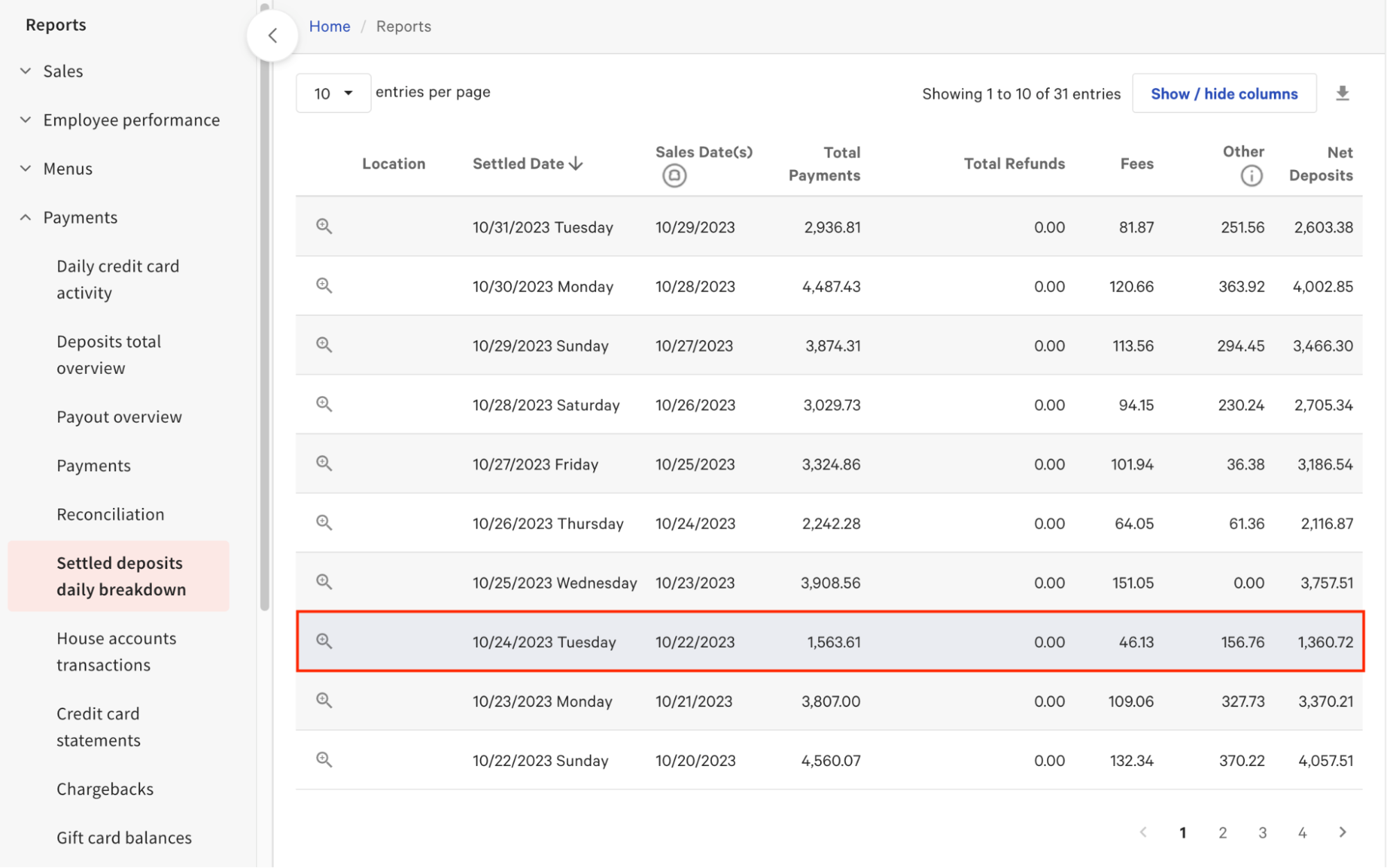
You can view how much has been withheld from your daily credit card payouts in the Other column of three Finance reports in Toast Web:
-
- Deposit Totals Overview: View totals of settled and pending batches of credit card deposits.
- Settled Deposits Daily Breakdown: View settled batches of credit card deposits by location.
- Daily Credit Card Activity: View credit card fees, settlements, and bank account transfer activity by day.
You can also use the Payout Overview report, which consolidates these three reports into one view.
Note: The amount in the Other column may not equal your delivery fee, Toast flat service fee, and driver tips on the same day if you have outstanding refund adjustments confirmed by Uber Direct or DoorDash Drive. You are not charged fees and tips until full refund amounts have been credited back to your restaurant.
For more information, see the reporting section of Toast Delivery Services® Automated Billing Overview.
Why doesn't the "Other" column always match the delivery fees and driver tips withheld on my TDS orders from the same day?
The Other column does not always match the delivery fees and driver tips from the same day because of timing and adjustments. There are several reasons the amounts may differ:
-
- Settlement timing. Because it takes up to two business days for withheld funds to settle, the amounts in the Other column reflect TDS orders from up to two business days prior. The Settled Deposits Daily Breakdown report shows the sales date(s) of the orders for which fees and tips were withheld on each settled date.
- Outstanding refund adjustments. If you have outstanding refund adjustments confirmed by Uber Direct or DoorDash Drive, Toast does not withhold subsequent fees and tips until the full refund amount is credited to your restaurant.
- Cancellations, re-dispatches, and refunds. If you cancel a delivery, re-dispatch a driver from the Toast POS, or receive a refund from your provider, Toast withholds or credits the appropriate amounts once the provider confirms them. These transactions appear in the TDS billing reports with both the withholding date and the settlement date.
- Other withholdings in the same column. The Other column can also include withholdings unrelated to TDS, such as Marketplace Facilitator Taxes, Toast Capital loans, instant deposit amounts, or Easy Pay leases. These add to the total and can make it differ from your TDS fees and tips alone.
- Phone order tips. Driver tips on orders placed on the Toast POS using the Toast Delivery Services dining option are only withheld if they are included in the original payment authorization. For details, see Tips and Invoicing for Toast Delivery Services®.
What reports do I receive for billing?
You receive a Toast Delivery Services billing email from Toast at the end of each month in which you processed at least one TDS order. The email is sent to your finance contact email and includes two attachments:
-
- A monthly TDS Fee Summary Report — a PDF summary of all TDS charges withheld during the month.
- A monthly TDS Fee Breakdown Report — a CSV file with a per-order breakdown of orders, re-dispatched orders, and refunds withheld during the month.
Note: To update your finance contact email, follow the instructions in Optimize Communication Preferences.
For more information, see the reporting section of Toast Delivery Services® Automated Billing Overview.
How can I view my TDS billing report in Toast Web?
You can view your TDS billing report in Toast Web on the Toast Delivery Services Billing page. Follow these steps:
-
- In Toast Web, navigate to Takeout & delivery > Toast Delivery Services Billing.
- Select Set time range and download.
- Use the date selector to choose a specific date or a custom date range.
- Select Download.
The report downloads as a .csv file containing your restaurant's historical withholding data.
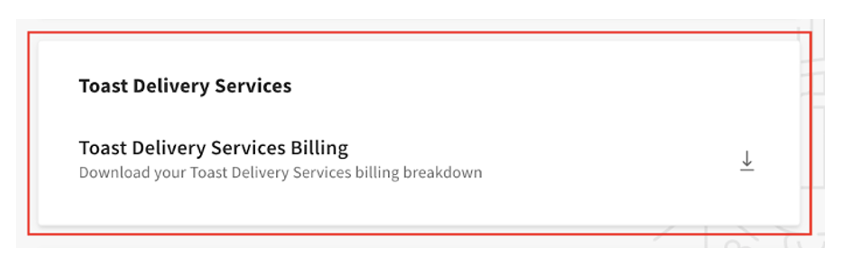
Note: There is a 48-hour lag between when orders are placed and when they appear in the TDS billing report generated from Toast Web.
Note: The charges in the TDS billing report are not in sequential order. You can filter and sort the report in Google Sheets or Microsoft Excel by Opened Date, Withholding Date, or Settled Date based on your needs.
To access this report, you must have Restaurant Operations Setup permissions associated with your Employee Job. To grant an employee access:
-
- In Toast Web, navigate to Team > Settings > Jobs.
- Select the job.
- Navigate to the Permissions tab.
- Enable the toggle for permission 6.6 Restaurant Operations Setup.
- Save and publish.
For more information on permissions, see the Permissions Reference Guide.
How do I reconcile my TDS delivery fees and driver tips against the amounts withheld from my payouts?
You reconcile your TDS delivery fees and driver tips against the amounts withheld from your payouts by comparing your TDS orders to your TDS billing reports and your Finance reports. Use the steps below.
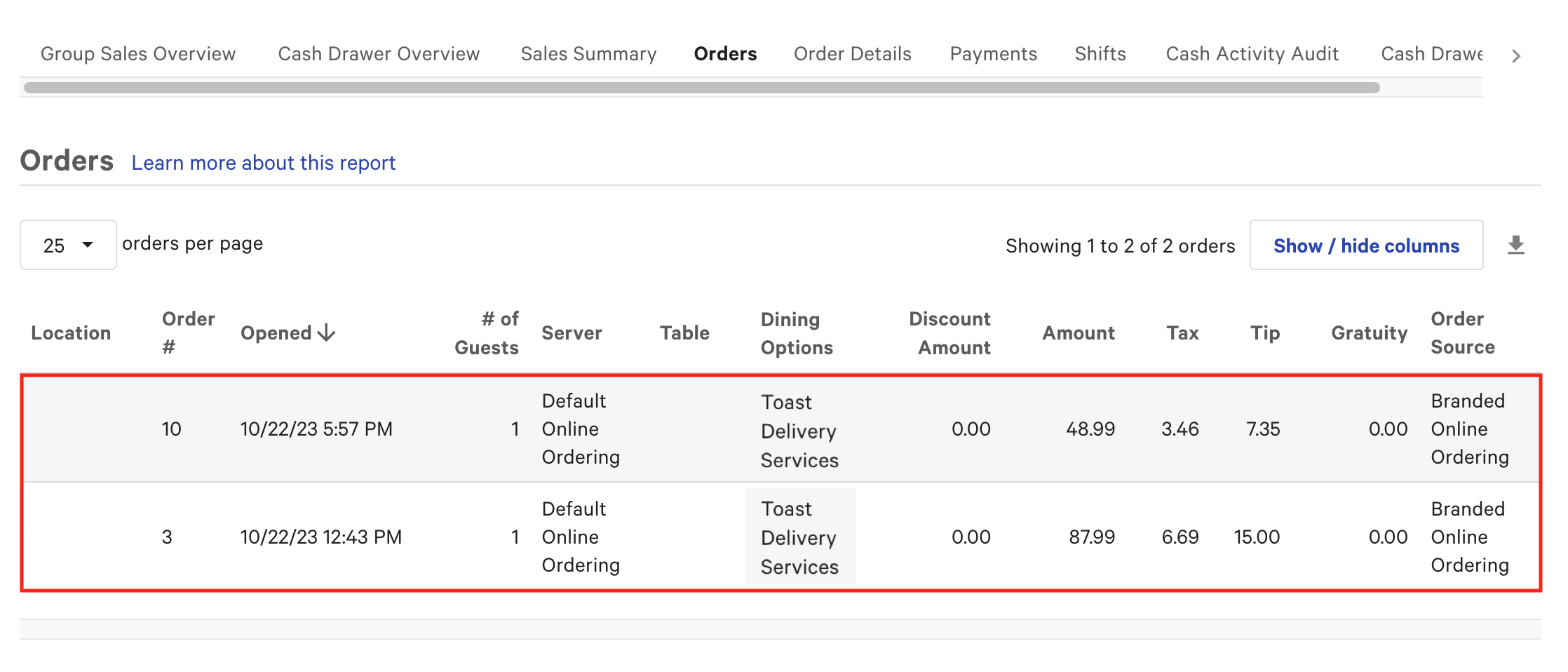
First, view your TDS orders in Toast Web by navigating to Reports > Sales > Orders, then filter by the Toast Delivery Services dining option. For example, two TDS orders on a single day might be:
-
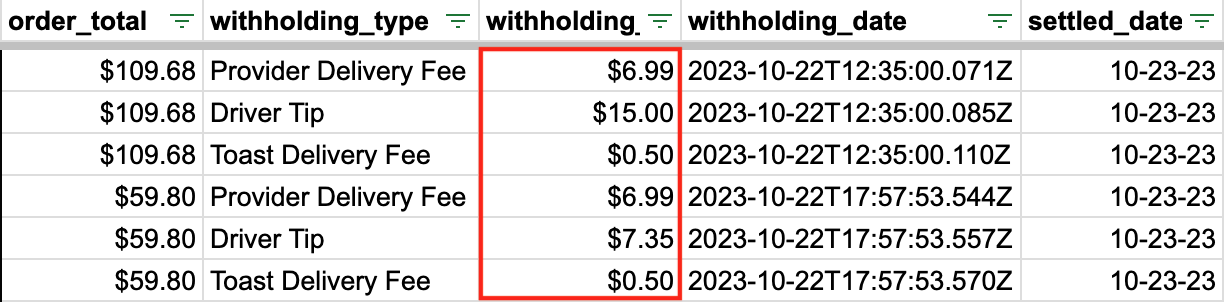
- Order 3: $6.99 delivery fee + $15.00 driver tip = $21.99
- Order 10: $6.99 delivery fee + $7.35 driver tip = $14.34
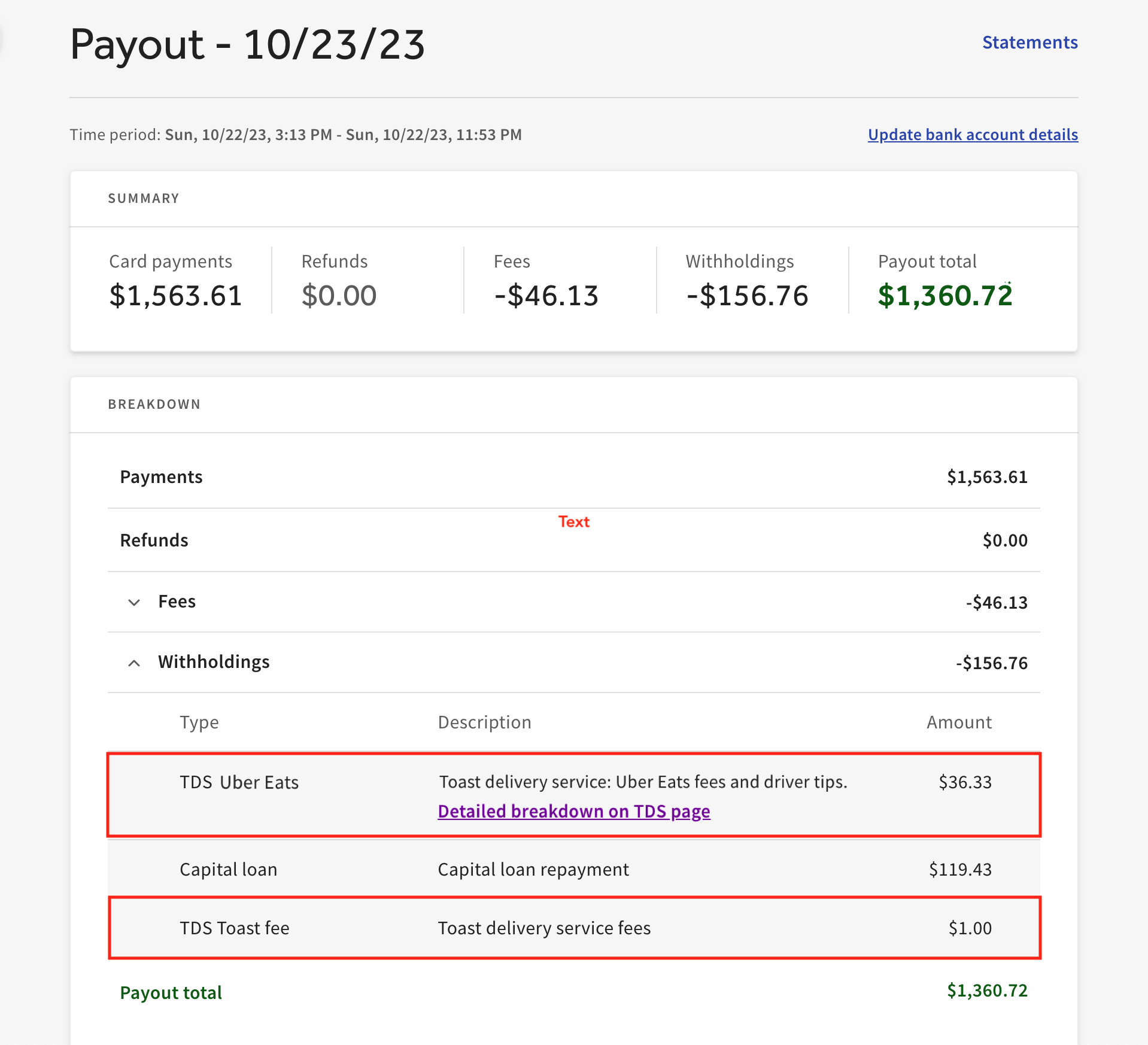
- Total withholding for the day: $36.33
These delivery fees and driver tips appear in your TDS billing breakdown report on the Takeout & delivery page in Toast Web.
You can then view the total amount withheld in the Other column of the Settled Deposits Daily Breakdown report. Because it takes up to two business days for withheld funds to settle, funds from orders processed on a Sunday settle into your bank account on the following Tuesday, for example.
Note: The amount in the Other column may not equal your delivery fee, Toast flat service fee, and driver tips if you have outstanding refund adjustments, or if you have withholdings from Marketplace Facilitator Taxes, Toast Capital loans, instant deposit amounts, or Easy Pay leases.
For a line-item view of every payout and withholding, use the Reconciliation report and the related Payout Details report. On the Reconciliation report, use the date and location filters at the top, and select a preset range (such as yesterday, today, or this week) or a custom date range.
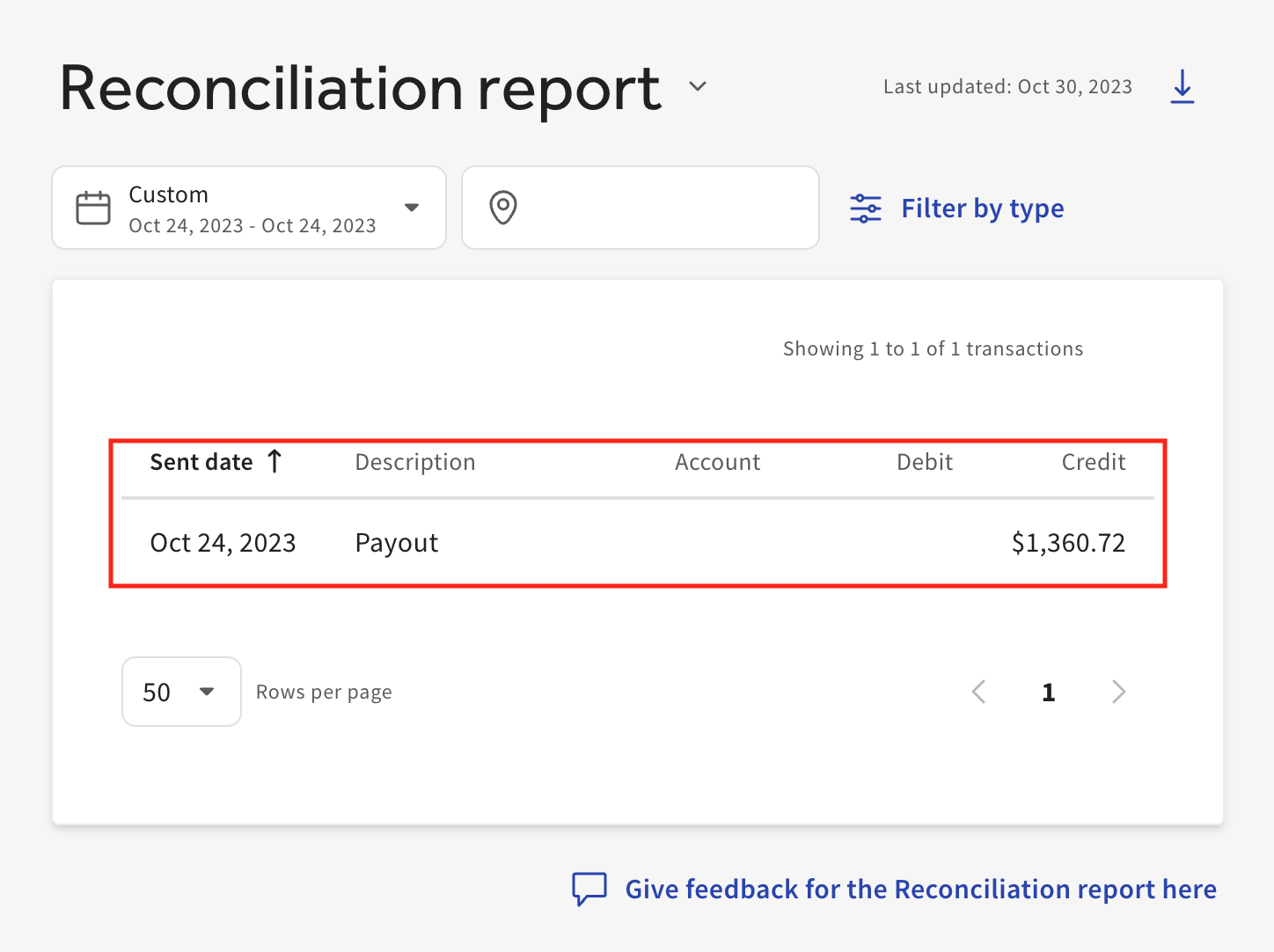
Selecting a payout on the Reconciliation report opens the Payout Details view, which shows the TDS delivery fees and driver tips withheld in that payout and all related transactions. For withholdings, the breakdown table shows the withholding type, a description, and the total amount.
Who can I contact for support or questions about TDS automated billing?
You can contact Toast Customer Care for support or questions about TDS automated billing by submitting a ticket. For instructions, see How to Submit a Ticket to Customer Care.
Related Articles
- Toast Delivery Services® Automated Billing Overview
- Toast Delivery Services® Overview
- Get Help With Toast Delivery Services®
- Tips and Invoicing for Toast Delivery Services®
- Access Reporting for Toast Delivery Services