Get Help With Toast Delivery Services®
Last updated: Oct 16, 2026, 9:43 AM
Oftentimes you might need to contact either Toast or Uber Direct in regards to Toast Delivery Services®. Learn more about who to call and why.
- Decide who to contact for a delivery problem
- Locate the Toast Delivery Services® Order ID
- Request a refund from your delivery provider
- Contact your delivery provider
- Related Articles
When a Toast Delivery Services® (TDS) order runs into trouble — a late driver, an undelivered order, a dispatch failure, or a refund request — this article tells you who to contact and what to do based on what you and your guest are seeing.
Note: You must always reference the Uber Direct or DoorDash Drive Order ID when contacting your delivery driver or delivery provider for support. To learn how to find this ID, see Locate the Toast Delivery Services® Order ID below.
To troubleshoot specific errors such as "Dispatch Failure" or "Out of Delivery Range," see Toast Delivery Services® FAQ. To learn immediately when Toast or a delivery provider is experiencing a service disruption, subscribe to incident updates at status.toasttab.com.
Decide who to contact for a delivery problem
Use the scenarios below to decide whether to contact the driver, your delivery provider, or Toast Customer Care. In every case, have your Uber Direct or DoorDash Drive Order ID ready.
Order is late or has not been delivered
Your guest contacts you saying the estimated delivery time has passed but the order has not arrived, or you see that the driver is late picking up, the driver is late delivering, or the delivery status has changed to Undeliverable.
If a delivery driver has been assigned, call the driver at the phone number that appears below the driver's name in the Orders Hub. You must call the driver from your restaurant's phone number as listed in Toast Web, or you will not be connected.
If a driver has not been assigned, or you cannot reach the assigned driver, call your delivery provider:
- Uber Direct: (866) 987-3750
- DoorDash Drive: (855) 222-8111
Order was never delivered, delivered late, wrong, or missing items
Your guest contacts you saying their food was never delivered or arrived more than 20 minutes late, that the wrong order was delivered, or that items were missing. On your side, the order status may have changed to Delivery Canceled, or no driver was assigned by the order's due time.
Call your delivery provider:
- Uber Direct: (866) 987-3750
- DoorDash Drive: (855) 222-8111
Then take the recommended action:
- Request a new driver if the delivery was canceled or the wrong order was delivered.
- Request a refund if the delivery was more than 20 minutes late or items were missing. See Request a Refund From Your Delivery Provider below.
Your guest is asking for a refund
Your guest asks for a refund because their order was never delivered, was delivered more than 20 minutes late, was the wrong order, or had missing items. This is also the path to follow when you want to request a refund for the same reasons.
Email your delivery provider:
- Uber Direct: uberdirect@uber.com
- DoorDash Drive: drive-support@doordash.com
Then take the recommended action:
- Provide the Uber Direct or DoorDash Drive Order ID and request a refund.
- Provide a partial or full refund for your guest on the Toast POS. Delivery providers never refund your guest directly.
For what you are eligible to be refunded, see the Uber Direct Refunds Matrix or the DoorDash Drive Refunds Matrix.
Order tracker shows delivery failed or dispatch failed
Your guest contacts you saying their food was never delivered and their order tracker or SMS status changed to delivery failed. On your side, the order status changes to Dispatch Failed, or Uber Direct has no record of the order.
Contact Toast Customer Care and inform them there has been a dispatch failure on a Toast Delivery Services® order. Then refund your guest for the order, or ask whether they would like to place a pickup order instead of delivery.
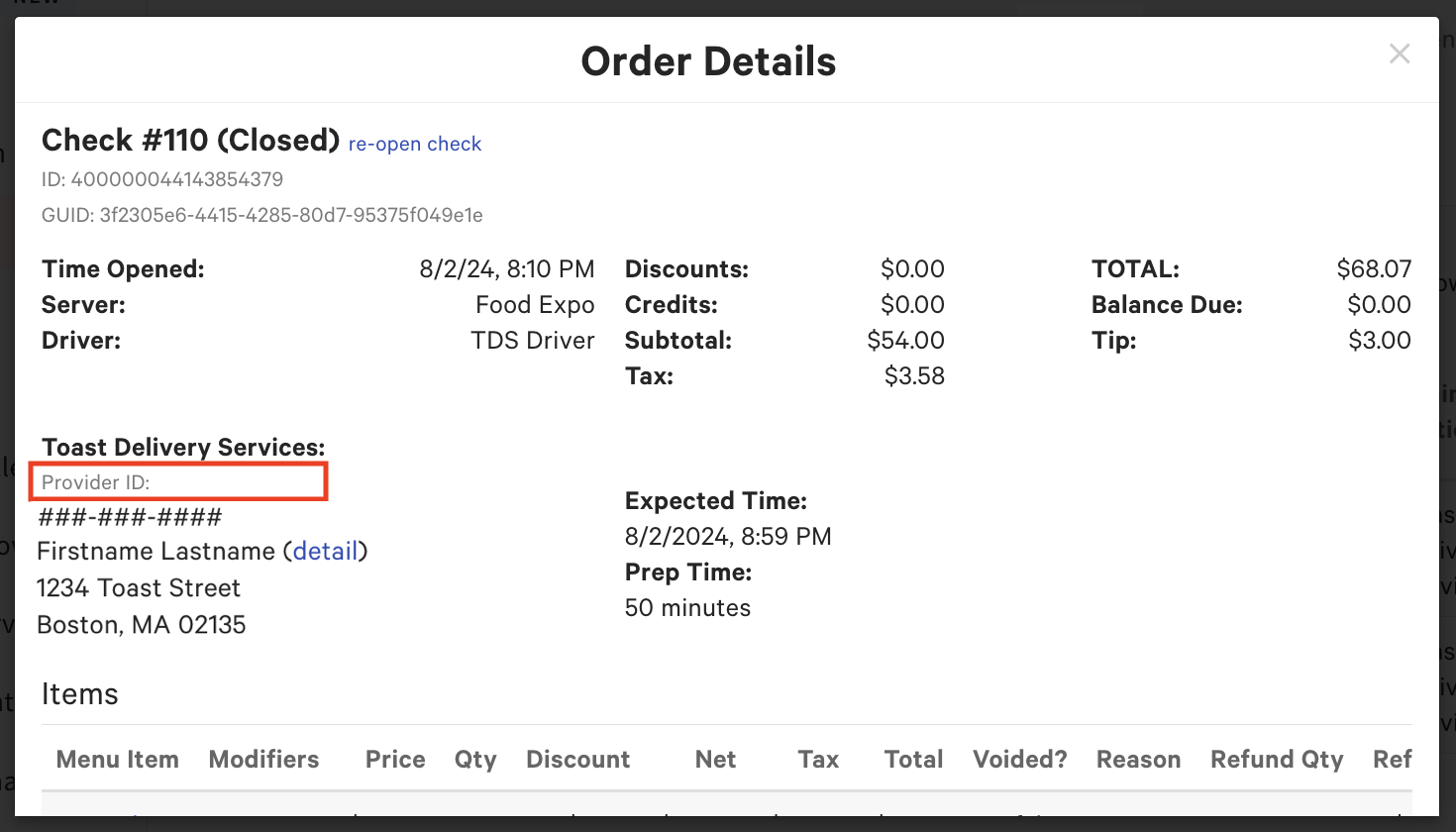
Note: When the provider ID field for an order is blank, it usually indicates a dispatch failure. See Locate the Toast Delivery Services® Order ID below.
Your guest contacted Toast Guest Support directly
Toast Guest Support can help guests with orders placed through the Local by Toast app for Toast Delivery Services®. For those orders, the Toast team works with Uber Direct or DoorDash Drive on the guest's refund request, and Toast passes a refund to the guest only after the delivery provider approves it. If the provider does not approve the refund, or the issue falls outside the Toast Delivery Services® Terms & Conditions, Toast Guest Support contacts your restaurant and refers the guest back to you. Guests who ordered through your Toast Online Ordering site should contact your restaurant directly. Use the steps above to request a refund from your delivery provider and refund your guest on the Toast POS. For more information, see Toast Delivery Services® Terms & Conditions.
Locate the Toast Delivery Services® Order ID
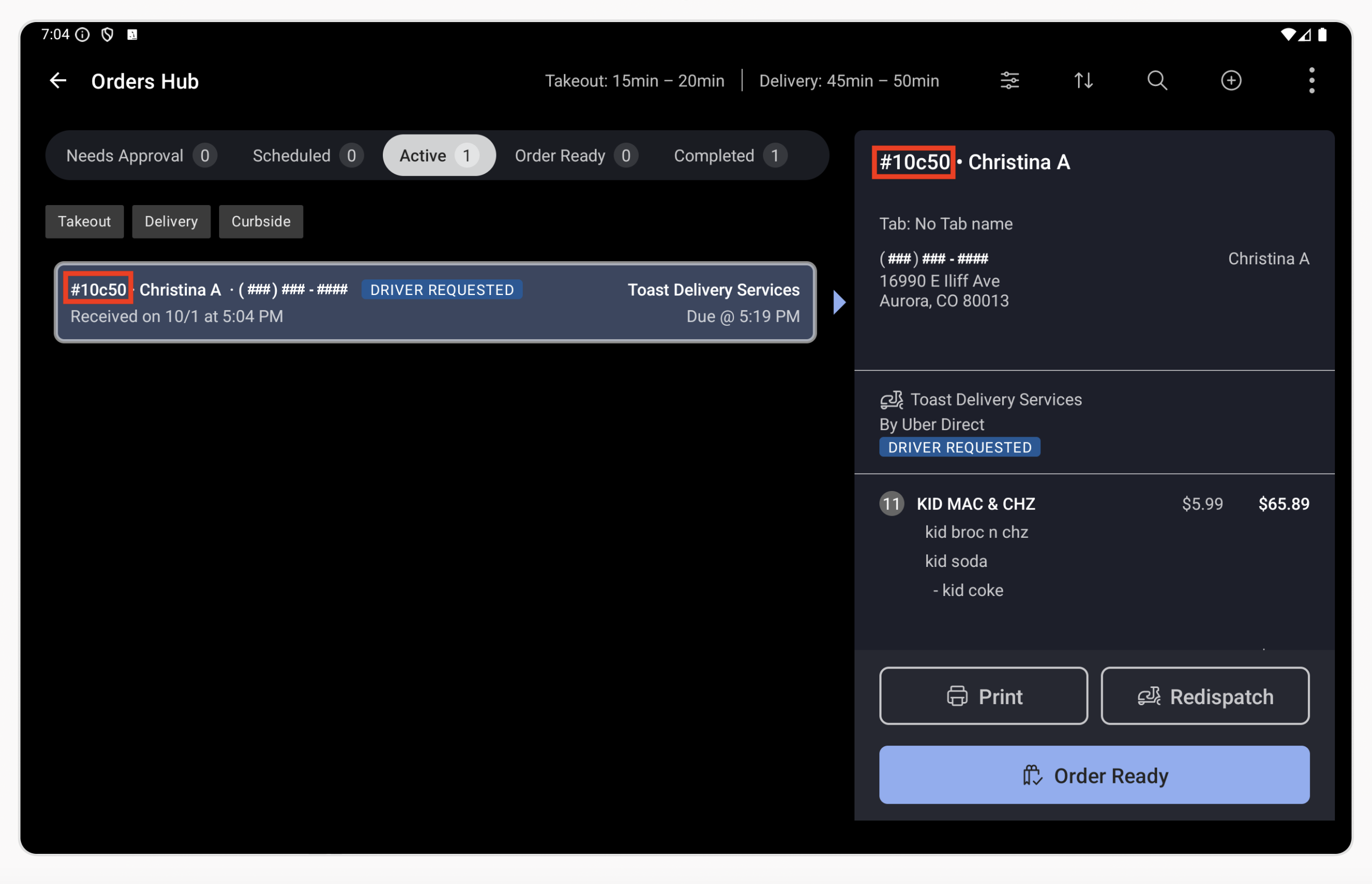
The Uber Direct and DoorDash Drive Order IDs are available in the Orders Hub on the Toast POS and on the Order Details pop-up of the Orders report in Toast Web. Reference this ID whenever you contact a driver or delivery provider.
Note: The Uber Direct Order ID is five characters, for example 5d187. The DoorDash Drive provider ID is 10 digits.
Find the Order ID in Toast Web
- Navigate to Toast Web and select Reports > Sales > Orders.
- Locate the order and select View Delivery Provider ID on the Order Details.
- Note: If no Provider ID appears in Order Details, locate the delivery order via Reports > Sales > Orders and open the Orders Hub entry, which lists the Delivery Provider ID.
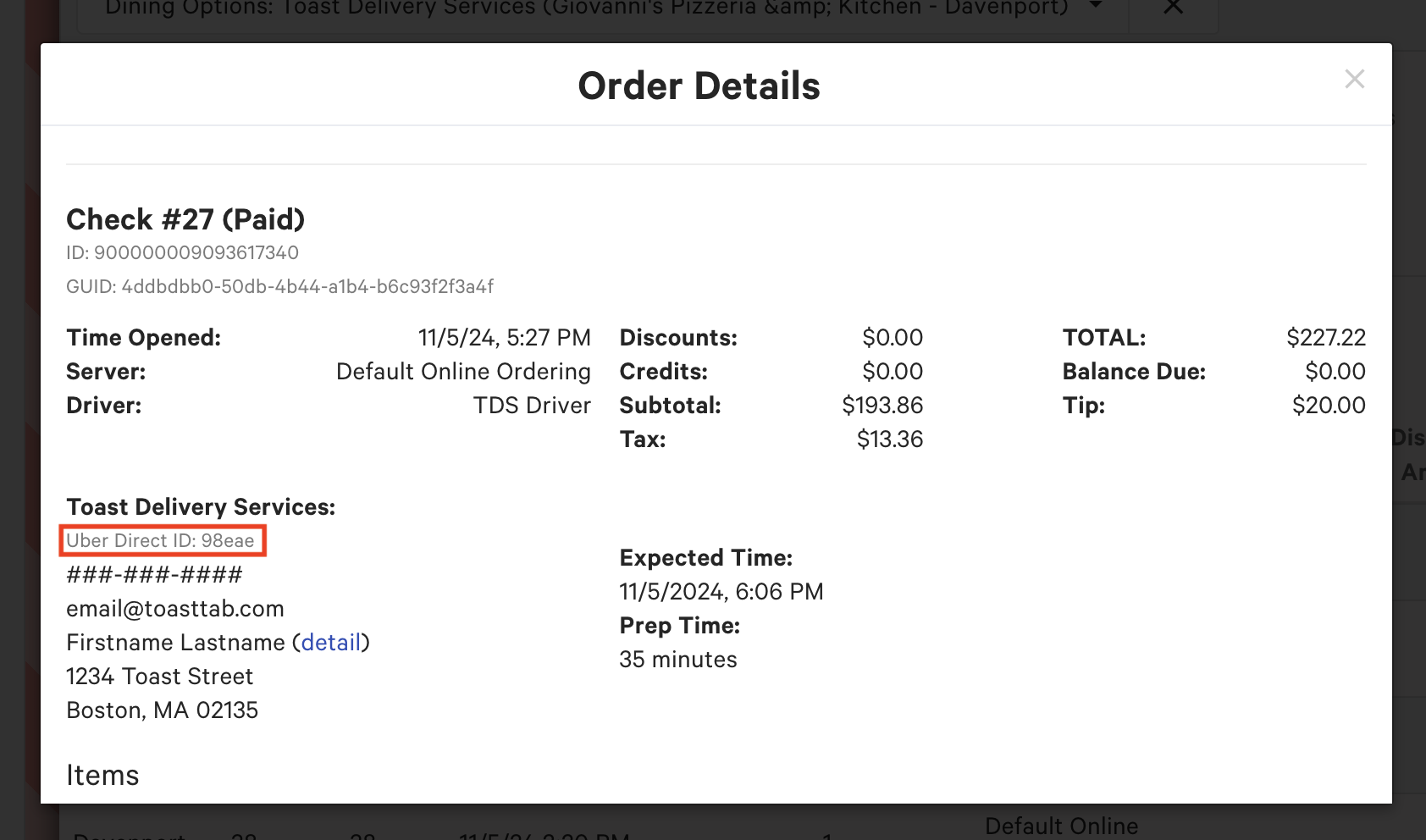
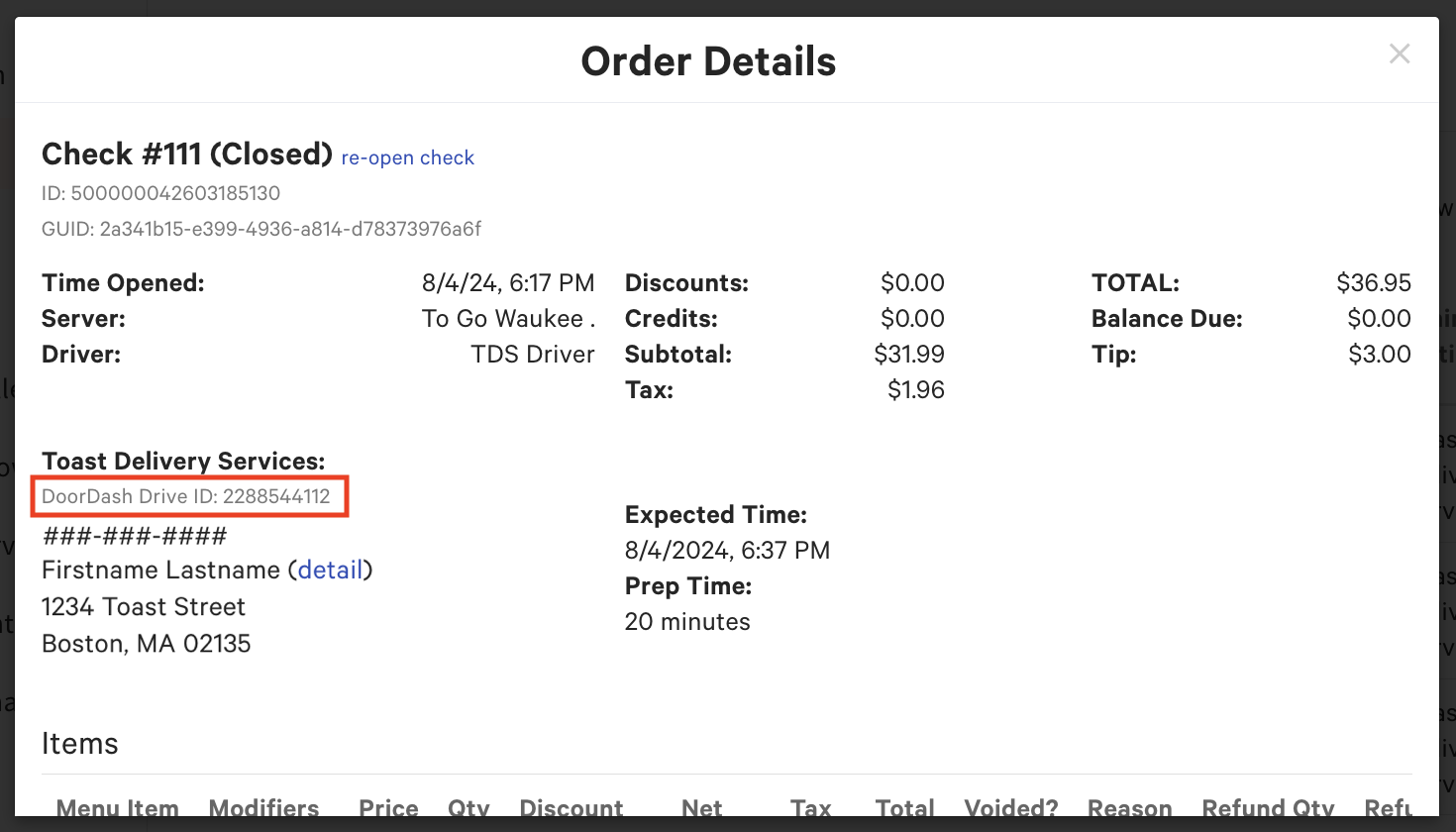
If there is a dispatch failure for a Toast Delivery Services® order, the provider ID field is blank.
Find the Order ID in the Orders Hub
To find the Toast Delivery Services® Order ID in the Orders Hub, navigate to Orders Hub > select the order > View Delivery Provider ID.
Note: If no Provider ID appears in Order Details, locate the delivery order via Reports > Sales > Orders and open the Orders Hub entry, which lists the Delivery Provider ID.
Request a refund from your delivery provider
You may be eligible for a full or partial refund from Uber Direct or DoorDash Drive for the order value of your Toast Delivery Services® order when there is a delivery issue. For what is covered, see the Uber Direct Refunds Matrix or the DoorDash Drive Refunds Matrix.
Note: Uber Direct and DoorDash Drive never refund your guest directly. To refund your guest, issue the refund on the Toast POS, then separately request reimbursement for your restaurant from the delivery provider.
When you email your provider, include your restaurant name, delivery provider ID, order date, guest name, and the reason for the request. You can use the templates below.
Submit a refund request in Toast Web
You can submit Toast Delivery Services® refund requests to your delivery provider directly in Toast Web and track their status. In Toast Web, go to Takeout & delivery > Toast Delivery Services and select TDS provider refunds. An approved provider refund doesn't refund your guest automatically. You still need to refund the guest on the Toast POS. Orders that were never dispatched don't appear on this page.
Uber Direct Refund Request Template
To: uberdirect@uber.com
Subject: Refund Request for {insert Uber Direct Order ID}
Body: To Uber Direct Customer Support — I'm writing to request a refund for Uber Direct order {insert Uber Direct Order ID} that {insert reason, for example "was never delivered"}.
- Restaurant Name:
- Uber Order Number:
- Order Date:
- Guest Name:
- Reason:
DoorDash Drive Refund Request Template
To: drive-support@doordash.com
Subject: Refund Request for {insert DoorDash Drive Order ID}
Body: To DoorDash Drive Customer Support — I'm writing to request a refund for DoorDash Drive order {insert DoorDash Drive Order ID} that {insert reason, for example "was never delivered"}.
- Restaurant Name:
- DoorDash Order Number:
- Order Date:
- Guest Name:
- Reason:
Contact your delivery provider
For live order issues such as a delayed driver or an urgent cancellation, contact your delivery provider directly.
| Provider | Phone | |
| Uber Direct | (866) 987-3750 | uberdirect@uber.com |
| DoorDash Drive | (855) 222-8111 | drive-support@doordash.com |
For non-urgent matters such as refund requests, email your provider using the templates above.
Related Articles
- Toast Delivery Services® FAQ
- Contact Your Toast Delivery Services Driver
- Toast Delivery Services® Billing FAQ
- Toast Delivery Services® Overview
- Contact Customer Support