Toast Delivery Services® FAQ
Last updated: Oct 8, 2026, 12:05 PM
Get answers to FAQ related to Toast Delivery Services® and Uber Direct/DoorDash Drive support, including delivery radius, tips, reporting, and dispatch errors.
In This Article:
- Delivery Times and Hours
- Provider Selection and Setup
- How Do I Switch Between Uber Direct and DoorDash Drive?
- How Do I Add Toast Delivery Services for Online Ordering?
- Can I Use Both My Own Drivers and Toast Delivery Services?
- Why Does Delivery Keep Reverting to Toast Delivery Services When I Try to Switch to My Own Drivers?
- Can I Remove Takeout as a Dining Option While Using Toast Delivery Services?
- Delivery Radius and Fees
- Dispatch Errors and Driver Issues
- What Does the "Dispatch Failure" Error Mean and How Do I Fix It?
- What Does the "Redispatch Failure" Error Mean?
- What Does the "Order Could Not Be Updated" Error Mean?
- My Driver Is More Than 15 Minutes Late for Pickup — What Do I Do?
- How Do I Find the Order ID, Driver Name, and Driver Phone Number?
- What If the Driver Picked Up the Order, but the Guest Never Received It?
- How Do I Request a New Driver If There Is an Issue With an Order?
- DoorDash Drive or Uber Direct Is Sending Drivers to the Wrong Pickup Address — How Do I Fix It?
- A Toast Delivery Services Order Was Cancelled, but Drivers Keep Showing Up — What Do I Do?
- How Do I Contact Uber Direct or DoorDash Drive Support?
- Billing, Refunds, and Reporting
- How Does Billing for Delivery Fees and Driver Tips Work?
- Can I Refund a Toast Delivery Services Order?
- My Toast Delivery Services Check Has Missing Items and I Can't Adjust the Payment — What Do I Do?
- How Do I See How Much Toast Delivery Services Is Withholding From My Payouts?
- How Do I Exclude Toast Delivery Services Driver Tips From My Daily Sales Report?
- Where Can I See and Isolate the Tips That Go to Toast Delivery Services Drivers?
- Other Common Questions
- Why Aren't My Toast Delivery Services Orders Firing to My KDS?
- Where Can I Find Reporting for My Toast Delivery Services Orders?
- Can Phone-In Delivery Orders Be Used With Toast Delivery Services?
- Can Guests Pay in Cash With Toast Delivery Services?
- Can Toast Delivery Services Be Used for Food Trucks?
- Can I Have Catering and Events Orders Delivered Through Toast Delivery Services?
- Can Uber Direct or DoorDash Drive Deliver Alcohol?
- Is My Toast Delivery Services Driver an Employee? Hourly or Salaried?
- What Is the "Driver, TDS" Entry on My Labor Summary?
- How Do I Add a Delay to My Toast Delivery Services Orders?
- Do Guests Receive Notifications About Their Order?
- Who Receives the Guest's Information for a Toast Delivery Services Order?
Delivery Times and Hours
Why Is the Driver Pickup Time Different From My Ready Time?
The driver pickup time is based on your takeout quote time + your delivery provider's estimated delivery time, not when you mark the food ready. Toast Delivery Services® schedules the driver to arrive at the end of your takeout quote window. To better match dispatch with prep, lower your takeout quote time. To learn how, see "Manage Your Quote Time Strategy".
If a single order shows a large unexplained gap between your ready time and the driver pickup time, the delivery provider may be experiencing dispatch delays — contact Customer Care to investigate that specific order.
How Is the Total Delivery Quote Time Calculated, and How Do I See the TDS Time?
Your guest sees a delivery time equal to your takeout quote time plus your delivery provider's estimated delivery time. The delivery provider (Uber Direct or DoorDash Drive) calculates and supplies the delivery portion. You cannot view the standalone provider delivery time before the order is placed; only the combined total appears to the guest.
For example, an order placed at 11:00 a.m. with a 15-minute takeout quote time and a 20-minute provider delivery time shows the guest an 11:35 a.m. expected delivery.
To learn how to set or adjust your quote times, see "Manage Your Quote Time Strategy".
What Hours Are Used to Decide When Delivery Is Available?
Delivery is available during your takeout hours in your Online Ordering schedule. Toast Delivery Services® uses the same hours as your takeout schedule — they cannot be set separately at this time. To view or update your hours, navigate to Toast Web > Takeout & Delivery and scroll to the Online Ordering Hours section.
Can Guests Schedule Future Orders Through Toast Delivery Services®?
Yes, guests can schedule future Toast Delivery Services® orders. They select a future order time using the drop-down menu when placing an online order. Toast fires the order to the kitchen using your prep and delivery times, so it is delivered at the time the guest selected.
Note: Scheduled delivery orders are assigned a driver pickup time, not a drop-off time. Set guest expectations accordingly. To learn more, see "Schedule Future Orders".
Provider Selection and Setup
How Do I Switch Between Uber Direct and DoorDash Drive?
You can switch the delivery provider that powers Toast Delivery Services® at any time in Toast Web. Follow these steps:
- Log in to Toast Web and navigate to Toast Web > Takeout & Delivery > Toast Online Ordering.
- Toggle Delivery on and select Toast Delivery Services. Select the delivery provider you would like to use.
- Save and publish your changes.
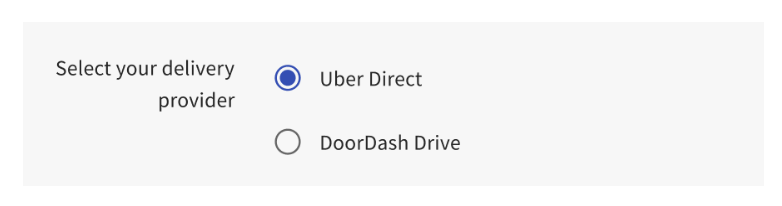
Expected outcome: Your selected delivery provider becomes active for all new orders once your changes are saved and published.
Note: The provider selected at the time the order is placed will fulfill that order. If you change your delivery provider, scheduled orders may still be fulfilled by the previous provider.
How Do I Add Toast Delivery Services® for Online Ordering?
To enable Toast Delivery Services® for Online Ordering, navigate to Toast Web > Takeout & Delivery > Toast Online Ordering and scroll to the Delivery section. From there, you can enable Toast Delivery Services®. For full setup instructions and pricing details, see "Toast Delivery Services® Overview".
Can I Use Both My Own Drivers and Toast Delivery Services®?
No. You cannot use your own delivery drivers and Toast Delivery Services® at the same time. Restaurants must choose one option for delivery — you cannot, for example, run Toast Delivery Services® on weekends and your own drivers on weekdays. To switch between the two, change your delivery configuration in Toast Web at Toast Web > Takeout & Delivery > Toast Online Ordering.
Why Does Delivery Keep Reverting to Toast Delivery Services® When I Try to Switch to My Own Drivers?
If your delivery configuration keeps reverting to Toast Delivery Services® when you try to switch to your own drivers, confirm that you saved and published your changes after each update. The configuration only takes effect once you publish.
If the setting still reverts, contact Customer Care so your account configuration can be reviewed.
Can I Remove Takeout as a Dining Option While Using Toast Delivery Services®?
No, you cannot remove takeout as a dining option while using Toast Delivery Services®. Both takeout and delivery must be enabled for guests placing online orders.
Delivery Radius and Fees
What Is My Delivery Radius?
Your delivery radius is set automatically by your delivery provider. The default is 10 miles for both Uber Direct and DoorDash Drive (with the exception of New York City), measured as a straight-line ("crow flies") distance — not driving distance. The radius excludes major bridges, airports, and state lines.
Note: Your Toast Delivery Services® delivery radius may differ from your delivery radius on the Uber Eats or DoorDash consumer app.
How Do I Change My Delivery Radius?
Your delivery radius is set by your delivery provider (Uber Direct or DoorDash Drive), not directly in Toast Web — there's no self-service radius setting in Toast Web. To request a radius change, contact Customer Care, who will route the request to your delivery provider; processing can take time, so submit your request as early as possible. If this article previously pointed you to an in-app (Pendo) guide or form to submit a radius-change request, that guide is no longer available — use the Customer Care contact path above instead.
My Guests Are Getting an "Out of Delivery Range" Error — What Should I Do?
An "Out of Delivery Range" error means the guest's address is outside your delivery provider's set radius. Check the following:
- If your restaurant is in New York City, your delivery radius may be smaller than your provider's stated default. Call your delivery provider directly for your specific radius.
- The radius is measured as a straight line ("crow flies"), not driving distance. If the address is more than the stated radius as a straight line, the order will not go through.
- If the address is within the stated radius and the error still appears, your Toast Delivery Services® configuration may have an issue — contact Customer Care.
How Do I Offer Free Delivery for a Promotion?
To offer free delivery for a limited promotion, set the Waive Fee Threshold on your delivery service charge to $1.00. This makes the delivery fee free to guests on any order of $1.00 or more. To update service charges, navigate to Toast Web > Finance > Related > Settings > Service charges & fees.
Can I Change the Default $3.99 Delivery Service Charge?
Yes, you can change the default $3.99 delivery service charge to help offset Toast Delivery Services® delivery fees. To edit, log in to Toast Web and navigate to Toast Web > Finance > Related > Settings > Service charges & fees, then update the delivery service charge.
Can I Charge Different Delivery Fees Based on Order Size?
Yes. You can set up multiple delivery fees with different waive thresholds so the fee drops off as the cart size grows. This encourages larger orders and helps offset small-order costs.
For example, with three delivery fees configured at different waive thresholds:
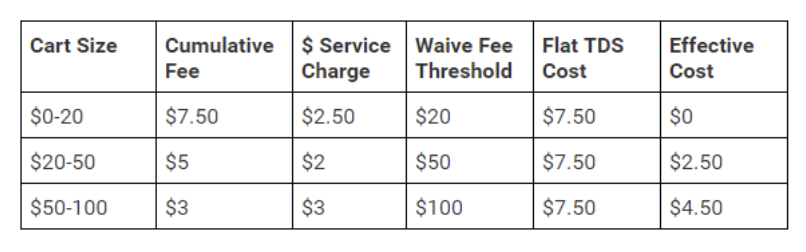
For setup instructions, see Toast Delivery Services® Overview.
Dispatch Errors and Driver Issues
What Does the "Dispatch Failure" Error Mean and How Do I Fix It?
A "Dispatch Failure" means the delivery provider could not assign a driver to your Toast Delivery Services® order. To fix it, select the order on the delivery screen and select the Request New Driver button (also called Redispatch) to attempt a new driver assignment.
For step-by-step instructions on the redispatch workflow in the Orders Hub, see Optimize Toast Delivery Services® POS Order Tracking Workflow.
What Does the "Redispatch Failure" Error Mean?
A "Redispatch Failure" means the system could not reassign a driver after a previous attempt. In this case, cancel the order and have the guest re-enter the order to try again.
What Does the "Order Could Not Be Updated" Error Mean?
The "Order could not be updated" error means the delivery provider could not accept changes to the date or time of an existing delivery. Call Uber Direct at (866) 987-3750 or DoorDash Drive at (855) 222-8111 to update the date or time of delivery on the provider's side.
My Driver Is More Than 15 Minutes Late for Pickup — What Do I Do?
If your driver is more than 15 minutes late for pickup, first call the driver using the phone number listed on the order in your POS. If you can't reach the driver, contact your delivery provider directly:
- Uber Direct: (866) 987-3750
- DoorDash Drive: (855) 222-8111
You must call from the phone number on file in Toast to be connected to the driver.
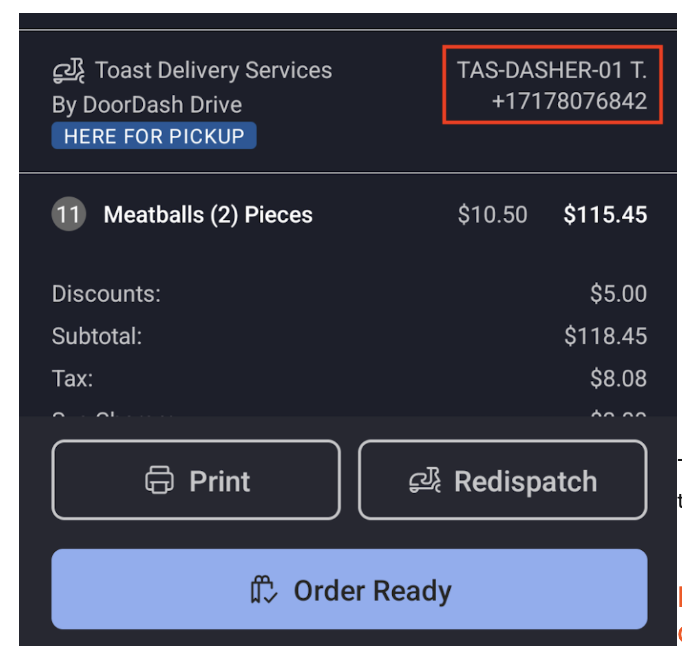
For more on contacting your driver and finding order details in the POS, see Optimize Toast Delivery Services® POS Order Tracking Workflow.
How Do I Find the Order ID, Driver Name, and Driver Phone Number?
The order ID, driver name, and driver phone number all appear on the POS order screen for your Toast Delivery Services® delivery. The information is visible in both the Payment Terminal and Orders Hub views. Reference the order ID when you contact the delivery driver or the delivery provider.
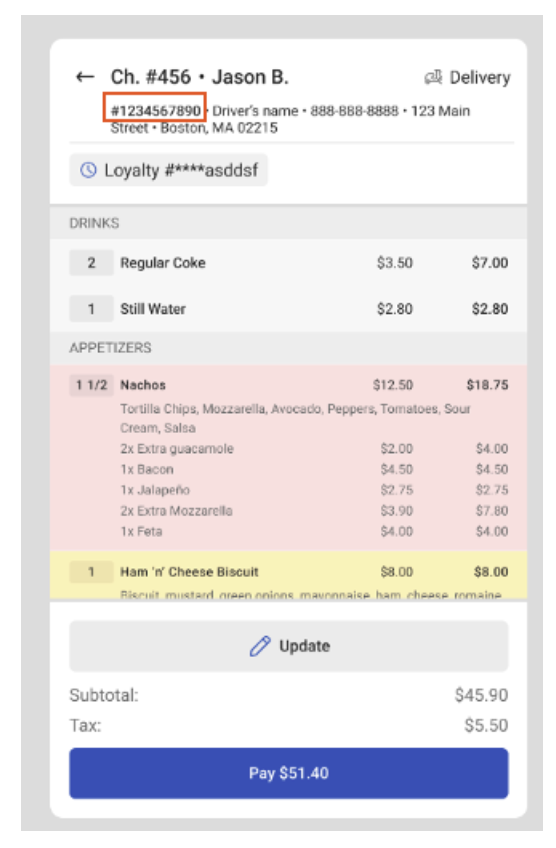
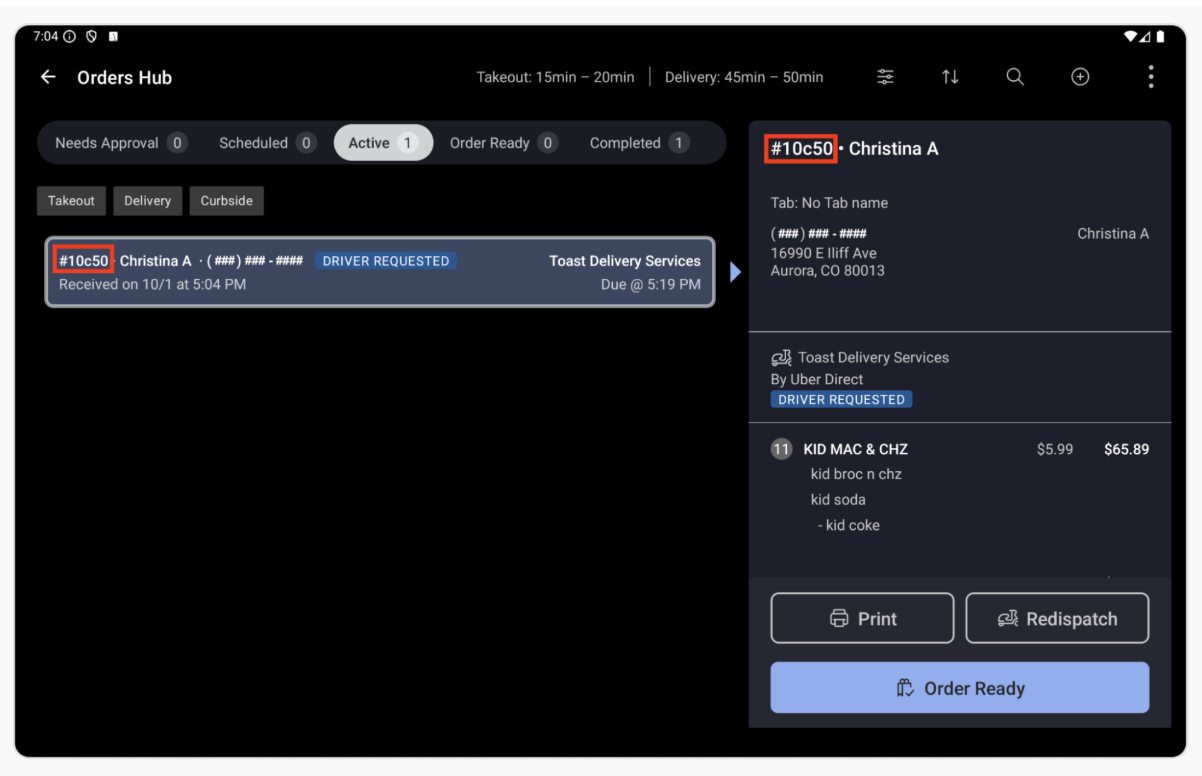
For step-by-step instructions, see Optimize Toast Delivery Services® POS Order Tracking Workflow.
What If the Driver Picked Up the Order, but the Guest Never Received It?
If the driver picked up the order but the guest never received it, only the restaurant can choose to refund the guest. Once you've refunded the guest, contact your delivery provider to request reimbursement based on their refund matrix:
If you've refunded the guest but still need to remove the delivery fee to close the check, follow these steps:
- Open the check on your POS and select Pay.
- Select the Service Charge button at the bottom of the screen.
- Select the checkbox next to the delivery fee to deselect it and remove it from the check.
- Select Done to confirm the changes.
Expected outcome: The delivery fee is removed from the check, and you can close the check.
How Do I Request a New Driver If There Is an Issue With an Order?
To request a new driver for a Toast Delivery Services® order, select the order on the delivery screen and select the Request New Driver button. For full instructions on the redispatch workflow, see Optimize Toast Delivery Services® POS Order Tracking Workflow.
DoorDash Drive or Uber Direct Is Sending Drivers to the Wrong Pickup Address — How Do I Fix It?
If DoorDash Drive or Uber Direct is sending drivers to the wrong pickup address for your Toast Delivery Services® orders, contact Customer Care so the address on file with the delivery provider can be reviewed and corrected.
A Toast Delivery Services® Order Was Cancelled, but Drivers Keep Showing Up — What Do I Do?
If a cancelled Toast Delivery Services® order is still attracting drivers, the cancellation may not have propagated to the delivery provider. Contact Customer Care so the order can be confirmed as cancelled with Uber Direct or DoorDash Drive on the provider side.
How Do I Contact Uber Direct or DoorDash Drive Support?
For live order issues — such as a delayed driver or an urgent cancellation — contact your delivery provider directly:
| Provider | Phone | |
|---|---|---|
| Uber Direct | (866) 987-3750 | uberdirect@uber.com |
| DoorDash Drive | (855) 222-8111 | drive-support@doordash.com |
For non-urgent matters, such as refund requests, email your provider. For Uber Direct, additional support details are available in the Uber Direct support flow document.
Billing, Refunds, and Reporting
How Does Billing for Delivery Fees and Driver Tips Work?
Toast Delivery Services® withholds delivery fees and driver tips from your daily credit card settlement payouts on a per-order basis. When your credit card sales are processed, TDS delivery fees and tips are deducted before the remaining amounts are settled and deposited into your bank account. Order adjustments resulting in refunds are credited against later orders' withheld fees until the total is refunded.
For full details on withholding mechanics, refunds, cancellation fees, and reporting, see Toast Delivery Services® Billing FAQ.
Can I Refund a Toast Delivery Services® Order?
Yes. A Toast Delivery Services® refund has two parts: refunding your guest, and requesting reimbursement from your delivery provider (Uber Direct or DoorDash Drive).
To refund your guest, use your normal Toast refund flow. Delivery providers don't refund guests directly.
To request reimbursement from your delivery provider:
- In Toast Web, navigate to Takeout & Delivery > Toast Delivery Services > TDS Provider Refunds.
- Select New refund request and follow the guided flow. It shows the potential refund amount before you submit.
Your request shows as Pending while the provider reviews it. It then changes to Approved or Rejected, and approved amounts appear on the same page. For more details, see Toast Delivery Services® Overview. For billing details, see Toast Delivery Services® Billing FAQ.
My Toast Delivery Services® Check Has Missing Items, and I Can't Adjust the Payment — What Do I Do?
If a Toast Delivery Services® check has missing items and you cannot open the check or adjust the payment to issue a refund, this is often because the check is in a restricted state — payments processed through the delivery provider's billing flow can lock the check from edits in the POS.
You will not be able to fix this directly in the POS. Contact Customer Care to refund the missing items.
How Do I See How Much Toast Delivery Services® Is Withholding From My Payouts?
To see how much Toast Delivery Services® has withheld from your payouts, run the TDS Billing Report in Toast Web. The report breaks down delivery fees, driver tips, and refunds applied to your batch.
For step-by-step instructions and reconciliation details, see Toast Delivery Services® Billing FAQ.
How Do I Exclude Toast Delivery Services® Driver Tips From My Daily Sales Report?
Toast Delivery Services® driver tips are tracked under an auto-generated TDS Driver employee profile, separate from your in-house staff tips. To exclude TDS driver tips from your daily sales summary, filter the Sales Summary report to exclude the TDS Driver employee.
For details on accessing reports and applying employee filters, see Access Reporting for Toast Delivery Services.
Where Can I See and Isolate the Tips That Go to Toast Delivery Services® Drivers?
Toast Delivery Services® driver tips are reported under the auto-generated TDS Driver employee profile. To isolate TDS tips from your tip pool, run a Labor Summary or Sales Summary report and filter on this employee.
For instructions, see Access Reporting for Toast Delivery Services.
Other Common Questions
Why Aren't My Toast Delivery Services® Orders Firing to My KDS?
If Toast Delivery Services® orders are not firing to your Kitchen Display System (KDS), confirm that the Toast Delivery Services dining option is enabled on the KDS. Without this setting, KDS routing won't include TDS orders. For full instructions on routing by dining option, see Configure Ticket Routing and Filter Tickets on Your KDS Device.
Where Can I Find Reporting for My Toast Delivery Services® Orders?
To find reporting for Toast Delivery Services® orders, run a Sales Summary, Labor Summary, or TDS Billing report in Toast Web. The reports cover order counts, tips, fees, and billing data. For full report locations and steps, see Access Reporting for Toast Delivery Services.
Can Phone-In Delivery Orders Be Used With Toast Delivery Services®?
Yes, you can use Toast Delivery Services® for delivery orders that started as phone-in (called-in) orders. The dispatch and tracking workflow works the same way as for online orders. To learn more, see Optimize Toast Delivery Services® POS Order Tracking Workflow.
Can Guests Pay in Cash With Toast Delivery Services®?
No, guests cannot pay in cash with Toast Delivery Services®. Only debit and credit card payments are accepted.
Can Toast Delivery Services® Be Used for Food Trucks?
Toast Delivery Services® can work for food trucks if you stay parked at a single, up-to-date pickup address and use DoorDash Drive as your provider. The address on the Restaurant Info page in Toast Web is sent to the driver for pickup, so a moving food truck won't work.
Note: Uber Direct does not support food truck pickups for Toast Delivery Services® at this time.
Can I Have Catering and Events Orders Delivered Through Toast Delivery Services®?
Yes, Toast Delivery Services® supports Catering and Events orders. To set this up, see the "Enable Toast Delivery Services® for Third-Party Ordering Partners" section in Optimize Toast Catering & Events.
Can Uber Direct or DoorDash Drive Deliver Alcohol?
Yes, Toast Delivery Services® supports alcohol delivery in select states where it is permitted by law. For a full list of eligible states, ID verification details, and setup steps, see Toast Delivery Services® Alcohol Delivery.
Important: All applicable menu items must be labeled as alcoholic items. If items aren't labeled correctly, your Toast Delivery Services® account can be deactivated. Restaurants should also review the Uber Direct and DoorDash Drive Merchant Terms for restrictions on the delivery of age-restricted items.
Is My Toast Delivery Services® Driver an Employee? Hourly or Salaried?
The Toast Delivery Services® driver is an auto-generated TDS Driver employee record created in your Toast account for reporting purposes — it is not a real person on your staff. The driver job title is Delivery Service Driver, and the employee does not need to clock in.
The TDS Driver employee can be set to either Hourly or Salaried:
- If set to Hourly, you'll need to complete a shift review for the TDS Driver.
- If set to Salaried, no shift review is required.
What Is the "Driver, TDS" Entry on My Labor Summary?
The "Driver, TDS" entry on your Labor Summary is the auto-generated TDS Driver employee record used for Toast Delivery Services® reporting. It is expected that when you have TDS enabled and does not represent a real staff member. You don't need to clock anyone in or take action on it.
For details on TDS reporting and how to filter on or exclude this employee, see Access Reporting for Toast Delivery Services.
How Do I Add a Delay to My Toast Delivery Services® Orders?
To add a delay to your Toast Delivery Services® orders, add a Takeout delay in Toast Web. TDS uses your Takeout quote time, so the delay applies automatically. The guest-facing quote time becomes your takeout quote time + the delay + the delivery provider's estimated delivery time.
For instructions on adding takeout delays, see Manage Online Order Volume (Delaying/Snoozing Orders).
Do Guests Receive Notifications About Their Order?
Yes, Toast Delivery Services® guests receive automated text notifications about their order status. Guests get text updates, including:
- Order Approved: "Hey [guest name], your order from [restaurant name] will be delivered by [delivery provider] at [delivery time]. Track your order status at: [link to Toast order tracker]"
- Driver Picked Up: "Your driver has picked up your order and is on their way to you."
- Driver Can't Find Address: "Your driver is having difficulty delivering your order. Please contact [driver name] at [driver phone number]."
- Order Delivered: "Your order was delivered! Thank you for ordering from [restaurant name]."
These texts include a link to the guest's Toast order tracker, which shows the driver's name, photo, and phone number, plus the restaurant name and phone number.
Note: To see updates on the order tracker, the guest needs to refresh. The guest must be signed into their Toast account both when placing the order and when viewing the tracker to see the map and address — otherwise, they only see a delivery status bar.
For more on order tracking and SMS, see Toast Delivery Services® Order Status Tracking.
Who Receives the Guest's Information for a Toast Delivery Services® Order?
The restaurant receives guest data for Toast Delivery Services® orders the same way it does for any online order — including name, address, phone number, and special instructions. The delivery provider only receives the information it needs to fulfill the delivery.