Toast Payroll: Delaware and Maine Paid Family Medical Leave
Last updated: Oct 21, 2026, 11:33 AM
Effective January 1st, 2025, Delaware and Maine will both be launching paid family medical leave (PFML) programs for employers.
New Paid Family Medical Leave (PMFL)
Effective January 1st, 2025, Delaware and Maine both launched paid family medical leave (PFML) programs. Per the Department of Labor, paid family medical leave refers to policies that enable workers to receive wage replacement when they take extended time off from work for qualifying reasons, such as bonding with a new child, recovering from their own serious health condition, or caring for a loved one with a serious health condition.
Delaware PFML
Registration with the state setup up your PFML account, identified by an Employer Identification Number (EIN). This number enables Toast Payroll to file electronically on your behalf. Failure to provide this information risks Toast Payroll's ability to remit/file on your behalf which may result in financial penalties for your company.
Employers with 10 or more Delaware employees are required to contribute to the PFML fund. The required contributions and coverage depend on the number of employees:
- Employers with 10 to 24 employees must offer paid Parental Leave and contribute at a rate of 0.32%.
- Employers with 25 or more employees must offer full coverage, including Parental Leave (0.32%), Family Leave (0.08%), and Medical Leave (0.4%), for a total contribution of 0.8%.
Information You'll Need to Register
Registration for Delaware's Paid Family Medical Leave withholding account is done via the Delaware Labor First portal. Before beginning, however, see the Delaware Registration Checklist for a full list of requested items during registration. To register for the PFML withholding, a customer will generally need to provide:
- Legal business name and DBA
- Federal Employer Identification Number (FEIN)
- Physical and mailing address of your business
- Additional business location addresses in Delaware (if applicable)
- Business type (corporation, sole proprietor, LLC)
- State and date of incorporation (if applicable)
- Primary business activity performed
- Owner/officer name(s), Social Security number(s), date(s) of birth, and personal address(es)
Delaware Setup Instructions
- To create a PFML tax account, open the Delaware Labor First Portal.
- Select Sign Up and enter all required information.
- For the Account Purpose setting, select For My Business.
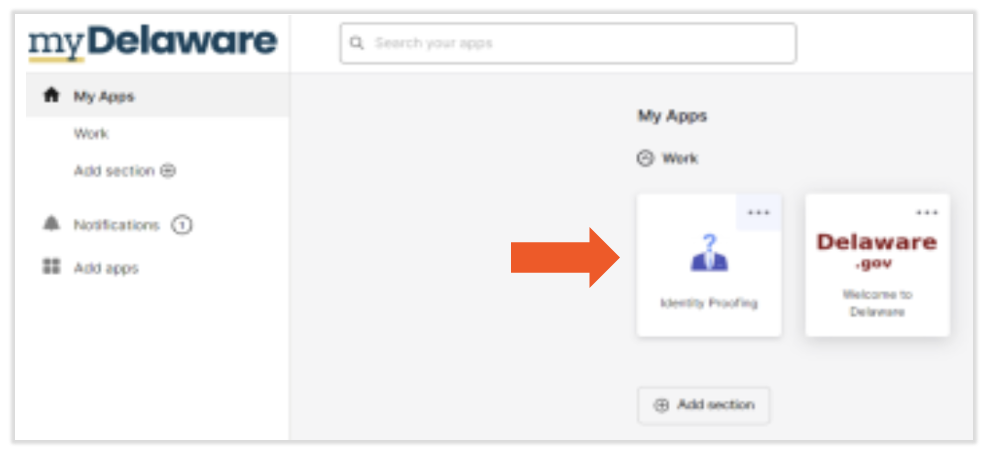
- After creating your account, the dashboard will display several tiles for different actions. If you see the Identity Proofing tile, you must select it first and complete the verification process, which takes about 15 minutes to confirm via email.
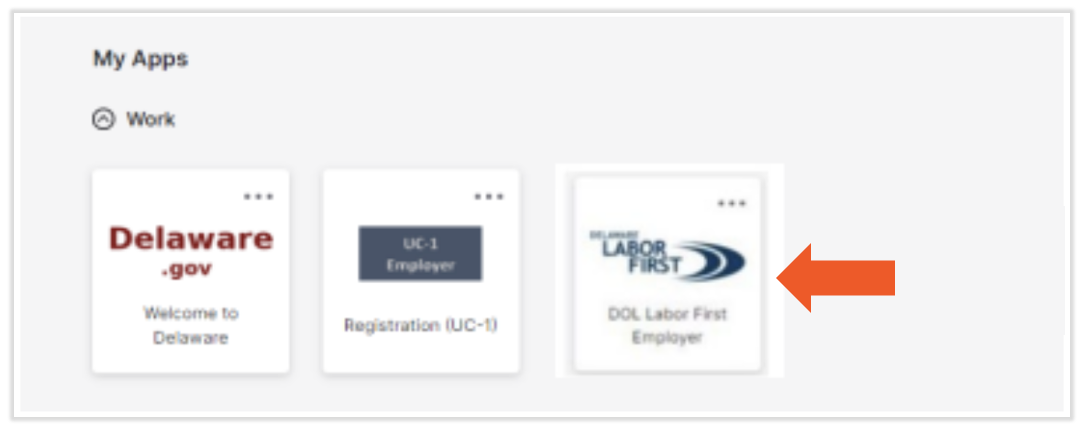
- Once your identity is confirmed as "clear," you can then select the DOL Labor First Employer tile to begin your employer registration application.
- Fill out the employer registration application with the business info listed above to receive an account number.
- Once you've received your account number, follow the steps in Toast Payroll: Get Help With Tax Accounts to enter the account number on your Toast Payroll Tax Accounts page.
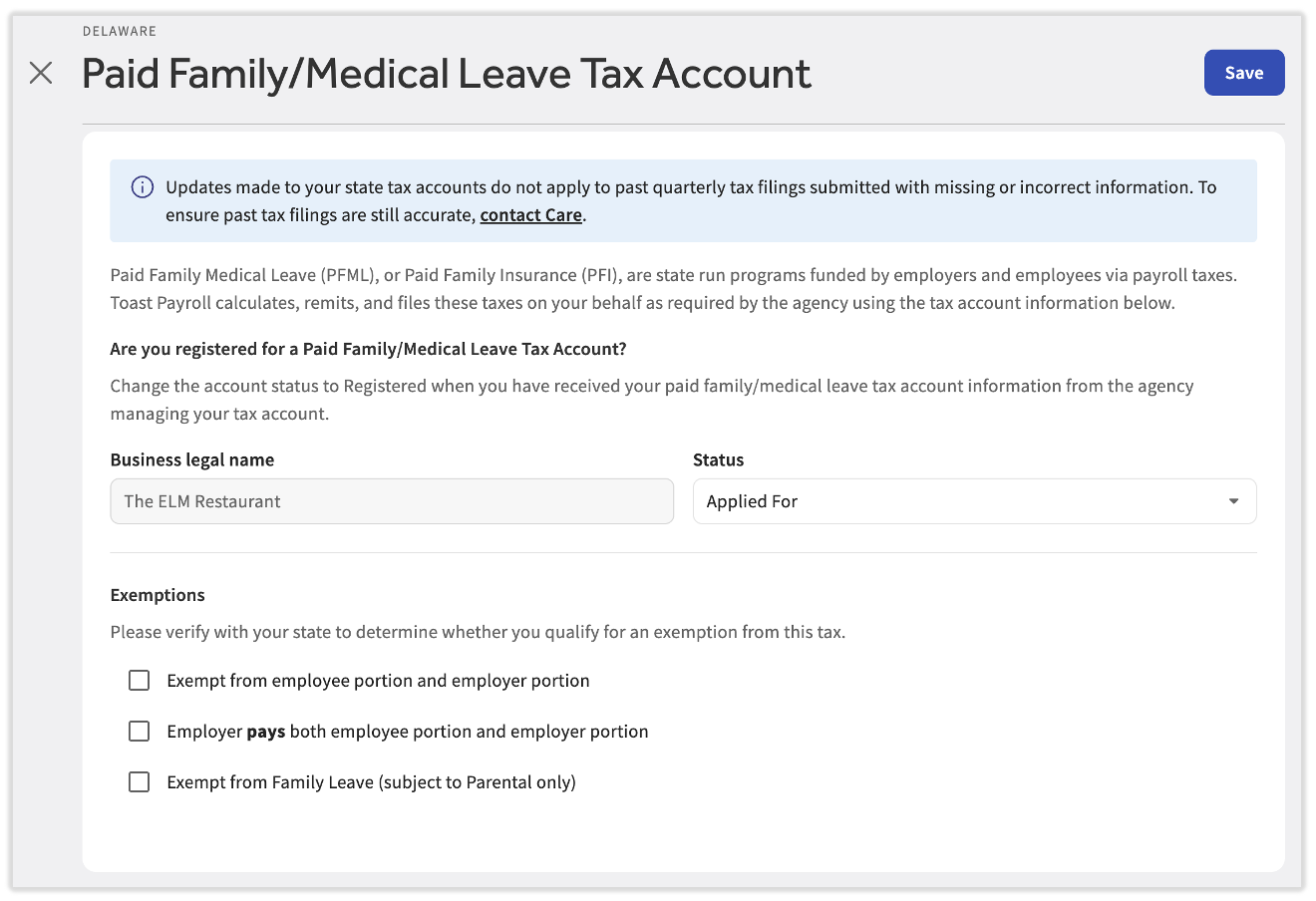
- Per the program, employers may pass up to 50% of their contribution to employees. By default, Toast Payroll splits the cost as such between employers and employees. If you'd like to adjust these default PFML payroll settings, you can do this on the Toast Payroll Tax Accounts page. Select the edit pencil for the Delaware - Family and Medical Leave Insurance tile and then select the appropriate checkbox in the Exemptions section. See more below.
Delaware PMFL Exemptions
You may be exempt from contributing if you:
- Are an employer that pays fewer than 10 Delaware employees in a quarter
- Operate a season business that shuts down for one month or more, or
- Exclusively employ federal government employees.
If you believe you are exempt and wish to voluntarily opt-out:
- Register with the state using the instructions below.
- In Toast Payroll, navigate to Settings > Payroll > Tax Accounts.
- If you do not see Settings on the left side of the screen, select Payroll from the Toast Web navigation rail on the left to make the Toast Payroll navigation rail appear.
- Select the edit pencil for the Delaware - Family and Medical Leave Insurance tile.
- Make your selection using the checkbox and select Save.
- Note: An employer can select Employer pays both employee portion and employer portion as an exemption on the tax account in Toast Payroll (see the image below). When an employer elects to cover more than their required share of a PFML tax on behalf of an employee, referred to as PFML “pick up”, the extra amount is considered taxable income. Toast Payroll handles this taxation as part of payroll by adding the wages to the required taxes without passing on the withholding amount to employees.
Maine PFML
Starting January 1, 2025, Maine launched a Paid Family Leave Insurance program, affecting employers based on their employee count.
- Businesses with fewer than 15 employees have a 0.5% premium, which can be fully deducted from employee wages.
- Businesses with 15 or more employees will have a 1.0% premium which can be split between the employer and employee, with a maximum of 0.5% being deducted from employee wages.
- For employers using the public plan, their employee count determination can be made by using the guidelines on Maine’s website.
- * An employer can select Employer pays both employee portion and employer portion as an exemption on the tax account in Toast Payroll (see the image below). When an employer elects to cover more than their required share of a PFML tax on behalf of an employee, referred to as PFML “pick up”, the extra amount is considered taxable income. Toast Payroll handles this taxation as part of payroll by adding the wages to the required taxes without passing on the withholding amount to employees.
Payroll contributions began in 2025 and the paid leave benefits from the state are available from 2026. Toast Payroll will calculate, withhold, collect, and file the paid family leave contributions for both employers and employees, following standard end-of-quarter reporting.
Maine Setup Instructions
- Employers must register for paid family leave with the Maine Department of Labor.
- From the ME Department of Labor website, navigate to Taxes > Edit state tax accounts.
- Scroll to the ME Paid Family Leave tile.
- Select the ... overflow menu.
- Select Edit.
- Enter information and Save.
- Employers should:
- Provide Toast with exemption status (yes or no). If yes, provide the level of exemption.
- Determined by the customer based on state guidance and calculations, not Toast.
- Provide Toast with their PFML account number to begin collecting to file. See Toast Payroll: Get Help With Tax Accounts to discover where this should be entered.
- Provide Toast with exemption status (yes or no). If yes, provide the level of exemption.
Note: By default, Toast Payroll will split a 1% premium evenly between employers and employees. If your company qualifies for the lesser premium or if your company would like to cover the full premium on behalf of employees, you can make this election yourself:
- After you've registered with the state, log into payroll.toasttab.com and navigate to Settings > Payroll > Tax Accounts.
- If you do not see Settings on the left side of the screen, select Payroll from the Toast Web navigation rail on the left to make the Toast Payroll navigation rail appear.
- Select the edit pencil for the Maine - Family and Medical Leave Insurance tile.
- Make your selection using the checkbox and select Save.
- Notes:
- An employer can select Employer covers the employee withholding as an exemption on the tax account in Toast Payroll (see the image below). When an employer elects to cover more than their required share of a PFML tax on behalf of an employee, referred to as PFML "pick up", the extra amount is considered taxable income. Toast Payroll handles this taxation as part of payroll by adding the wages to the required taxes without passing on the withholding amount to employees.
- A third option, Approved private plan - neither portion owed, is also available if the state has approved your private plan. Selecting it means neither the employer portion nor the employee portion is owed, and it automatically selects the "no employer share owed" checkbox, clears the "employer covers the employee withholding" checkbox, and disables both. Your Maine jurisdiction registration is retained, and subject wages continue to calculate at zero, which is what the state expects to see on the filing.
- Notes:
Additional Resources
- How to Register With Delaware Labor First (external link)
- Delaware Business Registration Guide (external link)
- Toast Payroll: State Third-Party Administrator Linking
- Toast Payroll: Register for State Tax Accounts
- Toast Payroll: Manage Employee Tax Exemptions
This content is for informational purposes and is not intended as legal, tax, HR, or any other professional advice. Please contact an attorney or other professional for advice specific to your circumstances.