Toast Payroll: Give Access to a Non-Employee
Last updated: Oct 8, 2026, 4:49 PM
Add a bookkeeper, accountant, or other financial professional to Toast Payroll as a Demo Employee with HR+ access and no impact to payroll cost.
- Non-Employee Access Overview
- Before You Begin
- Add a Non-Employee to Toast Payroll
- Set Up Toast Web Access for the Non-Employee
- Frequently Asked Questions
- Related Articles
Non-Employee Access Overview
Many companies have bookkeepers, accountants, payroll administrators, or other financial or HR professionals who need access to Toast Payroll reporting, team management, and HR tools without being paid in the payroll themselves. Setting someone up as a Demo Employee (also called a demo user or demo account) using this process ensures they:
- Are not allowed to receive pay through Toast Payroll
- Do not receive a Form W-2 or Form 1095-C
- Do not appear on any reports in the Reports section
- Do not affect company totals for quarterly tax filings
- Do not appear on monthly invoices
Important: Use this process for brand-new profiles only. If any timesheet or past pay data exists on the profile, you will not be able to update the profile to a Demo status. If you need to update an existing profile, contact Customer Care so they can review the profile and determine how to proceed.
Note: A profile set up using this process cannot later be changed to an Active employee status. Several required onboarding steps—including Social Security number entry and Forms I-9 and W-4—are skipped during this process. If this person should be an active, paid employee in Toast Payroll, follow the standard new hire process in Toast Payroll: New Hire Employees (Employer Guide) from the beginning.
Before You Begin
Applies to: Toast Payroll
Permissions needed:
- HR+ security role in Toast Payroll — required to add team members and update employment status
What you’ll accomplish: Add a bookkeeper, accountant, or other financial professional to Toast Payroll with an HR+ security role and Demo Employee employment status, so they can access payroll data and reports without being counted as a paid employee or appearing on monthly invoices.
Add a Non-Employee to Toast Payroll
These steps follow the same basic path as adding a new hire in Toast Payroll, but take a different route at the end. For a full walkthrough of the standard new hire process, see Toast Payroll: New Hire Employees (Employer Guide).
- Log into Toast Payroll and navigate to Team.
- When you select Team in Toast Payroll, you should see a URL that begins with payroll.toasttab.com. Visit Navigate Toast Payroll Within Toast Web to learn how the new Toast Payroll navigation works.
- Select the + Add employee button in the top-right corner.
- Fill out the Basic info tab with the non-employee’s information.
- The Email address should be accurate — the non-employee uses this to receive a welcome email and log in to Toast Payroll.
- In the Social Security number section: select No, it will be entered later. If your company requires Social Security numbers, you can enter a false number.
- On the Jobs & pay step, complete all required fields:
- Pay Type: select Salary
- Jobs & Pay: enter 0 in the Salary field. Select the Pay group first then select the appropriate position that populates for that Pay group. For Location, Job and Work Tax Location select the location this person should have access to, a Work Tax location and the job that grants the appropriate Toast Web permissions. Jobs in Toast Web have an assigned set of permissions that control this person’s level of access in Toast Web and on Toast POS devices.
- EEO-1 Classification: Because this employee will not be paid through payroll, any selection can be used here.
- Payroll security role: Select HR+ for full access to payroll data, reports, and team management. For a complete breakdown of what each role allows, see Toast Payroll: Manage Security Roles.
- On the Benefits step (if visible): make any selections you like — they do not affect this non-employee’s access.
- On the Documents step: uncheck all onboarding documents. This person will not advance through the typical employee new hire steps.
- On the Review step: verify Name, Email, Location, Job, and Payroll security role. Select Add to team, then select Return to Team page.
Note: At this point, Toast creates a Toast Web profile for this person and automatically maps it to their Toast Payroll profile.
- Navigate to the Onboarding tab and locate this person. Select their pencil icon.
- In the pop-up, select Mark this new hire as complete then select Confirm.
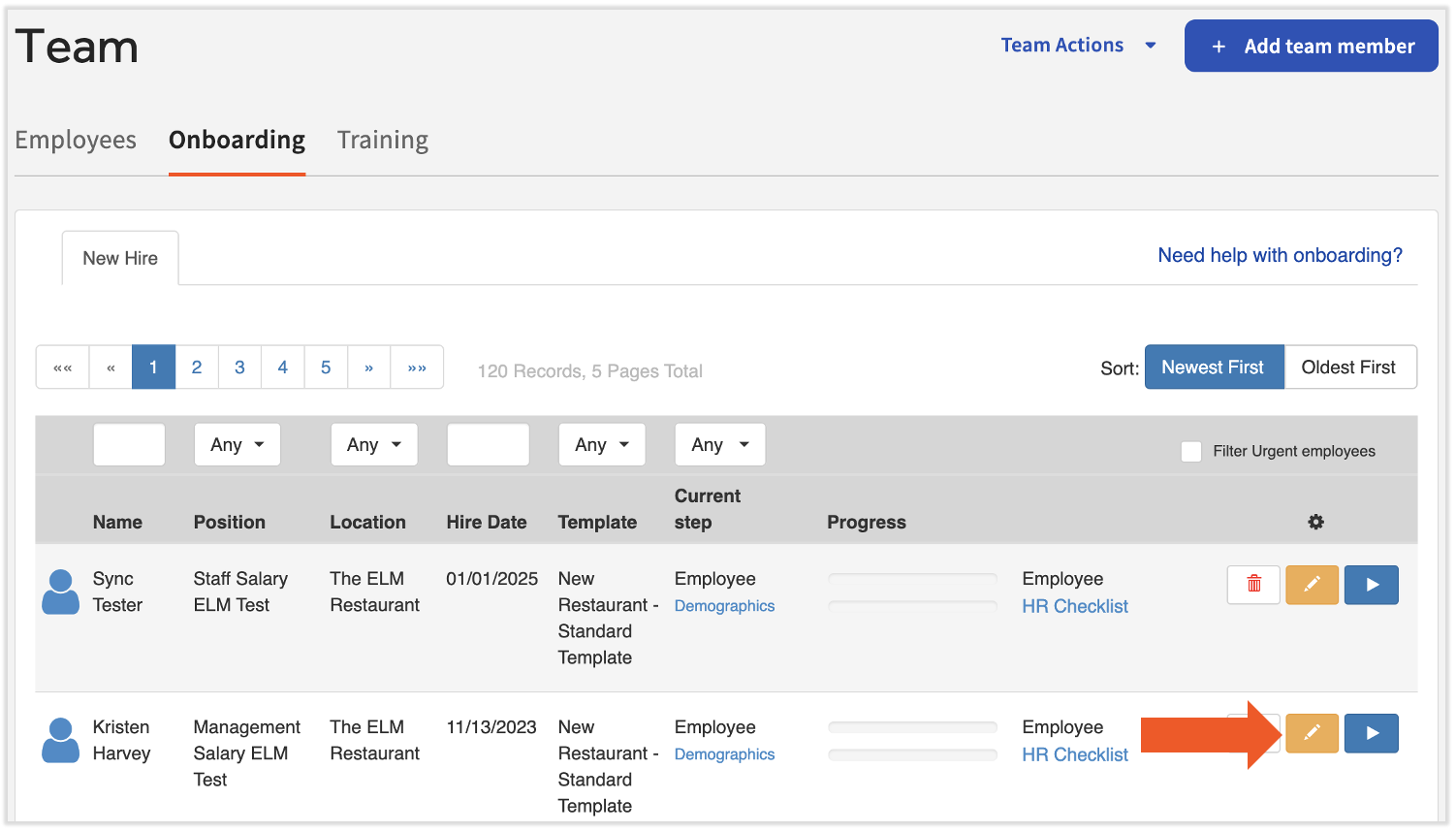
Expected outcome: The profile no longer appears on the New Hire Dashboard.
- Use the Search employees bar to locate this person’s profile.
- Scroll down and select Profile Settings.
- Set Employment status to Demo Employee. Select Save Changes.
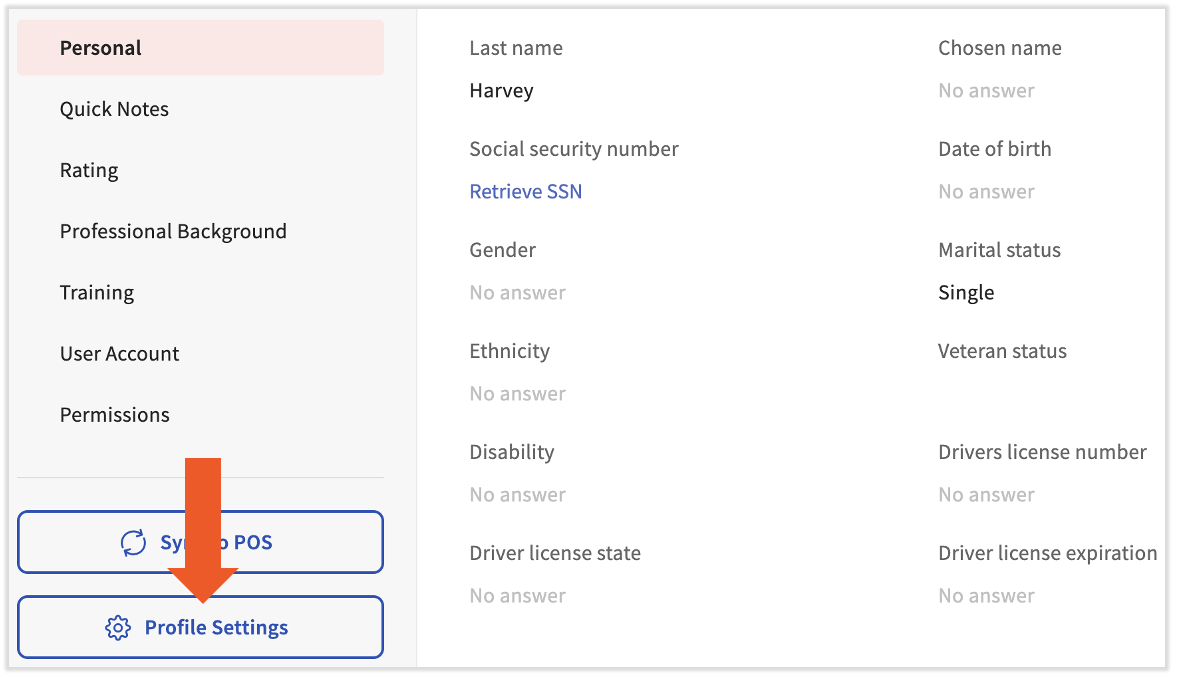
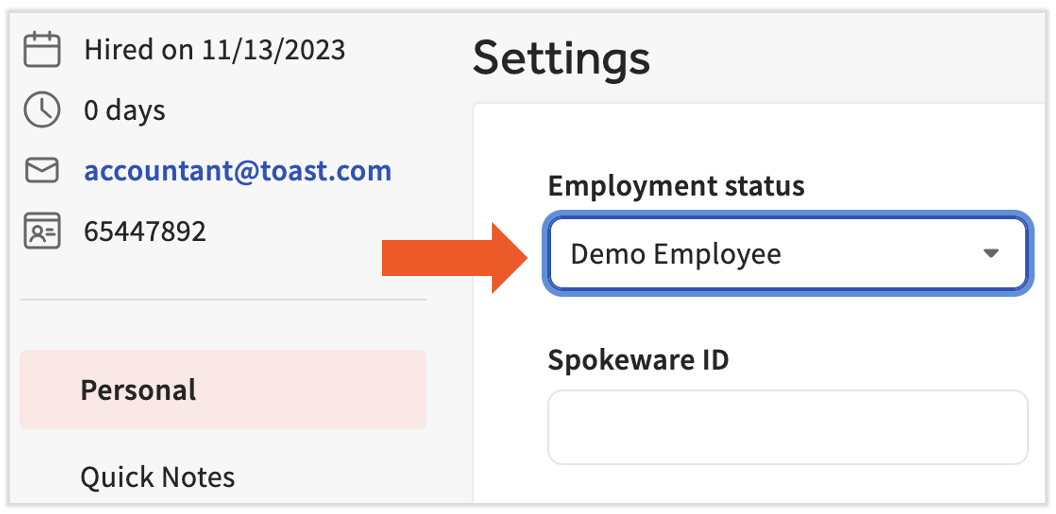
Expected outcome: The non-employee’s employment status is now Demo Employee. They receive a welcome email at the address entered in step 3 and can log in to Toast Payroll using those credentials. Based on their HR+ security role, they have access to all payroll data, reports, and team management. They will not receive pay, appear on payroll reports, receive a Form W-2 or Form 1095-C, affect quarterly tax filing totals, or appear on monthly invoices.
Set Up Toast Web Access for the Non-Employee
After completing the steps above, Toast automatically creates a Toast Web profile for this person. Many non-employees also need access to labor, sales, or other POS data in addition to payroll data.
To verify or adjust this person’s Toast Web permissions, follow the steps in Grant or Remove Toast Web Access for Existing Employees. When reviewing permissions, a non-employee typically needs reporting permissions in the 4 Restaurant Admin section but does not need Toast POS permissions in other sections.
Frequently Asked Questions
Can a Demo Employee See All HR+ Reports?
Also asked as:
-
- Do demo employees with HR+ access have access to all HR+ reports?
- What can a demo employee see?
- Would a demo employee still have access to payroll team management?
A Demo Employee’s access to Toast Payroll depends entirely on their security role. An HR+ Demo Employee has access to all pages and reports that the HR+ security role permits. For a full breakdown of what each security role can view and do, see Toast Payroll: Manage Security Roles.
Can Another Employee Report to a Demo Employee?
Also asked as:
-
- Can I assign direct reports to a demo employee?
Employees with Demo Employee status do not appear in the Reports To Employee field on a career profile. If an employee already had direct reports before their status changed to Demo Employee, those direct reports are retained.
Can I Change a Demo Employee Back to Active Status?
Also asked as:
-
- How do I change someone from demo to active?
- How do I make a demo employee a regular employee?
- How do I get myself off demo?
- How do I activate a demo account?
- How do I change my own profile from demo mode?
Yes. Navigate to an employee's Toast Payroll profile and select Profile Settings in the lower-left corner. For the Employment status field, select Active. Select Save Changes. Learn how the new Toast Payroll navigation works by visiting Navigate Toast Payroll Within Toast Web.
Please keep in mind that onboarding steps—including Social Security number entry and Forms I-9 and W-4 will need to be completed on the employee’s profile directly as they will not be prompted like the regular hire process does.
What If My Accountant or Bookkeeper Is Already Set Up as a Regular Employee?
Also asked as:
-
- I added my accountant as an employee—how do I fix this?
- My accountant is showing up on my payroll and I don’t want them there.
- My accountant is being charged as an employee.
These profiles can also be changed to Demo status but only when there is no pay or timesheets attached. Even if the employee was never paid, if a timesheet is attached, a new profile will need to be created and set as Demo.
Related Articles
- Grant or Remove Toast Web Access for Existing Employees
- Toast Payroll: Manage Security Roles
- Toast Payroll: New Hire Employees (Employer Guide)
- Toast Payroll: Security Role Page Access
- Toast Payroll: Employee Management Center
This content is for informational purposes and is not intended as legal, tax, HR, or any other professional advice. Please contact an attorney or other professional for advice.