Toast Payroll: Read Your Quarterly Tax Package
Last updated: Oct 19, 2026, 11:15 AM
Find your quarterly tax package in Toast Payroll, then review and verify each part to confirm your taxes were filed correctly.
| Toast Payroll may not be able to file certain taxes on your behalf if we don't receive any Employer Identification Number (EIN) or Social Security number (SSN) information you may be missing prior to the end of the quarter. For more information, see Toast Payroll: Manage Payroll Taxes. |
- Before You Begin
- Find Your Quarterly Tax Package
- Review and Verify Your Quarterly Tax Package
- Find Forms 940, 941, and 944 in Your Package
- Frequently Asked Questions
- Related Articles
Before You Begin
Applies to: Toast Payroll
Permissions needed:
- Access to the Reports area in Toast Payroll, with Tax Filing reporting enabled (typically HR+ users only)
What you'll accomplish: Find your most recent or historical quarterly tax package, then review each part of it to confirm your taxes were filed correctly.
Find Your Quarterly Tax Package
A quarterly tax package is a set of documents that contains all tax documents and returns filed with state and federal tax agencies on your behalf by Toast Payroll. Federal forms 940, 941, and (when appropriate) 944 are included in the quarterly tax package. To help Toast Payroll guarantee a successful tax filing each quarter, read Toast Payroll: Quarter-End Checklist. In Q4 each year, when preparing for the year-end season and Form W-2s, visit Toast Payroll: Get Started With the Year-End Checklist instead. Note: Failure to complete all tasks and responsibilities assigned to you in the Tax Center prior to quarterly filings may contribute to penalties, fees, and can possibly result in a quarterly tax package not being generated for you.
When a tax package is available, a notification email is sent to the last individual who submitted payroll. Quarterly tax packages are typically available the third full week of the month following quarter-end. If you do not see a package right after quarter close, it most likely has not been uploaded yet.
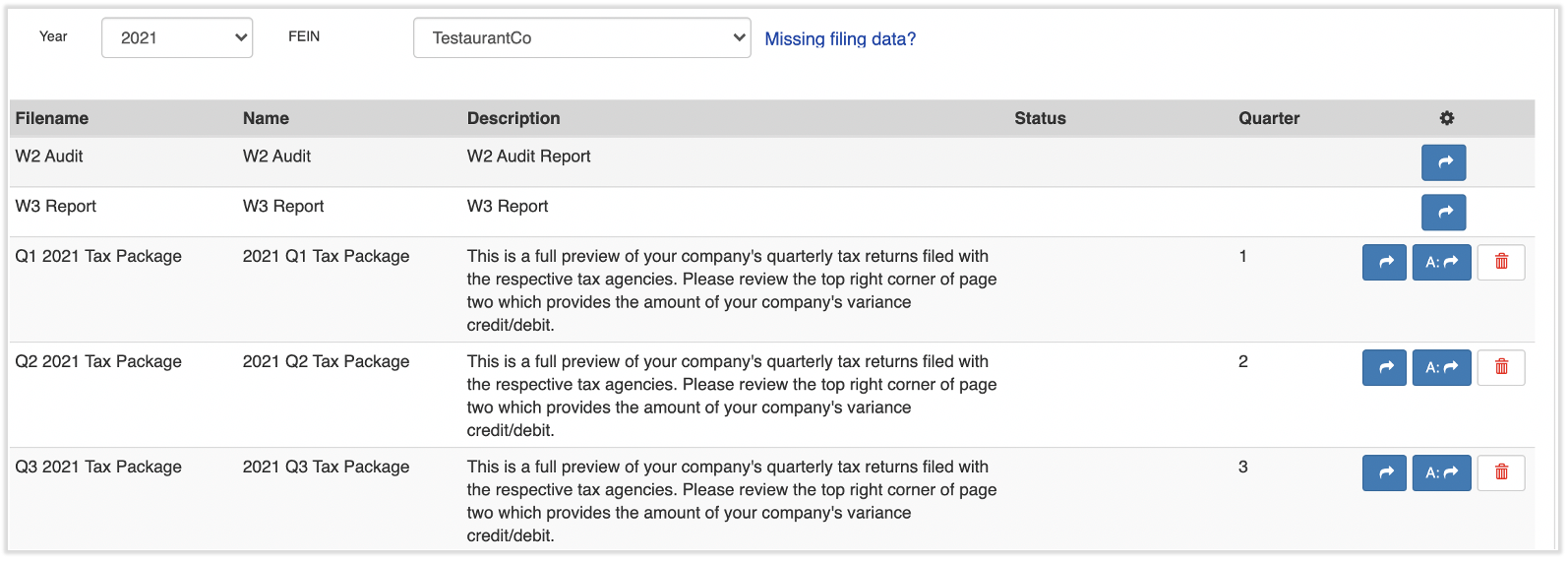
To find your most recent or any historical quarterly tax package, log into payroll.toasttab.com and navigate to Reports > Tax Filing. (When you select Reports in Toast Payroll, you should see a URL that begins with payroll.toasttab.com. Visit Navigate Toast Payroll Within Toast Web to learn how the new Toast Payroll navigation works.) Use the Year and FEIN drop-down menus to set the correct year and tax ID, then select the blue arrow button next to the quarter you need to view and download the files.
You can also reach your most recent package from the Tax Center. In Toast Payroll, select Taxes from the left-hand navigation menu, then select the tax package download button. For more about the Tax Center, see Toast Payroll: Manage Payroll Taxes. (If you do not see Taxes on the left side of the screen, select Payroll from the Toast Web navigation rail on the left to make the Toast Payroll navigation rail appear.)
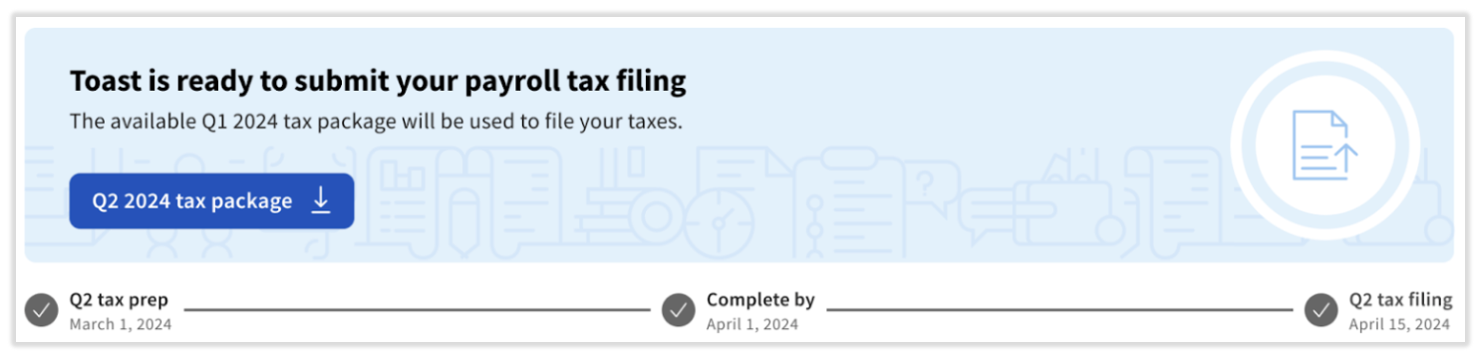
Expected outcome: The selected quarterly tax package downloads as a PDF that you can save for your records.
Note: If a package you expect is not in Reports > Tax Filing, or no package appears at all, see "Why isn't my quarterly tax package available to download?" in the Frequently Asked Questions section below.
Review and Verify Your Quarterly Tax Package
Toast recommends reviewing your quarterly tax package in four parts, in this order:
- Summary page
- Reconciliation Recap and variances
- Tax returns and filings
- Company tax file (this includes a red flag on filing issues)
Step 1 - Summary Page
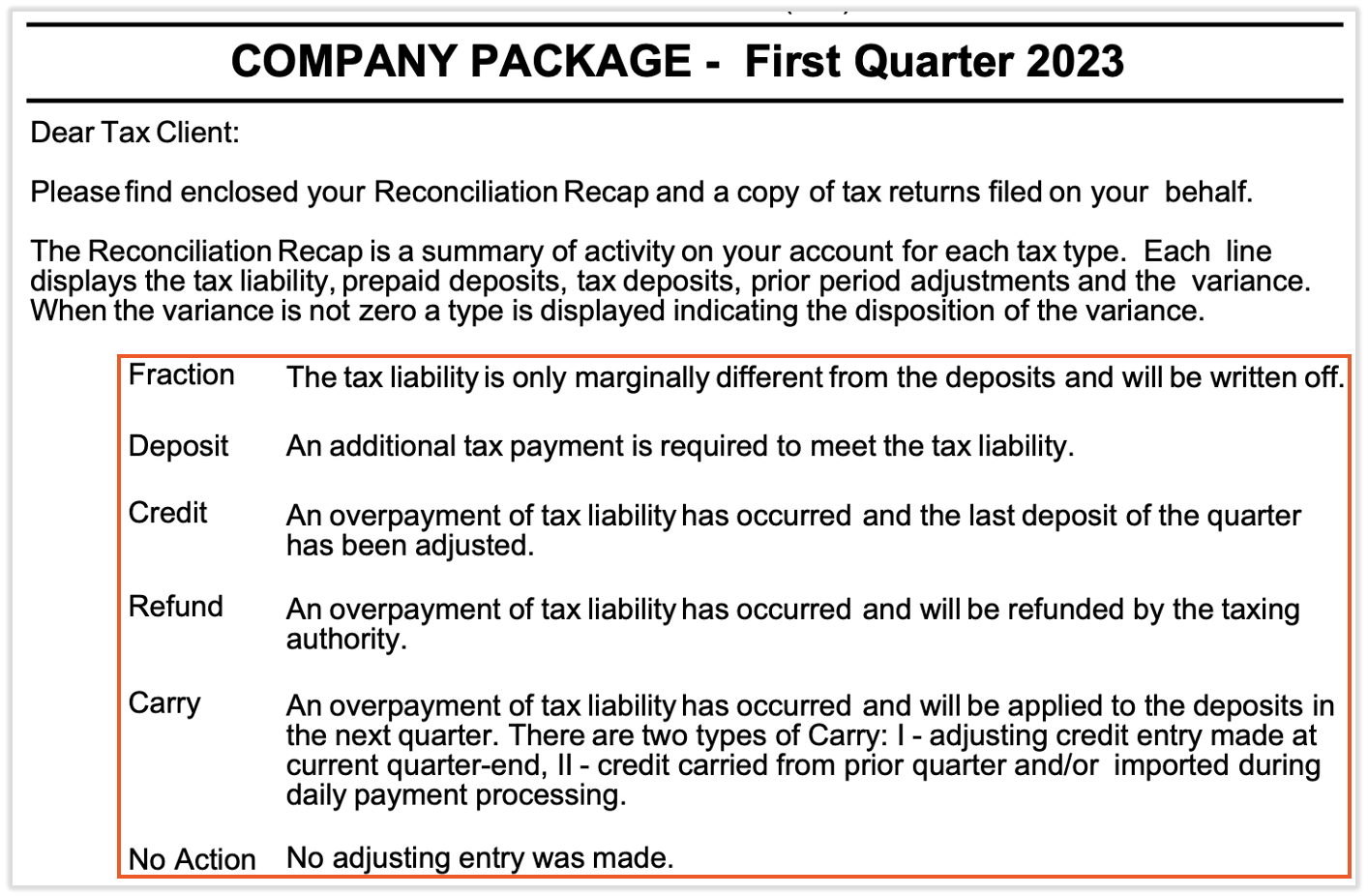
The first page provides a glossary of tax activity terms for the quarter. Review the description in the center of this page. The figures on the following pages are indicators of over- or underpayments that may have caused variances, which will be credited or debited from your bank account.
Step 2 - Reconciliation Recap and Variances
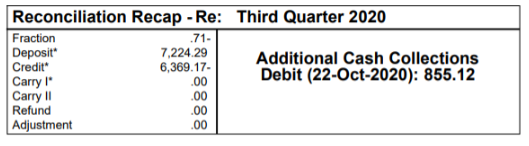
Your overall tax variance is found in the top right-hand corner of the second page of the quarterly tax package. A variance is the difference between what is owed to tax agencies and the amount collected during standard payroll processing. All tax variances, whether a credit or a debit, hit your account mid-month, roughly between the 19th and the 25th, in the month that follows the end of the quarter.
If no additional cash is needed, the Reconciliation Recap shows a zero balance for collections.
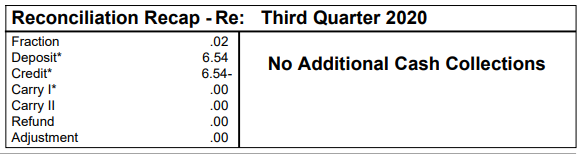
If additional cash is needed, the amount shown is debited from your account.
The bottom half of the page reconciles the amount of taxes you owed against the amounts withheld and remitted to the federal and state tax agencies. The columns are:
- The Liability column shows what is due based on wages and tax rates for those taxes.
- The Deposits column shows the amount of funds collected during the quarter through payroll to be remitted to the agencies.
- The Prior Adjustment column shows any credits or outstanding balances for the associated tax.
- The Variance column shows the difference between the Liability, Deposits, and Prior Adjustment columns.
- The Deposit Type describes how the variance is included in the overall quarterly tax variance, either a credit to your bank account or a debit to your bank account.
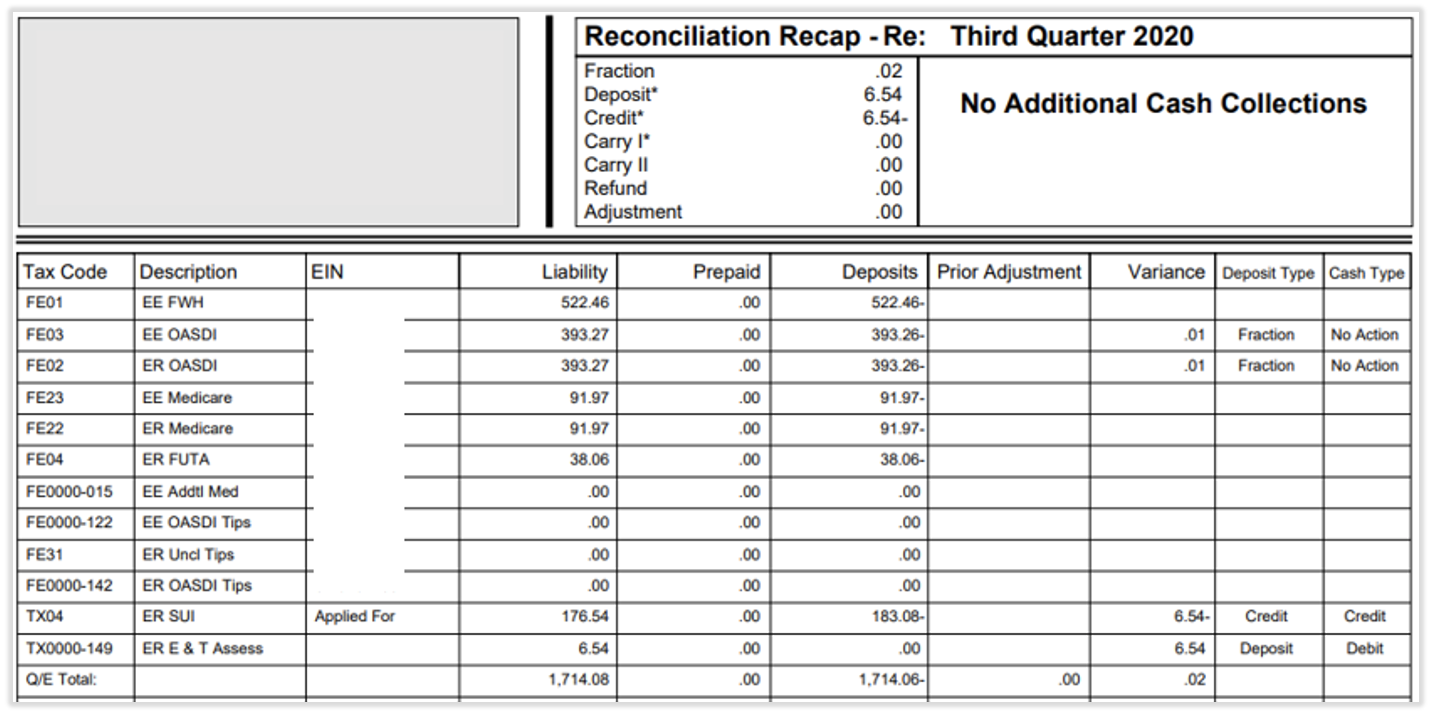
Note: A variance is often caused by an incorrect tax rate, such as a State Unemployment (SUTA/SUI) rate that differs from the rate the state assigned you. To review or update a rate, navigate to Settings > Payroll > Tax Accounts. For more on locating your rate, see Toast Payroll: Find Your SUTA/SUI Rate.
Step 3 - Review Tax Returns and Filings
The pages following the Reconciliation Recap are copies of all the tax returns and filings for the quarter, in alphabetical order by state. The federal returns come before the state returns, and these documents make up the majority of your tax package.
These documents are stored in Toast Payroll, but Toast recommends that you download them for your own records. If you use an accountant, they may need these documents.
Step 4 - Company Tax File
Review this section to confirm that your filings have gone through and that the information in certain columns is correct. If it is not, it could result in penalties or interest charges from tax agencies. To review this, scroll to the very last document in your quarterly tax package.
- Review the Employer Identification Number (EIN) column. This column provides a red flag around filing. If there is an Applied For message in this column, Toast was unable to successfully file a particular tax.
- If you have already received your EIN, add it to your Tax Accounts page. For instructions, see Toast Payroll: Get Help With Tax Accounts.
- If you have not yet received your EIN, use the links in Toast Payroll: Register for State Tax Accounts to locate it, then add it to the Tax Accounts page.
- Once it has been added, request a "quarter end exception" by selecting the blue chat dot in the lower-right corner of any Toast Payroll page. Include details about the quarter or quarters affected and which account was in an Applied For status.
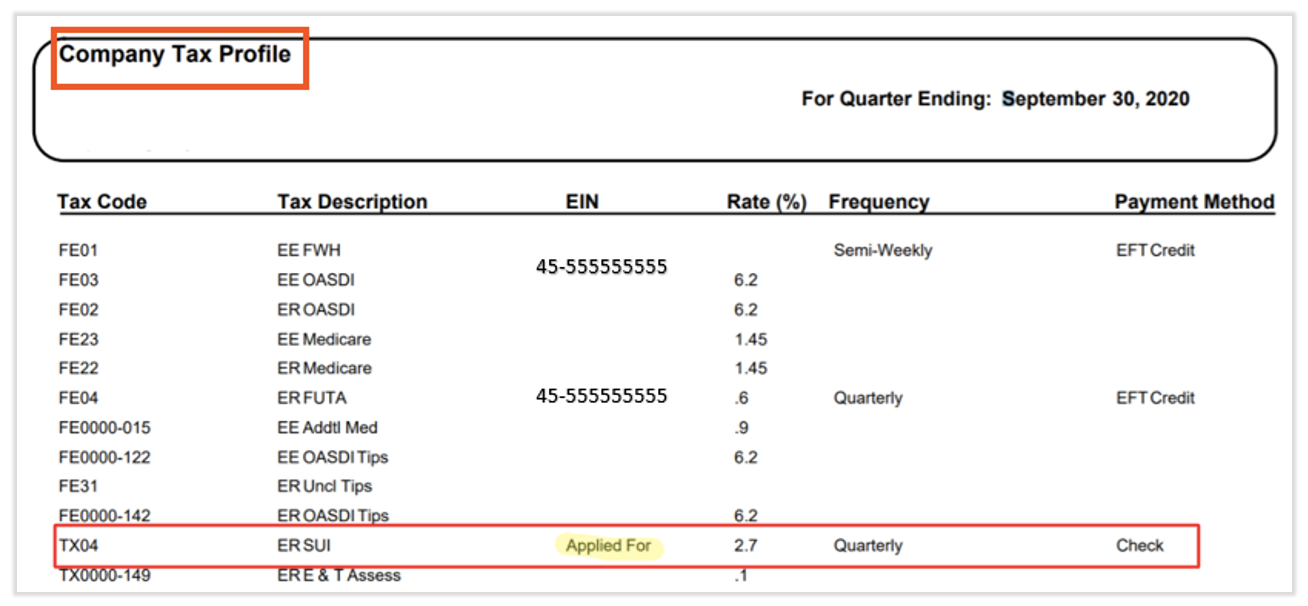
- Review the Rate (%) column and verify the rates are correct. For help locating your rates, see Toast Payroll: Register for State Tax Accounts. If a rate is not correct, navigate to Settings > Payroll > Tax Accounts within Toast Payroll and edit the appropriate rate.
- Review the Frequency column. This represents how often Toast Payroll remits withholding taxes to tax agencies. If it is not correct, navigate to Settings > Payroll > Tax Accounts within Toast Payroll to edit the payment frequency.
Expected outcome: You have confirmed there are no Applied For messages and that your rates and payment frequencies are correct, or you have taken the steps above to resolve any issues you found.
Find Forms 940, 941, and 944 in Your Package
The federal tax forms are located inside the quarterly tax package, not in a separate report. To find them, navigate to Reports > Tax Filing, set the correct Year and FEIN, then select the blue arrow button to open the package. (When you select Reports in Toast Payroll, you should see a URL that begins with payroll.toasttab.com. Visit Navigate Toast Payroll Within Toast Web to learn how the new Toast Payroll navigation works.)
- Form 940 is the annual federal unemployment (FUTA) return. It is included only in your Quarter 4 tax package and usually appears around the fifth page.
- Form 941 is the quarterly federal return for income tax, Social Security, and Medicare. It is included in each quarter's tax package and usually appears around the sixth to eighth page.
- Form 944 is the annual version of Form 941, filed by the smallest employers. If Toast Payroll files Form 944 for you, it is included in your Quarter 4 tax package. A company will have either Form 941 or Form 944, but not both.
Note: If you cannot find Form 941 in a quarter's package, confirm you have opened the correct quarter and FEIN and scrolled past the Reconciliation Recap pages to the federal returns. For more detail on these forms, see Toast Payroll: Get Help With Forms 940, 941, & 944.
Frequently Asked Questions
Where do I find my quarterly tax package?
You find your quarterly tax package by navigating to Reports > Tax Filing in Toast Payroll. (When you select Reports in Toast Payroll, you should see a URL that begins with payroll.toasttab.com. Visit Navigate Toast Payroll Within Toast Web to learn how the new Toast Payroll navigation works.) Set the correct Year and FEIN using the drop-down menus, then select the blue arrow button next to the quarter you need to view and download the package. You can also reach your most recent package by selecting Taxes from the left-hand navigation menu to open the Tax Center.
Also asked as:
- Where do I find my quarterly tax reports?
- Where do I go to find the quarterly tax filing package?
- How do I download my quarterly tax package?
Why isn't my quarterly tax package available to download?
Your quarterly tax package may not be available to download yet because packages are typically uploaded the third full week of the month following quarter-end. If the quarter recently closed, check back after that point. If the time window has passed and a package you processed payroll for is still missing from Reports > Tax Filing, contact Toast Customer Care by selecting the blue chat dot in the lower-right corner of any Toast Payroll page so they can confirm whether a package should have been issued. (When you select Reports in Toast Payroll, you should see a URL that begins with payroll.toasttab.com. Visit Navigate Toast Payroll Within Toast Web to learn how the new Toast Payroll navigation works.)
Also asked as:
- Why is my Q1 tax package missing?
- My quarterly packages do not appear in the tax filing section, what do I do?
- The package isn't there, how do I get it?
Where is Form 941 in my quarterly tax package?
Form 941 is inside your quarterly tax package, included in every quarter's package, and usually appears around the sixth to eighth page after the Reconciliation Recap section. To open the package, navigate to Reports > Tax Filing, set the correct Year and FEIN, and select the blue arrow button. If you need Form 941 for several past quarters, open and download each quarterly tax package for the periods you need. (When you select Reports in Toast Payroll, you should see a URL that begins with payroll.toasttab.com. Visit Navigate Toast Payroll Within Toast Web to learn how the new Toast Payroll navigation works.)
Also asked as:
- I do not have a 941 in my quarterly packages, where is it?
- I'm not finding Form 941 in our quarterly tax package.
- How do I get my 941 for prior quarters?
What does my tax variance mean and when will it hit my account?
Your tax variance is the difference between what you owed to tax agencies and what was collected during standard payroll processing, and it is shown in the top right-hand corner of the second page of your quarterly tax package. The variance, whether a credit or a debit, hits your bank account mid-month, roughly between the 19th and the 25th, in the month following the end of the quarter. A variance is often caused by an incorrect tax rate, such as a SUTA/SUI rate that does not match the rate your state assigned.
Also asked as:
- What is the additional cash collection on my tax package?
- Why was I debited for a tax variance?
- Where do I see my Q1 variance?
What should I do if I received an agency notice or my filing was rejected?
If you received a state or federal agency notice, or your quarterly filing was rejected, first review the Company Tax File section of your quarterly tax package for an Applied For message or an incorrect rate, account number, or frequency, and correct it on the Settings > Payroll > Tax Accounts page in Toast Payroll. (Learn how the new Toast Payroll navigation works by visiting Navigate Toast Payroll Within Toast Web.) If the issue is not something you can resolve on the Tax Accounts page, contact Toast Customer Care by selecting the blue chat dot in the lower-right corner of any Toast Payroll page. For more on rejected filings, see Toast Payroll: Get Help With Tax Filing Rejections.
Also asked as:
- Our quarterly tax filings were rejected, what do I do?
- I got a letter from the IRS about my forms.
- My return was filed with the wrong address.
Related Articles
- Toast Payroll: Manage Payroll Taxes
- Toast Payroll: Get Help With Forms 940, 941, & 944
- Toast Payroll: Tax Filing and Year-End Tax FAQ
- Toast Payroll: Optimize the Report Library
- Toast Payroll: Get Help With Tax Accounts
This content is for informational purposes and is not intended as legal, tax, HR, or any other professional advice. Please contact an attorney or other professional for advice.