Toast Payroll: Minnesota Paid Family Medical Leave (PFML)
Last updated: Oct 20, 2026, 11:43 AM
Effective January 1, 2026, Minnesota will be launching a paid family medical leave (PFML) program.
Minnesota Paid Family Medical Leave (PMFL)
Effective January 1st, 2026, Minnesota will be launching a paid family medical leave (PFML) program. Per the Department of Labor, paid family medical leave refers to policies that enable workers to receive wage replacement when they take extended time off from work for qualifying reasons, such as bonding with a new child, recovering from their own serious health condition, or caring for a loved one with a serious health condition.
Minnesota’s Department of Employment and Economic Development requires that certain employers and employees in the state begin funding a new paid leave program starting January 1, 2026. Benefits will also be available to eligible employees in January 2026.
- The standard rate is 0.88% of taxable wages for most employers, split evenly between employers and employees (0.44% employee, 0.44% employer).
- Employers with 30 or fewer Minnesota employees and an average wage less than 150% of the statewide average weekly wage have a rate of 0.66% of taxable wages. However, this is an uneven split by employers and employees (0.44% employee, 0.22% employer).
- Toast Payroll does not offer a method to elect any other percentages than 0.44% for employees and 0.22% for employers.
- Employee count determination can be made by using the guidelines on Minnesota’s website.
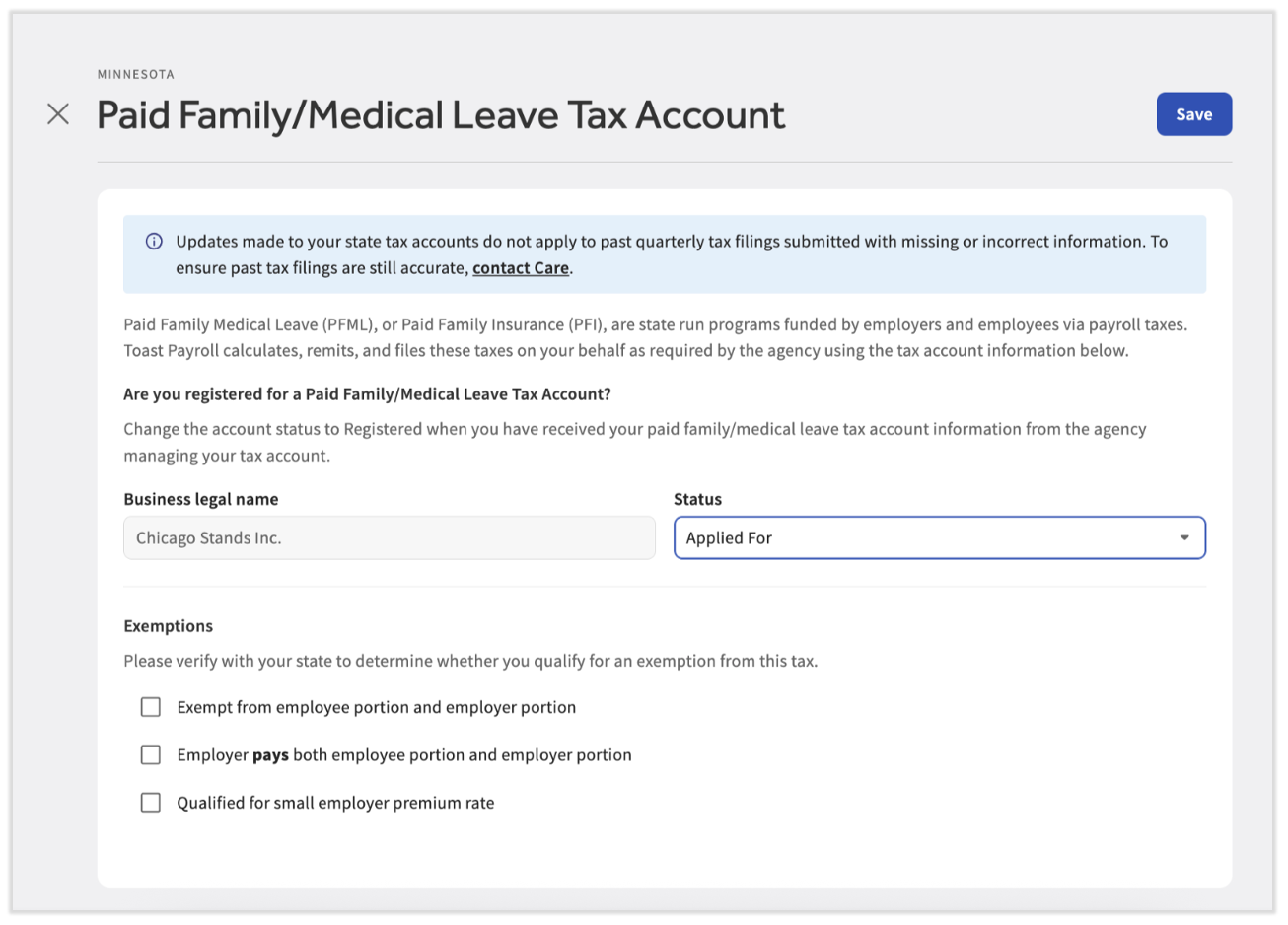
- An employer can select Employer pays both employee portion and employer portion as an exemption on the tax account in Toast Payroll (see the image below). When an employer elects to cover more than their required share of a PFML tax on behalf of an employee, referred to as PFML “pick up”, the extra amount is considered taxable income. Toast Payroll handles this taxation as part of payroll by adding the wages to the required taxes without passing on the withholding amount to employees.
These premiums fund the state’s PFML program and may be split between employer and employee contributions. Toast Payroll will support both configurations, including optional adjustments for employer-only contributions. At this time, Toast Payroll does not support a sliding scale contribution and thus contributions cannot be configured beyond the percentages listed above.
PFML Management in Minnesota
Toast Payroll will begin deductions as of January 1, 2026 and report premiums for first quarter 2026 on behalf of your business using the same online system used to manage Minnesota Unemployment Insurance (UI, also known as SUTA). Toast Payroll will submit payment and quarterly reports to the state on behalf of applicable customers.
If your business already has a Minnesota Employer account entered on the Tax Accounts page of Toast Payroll under Settings > Payroll > Tax Accounts, and all employees are covered under UI, Toast Payroll will use that information for PFML. If you qualify for the small employer contribution rate, you can designate on the Minnesota Paid Family and Medical Leave - Employer tax account in Tax Accounts. (If you do not see Settings on the left side of the screen, select Payroll from the Toast Web navigation rail on the left to make the Toast Payroll navigation rail appear.)
If your business does not have a UI account or employs individuals not subject to UI, you’ll need to visit the MN UI Employer Accounts webpage to register.
If you'd like to mark certain individuals as exempt from PFML (both the employee's and employer's tax portion), open an employee's Toast Payroll profile and navigate to Recurring > Taxes. (Learn how the new Toast Payroll navigation works by visiting Navigate Toast Payroll Within Toast Web.) Select the Settings button and check the box for MN FLI exempt before selecting Save. Check with a lawyer, accountant, or tax pro if you have questions about exemption or individuals not subject to PFML.
You are responsible for setting up a Paid Leave account at paidleave.mn.gov and for designated a Paid Leave Administrator to review employee leave applications and coordinate leave benefits. Toast Payroll does not manage nor need information regarding the paid leave account.
Additional Resources
- Minnesota UI Employer Accounts (external link)
- Minnesota Premium Rates and Contributions Calculator (external link)
- Toast Payroll: State Third-Party Administrator Linking
- Toast Payroll: Register for State Tax Accounts
- Toast Payroll: Manage Employee Tax Exemptions
This content is for informational purposes and is not intended as legal, tax, HR, or any other professional advice. Please contact an attorney or other professional for advice.