Toast Payroll: Reset a Payroll
Last updated: Oct 14, 2026, 4:49 PM
Resetting a payroll will begin the payroll from scratch, removing any custom imports or changes made to the Employee Earnings step.
Before You Reset a Payroll
There are a few things to keep in mind before resetting a payroll:
- Any manual changes to the Employee Earnings step of payroll will be removed, such as an employee who was added or a deduction which was edited.
- If the auto-approve timesheets feature is enabled, timesheets will be "unapproved" after resetting payroll, but will be "reapproved" once payroll is started again. In this case, you can make changes to time entries that will sync over to your payroll immediately and without having to navigate to the Time page in Toast Payroll.
- If the auto-approve timesheets feature is disabled, approved timesheets and recurring earnings and deductions will not be removed after resetting a payroll. However, to make a change to a time entry on a timesheet, the timesheet will need to be unapproved first.
- This will remove any custom imports that have been previously added to the payroll.
- The import audit on the Preview Payroll step will still display the previous import even though it is not part of payroll after a reset was performed.
- Resetting a payroll cannot be undone.
Some common reasons to reset a payroll might be:
- An employee's pay rate, position details, Form W-4 information, or direct deposit information were edited while payroll was open.
- Timesheets were unapproved or did not sync to the payroll run.
- You'd like to disable the automatically approved timesheets feature after you opened a payroll.
- Timesheets and/or tips were edited or changed in Toast Web after the payroll was opened.
- An employee is missing from the payroll run, but they do not appear in the Add Employees list.
- The incorrect payroll was started.
- Pay all via check was selected by mistake.
- A garnishment was added while payroll was open.
Reset Your Payroll
| Be cautious when resetting your payroll. This will remove any imports or manual changes you have made and it cannot be undone. |
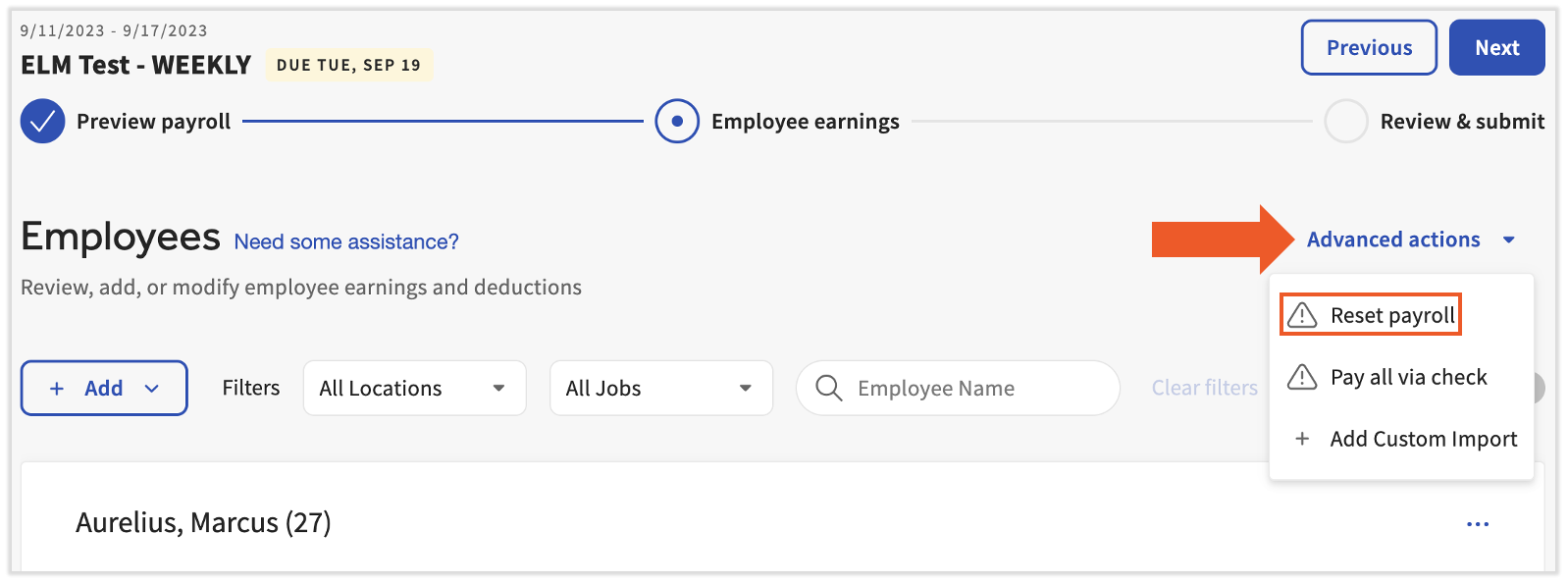
On the Preview Payroll step, select Reset payroll. On the Employee Earnings step of payroll, select Advanced actions and choose Reset payroll. If you are on the Review and Submit step of payroll, select Previous to return to the Employee Earnings step to reset a payroll.
This content is for informational purposes and is not intended as legal, tax, HR, or any other professional advice. Please contact an attorney or other professional for advice.