Toast Payroll: Set Up and Maintain Retirement Plans
Last updated: Jul 27, 2026, 5:34 PM
- Toast Payroll Retirement Plan Basics
- Set Up a Retirement Plan in Toast Payroll
- Maintain a Retirement Plan
Toast Payroll Retirement Plan Basics
Toast Payroll customers can sponsor, set up, and process customer employees' retirement elections and deferrals, and manage employer match contributions through Toast Payroll by virtue of Toast Payroll's integration and partnership with Vestwell Retirement. All Toast Payroll customers, regardless of payroll package, are eligible to support retirement-related deductions or to set up a per-pay-period employer match in Toast Payroll.
Note: Toast Payroll is not a retirement plan provider, record keeper, or administrator, and does not serve as a fiduciary for any Toast Payroll customer. Toast Payroll does not support payroll integrations with any provider except Vestwell Retirement. Toast Payroll does not sponsor or endorse any plans on behalf of or for their customers. Customers are responsible for sponsoring and maintaining their own plan(s) and may use Toast Payroll to support them in those efforts (e.g., to enable customer employees' to update their deductions, to communicate per pay period contributions with their provider, etc.).
Examples of retirement plans include: Pre-tax 401(k) retirement plans, Roth 401(k) retirement plans, SIMPLE IRA plans, or state-mandated retirement plans (e.g. CalSavers). Note: 401(k) providers or state programs (such as the CalSavers State-Mandated Retirement Plan) program cannot be set up as a vendor through Toast Payroll.
Set Up a Retirement Plan in Toast Payroll
To set up a retirement plan in Toast Payroll, you have to:
- Request the creation of the applicable deduction codes in Toast.
- For example: pre-tax 401(k) deduction, SIMPLE IRA deduction, etc.
- If you are in onboarding, please speak with your Onboarding Consultant. The appropriate codes may already be set up for you.
- If you are live with Toast Payroll, please fill out this form and send it to the Customer Care team by selecting the blue chat dot in the lower-right corner of any Toast Payroll page. Note: Toast Payroll is currently unavailable in Quebec. A French version of this form will be made available when the product launches in your region.
- Request to have your employer match rules added to Toast Payroll (if applicable).
- If you are in Onboarding, please speak with your Onboarding Consultant.
- If you are live with Toast Payroll, please contact benefitsops@toasttab.com.
- Common match rules include:
- Tiered match
- Match 100% of an employee's contribution up to 3% of gross wages.
- Then match 50% of an employee's contribution up to 2% in gross wages.
- Standard match
- Match 100% of an employee's contribution up to 4% in gross wages.
- Tiered match
- Add an employee's election/deferral to their recurring deductions page.
- Once your deduction codes and match rules have been added, you will need to create recurring deductions to match a participant's elections in your 401(k) provider's site.
- Employer match reminders
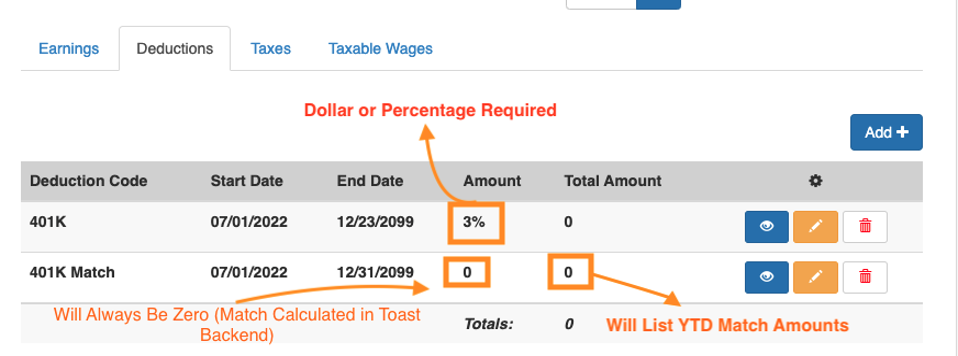
- If you have an employer match in Toast Payroll, the employer match deduction will automatically populate once the employee deduction has been added.
- Employers should not add or edit an employer match deduction (401k Match).
- For match deductions, the amount will always be zero.
- Match is calculated in Toast Payroll via your match rules.
- Matches will not populate until payroll has been calculated.
- Please consult your legal, tax, and compliance advisors for guidance on applicable employer and employee contribution limits.
- Participants over 50 years old may be eligible for a catch-up contribution. Beginning in 2025, participants aged 60-63 may be eligible for a higher catch-up contribution. Learn more from the Thrift Savings Plan website.
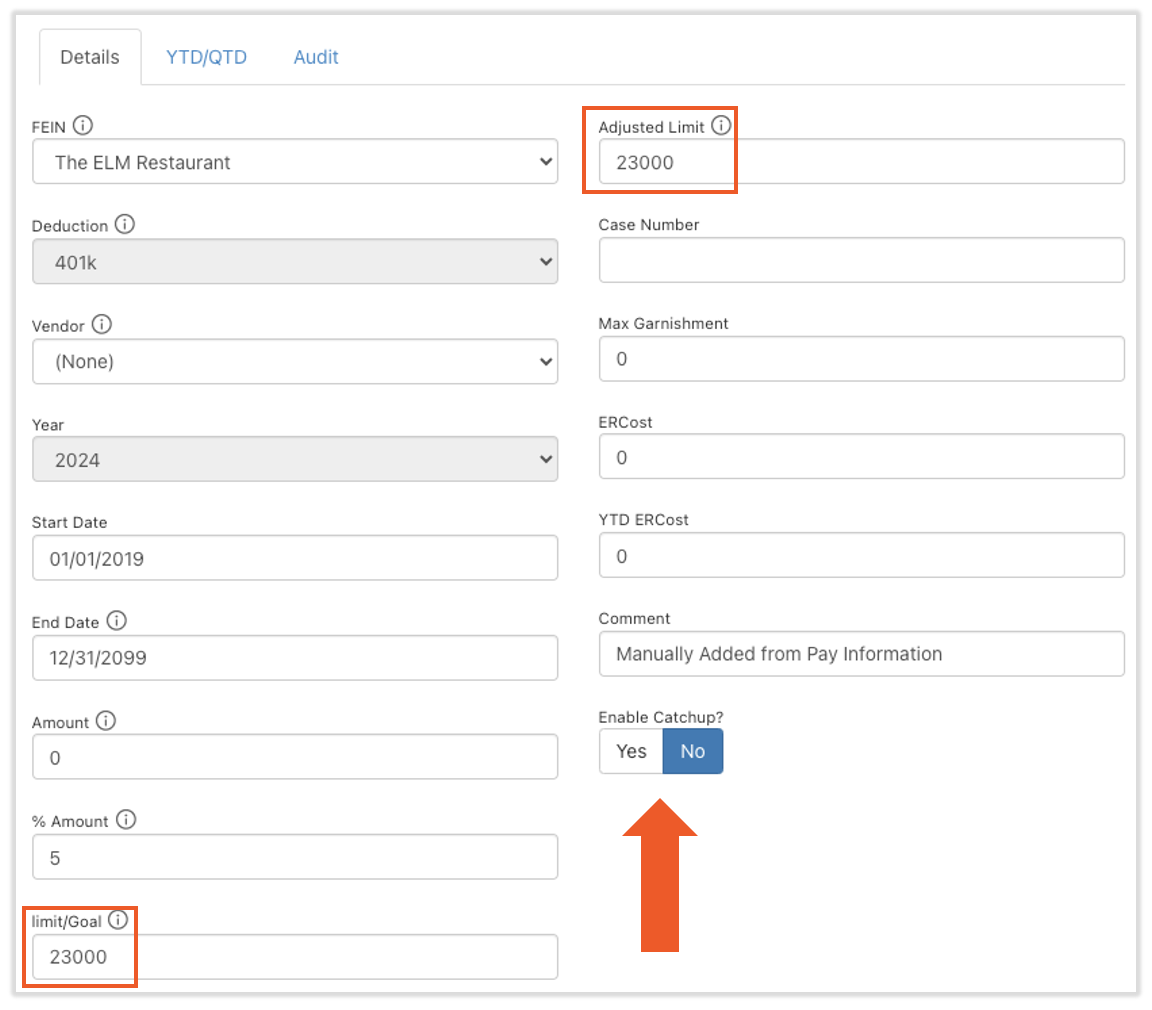
- Employers can adjust a contribution limit (how much they can contribute) by selecting the yellow pencil icon next to the employee deduction and changing their Limit/goal and Adjusted Limit to the new limit.
- Learn more about adjusting limits in the Recurring Deductions section of Toast Payroll: Add or Edit Earnings & Deductions.
- Also, flag Enable Catchup. This is what will allow the employee to go over the hardcoded 401k annual limit. Note: Even if this is flagged and the limits are changed, it will not go into effect until the employee turns 50.
Maintain a Retirement Plan
To maintain a retirement plan, you have to:
- Update Employee Deduction
- Your Role
- Since Toast is not your retirement provider, you'll have to update employee deductions in Toast Payroll based on any election changes made within your retirement provider's site.
- How Toast Can Help
- This can be done in Toast by adding or making updates to an employee's recurring deductions based on any election/deferral changes. See the Recurring Deductions section of Toast Payroll: Add or Edit Earnings & Deductions.
- Your Role
- Communicate Per Pay Period Contributions
- Your Role
- You'll have to communicate your per pay period contributions to your retirement provider. Please speak with your retirement provider for more assistance.
- How Toast Can Help
- Adding or making updates to an employee's recurring deductions based on any election/deferral changes. Reference the Recurring Deductions topic in Toast Payroll: Add or Edit Earnings & Deductions for more information.
- Communicate contributions to your retirement provider
- A custom report within Toast Payroll can be used to communicate per pay period contributions back to the per pay period provider.
- Check out the Custom Reports chapter of this video or Toast Payroll: Optimize the Report Library on utilizing custom reports within Toast Payroll.
- Please speak with your retirement provider for additional guidance.
- Note: 401(k) providers or state programs cannot be set up as vendors in Toast.
- Your Role
This content is for informational purposes and is not intended as legal, tax, HR, or any other professional advice. Please contact an attorney or other professional for advice.