Toast Tables™: Use Chits on the POS
Last updated: Sep 17, 2026, 4:03 PM
Learn how to enhance the guest experience with personalized digital chits on your POS.
Toast Tables Chits Overview
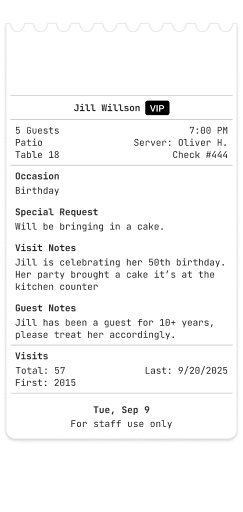
Using digital or printed chits on the POS, your staff can effortlessly view customer preferences, special requests, celebrations, and more right from the POS terminal and handheld. Chits help foster long-lasting customer relationships.
Note: Digital chits can still always be printed by selecting Print Guest Info. Digital chits are automatically enabled for any table seated through Toast Tables and cannot be turned on or off; there is no configuration setting for this in Toast Web. (Auto-printing physical chits, described below, is a separate, configurable setting.)
By integrating directly to your Guestbook, digital chits allow your staff access to key guest details such as:
- Visit Notes - See guest requests and notes captured at booking, like seat preferences, instructions, and more
- Visit History - Easily view guests' first visit, most recent visit, and total number of visits
- Guest Notes- Special guest preferences that can be easily accessed during each visit
- VIP Tags - Quickly identify your VIP guests
- Special Requests - Note any special requests for the current reservation
- Special Occasions - Keep track of birthdays, anniversaries, and other special milestones
- Custom Tags - Easily apply personalized labels to guests (e.g., Local, Wine Enthusiast) to enhance service. Visit this Support Center article to learn more!
Use Digital Chits on the POS
Tables on the POS that have been seated via Toast Tables will appear purple on the Table Service screen. When a staff member selects one of these tables, the digital chit will automatically open for review before an order can be placed.
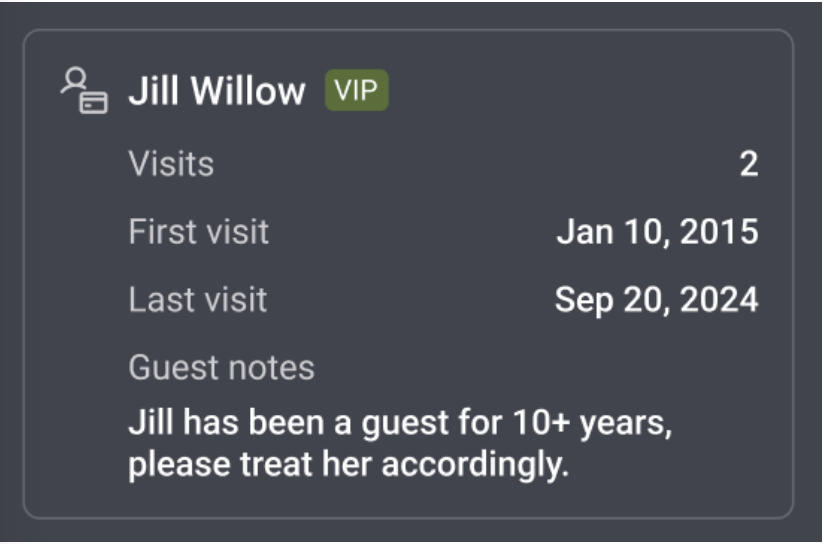
Once ready, staff can exit the digital chit and proceed with placing their order as usual. Once the server has started an order and added items to it, the table will no longer appear purple, and the digital chit will no longer open automatically when selecting the table.
Back to top
Re-Open a Digital Chit on the POS
Your staff can always revisit the information on a digital chit at any time using the re-entry button. To do so, they should:
- Navigate to the order screen for the table they want to revisit via Table Service.
- On this screen, select the re-entry button with the customer’s name as seen in the picture below.
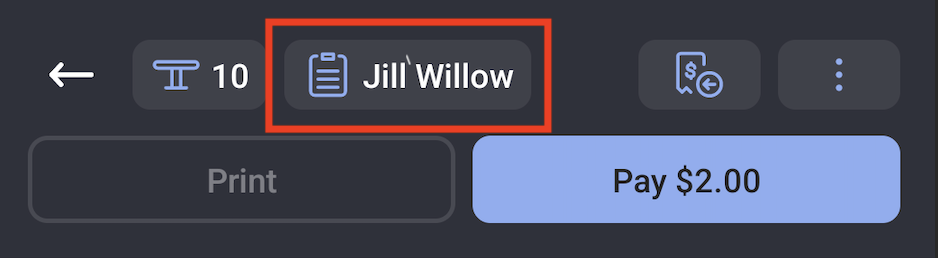
Note: Re-entry mode will soon be available via Table Service, Quick Order, and the Payment Terminal. Check back for updates!
Auto-Print Physical Chits
| Auto-printing physical chits is in limited release with select customers. Check back for updates. |
If you prefer to print physical chits, follow the steps below.
- Navigate to Front of house > Table service.
- From the drop-down menu, select the printer(s) you would like the chit to print the guest, table, and reservation details for Toast Tables guests.
- Toggle Automatically print Chit when a Toast Table guest is seated to On.
- Note:
- This setting will be disabled if no printer is selected from the drop-down menu.
- Auto-firing must be set up on a device before Chits will print automatically. See the Set Up Order Auto-Firing article to learn more.
- Note:
- Save and publish all changes.