Transfer a Gift Card Balance
Last updated: Sep 17, 2026, 8:48 AM
Question
How do I transfer a gift card balance?
Answer
If ever you need to transfer or combine a guest's gift card balance, the best way to do so is by using the Transfer Gift Card tool.
- In Toast Web, navigate to Finance > Gift Cards > Transfer gift cards.
- Note: You will need the old card number and the new card # before moving to the next step. You can find the customer's account by navigating to Reports > Payments > Gift Card Transactions.
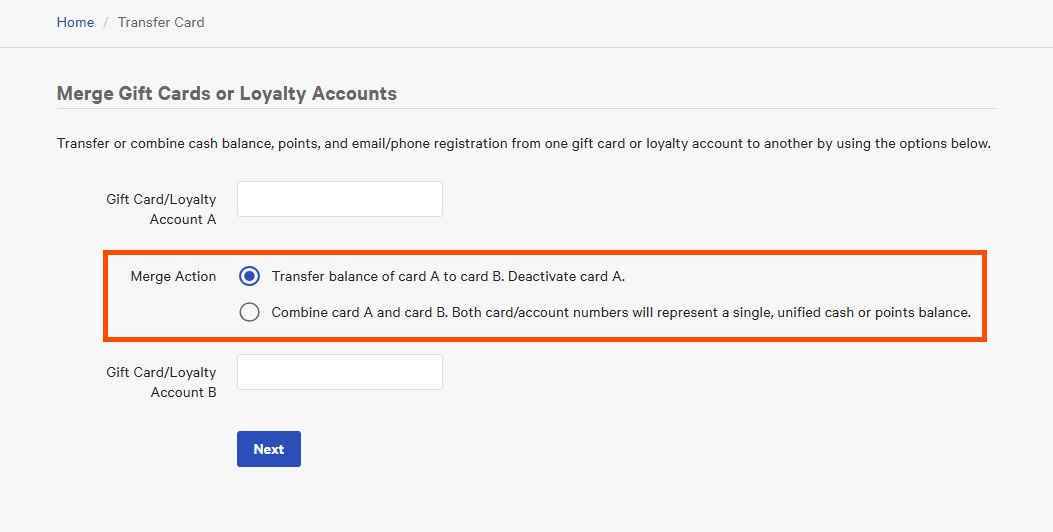
- You will have two options once you select Transfer gift cards.
- Transfer the balance of card A to card B. Deactivate card A (transfers the old card's balance and deactivates so that it is no longer valid).
- Combine card A and card B. Both card/account numbers will represent a single, unified cash or points balance (leaving both cards active but sharing the same combined balance).
- Choose which action you would like to take and then select Next. You have successfully transferred a gift card account!