Troubleshoot Your Apple Account for the Branded Mobile App
Last updated: Dec 17, 2025, 5:24 PM
Question
What are the troubleshooting steps for Apple with the Branded Mobile App?
Answer
Your Apple App Store listing for the Branded Mobile App will be managed via App Store Connect. Please visit this link to learn more about App Statuses, Submission Statuses, or App Store Availability Statuses in the App Store. You can check the status of your iOS app at any time within your Apple Developer account.
Note: You must contact Apple support directly if you need assistance setting up your Apple developer account. See Support—Apple Developer (external link) for more information.
If you’ve completed the “Let’s get started” steps and published your Branded Mobile App dashboard in Toast Web, and your iOS app is not in review within 24 hours, try these common troubleshooting steps:
- Confirm that you set your account up as an Organization and not an Individual account.
- To check this, navigate to https://developer.apple.com/account and view the Membership Details section. Under Enrolled, it should say “Organization.” If you accidentally enrolled as an individual, use the following link to request an update to your account: https://developer.apple.com/contact/request/migrate-individual-account
- Confirm that you have invited Toast as an Admin user on your Apple Developer account.
- Please invite brandedmobileapp@toasttab.com as an admin user on your Apple developer account.
- Learn how to add users to your Apple Developer account here.
- Confirm that you’ve completed all of Apple’s agreements and compliance requirements.
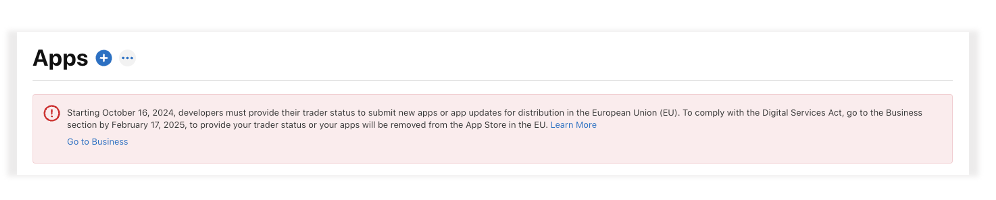
- If there are outstanding steps to complete, they will be featured in a banner at the top of your App Store Connect page. See below for an example.
- If there are outstanding steps to complete, they will be featured in a banner at the top of your App Store Connect page. See below for an example.
- Confirm that you’ve added a valid privacy policy.
- Check that you have added a valid privacy policy on the Branded Mobile App dashboard in Toast Web. The app stores require you to publish a statement describing how your business manages user data. You must add this link to your website if you do not already have one. This should be unique to your business, and we encourage you to seek legal counsel if you need assistance in drafting.
- Confirm that Apple has not rejected your app.
- If you check your app status within App Store Connect and see that it has been rejected, please contact your Onboarding Consultant for assistance.
- If you check your app status within App Store Connect and see that it has been rejected, please contact your Onboarding Consultant for assistance.
If you’ve checked the items above and still have questions about launching your iOS app, please contact Customer Care for help.