Branded Mobile App FAQ
Last updated: May 4, 2026, 4:20 PM
Branded Mobile App FAQ
The Branded Mobile App product is an extension of Toast’s Digital Storefront Premium suite. It allows Toast customers to launch their own white-labeled iOS and Android apps, opening up another digital ordering channel and staying top of mind for their most loyal guests. Through these apps, guests have the ability to find the right location, order, earn loyalty points, check rewards status, and more.
Toast Classroom - Branded Mobile App
Brand Mobile App Features
- What does the Branded Mobile App look like for guests?
- What is the difference between Toast Local and Branded Mobile App?
- How long will it take the Branded Mobile App to go live?
- Can we activate a Branded Mobile App before activation of POS?
- When we update the menu in Toast Web, will it reflect on the Branded Mobile App in real-time?
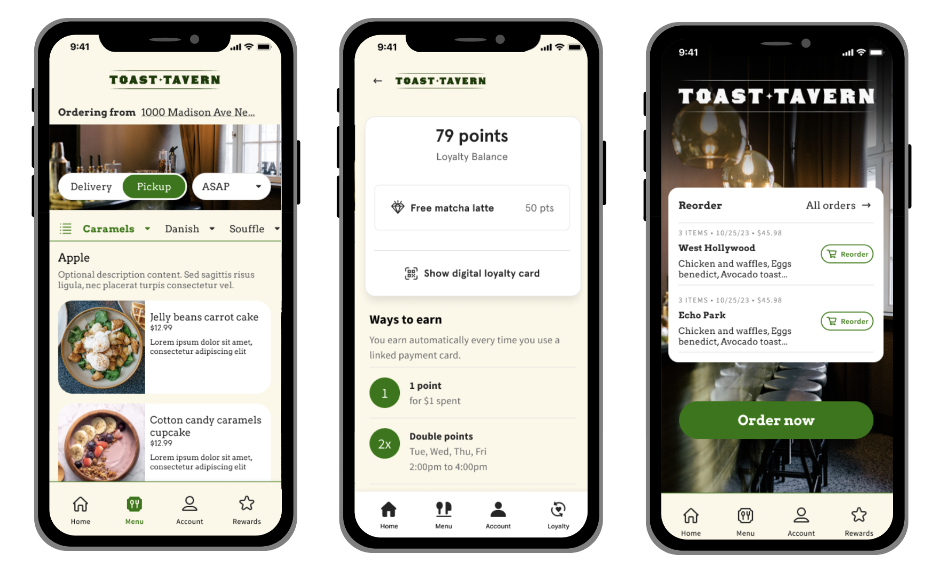
What does the Branded Mobile App look like for guests?
Below are examples of what the Branded Mobile App can look like for guests. Note that the guest-facing visuals will vary based on your Branded Mobile App design settings. See Get Started With the Branded Mobile App for more information.
What is the difference between Toast Local and Branded Mobile App?
- Toast Local: A marketplace app that allows guests to browse and place orders from any restaurant that uses Toast nearby.
- Branded Mobile App: An app for a single restaurant group that offers a branded presence as an app available in the Apple/Google Play Stores, which features customizable branding elements like the group's logo, colors, and fonts.
How long will it take the Branded Mobile App to go live?
If you do not currently have an app, the Branded Mobile App can take up to four weeks to go live. If you already have an app in the Apple or Google Play app stores, we quote one to two weeks to go live.
Can we activate a Branded Mobile App before activation of POS?
Yes, the Branded Mobile Apps can go live before POS is live, but we don’t recommend it, as orders accepted could change the live status.
When we update the menu in Toast Web, will it reflect on the Branded Mobile App in real-time?
Yes, menu updates in Toast Web will reflect in the Branded Mobile App in real-time.
Branded Mobile App Pricing
- What is the monthly charge for the Branded Mobile App?
- What are the requirements to start with the Branded Mobile App?
What is the monthly charge for the Branded Mobile App?
The Branded Mobile App a module within the Digital Storefront Premium suite. See pricing information and overview in Toast Shop.
What are the requirements to start with the Branded Mobile App?
To start with the Branded Mobile App, you must subscribe to Online Ordering Pro or Toast Websites.
Branded Mobile App Setup
Branded Mobile App Setup in Toast Web
- Where can I define my app’s branding and customizations?
- What customizations can I define for my app branding with Branded Mobile App?
- What happens when I want to make an update in the Branded Mobile App?
- What are the recommended image sizes for the Branded Mobile App?
- Where can I find the Dev Portal Team ID for the Branded Mobile App?
- Where can I find the App Connect team ID for the Branded Mobile App?
- How can I rearrange my Promotions on the home page for the Branded Mobile App?
- Who does photography for the Branded Mobile App?
- Where can I preview what the Branded Mobile App will look like?
- Where can I edit my brand’s primary logo, colors, and font for Branded Mobile App?
- Can I send push notifications to customers in the Branded Mobile App?
- I am converting from a third-party loyalty partner to Toast Loyalty. Should this be done before my Branded Mobile App goes live?
- Can I get help with building my Branded Mobile App?
Where can I define my app’s branding and customizations?
Brand fonts, colors, and even icon styles can be customized in your Branded Mobile App admin page. These choices are smartly adopted from your Toast Websites or Online Ordering Pro branding setup however you can always have app-specific branding should you prefer.
What customizations can I define for my app branding with Branded Mobile App?
You can edit the app logo, app store description, app-specific page imagery, brand color (HEX), font, font color (HEX), and customer-facing icon styles. The following online ordering branding configurations will be inherited unless overridden specifically in the Branded Mobile App:
-
- Out of stock configuration and visibility
- Menu style (classic, left, top) & mobile optimization
- Rounded corners
- Borders
- Shadows
- Hidden item descriptions
- Menu item tags
What happens when I want to make an update in the Branded Mobile App?
Changes to basic branding elements like colors, logos, and images will update automatically in real-time. Menu items, hours, and other operational details are also updated in the app as you make changes in your Toast account. If you’d like to update your brand font or any of the information in your app store listing, like your app description or icon, a new version of the app must be submitted to Apple and Google for review.
What are the recommended image sizes for the Branded Mobile App?
- App Store Icon: 1024x1024 px
- Logo: Will snap to 50px high and adjust based on device screen width
- Home screen background image or video: 1284 × 2778px. This can be a solo image or carousel, and any added video can loop.
- Hero Image: 640x256px
Where can I find the Dev Portal Team ID for the Branded Mobile App?
You can find the Dev Portal Team ID listed under Membership Details on this page (external link) for the Branded Mobile App.
Where can I find the App Connect team ID for the Branded Mobile App?
Log into your Apple developer account and visit this page. You will find the App Connect Team ID listed as Content Provider ID. Copy and paste the entire contents of the page into Toastweb as indicated in the Branded App onboarding instructions.
How can I rearrange my Promotions on the home page for the Branded Mobile App?
You can add and rearrange promotions set up in Toast Web here.
Who does photography for the Branded Mobile App?
You will need to provide your own photography for the Branded Mobile App.
Where can I preview what the Branded Mobile App will look like?
You can preview all tabs for the Branded Mobile App here in Toast Web.
Where can I edit my brand’s primary logo, colors, and font for Branded Mobile App?
You can edit your Toast-wide branding and customizations like the logo, colors, and font In the Branding & Customization Configuration in Toast Web.
Can I send push notifications to customers in the Branded Mobile App?
Push notifications can be scheduled to be sent via the Editor. Push notifications can be directed to any tab in the Branded Mobile App, a URL, or a specific menu item. You can also schedule them to send in 10 minutes or at the exact time of your choosing.
Push notifications are also available for your guests regarding their order status when their order is marked as picked up or delivered if they choose to order through your Branded Mobile App. iOS customer can even receive notifications about their order in real-time on their Apple device lock screen.
To turn on this setting:
- Navigate to Takeout & Delivery in Toast Web.
- Navigate to Branding & Customization.
- Select Branded Mobile App.
- Select Settings.
- Scroll to the bottom of the page and select the toggle to turn Show iOS Live Activities on or off.
Note: This setting will only work as intended if you are actively updating the order status within the Orders Hub page on the POS, or on your KDS screen.
I am converting from a third-party loyalty partner to Toast Loyalty. Should this be done before my Branded Mobile App goes live?
Loyalty conversion should be submitted at least two weeks prior if you’re converting from a third-party to Toast Loyalty.
Can I get help with building my Branded Mobile App?
Onboarding for the Branded Mobile App product is self-service. Using the editor takes less than 30 minutes and leverages branding choices already made in the Online Ordering Pro or Websites pages. It is best that your Menu, Website, and Online Ordering have been configured before you begin the Branded Mobile App setup.
Note: If you’re just getting started with Online Ordering or Websites, we recommend you set these up first, as you’ll be completing some app onboarding steps throughout that process.
Branded Mobile App Setup in Apple
- How do I get set up with an Apple developer account for the Branded Mobile App?
- Where can I go to create my Apple developer account?
- How much is it to create and maintain an Apple developer account?
- Once I have an Apple developer account, what should I do to give Toast access?
- What happens after admin privilege is given to Toast?
- I accidentally set up my developer account as an individual, how can I fix this?
- Is there a way to check on my app status with Apple?
- I have an existing live iOS app. How can I transfer my customers to the new one for Branded Mobile App?
- Is there a way to launch a private app in Apple that’s not generally available?
- Is there a way to transfer the ownership of my old app to this new account?
How do I get set up with an Apple developer account for the Branded Mobile App?
You’ll need to have an organization account (external link), provide your DUNS number (external link), and give brandedmobileapp@toasttab.com these Admin permissions (external link).
Where can I go to create my Apple developer account?
Log in or create your Apple developer account here on their website.
How much is it to create and maintain an Apple developer account?
Apple charges an annual fee of $99 to have an app on the app store.
Once I have an Apple developer account, what should I do to give Toast access?
Please invite brandedmobileapp@toasttab.com to your account with these Admin permissions (external link). To find out how to do this, you can visit Apple’s site, here.
What happens after admin privilege is given to Toast?
It can take Apple a few days to review your account. Once they grant access and the privileges are set, Toast will build the app. This process typically takes approximately four weeks.
I accidentally set up my developer account as an individual, how can I fix this?
Please visit Apple’s website, where they have some guidance on how to convert your account.
Is there a way to check on my app status with Apple?
See here or instructions on how to check on the status of your app review with Apple.
I have an existing live iOS app. How can I transfer my customers to the new one for Branded Mobile App?
If your app is published under your own Apple Developer account, the new app can be released as an update to your existing one, meaning customers will only need to update their existing app and not search for and download a new one. To do that, please select “I want to push an update to an existing app store app” in the setup process and fill in the appropriate information.
If the app is published under a third-party’s Apple Developer account, you will need to publish the new app separately and instruct customers to search for and download the new app.
Is there a way to launch a private app in Apple that’s not generally available?
Yes, it is possible to launch a private Branded Mobile App, though there are more steps in the process, which are detailed here.
Is there a way to transfer the ownership of my old app to this new account?
Yes it is possible to transfer the ownership of an old app to a new Google account for Branded Mobile App. Please follow the directions here: Apple transfer steps.
Note: Be sure to make your Apple developer account an Organization type. If you make a personal account, we will not be able to publish the app for you, and you’ll need to re-do your Apple setup.
Back to top
Branded Mobile App Setup in Google
- How do I get set up with an Android developer account for Branded Mobile App?
- Where can I go to create my Android developer account for the Branded Mobile App?
- How much is it to create and maintain an Android developer account?
- What will I need to set up an Android developer account?
- Once I have an Android developer account, what should I do to give Toast access?
- What happens after admin privilege is given to Toast?
- Is there a way to check on my app status with Google?
- I have an existing live Android app. How can I transfer my customers to the Branded Mobile App?
- Is there a way to launch a private app in Apple that’s not generally available?
- Is there a way to transfer the ownership of my old app to this new account?
How do I get set up with an Android developer account for Branded Mobile App?
You’ll need to log into or create your Android Developer Account (one-time fee of $25) and follow along with this setup video.
Where can I go to create my Android developer account for the Branded Mobile App?
Log in or create your Android developer account on the Android developer website here (external link).
How much is it to create and maintain an Android developer account?
Google charges a one-time fee of $25 to have an app on the app store.
What will I need to set up an Android developer account?
You will need a Play Console Developer account, which you can sign up for here.
Once I have an Android developer account, what should I do to give Toast access?
Within your Play Console site, on the left side under Users and Permissions, please invite brandedmobileapp@toasttab.com to your account with these Admin permissions.
What happens after admin privilege is given to Toast?
It can take Google a few days to review your account. Once they grant access and the privileges are set, Toast will build the app. This process typically takes a few weeks.
Is there a way to check on my app status with Google?
See this external article for information on how to check the status of your app review with Google.
I have an existing live Android app. How can I transfer my customers for Branded Mobile App?
If your app is published under your own Android Developer account, the new app can be released as an update to your existing one, meaning customers will only need to update their existing app and not search for and download a new one. To do that, please select I want to push an update to an existing app store app in the setup process and fill in the appropriate information.
If the app is published under a third party’s Android Developer account, you will need to publish the new app separately and instruct customers to search for and download the new app.
Is there a way to launch a private app in Apple that’s not generally available?
Yes it is possible to launch a private Branded Mobile App, though there are more steps in the process, which are detailed here.
Is there a way to transfer the ownership of my old app to this new account?
Yes, it is possible to do this. Please follow the directions here in Google transfer steps.
Note: Google Play setup requires many steps to configure and will take more time than the process with Apple.
Launch Your Branded Mobile App
- Do I need to set up both Apple and Android accounts to use Toast Branded Mobile App?
- What’s the average timeline for launching my Branded Mobile App?
- I selected the Publish button in Toast Web for my Branded Mobile App. What should I expect now?
- How do I transfer Toast loyalty or Toast gift cards from my third-party for Branded Mobile App?
- Are there promo codes that can only be used in the Branded Mobile App?
- Are there any materials that will assist in the marketing of our Branded Mobile App launch?
Do I need to set up both Apple and Android accounts to use Toast Branded Mobile App?
There is no requirement to sign up for both platforms to set up the Branded Mobile App.
What’s the average timeline for launching my Branded Mobile App?
The typical timeline to launch a Branded Mobile App is up to four weeks. If you already have developer accounts, this will significantly reduce the time it takes to launch with Toast.
I selected the Publish button in Toast Web for my Branded Mobile App. What should I expect now?
Be sure that you don’t have any compliance issues in Google or Apple. These appear as blue or yellow banners within the developer console. Typically, it takes up to 48-hours to review the submission, and if approved, an app should be available in the next 48-hours.
How do I transfer Toast loyalty or Toast gift cards from my third-party for Branded Mobile App?
See Import Toast Loyalty Information and Import Gift Cards in Support Center for more information.
Are there promo codes that can only be used in the Branded Mobile App?
Yes! When utilizing the Offers Dashboard, you can customize visibility for any offers you create using the "Choose where this offer is visible" dropdown. All offers can have associated promo codes, and these promo codes can also be set to single-use. To learn more, see Get Started With the Offers Dashboard.
Are there any materials that will assist in the marketing of our Branded Mobile App launch?
Some suggestions for marketing would include: social media posts, Instagram commercials/ads, in-store QR Codes, posters featuring the QR code to the app, and a one time promo code to incentivize guests to download the app.
Note: Launching your Branded Mobile App takes three to four weeks, but can take less time if you have an existing app in apple/android stores
Live Branded Mobile App
- How do I publish a new promotion or make my change live on my Branded Mobile App?
- Where can I view how many downloads my app has?
- If I publish a menu change, does that update on my Branded Mobile App?
- Does the Branded Mobile App handle nested modifiers?
- How can the Branded Mobile App benefit my brand?
- Can you split payment between a gift card and a credit card in the Branded Mobile App?
- What do I do if the app name I want is already taken?
- Who should I contact if I need support with the Branded Mobile App?
- How can my customers save a credit card to their account?
- Does the app work with Toast Delivery Services®?
- Is payment required upon checkout with the Branded Mobile App?
How do I publish a new promotion or make my change live on my Branded Mobile App?
Promotional content added, changed, or rearranged on the home screen of the Branded Mobile App will be updated in real-time.
Where can I view how many downloads my app has?
Your Apple/Android developer consoles can display the total number of downloads of your Branded Mobile App. For more information on tracking app downloads from Apple, see here, and for more information on tracking Android app downloads, see here.
If I publish a menu change, does that update on my Branded Mobile App?
As long as your menu is visible to Online Ordering, your menu changes will sync instantly to the Branded Mobile App – this includes 86ing items.
Does the Branded Mobile App handle nested modifiers?
The Branded Mobile App supports nested modifiers.
How can the Branded Mobile App benefit my brand?
Launching your own mobile app helps you stay top of mind with your most loyal guests, driving share of wallet, customer retention and satisfaction, and guest value.
Can you split payment between a gift card and a credit card in the Branded Mobile App?
You can split payments between gift cards and credit cards within the Branded Mobile App.
What do I do if the app name I want is already taken?
You can visit this help link (external link) where Apple support can assist. You could also include “App” as a suffix to your name. Once the Brand Mobile App is released, you can update the existing app.
Who should I contact if I need support with the Branded Mobile App?
Please use chat in the Toast Now app or the help icon on the pages within the Branded Mobile App settings pages.
How can my customers save a credit card to their account?
Credit cards can be saved at the time of checkout by selecting the Save this card.
Does the app work with Toast Delivery Services®?
The Branded Mobile App works with Toast Delivery Services® the same as Online Ordering.
Is payment required upon checkout with the Branded Mobile App?
Branded Mobile App will follow the settings you’ve declared for Online Ordering. If you allow checkout without payment, the app will respect this as well.
Additional Resources
- Get Started With the Branded Mobile App
- Get Started With Toast Websites
- Get Started With Online Ordering Pro
This FAQ and its content is provided for informational purposes only and is not intended as legal, tax, or other professional advice. You are responsible for your own compliance with applicable laws and regulations. We recommend that you contact your attorney or other relevant professional advisor for advice specific to your circumstances and to ensure compliance with relevant laws and regulations.