Daily and Weekly Performance Email FAQ
Last updated: Apr 13, 2026, 11:27 AM
| The daily and weekly performance email notifications will not be sent out when Test Mode is enabled. |
To learn more about what information is included in the daily/weekly performance emails and how to set up your email lists, check out this Support Center article: Create Email Lists and Configure Employee Notifications.
- Daily & Weekly Performance Summary Email: Frequently Asked Questions
- What does this email look like?
- What does the term SDLW refer to?
- What does the term SWLY refer to?
- How is the 4-week average calculated?
- What do the numbers in the deferred sales column mean?
- What does "Net Sales Upcoming Week" mean in the revenue forecasting section?
- When will I get the Daily and Weekly Performance Summary emails?
- How do I manage and update the recipients of these email notifications?
- How do I update my restaurant information, including the name that appears on performance summary emails?
- I’m unable to receive the daily and weekly performance email notifications. How do I fix this?
Daily & Weekly Performance Summary Email FAQ
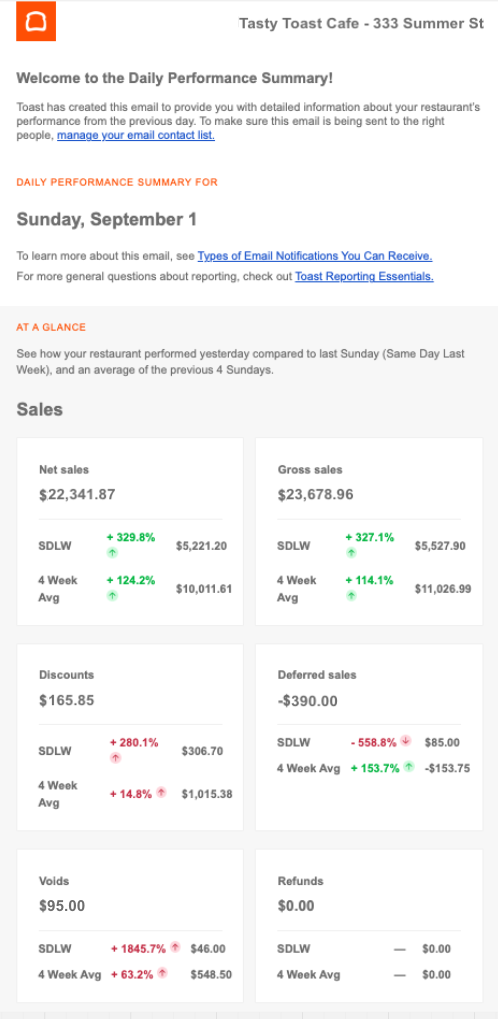
What does the daily performance email look like?
In addition to the sales information, the daily and weekly performance summary emails will also show you:
- Guest/cover counts, average order size, spend per guest, etc.
- Hourly labor costs
- Breakdowns of sales by daypart, revenue center, sales categories, etc.
- Loss management details (i.e., voids)
What does the term SDLW refer to?
SDLW stands for "Same Day Last Week". If today is Friday, May 19, 2023, then the SDLW is referring to last Friday (May 12, 2023).
What does the term SWLY refer to?
SWLY stands for "Same Week Last Year". If this week is Monday, May 15 - Sunday, May 21, 2023, then SWLY is referring to Monday, May 16 - Sunday, May 22, 2022.
How is the 4-week average calculated?
The 4-week average is a useful number because it helps you compare your performance against the past four days. For example, if today is Friday, May 19, 2023, then the 4-week average represents the average value from the last four Mondays.
What do the numbers in the deferred sales column mean?
- SWLY - Same week last year
- 4-week average - An average of the previous four (same) days of the week.
- Deferred Sales - Credits extended to a customer to be redeemed at a later time.
- Voids - The amount of voided items
- Guests - If servers are prompted to enter how many guests are on a check, it is shown here
- Breakdowns
- Service Type: This refers to information by Quick Service or Table Service
- Revenue Center - This refers to information by department such as Dining Room, Bar, Patio, etc.
- Sales Category - This refers to sales by category such as Food, Beverage, Retail, etc.
- Order Type - This refers to information by order type such as Delivery, Dine-In, Takeout, etc.
- Order Source - This refers to information based on where an order was generated, in-store, online, etc.
What does "Net Sales Upcoming Week" mean in the revenue forecasting section?
Net Sales Upcoming Week is the revenue forecasting tool, which will project the total net revenue (including taxes and tips) for the upcoming week compared to the last week and the same week last year (SWLY).
When will I get the Daily & Weekly Performance Summary email?
The Weekly Performance Summary email is scheduled to be sent within five hours of your restaurant's business cutoff day and cannot be rescheduled. If you change the day of the week that your reporting starts (Update First Day of the Week for Reporting), this will impact which day your Weekly Performance Summary email is sent. The Daily Performance Summary emails are sent every day at 9 a.m. ET, providing timely insights into the previous day's performance.
How do I manage and update the recipients of these email notifications?
To manage who receives emails for performance summaries, please follow these steps:
- In Toast Web, use the left-hand navigation bar to navigate to Toast account > Notifications & alerts > Contact settings
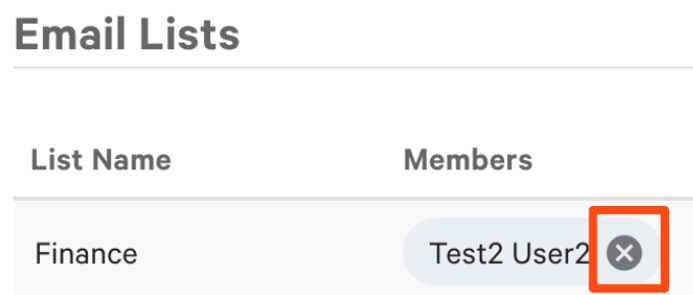
- Under the section Email Lists, you will see your current recipient lists.
- To delete a contact from an existing email list, select the X next to their name on the appropriate email list as shown below.
- To add a new contact, select Add Users from the appropriate email list. Then, enter the name of the user and select Done.
Once you have updated your recipient list, you can select which Email Type you'd like them to receive:
- Using the Email List drop-down next to your chosen Email Type, select the name of the email list.
- Save and publish your changes.
How do I update my restaurant information, including the name that appears on performance summary emails?
To learn how you can update information that your guests will see on your Toast products, see this Support Center article: Update Restaurant Information.
I'm unable to receive the daily and weekly performance email notifications. How do I fix this?
In order to ensure that you're able to receive your restaurant's daily and weekly performance email notifications, please log in to Toast Web and verify if you have the following:
-
- Sales Report User Permission: You must have the 4.1. Sales Reports user access permission. Check out these Support Center articles to learn more about assigning user access permissions:
- Restaurant Access: You must be listed as an active employee on the Employees page in Toast Web.
- Email Contact Settings: You must be listed in the Email Contact Settings group that receives the performance summary email notifications.
If you have recently added a financial contact, expect emails to be delayed until the next reporting cycle starts.
If you're still unable to receive the performance emails, even after checking that you have the requirements listed above, please follow the troubleshooting steps described in the Troubleshoot Email Notifications section of this article, Create Email Lists and Configure Employee Notifications. Should you need further assistance, please contact Customer Care.