Label Menu Items as Alcoholic
Last updated: Oct 20, 2026, 8:54 AM
Alcohol Item Labeling Overview
| It is vitally important that you label all alcoholic items visible to Online Ordering, regardless of whether you plan to offer alcohol for delivery. In states where alcohol delivery is permitted, proper labeling enables your delivery provider to verify a guest’s ID before delivery and confirm they are over the legal drinking age in the state in which your restaurant operates. Proper labeling also ensures that in states where alcohol delivery is not permitted, your guests are required to remove alcoholic items before submitting an order for delivery. |
New state laws allow alcohol sales for pickup/delivery. This feature helps you comply, sell more, and automatically tags items for delivery partners, who will require ID upon delivery.
When customers order alcohol via Toast Online Ordering (OO), they receive multiple age-verification reminders, ensuring delivery to those 21+. This applies if you use first-party delivery/TDS and label items as containing alcohol.
With this menu feature, you can:
- Sell alcoholic menu items through pickup and delivery services
- Remain compliant with the sale of alcoholic beverage laws for pickup and delivery
- Eliminate the need for manually tagging items as alcoholic in the partner portal
Note:
- Even if a menu item is labeled as alcoholic, the POS itself will not prompt a server to check a guest's ID.
- A gentle reminder that accurate labeling and adherence to alcohol compliance are your responsibility.
To get started with alcohol labeling, read the steps listed below.
Online Ordering (OO) Alcohol Notifications
Menu Item Detail
- The menu item detail page will notify guests when an item contains alcohol.
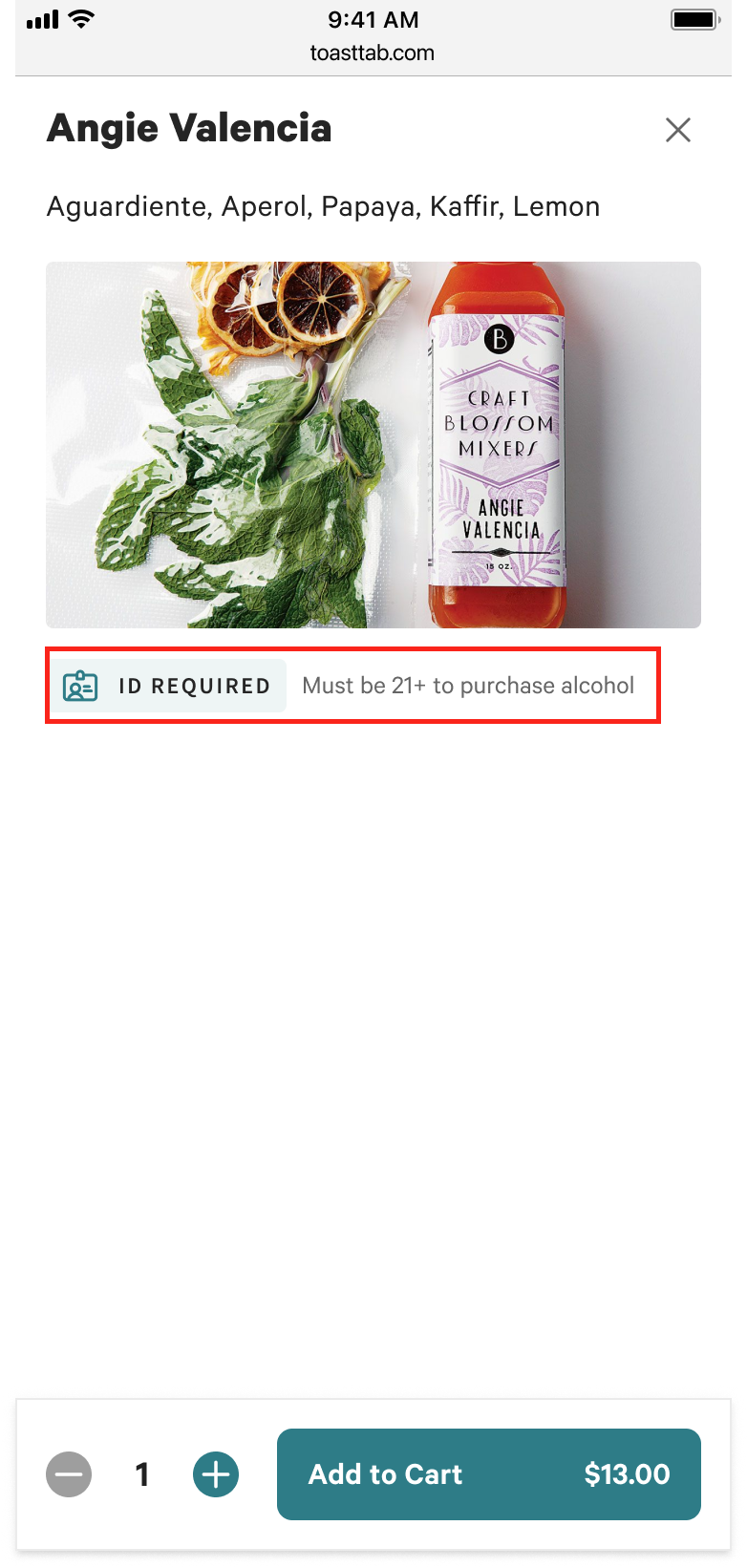
- Cart/Checkout
- Guests are reminded to be at the door with a valid ID when the delivery is being made.
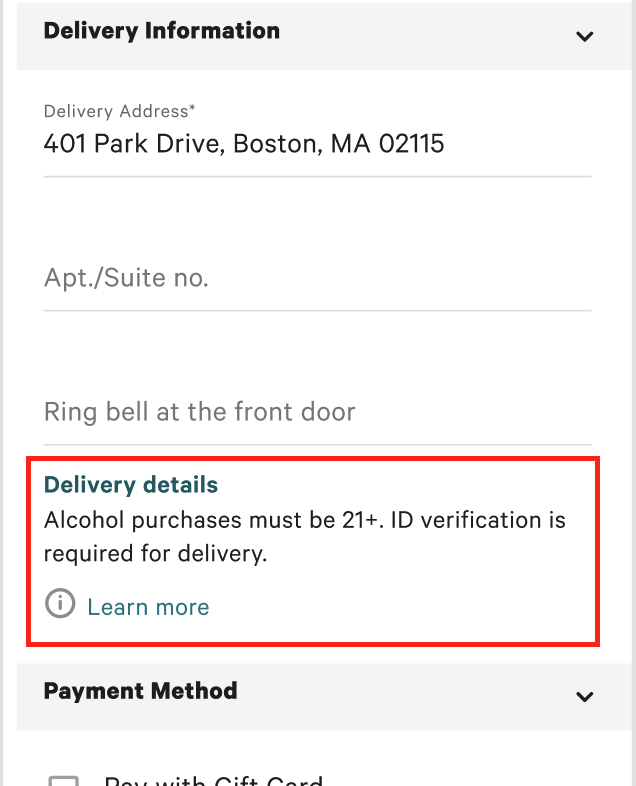
- Order Confirmation
- Guests are reminded to be at the door with a valid ID when the delivery is being made.
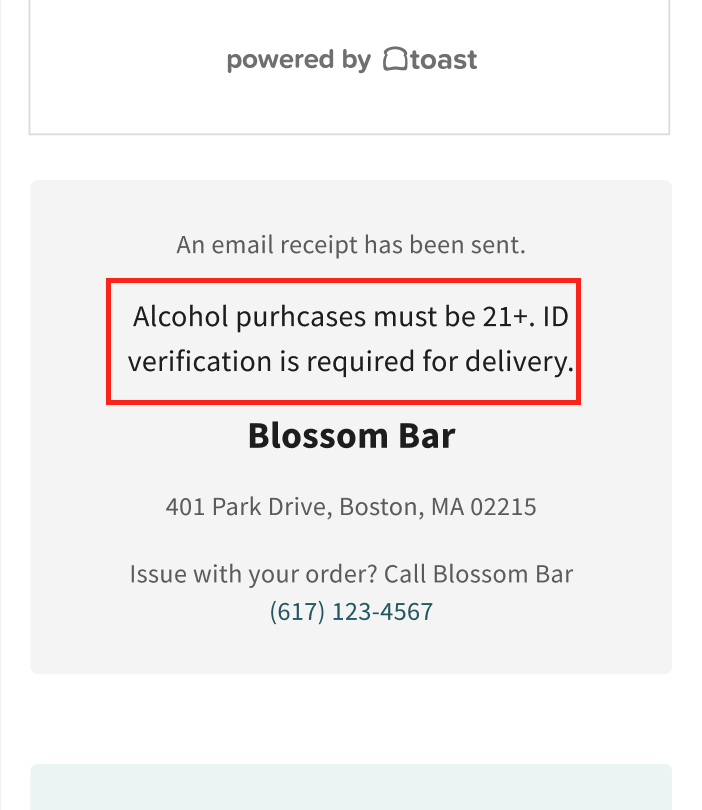
Alcohol Terms and Compliance Notes
When you offer alcoholic items for delivery orders, you're agreeing to comply with all applicable laws and regulations. This includes adhering to your agreements with any delivery partners you use, like Toast Delivery Services (TDS), DoorDash Drive, or Uber Eats.
It's essential that you hold all necessary licenses to sell and deliver alcoholic items. You are also responsible for correctly labeling all alcoholic items on your menus.
Note: The accurate labeling of your items and managing your alcohol compliance with all relevant laws and regulations are your responsibility. While we're here to help with our tools, Toast isn't responsible for your compliance. We always recommend consulting with an attorney or another licensed professional for advice tailored to your specific business and circumstances.
Frequently Asked Questions About Alcohol Labeling
What if alcohol is an ingredient in a food item?
The alcohol labeling feature is for menu items that need additional handling after they are ordered because they contain alcohol. For example, an ID check or the prevention of loyalty point accruals.
| When to mark “Yes” | When to mark “No” |
|
|
What's the difference between leaving the field blank and marking No?
If the alcohol label field is left blank, it's considered UNDECLARED, meaning there is no configuration that has been set.
Is alcohol labeling mandatory for all delivery partners?
Alcohol labeling will soon be mandatory for Toast Delivery Services, DoorDash, Uber Eats, and Grubhub. Also, restaurants must comply with local laws and contractual obligations with delivery partners.
Note: Toast Delivery Services locations must label their applicable menu items as alcoholic or run the risk of deactivation. Deactivation notifications will be communicated via email and message in Toast Web. Follow the steps in the communication to reinstate services.
If you're interested in adding Toast Delivery Services to your Toast suite, check out this Support Center article to learn more: Toast Delivery Services Overview.