xtraCHEF: Levels of Reporting
Last updated: Feb 1, 2026, 2:13 PM
- Levels of Reporting
- What Is a General Ledger Code?
- What Is a Category?
- What Is a Product?
- What Are Invoice Items?
- How Do These Work Together?
Levels of Reporting
xtraCHEF allows you to break out and organize your categorization into several different layers, ranging from broader to more specific groupings. That hierarchy of categorization helps you gain more insight into your purchases and view reporting on multiple different levels. The infographic below serves as a general rule of thumb for this hierarchy in xtraCHEF.
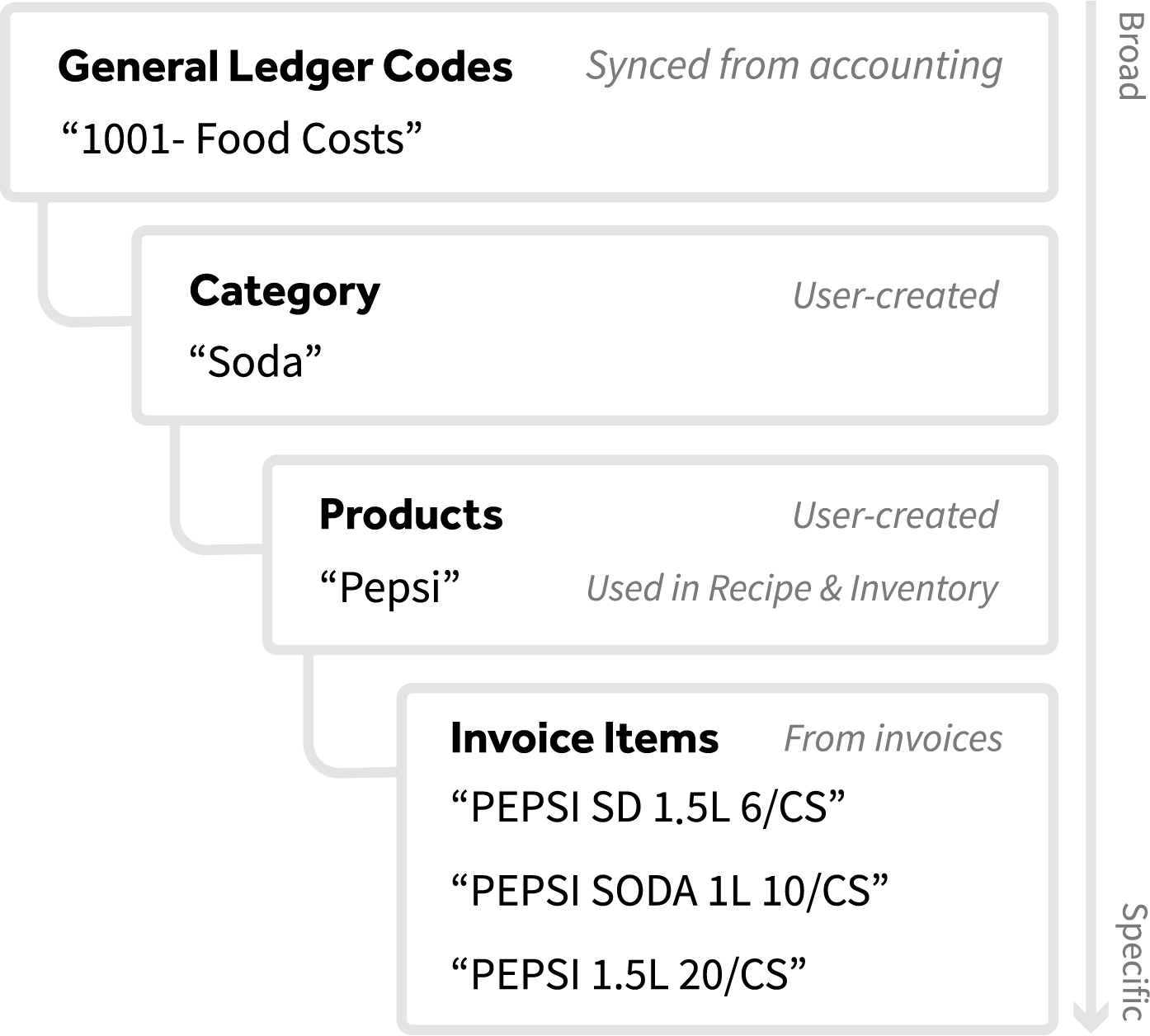
At the top of this hierarchy are your general ledger (GL) codes, which serve as your broadest grouping.
Back to top
What Is a General Ledger Code?
General ledger codes (GL codes) make up your Chart of Accounts and allow you to track certain transactions and revenue. A typical example of a GL code for restaurants is Food Purchases and Beverage Purchases. It’s important to note that these groupings can range from fairly broad to far more specific depending on a business's needs and operation.
Most businesses already using an accounting system, bookkeeper, or accountant will likely have a list of GL codes in place.
What Is a Category?
(Custom) Categories are unique to xtraCHEF and serve as an added layer of categorization within a GL code. These are particularly helpful if you have broader codes in place. For example, a category would allow you to break out a general ledger code titled Food Purchases into categories like Protein, Produce, and Seafood.
Categories do not impact or change anything in AP Automation or Accounting Extracts, as invoices will still report with their GL codes. Creating categories simply allows you to view reports on multiple levels.
What Is a Product?
In xtraCHEF, products refer to your Ingredients and inventory items. As you're getting started, your list of products will form the foundation for your restaurant to begin using Recipe and Inventory functions. After creating your products, you can immediately begin building your recipes and inventory counts.
Products also allow you to group invoice items together that are substitutes for the same ingredient or inventory item. This will ensure your plate costs and inventory values are calculated correctly regardless of any substitutions or replacements.
What Are Invoice Items?
In xtraCHEF, an Invoice Item directly correlates to the line item and item numbers read from your uploaded invoices. These invoice items build your Item Library and are mapped to Products during Item Review in the Item Library.
How Do These Work Together?
GL codes, categories, products, and invoice items create an organizational hierarchy within xtraCHEF to help you gain more insight into your purchases and overall reporting. In practice, this allows you to view reports at the broadest level, then quickly drill down into specific categories, groups, and products.