Crea un combo de comida personalizable
Última actualización: 16 sept 2026, 5:01 p.m.
Aprende a crear un artículo del menú que permita a los clientes hacer varias selecciones para un paquete o una oferta de comida personalizados.
- Prácticas recomendadas para combos de comida personalizables
- Crear un artículo del menú Combo de comidas
Prácticas recomendadas para combos de comida personalizables
Si quieres ofrecer a tus clientes la opción de seleccionar combos de artículos o crear ofertas de comida familiar (“Crear las tuyas propias”), considera las siguientes pautas para la configuración de tu menú:
- Cuantos menos botones haya en el POS, mejor. Considera crear un artículo del menú para cada comida de referencia. Estos artículos deben enumerarse en un solo grupo de menús si es posible y el menú debe moverse a la parte superior de la lista para que sea lo primero que aparezca en tu POS cuando estés en modo Pedido rápido.
- Por ejemplo, si tu restaurante vende burritos, podrías usar la siguiente estructura:
- Menú: Alimentos
- Grupo de menús: Burritos
- Artículos del menú: Burrito de ternera, Burrito de pollo
- Por ejemplo, si tu restaurante vende burritos, podrías usar la siguiente estructura:
- Mantén todos los modificadores adicionales y no esenciales enumerados individualmente en un solo grupo. Esto puede hacerse como un modificador o cada “extra” puede construirse como un artículo del menú y agregarse al grupo de menús principal para una aplicación rápida. Al elegir entre las siguientes opciones, te recomendamos tener en cuenta los informes:
- Si deseas ver estos “extras” en un informe de modificadores separado, puedes crear estas opciones en un grupo de modificadores (por ejemplo, crear un grupo de modificadores llamado “Extras” que incluya Guacamole y Tortilla extra, y agregar ese grupo a cada uno de tus burritos) y aplicar el grupo de modificadores a todos los artículos de tu grupo de menús.
- Si deseas ver estos “extras” en el informe de artículos del menú junto con otras ofertas, considera usar el enfoque de artículos del menú (por ejemplo, agregar guacamole y tortillas extra como artículos separados del menú en el grupo de burritos).
- Si usas Pedidos digitales Toast, considera crear un menú de pedidos digitales aparte y adecuado para los clientes. Cuando los clientes pidan artículos altamente personalizables en línea, recomendamos crear un menú de pedidos digitales separado donde puedas usar diferentes modificadores e idiomas que guíen al cliente a realizar un pedido por su cuenta. Consulta la sección Recomendaciones para pedidos digitales para obtener más detalles.
Crear un artículo del menú Combo de comida
Sigue estos pasos para crear un artículo del menú de comida combinada:
- En Toast Web, ve a Menús y abre el editor de menús.
- Ve al menú y grupo de menús deseados y, luego, agrega un nuevo artículo.
- Ingresa el nombre y el precio básico para obtener la combinación de opciones más económica posible para tu paquete.
- Selecciona Guardar.
- En la pantalla de detalles del artículo, desplázate hacia abajo hasta la sección Grupos de modificadores y crea un nuevo grupo de modificadores, o usa grupos existentes para enumerar las opciones que los clientes necesitarán para hacer su pedido. Estas son algunas pautas a considerar:
- Si se requieren varios tipos de selecciones de modificadores (por ejemplo, una entrada, dos guarniciones, un postre), crea un grupo de modificadores para cada selección que el cliente tenga que hacer.
- Si alguna de tus opciones de modificadores se considera premium, ingresa un valor de recargo en el campo Precio al escribir las opciones.
- Ingresa la cantidad mínima y/o máxima de selecciones que un cliente puede hacer para ese grupo de modificadores, según sea necesario. Si se requiere una selección, ingresa un mínimo de uno (1). Si el grupo de modificadores está pidiendo a los clientes que "elijan dos entradas", por ejemplo, establece un máximo de dos (2).
- Guarda y publica los cambios.
Ejemplo: Supongamos que quieres vender un combo de almuerzo donde los clientes eligen una entrada, una guarnición y una bebida por un precio fijo.
- Crea un artículo del menú llamado Combo de almuerzo e ingresa el precio básico para la combinación más económica posible.
- En la pantalla de detalles del artículo, crea tres grupos de modificadores: Entrada, guarnición y bebida.
- En cada grupo de modificadores, agrega las opciones aplicables y establece el número mínimo y máximo de selecciones en 1, ya que el cliente debe elegir exactamente una de cada grupo.
- Si alguna opción cuesta más que las demás, ingresa un recargo en el campo Precio para esa opción.
- Guarda y publica los cambios.
Ahora, cuando un cliente pida un combo de almuerzo, el POS le pedirá que elija una entrada, una guarnición y una bebida antes de que el pedido se pueda completar”.
Configurar el artículo del menú de comida combinada de esta manera significa que las selecciones de tus clientes aparecerán como modificadores en los tickets de cocina. Si deseas acortar o abreviar el nombre de un modificador para el POS o los tickets de cocina, puedes usar el campo Apodo del POS o Apodo de cocina en el editor de menús. Obtén más información aquí: Personalizar nombres de modificadores y artículos del menú para POS y KDS.
Ten en cuenta que, sin la configuración del grupo de modificadores descrita anteriormente, no es posible requerir que los clientes seleccionen varios artículos del menú para un combo de comidas. Por ejemplo, si deseas configurar un menú “Elige dos” donde los clientes elijan un artículo de dos grupos de menús diferentes, el sistema no podría obligar a los clientes a elegir un artículo de dos grupos de menús diferentes. Por esta razón, se recomienda seguir los pasos anteriores para crear un artículo del menú de comida combinada utilizando grupos de modificadores para cada elección requerida.
Recomendaciones de Pedidos digitales para combos de menús
Si deseas que los clientes puedan pedir un combo de comidas en línea, aquí hay algunas pautas adicionales a considerar:
- Al titular tu grupo de modificadores, mantenlo claro y orientado a la acción para tus clientes. Por ejemplo, “Elige dos entradas” o “Elige tres lados cualesquiera”.
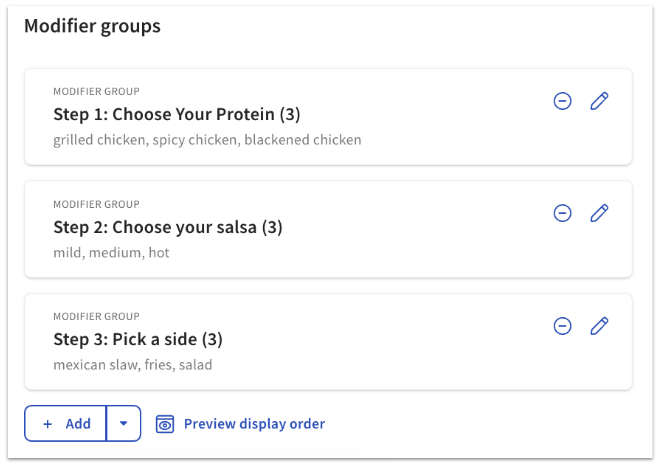
- Estos pueden etiquetarse con pasos en el título para ayudar a guiar al cliente mientras realiza un pedido (p. ej., "Paso 3: Dessert Choice").
- Por ejemplo, puedes elegir nombrar tus opciones de modificadores de esta manera:
- Asegúrate de que el artículo que creaste sea visible para pedidos digitales. Consulta Gestionar la configuración de visibilidad de tu menú para obtener más información.