Preguntas frecuentes sobre la facturación de Servicios de entrega de Toast®
Última actualización: 2 oct 2026, 11:25 a.m.
Preguntas frecuentes sobre la facturación de Servicios de entrega de Toast®.
Los pagos de Servicios de entrega de Toast® (TDS) son automatizados por Toast. Una vez que la facturación automatizada esté activa en su módulo de TDS, Toast retendrá todas las tarifas de TDS aplicables, incluidas las tarifas de Envío, la tarifa de servicio fija de Toast y las propinas del conductor, de sus pagos diarios con tarjeta de crédito cada vez que se entregue un pedido de TDS a su cliente. Usted no recibe ni paga una factura o recibo por separado de Uber Direct, DoorDash Drive o Toast.
Nota: Para pedidos en California, la ciudad de Nueva York y Seattle, WA, se le cobra una tarifa fija por Envío más las tarifas regulatorias aplicables. Para obtener el desglose completo de las tarifas, consulte Descripción general de la facturación automatizada de Servicios de entrega de Toast®.
- Preguntas generales sobre la facturación de TDS
- Informes y conciliación de sus retenciones de TDS
- Artículos relacionados
Preguntas generales
¿Qué significa "retención de tarifas y propinas del conductor"?
La retención de tarifas y propinas del conductor significa que Toast deduce sus tarifas de Envío de TDS, la tarifa de servicio fija de Toast y las propinas del conductor de sus pagos diarios con tarjeta de crédito. Cuando su procesador de tarjetas de crédito procesa sus ventas con tarjeta de crédito, estos montos se deducen antes de que el resto se liquide y se deposite en su cuenta bancaria.
Por ejemplo, suponga que su restaurante tuvo diez pedidos de TDS de $40.00 dentro de un radio de 6 millas el lunes, sin tarifas regulatorias, y cada pedido recibió una propina de $2.50:
-
- Valor del pedido antes de cualquier deducción: 10 x $40.00 = $400.00
- Tarifa de Envío de TDS y tarifa de servicio fija de Toast: 10 x $6.99 = $69.90
- Propinas del conductor: 10 x $2.50 = $25.00
- Monto depositado en su cuenta bancaria después de las deducciones: $400.00 − $69.90 − $25.00 = $305.10
Nota: El monto depositado que se muestra arriba excluye las tarifas de procesamiento de tarjetas de crédito.
¿Para quién está habilitada la retención de facturación de TDS?
La retención de facturación de TDS está habilitada para todos los restaurantes que utilizan Servicios de entrega de Toast®. Todos los restaurantes de TDS son parte de esta retención automatizada.
¿Se pueden deducir estas tarifas mensualmente en lugar de diariamente?
Estas tarifas no se pueden deducir mensualmente. En este momento, la retención ocurre solo diariamente.
¿Cuándo se depositarán mis fondos en mi cuenta bancaria?
Sus fondos se depositan en su cuenta bancaria aproximadamente 1 o 2 días hábiles después de la venta. Usando el ejemplo anterior, los fondos de una venta del lunes se liquidan en su cuenta bancaria a más tardar el miércoles. En sus informes financieros, los montos retenidos de TDS aparecen en la columna Otros e incluyen las tarifas de Envío de TDS retenidas, la tarifa de servicio fija de Toast y las propinas de los 1 o 2 días hábiles anteriores.
¿Qué sucede cuando cancelo un pedido de TDS?
Para cancelar un pedido de TDS que ya no desea Completar, debe comunicarse directamente con su proveedor de Envío. Comuníquese con Uber Direct al (866) 987-3750 o con DoorDash Drive al (855) 222-8111 para cancelar el Envío.
Nota: Los envíos programados de Uber Direct solo se pueden cancelar después de que el pedido se active. Los pedidos no se pueden cancelar por adelantado, antes de que se envíe el pedido a cocina.
Tarifas de cancelación con Uber Direct:
| Estado del Envío | Tarifa de cancelación |
| No se ha asignado un conductor al Envío | Sin tarifa de cancelación |
| Se ha asignado un conductor al Envío | Tarifa de cancelación de $5.00 |
| El conductor ha recogido el Envío | Tarifa de Envío |
Tarifas de cancelación con DoorDash Drive:
| Estado del Envío | Tarifa de cancelación |
| No se ha asignado un conductor al Envío | Sin tarifa de cancelación |
| Se ha asignado un conductor al Envío | Sin tarifa de cancelación |
| El conductor ha recogido el Envío | Tarifa de Envío |
¿Qué sucede cuando vuelvo a enviar un pedido de TDS?
Cuando vuelve a enviar un pedido de TDS, Toast retiene una tarifa de Envío y la propina del conductor cada vez que el pedido se vuelve a enviar usando el botón Redispatch (Volver a enviar) en el centro de pedidos en el Toast POS. Cada monto retenido aparece en sus informes de facturación de TDS, junto con sus fechas de retención y liquidación. Para obtener detalles sobre los tiempos, consulte \"¿Cuándo se depositarán mis fondos en mi cuenta bancaria?\" arriba.
¿Qué sucede cuando recibo un reembolso de un pedido de TDS de mi proveedor de Envío?
Cuando recibe un reembolso de un pedido de TDS de su proveedor de Envío, el reembolso se acredita a su restaurante a través de sus pagos con tarjeta de crédito. Siga comunicándose con Uber Direct en uberdirect@uber.com o DoorDash Drive en drive-support@doordash.com para solicitar un reembolso cuando su conductor sea responsable de un problema con un pedido de TDS. Uber Direct o DoorDash Drive ofrecerán reembolsos de la tarifa de Envío, la tarifa de servicio fija y/o la propina del conductor si se considera que son responsables según su matriz de reembolsos. Una vez que el proveedor confirma el reembolso, envía la información a Toast y Toast procesa un ajuste de pedido. Los ajustes de reembolso se acreditan contra las tarifas y propinas retenidas de cada pedido posterior hasta que se reembolse el monto total a su restaurante.
El proceso de reembolso funciona así:
-
- Su restaurante contacta al proveedor de Envío para solicitar un reembolso.
- El proveedor de Envío revisa la solicitud de reembolso.
- El proveedor de Envío emite un reembolso basado en su matriz de reembolsos.
- Su restaurante recibe el reembolso como un crédito en su próximo pago con tarjeta de crédito.
Nota: Uber Direct y DoorDash Drive nunca le reembolsarán a su cliente directamente. Para reembolsar a su cliente, debe procesar el reembolso en el Toast POS y luego solicitar por separado un reembolso para su restaurante al proveedor de Envío. Para obtener detalles sobre qué es elegible para un reembolso, consulte la Matriz de reembolsos de Uber Direct o la Matriz de reembolsos de DoorDash Drive, o vea a continuación.
Matriz de reembolsos de Uber Direct
| Area | Categoría | Descripción del escenario | Parte responsable | ¿Artículos reembolsables?1,2 | ¿Propina reembolsable?3 | ¿Tarifa de servicio de Envío reembolsable?4 |
| Pedido cancelado | Pedidos cancelados de Uber | El repartidor cancela después de completar la recolección por una razón desconocida y el pedido no se entrega (ni se devuelve) | Uber | 100% o tope | Sí | No facturado |
| Pedido cancelado | Pedidos cancelados de Uber | [Si es elegible para devolución] El repartidor cancela en camino a o en el punto de entrega sin que el cliente lo solicite; el repartidor inicia una devolución y la devolución es exitosa | Uber | 100% o tope | Sí | Sí |
| Pedido cancelado | Pedidos cancelados de Uber | El repartidor cancela después de esperar en el lugar de recolección por más de 10 minutos | Comercio | No | No facturado | No facturado |
| Pedido cancelado | Repartidor no encontrado | El comercio no puede encontrar un repartidor y Uber marca el Envío como fallido después de aceptar la solicitud de pedido (y no se asignó ningún repartidor y esperó más de 10 minutos en el lugar de recolección). Incluye (pero no se limita a): Uber acepta la solicitud de pedido y uno o más repartidores cancelan antes de llegar a la tienda, lo que resulta en que Uber no puede encontrar un repartidor; o Uber acepta la solicitud de pedido, un repartidor llega a la tienda pero cancela el viaje dentro de los 10 minutos posteriores a su llegada y Uber no puede encontrar un nuevo repartidor | Uber | 100% o tope (solo si la comida está preparada) | No facturado | No facturado |
| Pedido cancelado | Pedido cancelado por el comercio/cliente | El socio o el cliente cancela: no se asignó ningún repartidor | Comercio | No | No facturado | No facturado |
| Pedido cancelado | Pedido cancelado por el comercio/cliente | El socio o el cliente cancela: después de asignar el repartidor pero antes de completar la recolección | Comercio | No | No facturado | Cargo por cancelación aplicado a nivel de factura |
| Pedido cancelado | Pedido cancelado por el comercio/cliente | El socio o el cliente cancela: después de que el repartidor completó la recolección | Comercio | No | No facturado | No |
| Pedido cancelado | Pedido cancelado por el comercio/cliente | [Si es elegible para devolución] El comercio/cliente cancela e inicia una devolución (o el repartidor lo hace después de intentar el Envío) y la devolución es exitosa. Incluye (pero no se limita a): el socio o el cliente cancela, la recolección se completa y el repartidor devuelve el artículo; el socio o el cliente cancela, el repartidor llega al punto de entrega y el repartidor devuelve el artículo; o el repartidor inicia un viaje de devolución porque el cliente final no está disponible en el punto de entrega o no puede recibir el artículo | Comercio | No | No | No |
| Pedido retrasado | Pedido retrasado – Culpa del comercio | El pedido tiene un retraso superior al Tiempo Estimado de Envío (ETD) de Uber + 20 minutos y cualquier tiempo de espera asignado al repartidor en el lugar de recogida es superior a 10 minutos | Comercio | No | No | No |
| Pedido retrasado | Pedido retrasado – Uber tiene la culpa | El pedido tiene un retraso de entre el ETD de Uber + 20 y el ETD + 30 minutos y el tiempo de espera del repartidor en el lugar de recogida es inferior a 10 minutos | Uber | 15% o límite | Sí | Sí |
| Pedido retrasado | Pedido retrasado – Uber tiene la culpa | El pedido tiene un retraso de entre el ETD de Uber + 30 y el ETD + 60 minutos y el tiempo de espera del repartidor en el lugar de recogida es inferior a 10 minutos | Uber | 50% o límite | Sí | Sí |
| Pedido retrasado | Pedido retrasado – Uber tiene la culpa | El pedido tiene un retraso superior al ETD de Uber + 60 minutos y el tiempo de espera del repartidor en el lugar de recogida es inferior a 10 minutos | Uber | 100% o tope | Sí | Sí |
| Nunca entregado | Cliente no encontrado/no disponible | El repartidor realiza el envío en la ubicación incorrecta porque la información del cliente es incorrecta, o no es posible entregar los artículos al cliente. Incluye (pero no se limita a): las instrucciones de entrega no dieron al repartidor suficiente información para ingresar a una comunidad cerrada, apartamento, complejo o condominio; dirección incorrecta proporcionada por el cliente; el repartidor cancela el pedido porque el cliente final no está disponible en la entrega después de 8 minutos y el repartidor intentó contactarlo; o el cliente no cumple con los requisitos de identificación o está demasiado intoxicado para recibir el pedido (y el viaje no es elegible para devolución) | Comercio | No | No | No |
| Nunca entregado | Pedido marcado como completado pero nunca recibido | El cliente final declara que el pedido no fue entregado, pero el repartidor ha tomado una foto que demuestra que los productos fueron entregados en la ubicación correcta, o existe una confirmación de código de barras/firma/código PIN/verificación de identificación; o las notas de entrega del cliente entraron en conflicto con las instrucciones de entrega del comercio (por ejemplo, el cliente dice "dejar en mi puerta" para un envío de tipo Entregar en la puerta) | Comercio | No | No | No |
| Nunca entregado | Pedido marcado como completado pero nunca recibido | El cliente final declara que el pedido no fue entregado y el repartidor no llegó a la entrega ni obtuvo pruebas si se solicitaron (o el repartidor no devuelve el artículo si el viaje es elegible para devolución). Incluye: el repartidor completó la recogida pero no llegó a la ubicación de entrega y el envío aparece como completado; el repartidor no llegó a la ubicación de recogida pero el envío aparece como completado; o el repartidor realizó el envío pero no tiene pruebas si se solicitaron | Uber | 100% o tope | Sí | Sí |
| Mala calidad | Artículos dañados | Artículo(s) dañado(s), o todos los artículos parcialmente dañados durante el transporte pero aún funcionales/comestibles | Uber | No | Sí | No |
| Mala calidad | Artículos dañados | Artículo(s) dañado(s), o todos los artículos parcialmente dañados durante el transporte e inutilizables/no comestibles, y el cliente muestra pruebas (una foto del artículo dañado) | Uber | 100% de los artículos o límite | Sí | Sí |
| Mala calidad | Experiencia de Envío | El repartidor mostró un mal comportamiento y el cliente desea cambiar el monto de la propina | Uber | No | Sí | No |
| Pedido con artículos incorrectos/faltantes | Pedido incorrecto | El repartidor entregó el pedido incorrecto debido a que tenía varios pedidos del comercio y los mezcló (confirmado a través del recibo en la bolsa de comida), o entregó el pedido de un comercio diferente | Uber | 100% o tope | Sí | Sí |
| Pedido con artículos incorrectos/faltantes | Pedido incorrecto | El repartidor entregó el pedido incorrecto porque era un pedido único y era el pedido equivocado, o el contenido del empaque es incorrecto o los artículos sustitutos no cumplen con los requisitos del cliente | Comercio | No | No | No |
| Pedido con artículos incorrectos/faltantes | Artículos faltantes | Falta(n) algún(os) artículo(s) del pedido general correcto | Comercio | No | No | No |
1 Si es reembolsable, el monto debe compartirse con Uber a través del recibo o la API. El monto del reembolso no incluye el impuesto sobre las ventas. 2 Para reembolsos a nivel de artículo, el monto desglosado asociado con cada artículo debe proporcionarse y compartirse con Uber a través del recibo o la API. 3 Las propinas no son reembolsadas por Uber, pero deben ser ajustadas por el cliente final dentro del período de ajuste. 4 La tarifa por servicio de Envío se refiere a los cargos impuestos por los servicios de Envío prestados durante el plazo, incluidas las tarifas de devolución cuando corresponda.
A menos que se especifique lo contrario, los montos reembolsados tienen un límite de $200 y las tarifas de cancelación se establecen en $5. Las solicitudes de reembolso deben enviarse dentro de los 14 días posteriores a la fecha de creación del pedido, y cualquier reclamo sobre una decisión de reembolso debe presentarse dentro de los 14 días posteriores a la fecha de la decisión; las solicitudes o reclamos enviados después de estos plazos no serán considerados. Esta política está sujeta a cambios por parte de Uber a su entera discreción.
DoorDash Drive Refunds Matrix
| Motivo (nivel 1) | Motivo (nivel 2) | Descripción | Motivo (nivel 3) | Motivo de reembolso | Parte responsable | Valor del pedido reembolsado | Tarifa de Envío de Drive reembolsada | Propina reembolsada |
| Pedido cancelado | Falla de DoorDash | Cualquier falla relacionada con DoorDash que resulte en la cancelación de un pedido, incluyendo: pedido con retraso; interrupción del servicio de DoorDash; baja disponibilidad de Dashers que lleva a que el pedido no sea asignado o sea asignado muy tarde; ningún Dasher asignado; pedido recogido por el Dasher incorrecto; o tiempo/fecha de Envío incorrecto debido a un problema técnico | Falla de DoorDash: comida no preparada | Cancelado por DoorDash | DoorDash | 0% | No facturado | No facturado |
| Pedido cancelado | Falla de DoorDash | Cualquier falla relacionada con DoorDash que resulte en la cancelación de un pedido, incluyendo: pedido con retraso; interrupción del servicio de DoorDash; baja disponibilidad de Dashers que lleva a que el pedido no sea asignado o sea asignado muy tarde; ningún Dasher asignado; pedido recogido por el Dasher incorrecto; o tiempo/fecha de Envío incorrecto debido a un problema técnico | Falla de DoorDash: comida preparada | Cancelado por DoorDash | DoorDash | 100% | No facturado | No facturado |
| Pedido cancelado | Solicitado por el comercio | El cliente o el comercio ya no necesita que DoorDash realice el Envío, y/o cualquier falla relacionada con el comercio resultó en la cancelación de un pedido, incluyendo: el comercio no pudo Completar el pedido (tienda cerrada, pedido no recibido en la tienda, artículo(s) agotado(s)); o el cliente realizó el pedido con la dirección y/o el tiempo de Envío incorrectos | Solicitado por el comercio antes de la asignación del Dasher | Pedido cancelado | Comercio | 0% | No facturado | No facturado |
| Pedido cancelado | Solicitado por el comercio | El cliente o el comercio ya no necesita que DoorDash realice el Envío, y/o cualquier falla relacionada con el comercio resultó en la cancelación de un pedido, incluyendo: el comercio no pudo Completar el pedido (tienda cerrada, pedido no recibido en la tienda, artículo(s) agotado(s)); o el cliente realizó el pedido con la dirección y/o el tiempo de Envío incorrectos | Solicitado por el comercio después de la asignación del Dasher | Pedido cancelado | Comercio | 0% | 0% | 0% |
| Pedido cancelado | Solicitado por el cliente | El cliente o el comercio ya no necesita que DoorDash realice el Envío, y/o cualquier falla relacionada con el comercio resultó en la cancelación de un pedido, incluyendo: el comercio no pudo Completar el pedido (tienda cerrada, pedido no recibido en la tienda, artículo(s) agotado(s)); o el cliente realizó el pedido con la dirección y/o el tiempo de Envío incorrectos | El cliente lo solicitó antes de la asignación del Dasher | Pedido cancelado | Comercio | 0% | No facturado | No facturado |
| Pedido cancelado | Solicitado por el cliente | El cliente o el comercio ya no necesita que DoorDash realice el Envío, y/o cualquier falla relacionada con el comercio resultó en la cancelación de un pedido, incluyendo: el comercio no pudo Completar el pedido (tienda cerrada, pedido no recibido en la tienda, artículo(s) agotado(s)); o el cliente realizó el pedido con la dirección y/o el tiempo de Envío incorrectos | El cliente lo solicitó después de la asignación del Dasher | Pedido cancelado | Comercio | 0% | 0% | 0% |
| Pedido llegó tarde | Pedido no listo y Dasher a tiempo | La ubicación de la tienda no estaba lista para la recolección, lo que resultó en retrasos después de la hora de entrega indicada | Pedido entregado con 15–30 minutos de retraso | Entregado tarde | Comercio | 0% | 0% | 0% |
| Pedido llegó tarde | Pedido no listo y Dasher a tiempo | La ubicación de la tienda no estaba lista para la recolección, lo que resultó en retrasos después de la hora de entrega indicada | Pedido entregado con 30–45 minutos de retraso | Entregado tarde | Comercio | 0% | 0% | 0% |
| Pedido llegó tarde | Pedido no listo y Dasher a tiempo | La ubicación de la tienda no estaba lista para la recolección, lo que resultó en retrasos después de la hora de entrega indicada | Pedido entregado con 45–60 minutos de retraso | Entregado tarde | Comercio | 0% | 0% | 0% |
| Pedido llegó tarde | Pedido no listo y Dasher a tiempo | La ubicación de la tienda no estaba lista para la recolección, lo que resultó en retrasos después de la hora de entrega indicada | Pedido entregado con más de 60 minutos de retraso | Entregado tarde | Comercio | 0% | 0% | 0% |
| Pedido llegó tarde | Pedido listo y Dasher retrasado | El Dasher se retrasó en la recolección o entrega, lo que provocó que el pedido llegara tarde | Pedido entregado con 15–30 minutos de retraso | Entregado tarde | DoorDash | 15% | 0% | 0% |
| Pedido llegó tarde | Pedido listo y Dasher retrasado | El Dasher se retrasó en la recolección o entrega, lo que provocó que el pedido llegara tarde | Pedido entregado con 30–45 minutos de retraso | Entregado tarde | DoorDash | 25% | 0% | 0% |
| Pedido llegó tarde | Pedido listo y Dasher retrasado | El Dasher se retrasó en la recolección o entrega, lo que provocó que el pedido llegara tarde | Pedido entregado con 45–60 minutos de retraso | Entregado tarde | DoorDash | 80% | 0% | 0% |
| Pedido llegó tarde | Pedido listo y Dasher retrasado | El Dasher se retrasó en la recolección o entrega, lo que provocó que el pedido llegara tarde | Pedido entregado con más de 60 minutos de retraso | Entregado tarde | DoorDash | 100% | 100% | 100% |
| Pedido llegó temprano | Entregado temprano | El Dasher llega más de 30 minutos antes al cliente | Entregado temprano | Entregado temprano | DoorDash | 15% | 0% | 0% |
| Nunca entregado | Información del cliente incorrecta | El Dasher no pudo completar el Envío debido a una dirección de Envío incorrecta, información del cliente incorrecta, etc. | Información del cliente incorrecta | Nunca se entregó | Comercio | 0% | 0% | 0% |
| Nunca entregado | Nunca se entregó: Falla del Dasher | El Dasher no cruzó la geocerca del cliente y/o no tomó una foto, por cualquier motivo (p. ej., falla mecánica del Dasher, error del sistema, falta de comunicación, fraude del Dasher, etc.) | Falla del Dasher | Nunca se entregó | DoorDash | 100% | 100% | 100% |
| Nunca entregado | Nunca se entregó: Culpa del cliente | El Dasher cruzó la geocerca de la ubicación del cliente y tomó una foto de alta calidad, escaneó un código de barras o recibió una firma. No se pudo contactar al cliente. | Nunca se entregó – culpa del cliente | Nunca se entregó | Comercio | 0% | 0% | 0% |
| Faltante e incorrecto | Artículo principal faltante: Culpa del comerciante | El comerciante no proporcionó el artículo principal | Artículo principal faltante | Artículos faltantes/incorrectos | Comercio | 0% | 0% | 0% |
| Faltante e incorrecto | Artículo secundario faltante: Culpa del comerciante | El comerciante no proporcionó el artículo secundario | Artículo secundario faltante | Artículos faltantes/incorrectos | Comercio | 0% | 0% | 0% |
| Faltante e incorrecto | Incorrecto, algunos artículos: Culpa del comerciante | El comercio no proporcionó algunos artículos, o no se siguieron las instrucciones especiales | Incorrecto, algunos artículos | Artículos faltantes/incorrectos | Comercio | 0% | 0% | 0% |
| Faltante e incorrecto | Pedido completo incorrecto: Falla del Dasher | El Dasher entregó al cliente el pedido incorrecto | Pedido completo incorrecto – error del Dasher | Artículos faltantes/incorrectos | DoorDash | 100% | 100% | 100% |
| Faltante e incorrecto | Pedido completo incorrecto: Culpa del comerciante | El cliente recibió el pedido incorrecto | Pedido completo incorrecto – error del comercio | Artículos faltantes/incorrectos | Comercio | 0% | 0% | 0% |
| Faltante e incorrecto | Artículo principal faltante: Falla del Dasher | El Dasher no proporcionó todos los artículos; se requiere que el comercio se comunique para categorizar esto como un error del Dasher | Falta artículo principal – error del Dasher | Artículos faltantes/incorrectos | DoorDash | 50% | 0% | 0% |
| Faltante e incorrecto | Artículo secundario faltante: Falla del Dasher | El Dasher no proporcionó todos los artículos; se requiere que el comercio se comunique para categorizar esto como un error del Dasher | Falta artículo secundario – error del Dasher | Artículos faltantes/incorrectos | DoorDash | 15% | 0% | 0% |
| Mala experiencia de envío | Mala calidad de la comida | El cliente reporta mala calidad de la comida | Mala calidad de la comida | Mala calidad de la comida | Comercio | 0% | 0% | 0% |
| Mala experiencia de Envío | Pedido parcialmente dañado | El contenido resultó parcialmente dañado durante el envío | Pedido parcialmente dañado | Envío descuidado | DoorDash | 25% | 100% | 100% |
| Mala experiencia de Envío | Pedido completo dañado | El pedido completo resultó dañado durante el envío | Pedido completo dañado | Envío descuidado | DoorDash | 100% | 100% | 100% |
| Mala experiencia de Envío | Pedido manipulado | El cliente informa que el pedido ha sido abierto o manipulado | Pedido manipulado | Envío descuidado | DoorDash | 100% | 100% | 100% |
| Mala experiencia de Envío | Ajuste de propina | El cliente desea eliminar la propina debido al mal desempeño o mal comportamiento del Dasher | Ajuste de propina | Envío descuidado | DoorDash | 0% | 0% | 100% |
| Mala experiencia de Envío | Comida no segura | Se encontró cabello, residuos, etc. en la comida | Alimentos no seguros | Mala calidad de los alimentos | Comerciante | 0% | 0% | 0% |
| Mala experiencia de Envío | Queja sobre COVID | El repartidor no lleva cubrebocas o no sigue los protocolos de seguridad sugeridos | Queja sobre COVID | Envío descuidado | DoorDash | 15% | 0% | 100% |
Todas las solicitudes de reembolso deben ser reportadas por el cliente o el comerciante dentro de los 14 días posteriores a la realización del pedido.
Nota: Si un cliente se comunica directamente con el Soporte al cliente de Toast para solicitar un reembolso, Toast se pone en contacto con Uber Direct o DoorDash Drive, asegura el reembolso en su nombre, se lo entrega al cliente y lo mantiene informado. Para obtener más información, consulte los Términos y condiciones de los Servicios de entrega de Toast.
Para obtener más información sobre a quién contactar para solicitar reembolsos, consulte Obtenga ayuda con los Servicios de entrega de Toast®.
¿La retención de TDS afecta mi proceso de cierre diario?
La retención de TDS no afecta su proceso de cierre diario. Las tarifas de Envío y las propinas de TDS no afectan las entradas de efectivo ni los depósitos, y no cambian la forma en que las propinas de TDS se deducen de las propinas con tarjeta/sin efectivo antes de realizar el pago al personal del restaurante.
¿Por qué mi retención es superior a $6.99 por un pedido?
Su retención puede ser superior a $6.99 por un pedido debido a tarifas regulatorias o a un radio de Envío extendido. La tarifa base de Envío cubre un radio determinado; los envíos que superan ese radio tienen un cargo por radio extendido, y los pedidos en California, la ciudad de Nueva York y Seattle, WA, incluyen una tarifa regulatoria adicional. Para ver las tablas completas de tarifas por radio y tarifas regulatorias, consulte la Descripción general de la facturación automatizada de los Servicios de entrega de Toast®.
Para verificar si un pedido se realizó fuera de su radio estándar, ingrese la dirección de recolección y la dirección de entrega en una herramienta de mapas como Google Maps y verifique la distancia.
Nota: El radio de Envío predeterminado de TDS es de 10 millas. Para cambiar su radio de Envío, comuníquese directamente con su proveedor de Envío. Cualquier cambio de radio se acuerda entre su restaurante y el proveedor.
Informes
¿Cómo puedo ver cuánto se ha retenido de mis pagos diarios con tarjeta de crédito?
Puede ver cuánto se ha retenido de sus pagos diarios con tarjeta de crédito en la columna Otro de tres informes financieros en Toast Web:
-
- Resumen de totales de depósitos: Vea los totales de los lotes liquidados y pendientes de depósitos con tarjeta de crédito.
- Desglose diario de depósitos liquidados: Vea los lotes liquidados de depósitos con tarjeta de crédito por ubicación.
- Actividad diaria de tarjetas de crédito: Vea las comisiones de tarjetas de crédito, las liquidaciones y la actividad de transferencias a cuentas bancarias por día.
También puede usar el informe de Resumen de pagos, que consolida estos tres informes en una sola vista.
Nota: El monto en la columna Otro puede no ser igual a su tarifa de Envío, la tarifa de servicio fija de Toast y las propinas del conductor del mismo día si tiene ajustes de reembolso pendientes confirmados por Uber Direct o DoorDash Drive. No se le cobran comisiones ni propinas hasta que los montos totales de reembolso se hayan acreditado a su restaurante.
Para obtener más información, consulte la sección de informes de Resumen de facturación automatizada de Servicios de entrega de Toast®.
¿Por qué la columna "Otro" no siempre coincide con las tarifas de Envío y las propinas del conductor retenidas en mis pedidos de TDS del mismo día?
La columna Otro no siempre coincide con las tarifas de Envío y las propinas del conductor del mismo día debido a los tiempos y los ajustes. Existen varias razones por las que los montos pueden diferir:
-
- Momento de la liquidación. Debido a que los fondos retenidos tardan hasta dos días hábiles en liquidarse, los montos en la columna Otros reflejan los pedidos de Servicios de entrega de Toast® de hasta dos días hábiles anteriores. El informe de desglose diario de depósitos liquidados muestra la(s) fecha(s) de venta de los pedidos para los cuales se retuvieron tarifas y propinas en cada fecha de liquidación.
- Ajustes de reembolso pendientes. Si tiene ajustes de reembolso pendientes confirmados por Uber Direct o DoorDash Drive, Toast no retiene tarifas y propinas posteriores hasta que el monto total del reembolso se acredite a su restaurante.
- Cancelaciones, reenvíos y reembolsos. Si cancela un Envío, reenvía a un conductor desde el punto de venta de Toast o recibe un reembolso de su proveedor, Toast retiene o acredita los montos correspondientes una vez que el proveedor los confirma. Estas transacciones aparecen en los informes de facturación de Servicios de entrega de Toast® con la fecha de retención y la fecha de liquidación.
- Otras retenciones en la misma columna. La columna Otros también puede incluir retenciones no relacionadas con Servicios de entrega de Toast®, como impuestos de facilitador de mercado, préstamos de Toast Capital, montos de depósito instantáneo o arrendamientos de Easy Pay. Estos se suman al total y pueden hacer que difiera únicamente de sus tarifas y propinas de Servicios de entrega de Toast®.
- Propinas de pedidos telefónicos. Las propinas del conductor en los pedidos realizados en el punto de venta de Toast utilizando la opción de comedor de Servicios de entrega de Toast® solo se retienen si están incluidas en la autorización de pago original. Para obtener más detalles, consulte Propinas y facturación para Servicios de entrega de Toast®.
¿Qué informes recibo para la facturación?
Usted recibe un correo electrónico de facturación de Servicios de entrega de Toast® de Toast al final de cada mes en el que procesó al menos un pedido de Servicios de entrega de Toast®. El correo electrónico se envía a su correo electrónico de contacto financiero e incluye dos archivos adjuntos:
-
- Un informe mensual de resumen de tarifas de Servicios de entrega de Toast®: un resumen en PDF de todos los cargos de Servicios de entrega de Toast® retenidos durante el mes.
- Un informe mensual de desglose de tarifas de Servicios de entrega de Toast®: un archivo CSV con un desglose por pedido de los pedidos, pedidos reenviados y reembolsos retenidos durante el mes.
Nota: Para actualizar su correo electrónico de contacto financiero, siga las instrucciones en Optimizar las preferencias de comunicación.
Para obtener más información, consulte la sección de informes de Resumen de facturación automatizada de Servicios de entrega de Toast®.
¿Cómo puedo ver mi informe de facturación de TDS en Toast Web?
Puede ver su informe de facturación de TDS en Toast Web en la página de Facturación de Toast Delivery Services. Siga estos pasos:
-
- En Toast Web, navegue a Comida para llevar y Envío > Facturación de Toast Delivery Services.
- Seleccione Establecer rango de fechas y descargar.
- Utilice el selector de fechas para elegir una fecha específica o un rango de fechas personalizado.
- Seleccione Descargar.
El informe se descarga como un archivo .csv que contiene los datos históricos de retención de su restaurante.
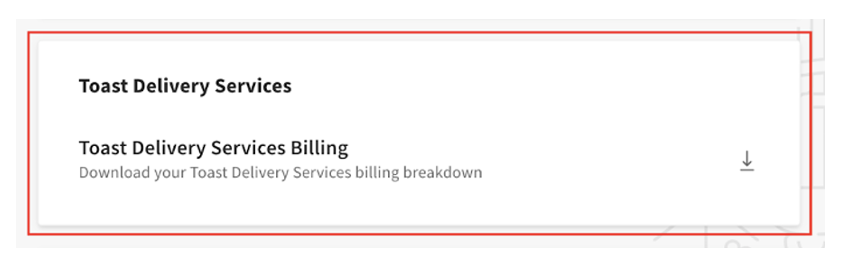
Nota: Existe un retraso de 48 horas entre el momento en que se realizan los pedidos y el momento en que aparecen en el informe de facturación de TDS generado desde Toast Web.
Nota: Los cargos en el informe de facturación de TDS no están en orden secuencial. Puede filtrar y ordenar el informe en Google Sheets o Microsoft Excel por fecha de apertura, fecha de retención o fecha de liquidación según sus necesidades.
Para acceder a este informe, debe tener permisos de Configuración de operaciones del restaurante asociados con su puesto de empleado. Para otorgar acceso a un empleado:
-
- En Toast Web, navegue a Equipo > Configuración > Puestos.
- Seleccione el puesto.
- Navegue a la pestaña Permisos.
- Active el interruptor para el permiso 6.6Configuración de operaciones del restaurante.
- Guarde y publique.
Para obtener más información sobre los permisos, consulte la Guía de referencia de permisos.
¿Cómo concilio mis tarifas de Envío de TDS y las propinas de los conductores con los montos retenidos de mis pagos?
Usted concilia sus tarifas de Envío de TDS y las propinas de los conductores con los montos retenidos de sus pagos comparando sus pedidos de TDS con sus informes de facturación de TDS y sus informes de Finanzas. Utilice los pasos a continuación.
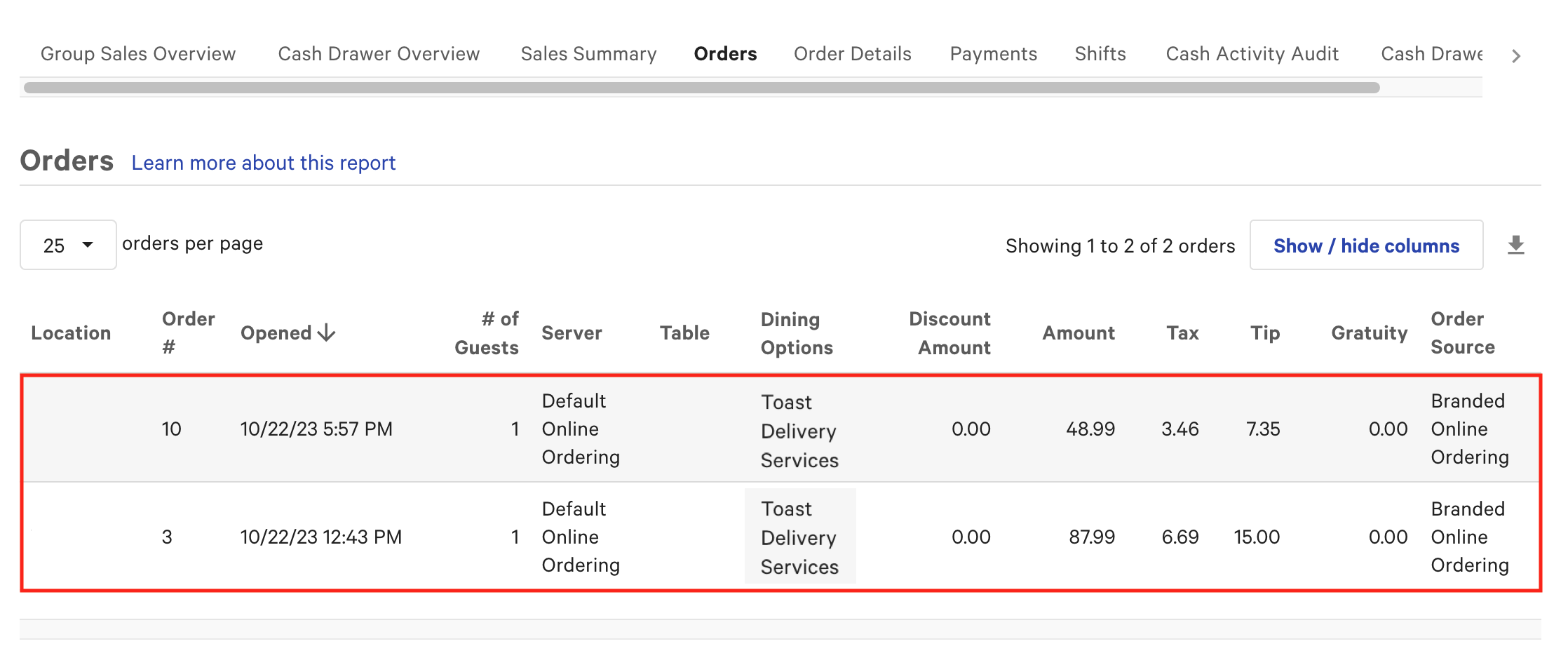
Primero, vea sus pedidos de TDS en Toast Web navegando a Informes > Ventas > Pedidos, luego filtre por la opción de comedor de Toast Delivery Services. Por ejemplo, dos pedidos de TDS en un solo día podrían ser:
-
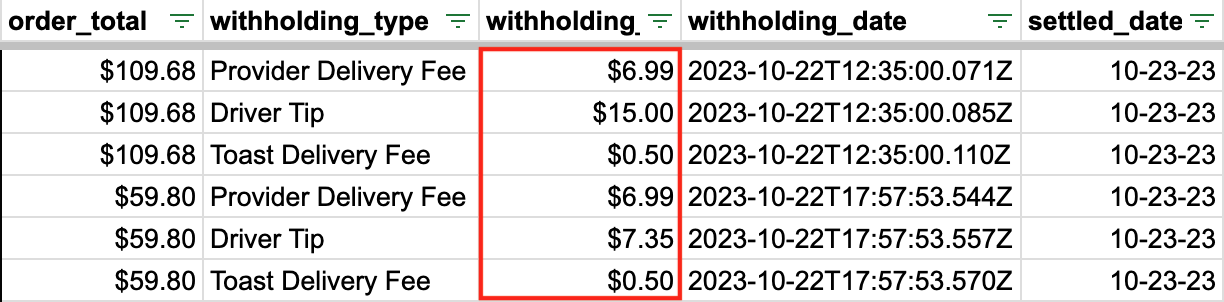
- Pedido 3: $6.99 tarifa de Envío + $15.00 propina del conductor = $21.99
- Pedido 10: $6.99 tarifa de Envío + $7.35 propina del conductor = $14.34
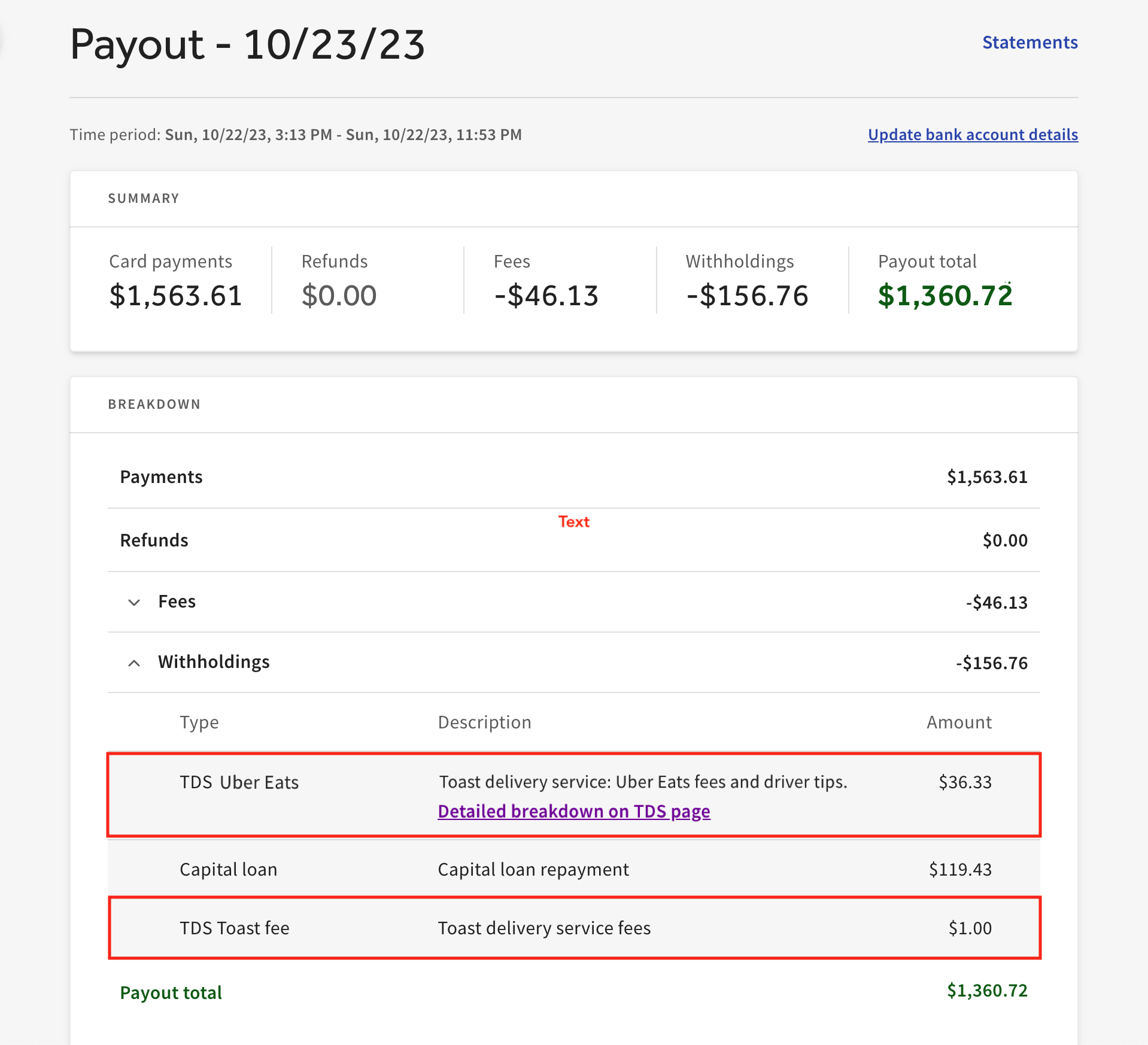
- Retención total del día: $36.33
Estas tarifas de Envío y propinas de los conductores aparecen en su informe de desglose de facturación de TDS en la página de Comida para llevar y Envío en Toast Web.
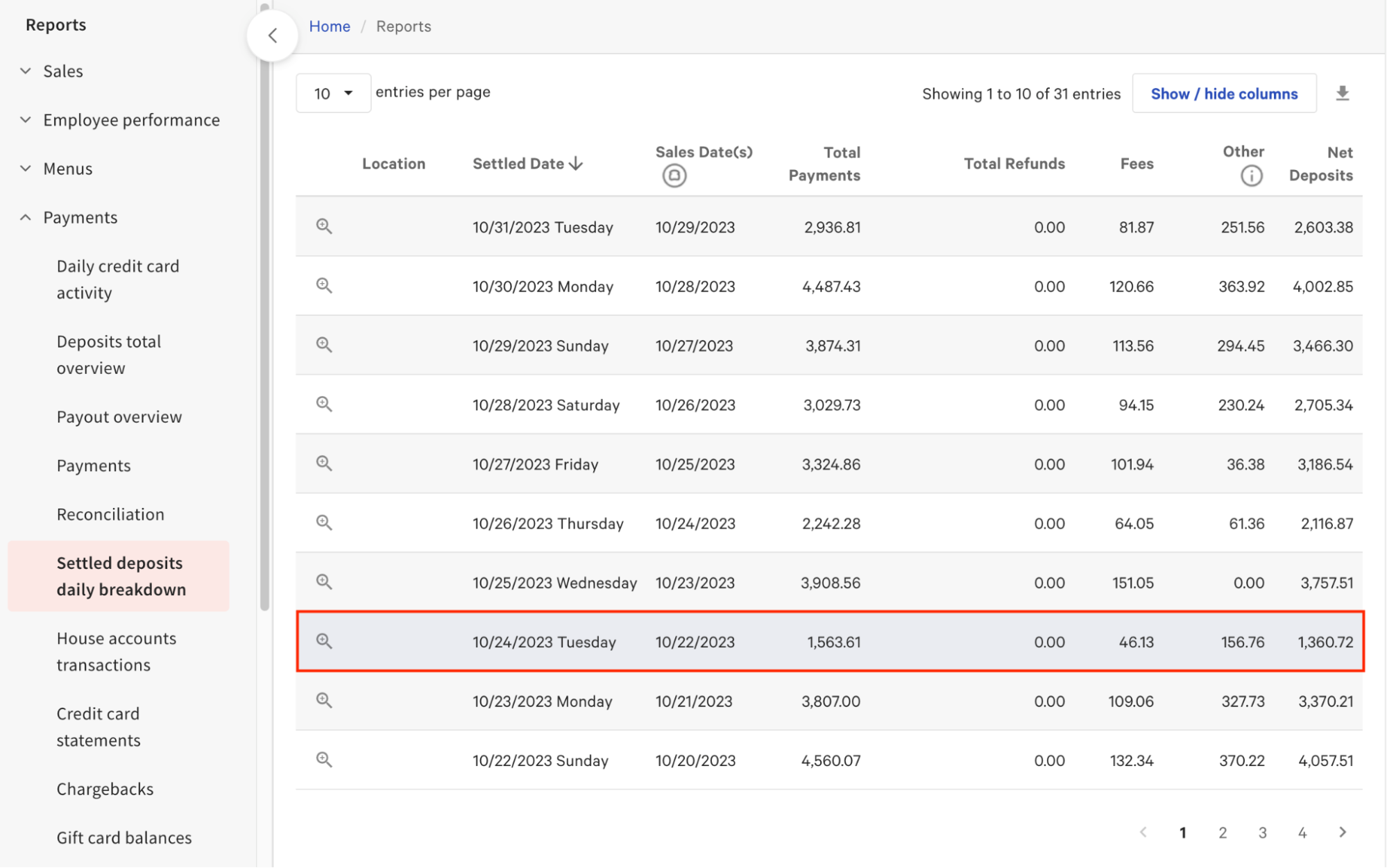
Luego, puede ver el monto total retenido en la columna Otros del informe de Desglose diario de depósitos liquidados. Debido a que los fondos retenidos tardan hasta dos días hábiles en liquidarse, los fondos de los pedidos procesados un domingo se liquidan en su cuenta bancaria el martes siguiente, por ejemplo.
Nota: El monto en la columna Otros puede no ser igual a su tarifa de Envío, la tarifa de servicio fija de Toast y las propinas de los conductores si tiene ajustes de reembolso pendientes, o si tiene retenciones de Impuestos de facilitador de mercado, préstamos de Toast Capital, montos de depósito instantáneo o arrendamientos de Easy Pay.
Para obtener una vista detallada de cada pago y retención, utilice el informe de Conciliación y el informe de Detalles de pago relacionado. En el informe de Conciliación, utilice los filtros de fecha y ubicación en la parte superior, y seleccione un rango preestablecido (como ayer, hoy o esta semana) o un rango de fechas personalizado.
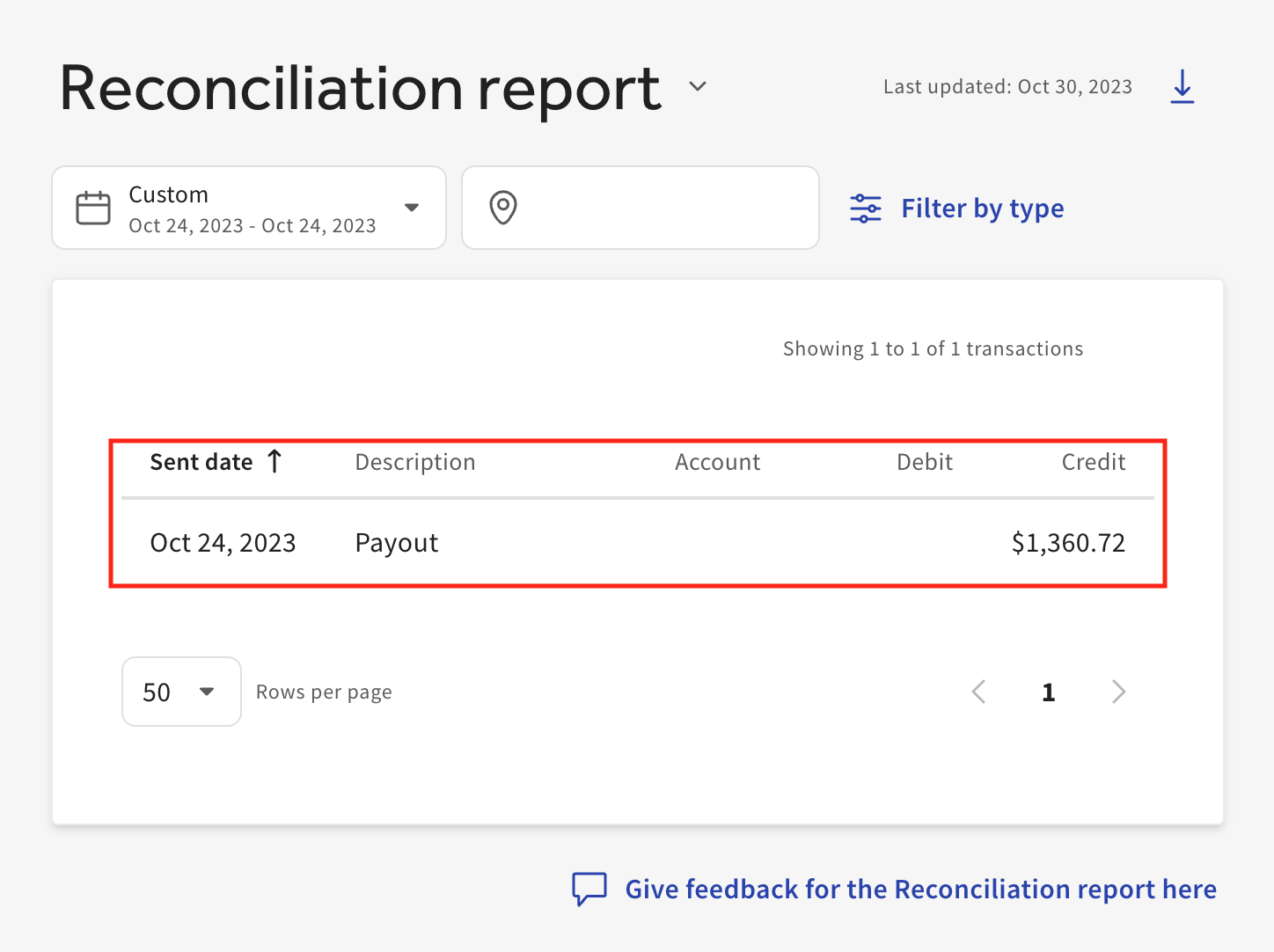
Al seleccionar un pago en el informe de Conciliación se abre la vista de Detalles de pago, que muestra las tarifas de Envío de TDS y las propinas de los conductores retenidas en ese pago y todas las transacciones relacionadas. Para las retenciones, la tabla de desglose muestra el tipo de retención, una descripción y el monto total.
¿A quién puedo contactar para obtener asistencia o hacer preguntas sobre la facturación automatizada de Servicios de entrega de Toast®?
Puede contactar al Servicio de atención al cliente de Toast para obtener asistencia o hacer preguntas sobre la facturación automatizada de Servicios de entrega de Toast® enviando un Ticket. Para obtener instrucciones, consulte Cómo enviar un Ticket al Servicio de atención al cliente.
Artículos relacionados
- Descripción general de la facturación automatizada de Servicios de entrega de Toast®
- Descripción general de Servicios de entrega de Toast®
- Obtener ayuda con Servicios de entrega de Toast®
- Consejos y facturación para Servicios de entrega de Toast®
- Acceder a informes de Servicios de entrega de Toast