Nómina Toast: Agregar o editar ganancias y deducciones
Última actualización: 15 oct 2026, 11:49 a.m.
Agrega o cambia los ingresos o la deducción de un empleado, de forma recurrente en su perfil o por única vez dentro de una nómina abierta.
- Recurrente vs. Único: ¿Cuál necesito?
- Antes de comenzar
- Corrección rápida: Haz que tu tarea coincida con los pasos correctos
- Agregar un ingreso único
- Editar un ingreso único
- Agregar una deducción única
- Editar una deducción única
- Agregar o revisar un ingreso recurrente
- Agregar o revisar una deducción recurrente
- Configurar un embargo, manutención, gravamen o embargo
- Agregar un nuevo código de ingresos o código de deducción (p. ej., bono, 401(k), médico)
- Preguntas frecuentes
- Antes de contactar al servicio de atención al cliente
- Artículos relacionados
Recurrente vs. Único: ¿Cuál necesito?
Aparece una ganancia o deducción recurrente en cada ejecución de nómina. Los ingresos recurrentes suelen ser los tipos de pago del empleado: Salario, Regular (por hora), Propinas. Las deducciones recurrentes son artículos retenidos en cada período de pago: deducciones de comidas, primas de atención médica, 401(k), embargos salariales. Se agregan al perfil del empleado.
Una ganancia o deducción única solo aparece en la nómina a la que la agregas. Se trata de bonificaciones, una deducción uniforme, una tarifa anual o cualquier otro cambio que no deba repetirse. Los artículos de un solo uso se agregan en el paso Ganancias del empleado dentro de una nómina abierta.
Importante: Se deben realizar cambios en las ganancias y deducciones recurrentes antes de seleccionar Vista previa para abrir la nómina. Si agregas o cambias un artículo recurrente después de que se haya seleccionado Vista previa, no aparecerá en esa ejecución de nómina. Restablece la nómina para aceptar el cambio, o agrega el artículo como una entrada única en esta ejecución y luego actualiza el perfil recurrente para futuras ejecuciones.
En este video, se describen las diferentes acciones que puedes realizar en el paso Ganancias del empleado, incluidas las adiciones o ediciones únicas de ingresos o deducciones.
Antes de comenzar
Se aplica a: Nómina Toast
Permisos necesarios:
- Permiso de Nómina Toast para acceder a perfiles de empleados (normalmente gerente o RR. HH.+)
- Permiso de Nómina Toast para abrir y ejecutar nómina (normalmente RR. HH.+)
Lo que lograrás: Agregarás o editarás un ingreso o deducción para que se pague (o retenga) correctamente en la próxima nómina elegible.
Corrección rápida: Haz coincidir tu tarea con los pasos correctos
Busca tu tarea en la tabla y, luego, sigue la sección a la que apunta.
| Qué necesitas | Dónde ir | ¿Autoservicio? |
|---|---|---|
| Agregar una bonificación a un cheque de pago | Para agregar una bonificación a un solo cheque de pago, usa el flujo de ingresos de un solo uso para agregarlo directamente a esa ejecución de pago. Pasos completos: consulta Agregar una ganancia única a continuación. | Sí, si ya existe un código de ganancia adicional. Si no, consulta Agregar un nuevo código de ingresos o código de deducción. |
| Agregar una deducción única (uniforme, comida, cargo) | Para agregar una deducción única, como un uniforme, una comida o un cargo: usa el flujo de deducciones únicas para ese pago. Pasos completos: consulta Agregar una deducción única a continuación. | Sí |
| Editar un ingreso que ya está en esta nómina | Para editar un ingreso que ya se agregó a esta ejecución de nómina, usa la opción editar ese ingreso único antes de los procesos de nómina. Pasos completos: consulta Editar una ganancia única a continuación. | Sí |
| Editar una deducción que ya está en esta nómina | Para editar una deducción que ya se agregó a esta ejecución de nómina, usa la opción editar esa deducción única antes de los procesos de nómina. Pasos completos: consulta Editar una deducción única a continuación. | Sí |
| Configurar ingresos recurrentes (Salario, Regular, Propinas) | Para configurar ingresos recurrentes como Salario, Regular o Propinas, primero verifica los Puestos o Tareas del empleado, ya que las ganancias recurrentes casi siempre están vinculadas al puesto en lugar de agregarse manualmente. Pasos completos: consulta Agregar o revisar una ganancia recurrente a continuación. | Sí |
| Configura una deducción recurrente (401(k), médica, dental, de comida) | Para configurar una deducción recurrente, como 401(k), médica, dental o de comidas: agrégala o revísala como deducción recurrente en el perfil del empleado. Pasos completos: consulta Agregar o revisar una deducción recurrente a continuación. | Sí, si el código de deducción ya existe |
| Configurar una pensión alimenticia, embargo, gravamen o embargo para niños | Para configurar una orden de manutención, embargo, gravamen o embargo: esto no es autoservicio: el servicio de atención al cliente de Nómina Toast lo configura directamente desde la orden judicial. Pasos completos: consulta Configurar un embargo, manutención, gravamen o embargo a continuación. | No. El servicio de atención al cliente de Nómina Toast los configura desde la orden judicial. |
| Crea un nuevo código de ingresos (p. ej., “Bonificación”) o código de deducción (p. ej., nuevo beneficio) | Para crear un nuevo código de ingreso (como “Bonificación”) o un nuevo código de deducción (como un nuevo beneficio): envía el formulario de solicitud. El servicio de atención al cliente crea el código a partir de ahí. Pasos completos: consulta Agregar un nuevo código de ganancia o código de deducción a continuación. | Parcial: envías el formulario de solicitud; el servicio de atención al cliente crea el código |
| Una deducción muestra USD 0, no realiza retenciones o no aparece | Si una deducción muestra USD 0, no realiza retenciones o no aparece en absoluto: consulta primero las Preguntas frecuentes a continuación. La mayoría de las causas son autoservicio. | A menudo sí, revisa las preguntas frecuentes antes de ponerte en contacto con el servicio de atención al cliente |
Agregar un ingreso único
Usa esta opción cuando los ingresos solo se deberían aplicar a la nómina que ejecutas en este momento (por ejemplo, una bonificación o un ajuste de horas perdidas).
- Inicia sesión en payroll.toasttab.com y ve a Nómina > Vista previapara abrir y comenzar una ejecución de nómina.
- Cuando los menús de navegación de Toast Web y Nómina Toast estén visibles, selecciona Nómina en el submenú de navegación de Nómina Toast. Si no ves el submenú Nómina Toast, al seleccionar Nómina en el menú de navegación de Toast Web, se expandirá.
- Avanza en el paso Vista previa de Nómina seleccionando Siguiente.
- En el paso Ganancias del empleado, ubica al empleado y selecciona + Agregar ganancias.
- Completa el código de ingresos y las horas o el monto. Selecciona Opciones avanzadaspara personalizar aún más estos ingresos si es necesario (se suele usar para editar las tasas salariales).
- Selecciona Agregar ingresos para finalizar.
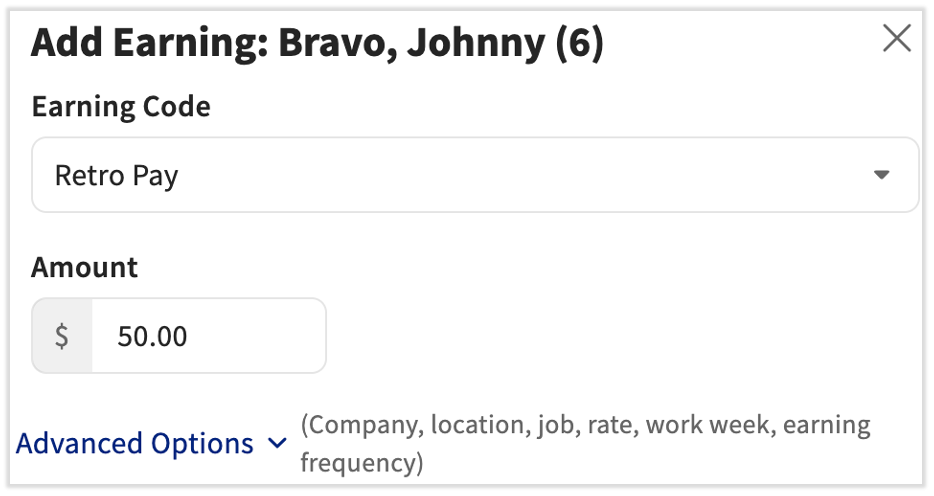
Resultado previsto: Los nuevos ingresos aparecen en la fila del empleado en el paso Ganancias del empleado y se incluyen en los totales de nómina en la parte superior de la página.
Nota: Si el empleado falta en esta nómina, selecciona Agregar empleado. Solo aparecerán en la lista los empleados del mismo grupo de pago que esta nómina.
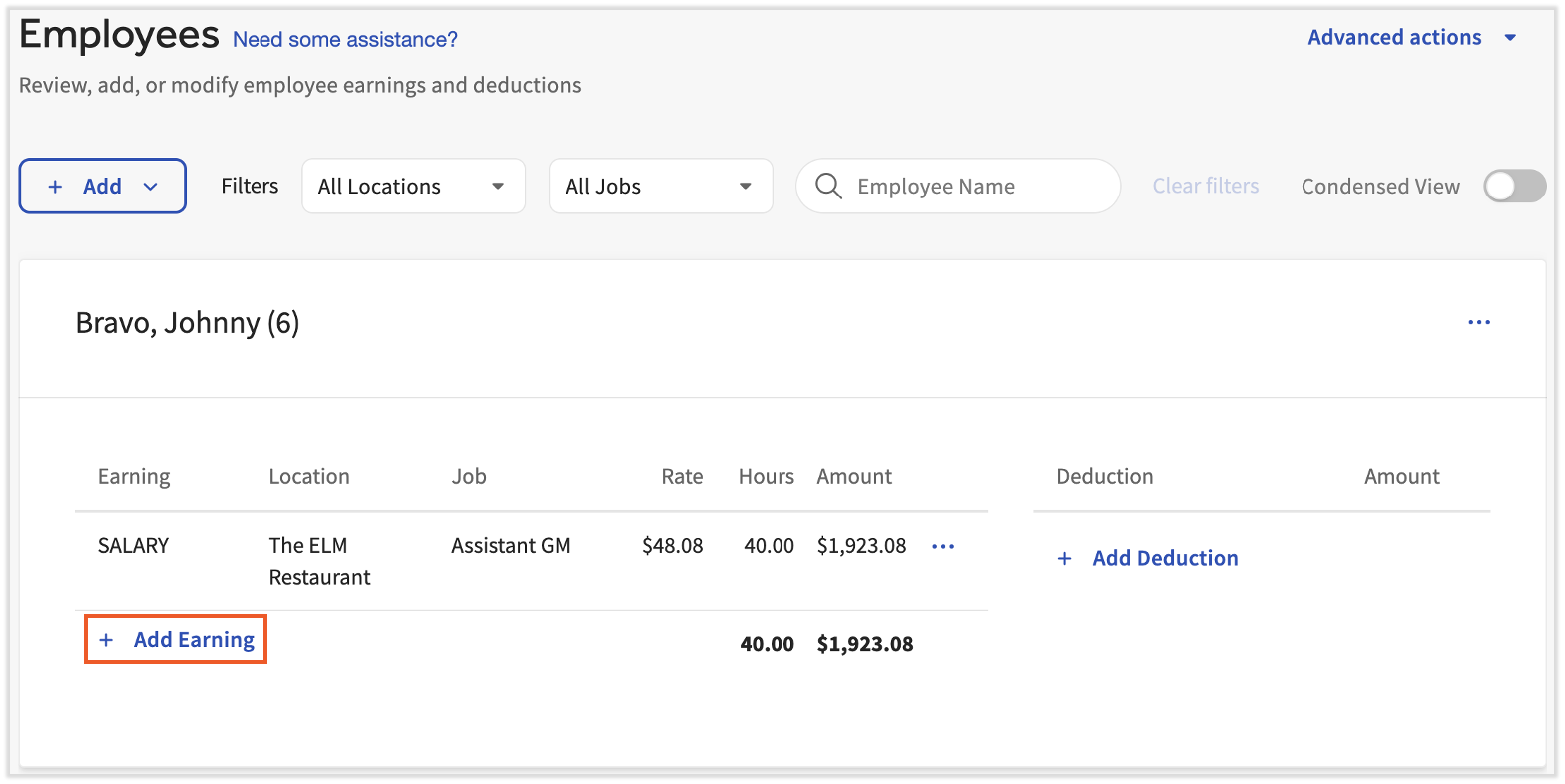
Editar un ingreso único
Usa esta opción cuando un ingreso ya está en la nómina, pero el monto, las horas o la tasa son incorrectos. El cambio se aplica solo a esta nómina; no actualizará el perfil recurrente del empleado.
- Inicia sesión en payroll.toasttab.com y ve a Nómina > Vista previapara abrir y comenzar una ejecución de nómina.
- Cuando los menús de navegación de Toast Web y Nómina Toast estén visibles, selecciona Nómina en el submenú de navegación de Nómina Toast. Si no ves el submenú Nómina Toast, al seleccionar Nómina en el menú de navegación de Toast Web, se expandirá.
- En el paso Ganancias del empleado de una nómina abierta, ubica al empleado con ingresos incorrectos.
- Selecciona el menú de desbordamiento (...) a la derecha de la ganancia y, luego, elige Editar ganancia.
- Haz los cambios necesarios. Puedes actualizar las horas o el monto, o usar el menú de opciones avanzadas para ajustar la ubicación y la tarifa.
- Selecciona Cambiar ingresos para guardar.
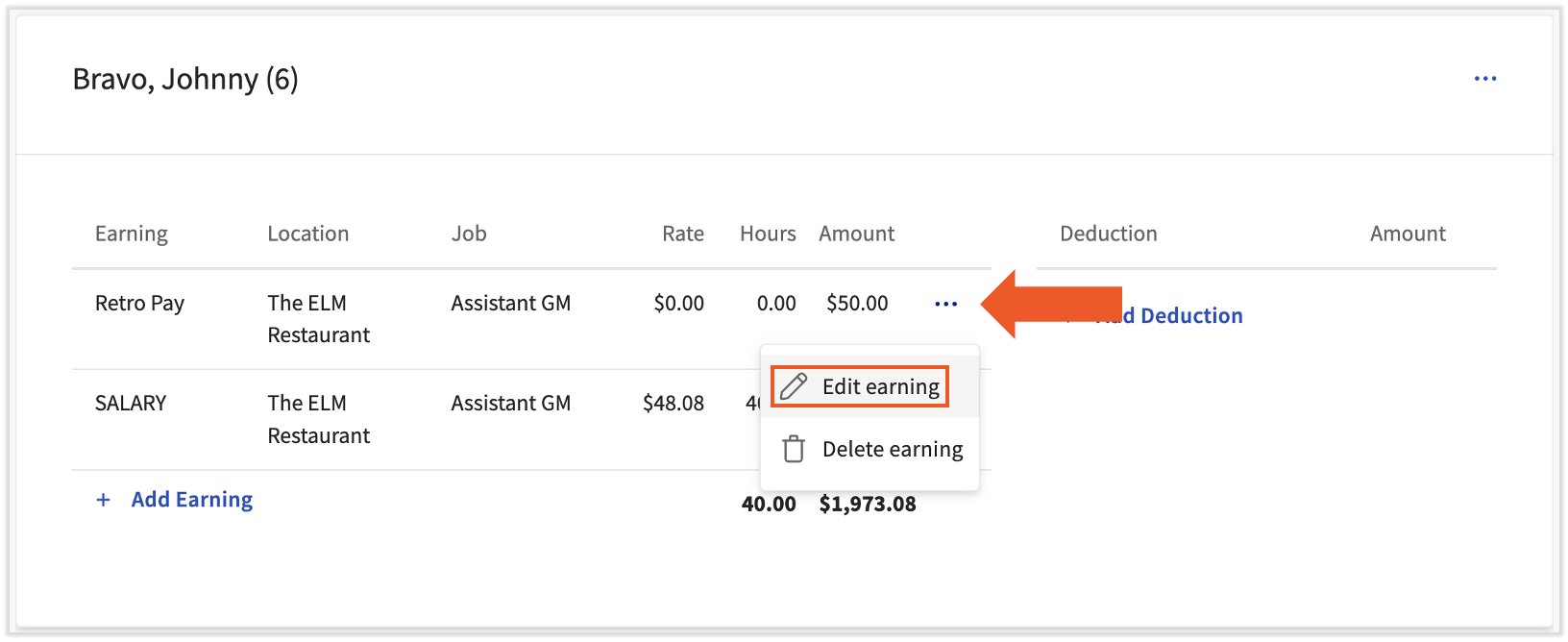
Resultado previsto: El monto, las horas o la tarifa actualizados aparecen solo en la línea de ingresos de esta nómina. El perfil recurrente del empleado no cambia.
Agregar una deducción única
Usa esta deducción para una que solo se aplica a esta nómina, por ejemplo, una tarifa uniforme única, un ajuste de deducción de comida o una tarifa anual de membresía.
- Inicia sesión en payroll.toasttab.com y ve a Nómina > Vista previapara abrir y comenzar una ejecución de nómina.
- Cuando los menús de navegación de Toast Web y Nómina Toast estén visibles, selecciona Nómina en el submenú de navegación de Nómina Toast. Si no ves el submenú Nómina Toast, al seleccionar Nómina en el menú de navegación de Toast Web, se expandirá.
- Avanza en el paso Vista previa de Nómina seleccionando Siguiente.
- En el paso Ganancias del empleado, ubica al empleado y selecciona + Agregar deducción.
- Elige el Tipo de deducción y si es un porcentaje o un monto fijo.
- Ingresa el monto o porcentaje del pago bruto. Selecciona Agregar deducción para finalizar.
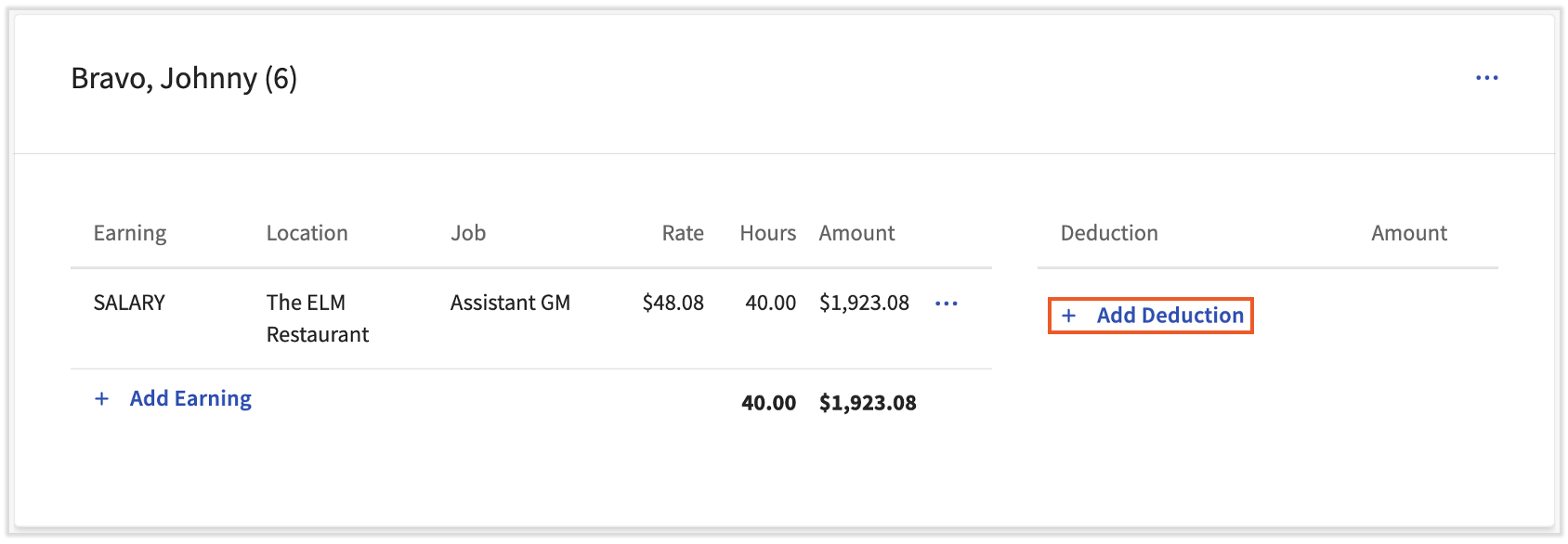
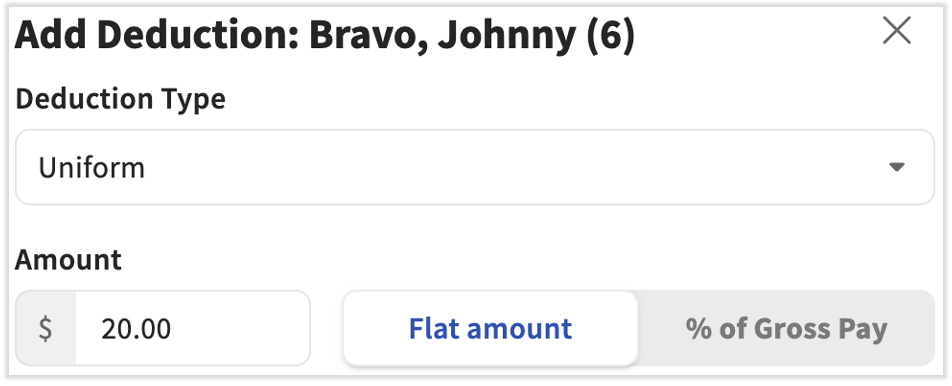
Resultado previsto: La deducción aparece en la fila del empleado en el paso Ganancias del empleado y reduce el pago neto del empleado solo por esta nómina.
Editar una deducción única
Usa esta opción cuando ya haya una deducción en la nómina, pero el monto o tipo sea incorrecto.
- Inicia sesión en payroll.toasttab.com y ve a Nómina > Vista previapara abrir y comenzar una ejecución de nómina.
- Cuando los menús de navegación de Toast Web y Nómina Toast estén visibles, selecciona Nómina en el submenú de navegación de Nómina Toast. Si no ves el submenú Nómina Toast, al seleccionar Nómina en el menú de navegación de Toast Web, se expandirá.
- En el paso Ganancias del empleado de una nómina abierta, ubica al empleado con la deducción incorrecta.
- Selecciona el menú de desbordamiento (...) a la derecha de la deducción y, luego, elige Editar deducción.
- Haz los cambios necesarios. Selecciona Guardar deducción para guardar.
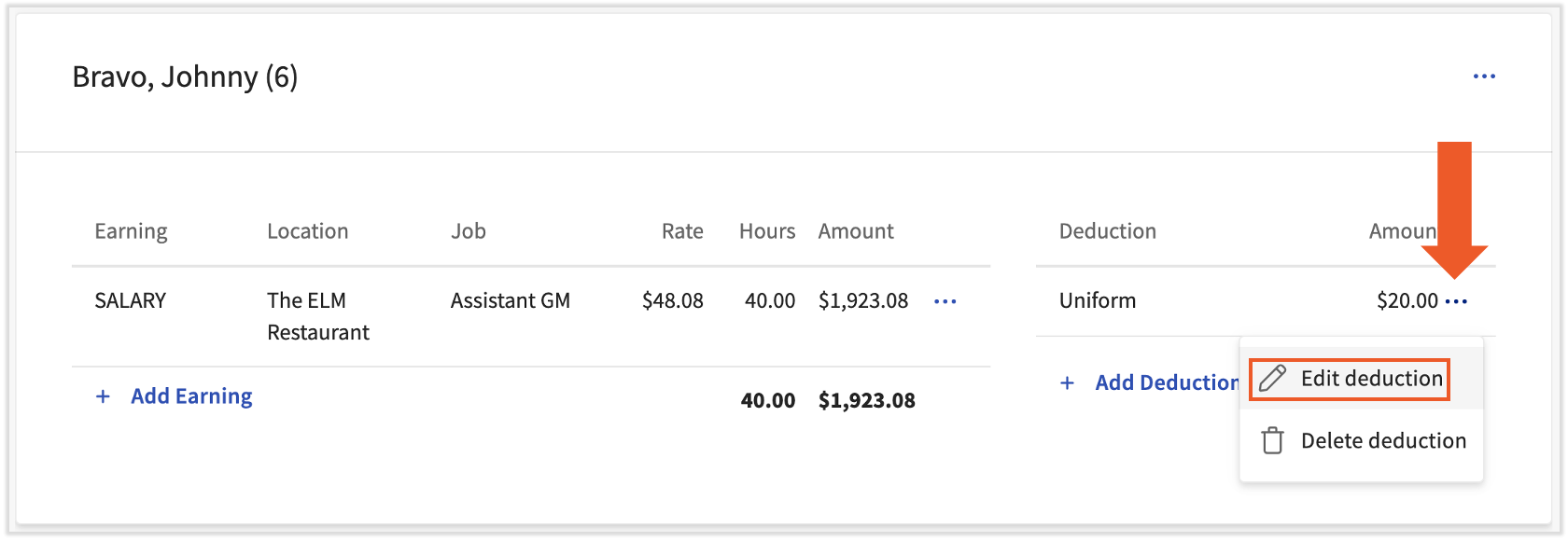
Resultado previsto: La deducción actualizada aparece solo en la línea de deducción correspondiente a esta nómina. El perfil recurrente del empleado no cambia.
Nota: Si estás corrigiendo un pago en exceso, anular y volver a registrar puede ser mejor que editar la deducción. Consulta Nómina Toast: Solicitar anulación.
El menú de desbordamiento en el paso Ganancias del empleado también incluye lo siguiente:
- Pagar con cheque: obliga a que el empleado reciba un cheque en vivo (en papel) y anula el depósito directo de esta nómina.
- Crea cheques adicionales, útiles para artículos como cheques de bonificación.
El menú de acciones avanzadas ofrece más funciones:
- Restablecer nómina: elimina cualquier edición que hayas hecho en la nómina y te devuelve al primer paso. Útil si agregaste un cambio recurrente después de la vista previa y necesitas volver a extraer los datos recurrentes.
- Agregar importación personalizada: carga una hoja de cálculo de ganancias o deducciones, pero solo si Nómina Toast configuró una plantilla de importación personalizada para ti.
Agregar o revisar un ingreso recurrente
Importante: Las ganancias recurrentes casi siempre se basan en roles. Antes de agregar un ingreso recurrente directamente a un empleado, verifica si el ingreso pertenece al puesto o al registro de tareas del empleado. Consulta Nómina Toast: Asignar o cambiar tareas o ubicaciones de los empleados.
Las ganancias recurrentes deben agregarse o actualizarse antes de seleccionar Obtener vista previa en una nómina. Los cambios realizados después de la vista previa no aparecerán en esa ejecución de nómina.
- Ve a la página Equipo o usa la barra Buscar empleados. Selecciona un empleado.
- Cuando selecciones Equipo en Nómina Toast, deberías ver una URL que comienza con payroll.toasttab.com. Visita Nómina Toast en Toast Web para conocer cómo funciona la nueva navegación de Nómina Toast.
- Selecciona Recurrente desde el lado izquierdo de la pantalla.
- Desplázate por debajo del gráfico para ver cada ingreso. Las ganancias activas se identifican por la Fecha de inicio y la Fecha de finalización. Cuando se abre una nómina, todas las ganancias activas se incorporan al paso Ganancias del empleado del proceso de nómina.
- Para ver la configuración de un ingreso recurrente, selecciona el ícono de globo ocular junto a él.
- Para agregar un ingreso recurrente, selecciona el botón Agregar + y completa los siguientes campos antes de seleccionar Guardar:
- FEIN: La mayoría de los empleados trabaja con un solo FEIN. Ajusta en consecuencia.
- Posición: Aplica la posición correcta (grupo de atributos, no la tarea en la que registra su entrada) si un empleado tiene más de uno. La mayoría de los empleados solo tienen un puesto.
- Ganancias: El código de ingreso correcto debe aparecer aquí. El código de ganancia hereda propiedades como el salario por hora, si es una ganancia por propina y cómo se debe tributar.
- Año: Usa el año actual para que estos ingresos estén disponibles siempre que los necesites.
- Fechas de inicio y finalización: Ajusta estas fechas para tener en cuenta las ganancias recurrentes. Las fechas de finalización se pueden establecer con mucha anticipación (año 2099) para que no desaparezcan de los ingresos recurrentes del empleado.
- Monto: Ingresa el monto que los ingresos deben sumarse al salario bruto de la persona. Dependiendo de si se trata de un código por hora o de salario, este monto puede ser por hora o por período de pago.
- Por monto garantizado de nómina: Dejar en blanco. Esta función está desactualizada y no tiene aplicabilidad.
- Frecuencia de comprobación: Ingresa la frecuencia con la que este empleado recibe sus cheques de pago.
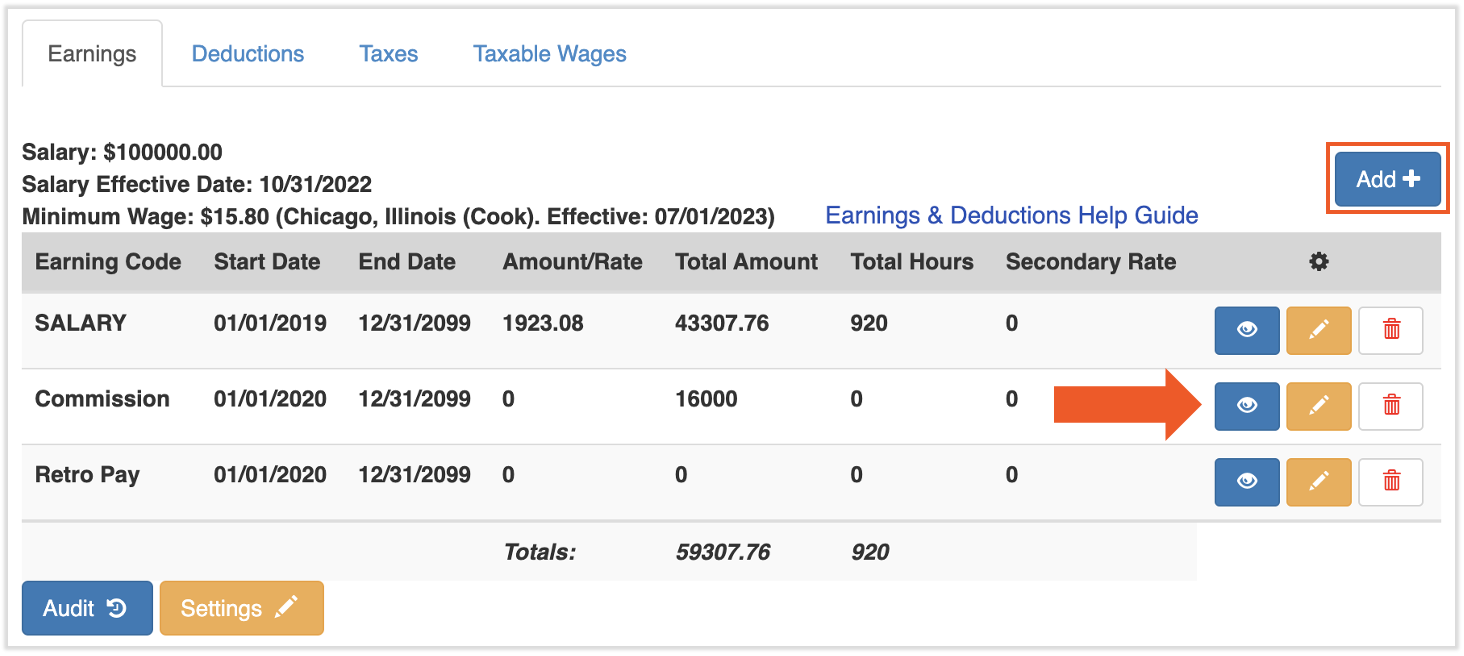
Resultado previsto: Los ingresos recurrentes aparecen en la lista de ganancias recurrentes del empleado con la Fecha de inicio y la Fecha de finalización que especificaste, y se incorporarán al paso Ganancias del empleado de cada nómina Regular dentro de ese rango de fechas.
Agregar o revisar una deducción recurrente
Usa esta opción para deducciones de beneficios, 401(k), HSA, deducciones de comidas y artículos similares que deberían retenerse en cada período de pago Regular. Para deducciones ordenadas por la corte, consulta Configurar un embargo, manutención de hijos, gravamen o embargo.
Se deben agregar o actualizar deducciones recurrentes antes de seleccionar Obtener vista previa en una nómina. Los cambios realizados después de la vista previa no aparecerán en esa ejecución de nómina.
- Ve a la página Equipo o usa la barra Buscar empleados. Selecciona un empleado.
- Cuando selecciones Equipo en Nómina Toast, deberías ver una URL que comienza con payroll.toasttab.com. Visita Nómina Toast en Toast Web para conocer cómo funciona la nueva navegación de Nómina Toast.
- Selecciona Recurrente desde el lado izquierdo de la pantalla.
- Desplázate por debajo del gráfico y selecciona la pestaña Deducciones. Las deducciones activas se identifican por la Fecha de inicio y la Fecha de finalización. Cuando se abre una nómina, todas las deducciones activas se llevan al paso Ganancias del empleado del proceso de nómina.
- Para ver la configuración de una deducción recurrente, selecciona el ícono de globo ocular junto a ella.
- Para agregar una deducción recurrente, selecciona el botón Agregar + y completa los siguientes campos antes de seleccionar Guardar:
- FEIN: La mayoría de los empleados trabaja con un solo FEIN. Ajusta en consecuencia.
- Deducción: El código de deducción correcto debe aparecer aquí. Si el código de deducción que necesitas no existe (por ejemplo, un nuevo plan 401(k) o un nuevo beneficio), consulta Agregar un nuevo código de ganancia o código de deducción.
- Proveedor: Se usa cuando se envía una deducción a un proveedor de terceros. Consulta Nómina Toast: Configurar proveedores.
- Fechas de inicio y finalización: Ajusta estas fechas para permitir deducciones recurrentes. Las fechas de finalización se pueden establecer con mucha anticipación (año 2099) para que no desaparezcan de las deducciones recurrentes del empleado.
- (%) o Monto: El monto o porcentaje del pago a deducir con cada nómina. Usa cualquiera de los campos, pero no ambos. Uno se dejará en 0.
- Límite/objetivo: Ingresa el monto total que se deducirá con el tiempo. Si lo dejas como -99, no hay límite y este campo está en blanco (en lugar de usar un 0, lo que podría indicar lo contrario).
- Límite ajustado: No edites este campo. Una vez guardada la deducción, el límite ajustado copia del límite o objetivo. Cada vez que esta deducción se procesa en una nómina, el límite ajustado se reduce automáticamente en el monto o porcentaje del monto. Puedes usar este número para hacer un seguimiento de cuánto de la deducción total queda por retener. Una vez que el límite ajustado llegue a 0, la deducción recurrente finalizará.
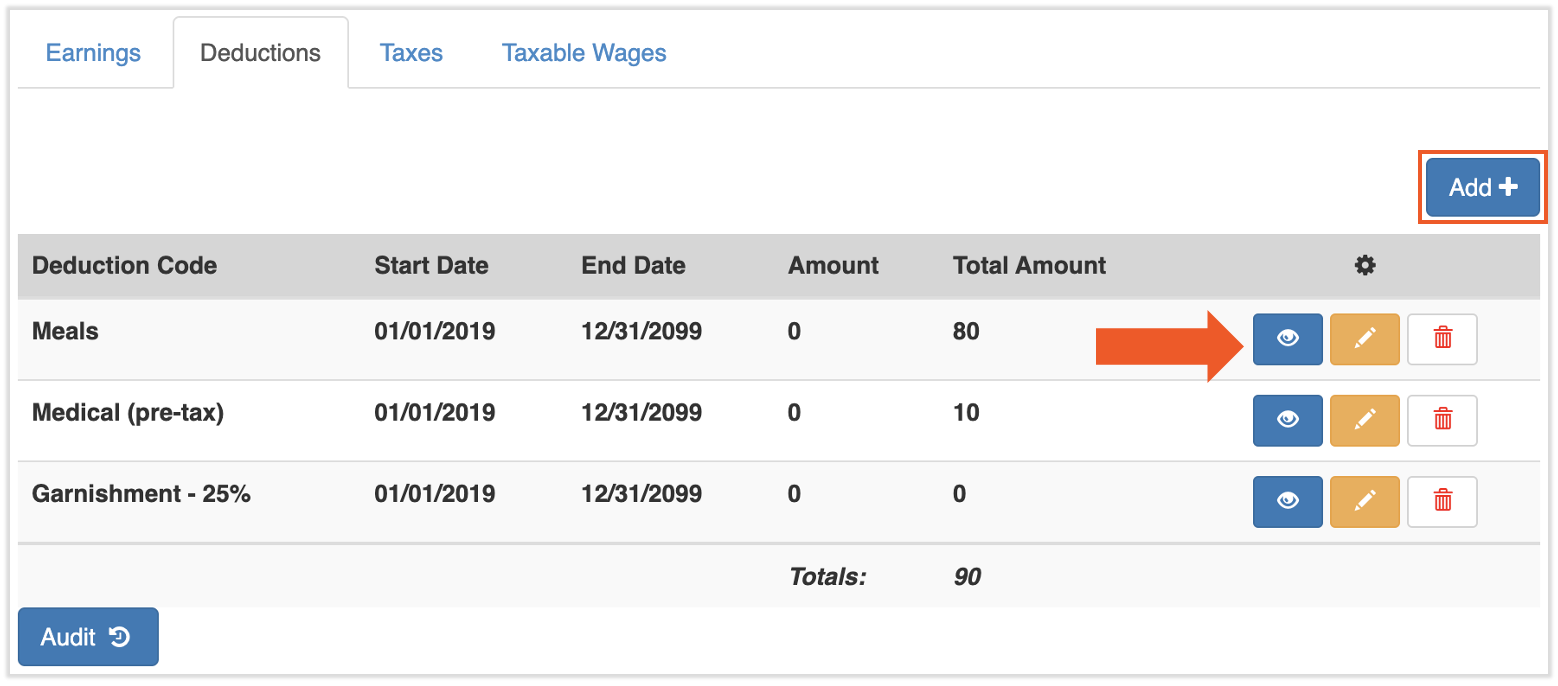
Resultado previsto: La deducción recurrente aparece en la lista de deducciones recurrentes del empleado con la Fecha de inicio, la Fecha de finalización y el monto o porcentaje que especificaste. Se aplicará en cada nómina Regular dentro de ese rango de fechas, siempre que el empleado gane lo suficiente en ese período de pago para cubrirla.
Configurar un embargo, manutención, gravamen o embargo
Si usted recibió una orden de manutención, orden de embargo, gravamen o embargo que ordena a un empleador que retenga fondos de un empleado, no ingrese la deducción usted mismo. El servicio de atención al cliente de Nómina Toast las configura desde la orden judicial para garantizar que el pedido se siga correctamente y se retengan los montos correctos.
Qué hacer:
- Verifica que el empleado aún esté en tu empresa. Si el empleado ya no trabaja para tu negocio, notifica a la agencia que envió el embargo. No tienes la obligación de cobrarle el salario a un ex empleado.
- Selecciona el punto de chat azul en la esquina inferior derecha de cualquier página de Nómina Toast.
- Envía el aviso de embargo completo al servicio de atención al cliente, incluidas todas las páginas y documentos respaldatorios.
- Espera la confirmación de que se configuró la deducción recurrente. Después de la configuración, la deducción se aplicará en cada período de pago Regular (no en nóminas suplementarias o fuera del ciclo) hasta que se complete el pedido.
Importante: Si se incluye cualquier hoja de trabajo u hoja de respuestas con la orden judicial, es responsabilidad del cliente completarlas y devolverlas. Nómina Toast no puede aconsejar cómo o si completar esas páginas.
Nota: Nómina Toast no establece órdenes médicas de manutención de niños ni gravámenes que carezcan de orden judicial. Para obtener más detalles sobre cómo funcionan los embargos, qué tipos se admiten y cómo se remiten los pagos, consulta Nómina Toast: Preguntas frecuentes sobre embargos salariales y Nómina Toast: Remisión de pagos de manutención infantil.
Resultado previsto: Una vez que el servicio de atención al cliente confirma la configuración, el embargo aparece como una deducción recurrente en el perfil del empleado y se retendrá automáticamente en cada nómina Regular hasta que el pedido se complete o finalice.
Agregar un nuevo código de ingresos o código de deducción (p. ej., bono, 401(k), médico)
Los códigos de ingresos y de deducciones se configuran a nivel de cuenta, no en nóminas individuales. Si aún no existe un código (por ejemplo, no ves “Bonificación” en tus opciones de ingresos, o necesitas un nuevo código de deducción 401(k), debes solicitarlo al servicio de atención al cliente para poder usarlo.
Para solicitar un nuevo código de ganancia (bonificación, kilometraje, comisión, etc.):
- Completa el formulario de solicitud de código de ganancia. Nota: Por el momento, Nómina Toast no está disponible en Quebec. Una versión en francés de este formulario estará disponible cuando el producto se lance en tu región.
- Envía el formulario completado al servicio de atención al cliente a través del punto de chat azul en la esquina inferior derecha de cualquier página de Nómina Toast.
- Espera el correo electrónico de confirmación del servicio de atención al cliente. Una vez recibido, puedes usar el nuevo código de ganancia de inmediato.
Nota: Nómina Toast no admite un monto máximo en códigos de ingresos. Si necesitas limitar una bonificación u otros ingresos, deberás hacer un seguimiento manual del límite.
Para solicitar un nuevo código de deducción (médico, odontológico, oftalmológico, 401(k), HSA, etc.):
- Completa el formulario de solicitud de código de deducción. Nota: Por el momento, Nómina Toast no está disponible en Quebec. Una versión en francés de este formulario estará disponible cuando el producto se lance en tu región.
- Envía el formulario completado al servicio de atención al cliente a través del punto de chat azul en la esquina inferior derecha de cualquier página de Nómina Toast.
- Espera el correo electrónico de confirmación del servicio de atención al cliente. Una vez recibido, puedes usar el nuevo código de deducción de inmediato.
Importante: Si un código de deducción se configuró incorrectamente o no se retiene correctamente, no ajustes el existente, lo que puede crear complicaciones impositivas. En su lugar, ponte en contacto con el servicio de atención al cliente a través del punto de chat azul para desactivar el código antiguo y crear una versión corregida. Consulta Cambiar la tasa impositiva de un código de ganancia o deducción en Nómina Toast.
Nota: Si usas SimplyInsured para gestionar beneficios, el método del formulario de solicitud solo se aplica a las deducciones que SimplyInsured no admite. En el caso de los beneficios respaldados por SimplyInsured, envía un correo electrónico a toastsupport@simplyinsured.com.
Resultado previsto: Una vez que el servicio de atención al cliente confirma que el nuevo código está configurado, puedes aplicarlo como entrada única en el paso Ganancias del empleado o agregarlo como artículo recurrente en el perfil del empleado.
Preguntas frecuentes
¿Por qué mi deducción no aparece en la nómina?
Las razones más comunes son relacionadas con el tiempo:
-
- Agregaste la deducción después de seleccionar Vista previa. Se deben realizar cambios recurrentes en los ingresos y las deducciones antes de abrir la nómina. Si agregaste o cambiaste una deducción recurrente después de seleccionar Vista previa, no aparecerá en esa nómina. Restablece la nómina para incorporar el cambio, o agrega el artículo como una entrada única en esta nómina y actualiza el perfil recurrente para la próxima ejecución.
- La fecha de inicio de la deducción es posterior a la fecha de liquidación. La deducción solo se aplica a las nóminas cuya fecha de liquidación es anterior o igual a la fecha de inicio de la deducción.
- La Fecha de finalización de la deducción ya pasó. Revisa el campo Fecha de finalización en la deducción recurrente.
También pregunté: "la deducción no se aplicó", "no se aplica", "agregué la deducción, pero no aparece".
¿Por qué mi deducción muestra USD 0?
La razón más común es que el empleado no ganó lo suficiente en este período de pago para cubrir la deducción. El sistema puede retener parte de la deducción, nada de ella o toda ella dependiendo de las ganancias disponibles.
Otras razones:
-
- Las propinas están excluidas de los cálculos de embargos por normativa federal. Si el cheque de pago es principalmente propina, la deducción puede mostrar USD 0 aunque se le haya pagado al empleado. (Consulta Nómina Toast: Preguntas frecuentes sobre embargos de salarios).
- La deducción se agregó después de seleccionar Vista previa. Restablece la nómina para incorporar el cambio recurrente, o agrega la deducción como una entrada única en esta nómina.
- La deducción alcanzó su límite/objetivo. Una vez que el límite ajustado alcanza 0, la deducción recurrente detiene la retención.
También preguntamos: "el embargo muestra una deducción de USD 0", "el embargo no se está calculando", "no retuvo nada esta nómina".
¿Cómo agrego una bonificación al cheque de pago de alguien?
Agrégalo como ganancia única en el paso Ganancias del empleado usando un código de ganancia adicional.
Si no ves una opción de bonificación cuando seleccionas + Agregar ganancia, tu cuenta todavía no tiene configurado un código de ganancia de bonificación. Consulta Agregar un nuevo código de ingresos o código de deducción para crear un nuevo código de ingresos y usarlo en nómina.
También se le preguntó como: "¿Cómo agrego una bonificación mientras proceso la nómina?" "¿Qué opción de ingresos selecciono para una bonificación?" "No veo la bonificación en mis opciones de ingresos".
¿Puedo editar o eliminar un código de ingresos?
Puedes editar o eliminar una sola ganancia en una nómina específica usando el menú de desbordamiento (...) en el paso Ganancias del empleado (ver Editar una ganancia única).
No puedes editar ni eliminar el código maestro de ingresos (el código subyacente en tu base de datos de Nómina Toast) tú mismo. Para desactivar o cambiar un código maestro de ganancia o deducción, incluido el cambio de su tasa impositiva, ponte en contacto con el servicio de atención al cliente a través del punto de chat azul. La práctica recomendada es inactivar el código antiguo y crear una versión corregida en lugar de editar la existente, para evitar complicaciones fiscales.
¿Puedo agregar o editar una ganancia o deducción dentro de un Quick Calc?
No. Las ganancias y deducciones no se pueden agregar ni editar en un cálculo rápido. Los cálculos rápidos se utilizan para registrar transacciones fuera de Nómina Toast, normalmente para cumplir con la normativa fiscal, y las funciones de agregar o editar no están disponibles allí. El cálculo rápido aparece en la nómina como un ingreso o deducción que el empleado ya procesó y debe incluirse aunque no "se realice" en la nómina misma real. Consulta Nómina Toast: Emitir cuentas manuales (calculos rápidos).
¿Cuál es la diferencia entre recurrente y única?
Aparece un artículo recurrente en cada ejecución de nómina y se configura en el perfil del empleado en Recurrente. (Descubre cómo funciona la nueva navegación de Nómina Toast visitando Navegar por Nómina Toast dentro de Toast Web). Un artículo único solo aparece en la nómina específica a la que lo agregas y se configura en el paso Ganancias del empleado dentro de una nómina abierta. Usar recurrente para pagos continuos (Salario, Regular, Propinas) y retenciones continuas (401(k), beneficios, embargos). Usa una única vez para bonificaciones, tarifas uniformes, ajustes de comidas y cualquier cambio que no deba repetirse.
¿Por qué la deducción de manutención de los hijos del empleado dejó de retenerse?
En muchos casos, el pedido se completó. Otras posibilidades:
-
- El embargo se configuró con una fecha de finalización que ya pasó.
- El tribunal o el acreedor cancelaron o cancelaron el embargo.
- Los salarios de los empleados en esta cuenta eran en su mayoría propinas, que la regulación federal excluye de los cálculos de embargo.
Para investigar un caso específico, ponte en contacto con el servicio de atención al cliente a través del punto de chat azul. Consulta Nómina Toast: Preguntas frecuentes sobre embargos salariales para más detalles.
¿Puedo agregar una ganancia o deducción recurrente después de la vista previa?
No. Los cambios recurrentes realizados después de seleccionar Vista previa no aparecerán en la ejecución de nómina abierta. Tienes dos opciones:
-
- Usa Acciones avanzadas > Restablecer nómina para borrar tus ediciones y reabrir la nómina, lo que generará el nuevo elemento recurrente.
- Agrega el artículo como entrada única en esta nómina y, luego, actualiza el perfil recurrente para que se aplique en la próxima ejecución.
Antes de contactar al servicio de atención al cliente
Algunos artículos realmente requieren la intervención del servicio de atención al cliente: órdenes judiciales, nuevas solicitudes de códigos de ingresos o deducciones y correcciones a códigos maestros. Para acelerar la resolución, reúne lo siguiente antes de enviar un mensaje a través del punto de chat azul:
- El nombre completo del empleado y el período de pago o la fecha del cheque afectados
- El código de ingresos o el nombre del código de deducción (o número de código, si se conoce)
- Una descripción de lo que está mal (por ejemplo, “la deducción muestra USD 0 en la cuenta de 5/8”, “se necesita un nuevo código de ganancia adicional”, “se recibió una orden de manutención de los hijos (ver adjunto)”)
- Una captura de pantalla del paso Ganancias del empleado o un perfil recurrente, si corresponde
- Para órdenes judiciales: el aviso de embargo completo, incluidas todas las páginas y hojas de cálculo
Para obtener detalles sobre lo que el servicio de atención al cliente puede y no puede hacer respecto de los embargos, consulta Nómina Toast: Preguntas frecuentes sobre embargos salariales.
Artículos relacionados
- Nómina Toast: Paso de ganancias del empleado
- Nómina Toast: Primeros pasos con los códigos de ganancia
- Nómina Toast: Primeros pasos con los códigos de deducción
- Nómina Toast: Preguntas frecuentes sobre embargos salariales
- Nómina Toast: Tiempo de ingresos y deducciones
Este contenido se publica con fines informativos y no tiene como propósito brindar asesoramiento legal, fiscal, de recursos humanos ni ningún otro tipo de recomendación profesional. Ponte en contacto con un abogado u otro profesional para recibir asesoramiento.