Nómina Toast: Preguntas frecuentes sobre el número de empleado y el código de acceso del POS
Última actualización: 24 sept 2026, 11:00 a.m.
| Recuerda, toda la información del empleado (excepto por horas y propinas) se ingresa y mantiene en Toast Payroll. La información luego se sincroniza con Toast Web. Es importante que la información se ingrese y edite en el lugar correcto. Usa Nómina Toast: Sincroniza la información con Toast Web para aprender dónde ingresar los datos del empleado. |
En este artículo, encontrarás:
Preguntas frecuentes sobre el número de empleado y el código de acceso del POS
¿Qué es un número de empleado en Toast Payroll?
Cuando contratas a un nuevo empleado, su número de empleado se genera automáticamente, pero puede ser cambiado (ver paso 4 en Toast Payroll: Nuevos empleados contratados (Guía para empleadores)). Este es su identificador único en Toast Payroll. Este identificador único también se envía a Toast Web y sirve como su ID de empleado de Toast Web (y código de acceso del POS a menos que se cambie).
¿Cuáles son los requisitos del número de empleado?
Primero, este número no puede ser un duplicado de ningún número de empleado existente en Toast Payroll. Además, para que este número funcione como un código de acceso para el POS, se deben ingresar de 3 a 8 dígitos durante el proceso de contratación. Si el número de empleado está fuera de ese rango, no podrá usar un dispositivo POS de Toast. Sin embargo, puedes cambiar el número de empleado después de que el proceso de contratación esté completo y su código de acceso no se verá afectado.
¿Cómo cambio el número de empleado en Toast Payroll?
- Selecciona la pestaña Equipo o utiliza la barra Buscar empleados para acceder al perfil del empleado.
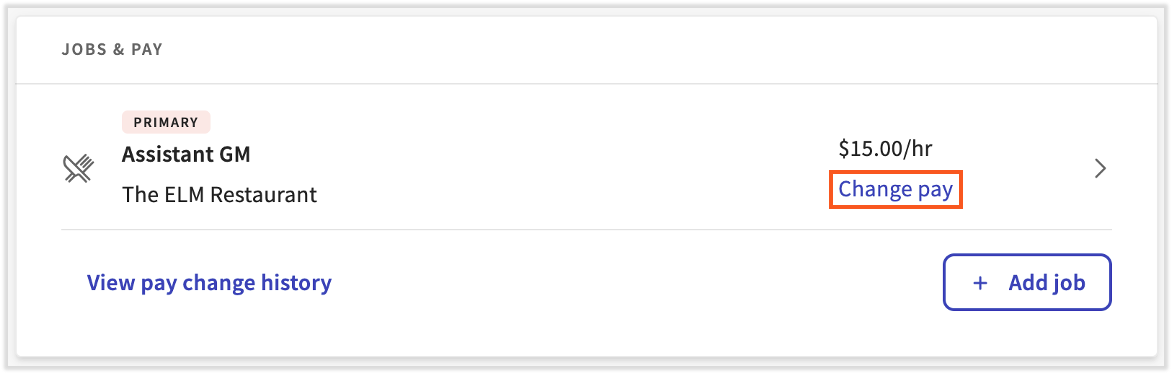
- Selecciona el > ícono de caret junto al trabajo principal.
- Elige Editar en la siguiente página.
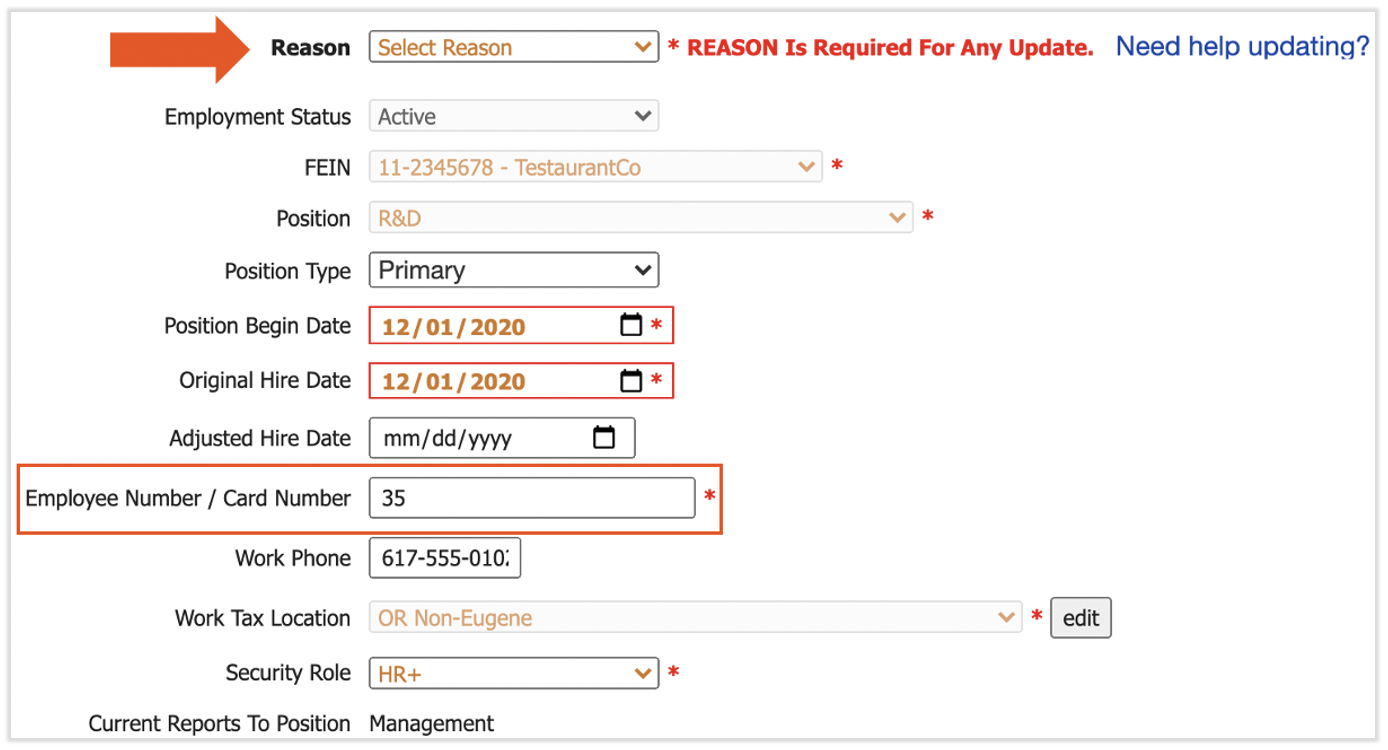
- Cada vez que realices una actualización en Posiciones, debes ingresar un Motivo. Selecciona Actualización Administrativa del menú desplegable Motivo.
- A continuación, edita el campo Número de Empleado / Número de Tarjeta. Solo puedes elegir un número que no esté ya asignado a un empleado en Toast Payroll.
- Selecciona Enviar en la parte inferior de la página para finalizar.
- El nuevo número de empleado se sincronizará con Toast Web como el número de identificación del empleado. Su código de acceso POS no se actualizará ya que esto se ha hecho fuera del proceso de contratación.
¿Cómo cambio el código de acceso POS de un empleado en Toast Web?
Haz clic aquí para aprender más sobre cómo actualizar los códigos de acceso de empleados en Toast Web.
Este contenido se publica con fines informativos y no tiene como propósito brindar asesoramiento legal, fiscal ni referido a recursos humanos, ni constituye ningún otro tipo de recomendación profesional. Para recibir asesoramiento, comunícate con un abogado u otro profesional.