Nómina Toast: Primeros pasos con las tareas pendientes del empleado
Última actualización: 9 oct 2026, 4:08 p.m.
| Los empleados de To Dos son diferentes de los de Nómina To Dos (estos ayudan a los administradores de nómina a configurar recordatorios para las próximas nóminas). |
- Empleado para hacer lo básico
- Crear un empleado para hacer
- Otorga a los empleados acceso a estos documentos
- Empleado para hacer informes
Empleado para hacer lo básico
Las tareas pendientes de los empleados se utilizan para enviar encuestas, mensajes y/o documentos a un empleado o grupo de empleados para su reconocimiento. Las notificaciones aparecerán en el panel cuando un empleado inicie sesión por primera vez en Nómina Toast. Una vez enviada una tarea pendiente, no se puede eliminar/deshacer.
Ejemplos comunes de tareas que los empleados pueden realizar incluyen:
- Encuesta a nuevos empleados sobre el tamaño del uniforme
- Actualizaciones del manual del empleado que necesitan aprobación del empleado
- Nueva política para que el personal de atención al público revise
- Comunicación con tus empleados
- Los documentos deben ser reconocidos o completados por empleados específicos
- Un aviso de comunicación sobre tasas de pago (estado de Nueva York)
Crear un empleado para hacer
- Para crear una tarea pendiente de un empleado, primero inicia sesión en Nómina Toast.
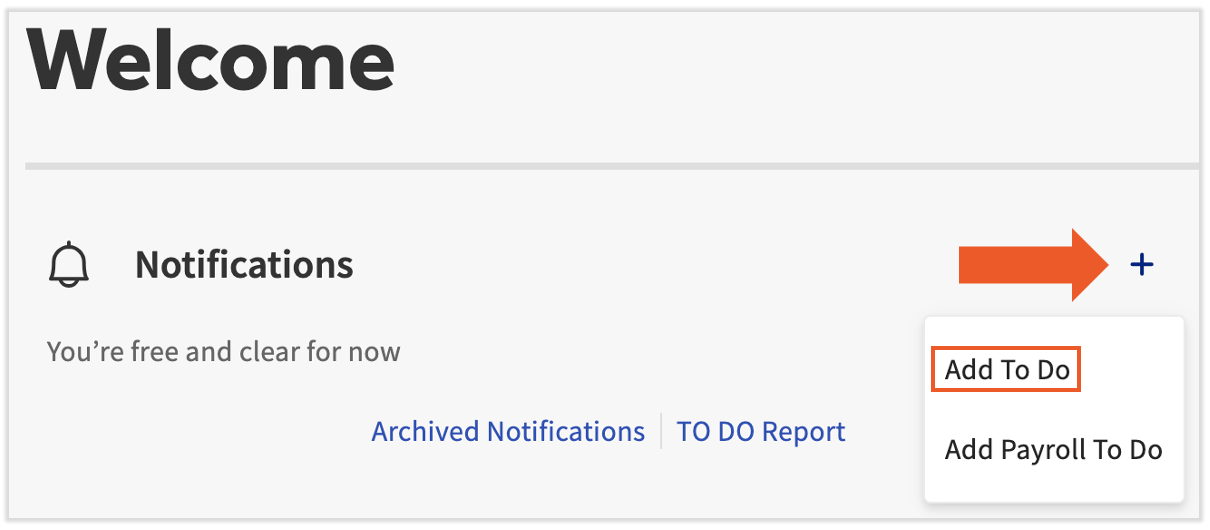
- Selecciona el signo +en el panel de nómina y, Agregar tarea en el menú desplegable.
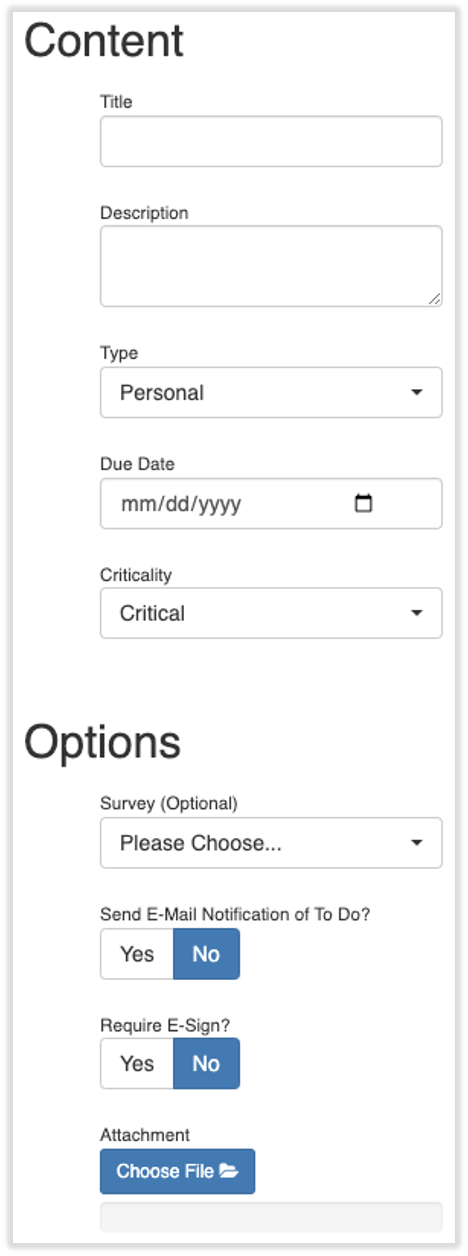
- A continuación, completa los siguientes campos aplicables:
- Agrega un título y una descripción. Los empleados verán estos dos campos.
- Indica el tipo de tarea pendiente, la fecha de vencimiento y la importancia crítica.
- Si esta tarea es una encuesta, elige tu encuesta en el menú desplegable. Deberás crear una encuesta para que aparezca aquí.
- Puedes elegir enviar una notificación por correo electrónico a los empleados que no inician sesión en el sistema con frecuencia y es posible que necesiten una instrucción para saber que un elemento de acción los está esperando.
- Selecciona si quieres exigirles a los empleados que firmen electrónicamente el documento que confirma que lo revisaron. Obtén más información sobre la firma electrónica y aquí está,.
- Si es necesario, adjunta un documento aplicable.
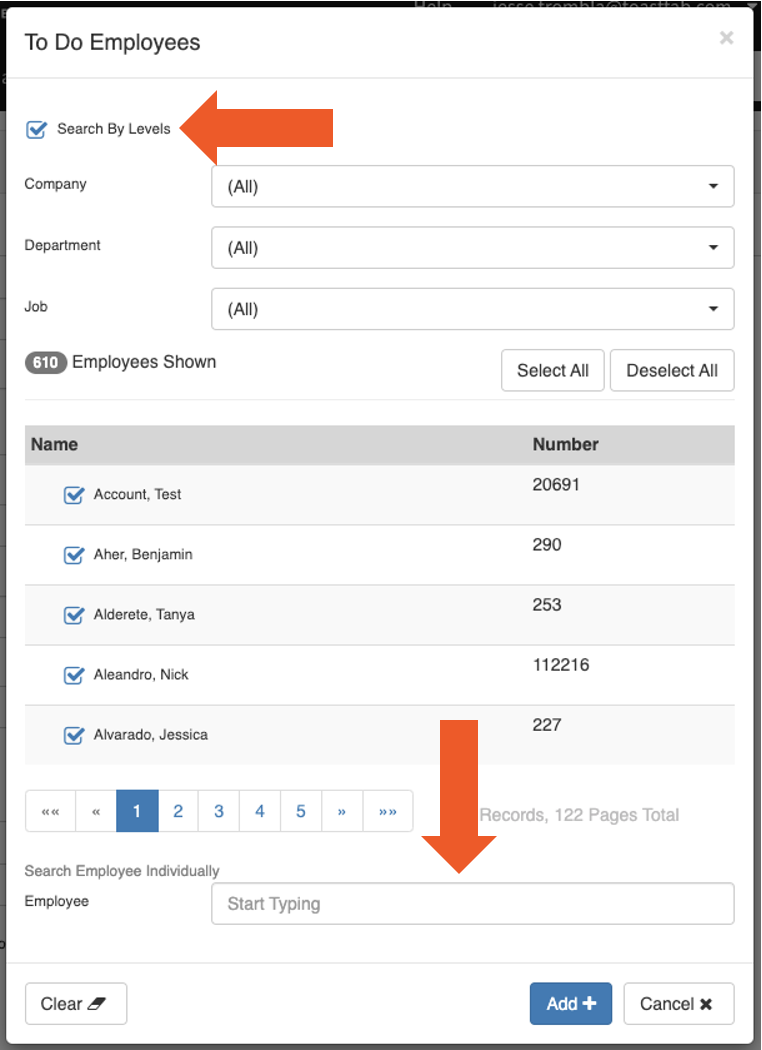
- El siguiente paso es asignarlo a los empleados. Elige el botón Seleccionar debajo de Empleados.
- Puedes asignar una tarea pendiente a todos los empleados, a un grupo específico de empleados o a un empleado individual. Selecciona Buscar por nivelespara ampliar la vista y facilitar la ubicación de grupos específicos de empleados. Presiona Agregar + cuando hayas terminado.
- Puedes asignar una tarea pendiente a todos los empleados, a un grupo específico de empleados o a un empleado individual. Selecciona Buscar por nivelespara ampliar la vista y facilitar la ubicación de grupos específicos de empleados. Presiona Agregar + cuando hayas terminado.
- Por último, selecciona Guardar en la parte inferior de la página, y la notificación Tarea pendiente se enviará al empleado que seleccionaste.
- Una vez que se reconoce o elimina una notificación del panel de control de un empleado, no se puede recuperar. Sin embargo, puede estar resentido.
Otorga a los empleados acceso a estos documentos
Es posible que necesites una firma electrónica en el documento, pero una vez que el empleado lea y firme la tarea pendiente, solo la firma se cargará automáticamente en su Biblioteca de documentos (Mi Perfil > Impuestos y documentos). (Descubre cómo funciona la nueva navegación de Nómina Toast visitando Navegar por Nómina Toast dentro de Toast Web). El documento no se cargará en su perfil.
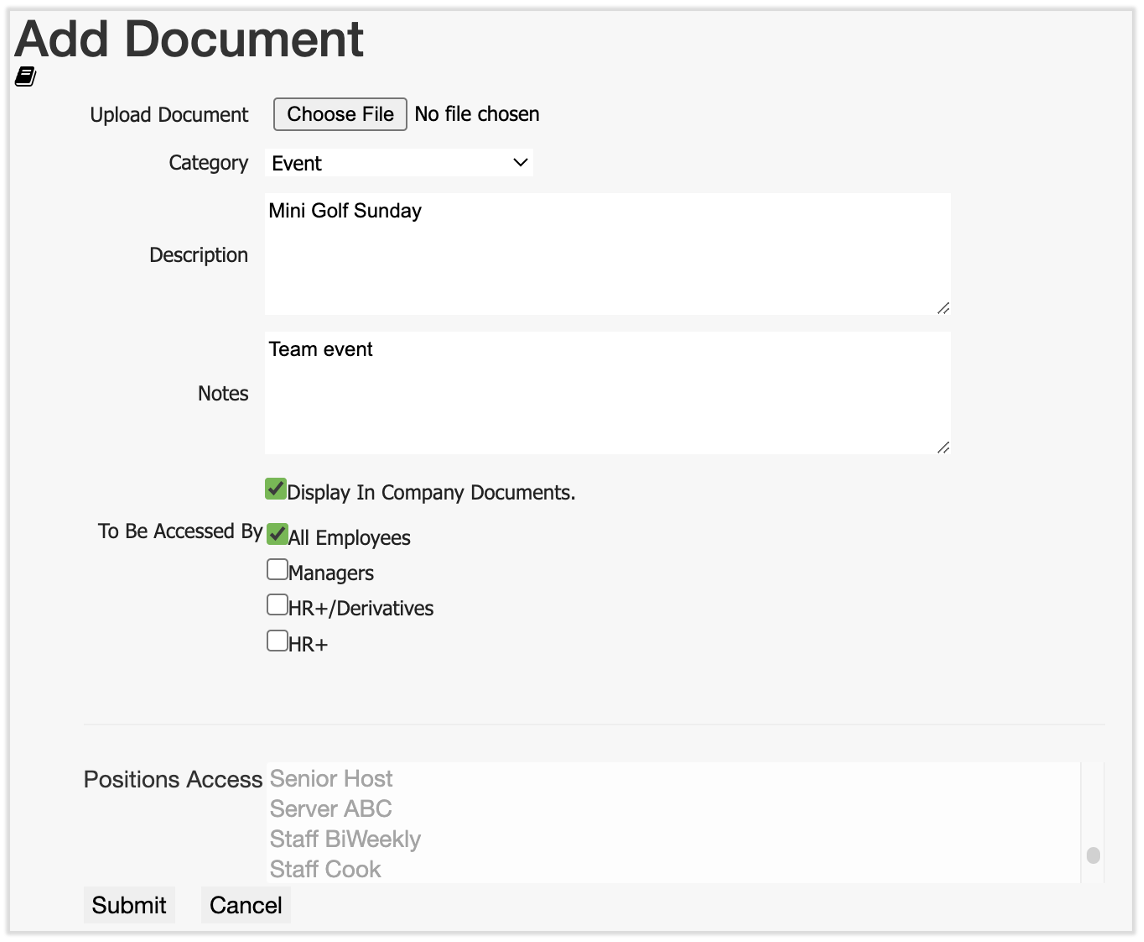
- Para agregar el documento a la página Documentos de la empresa del empleado en su perfil, ve a Documentosen la barra de navegación de la izquierda.
- Si no ves Documentos en el lado izquierdo de la pantalla, selecciona Nómina en la barra de navegación de Toast Web de la izquierda para que aparezca la barra de navegación de Nómina Toast.
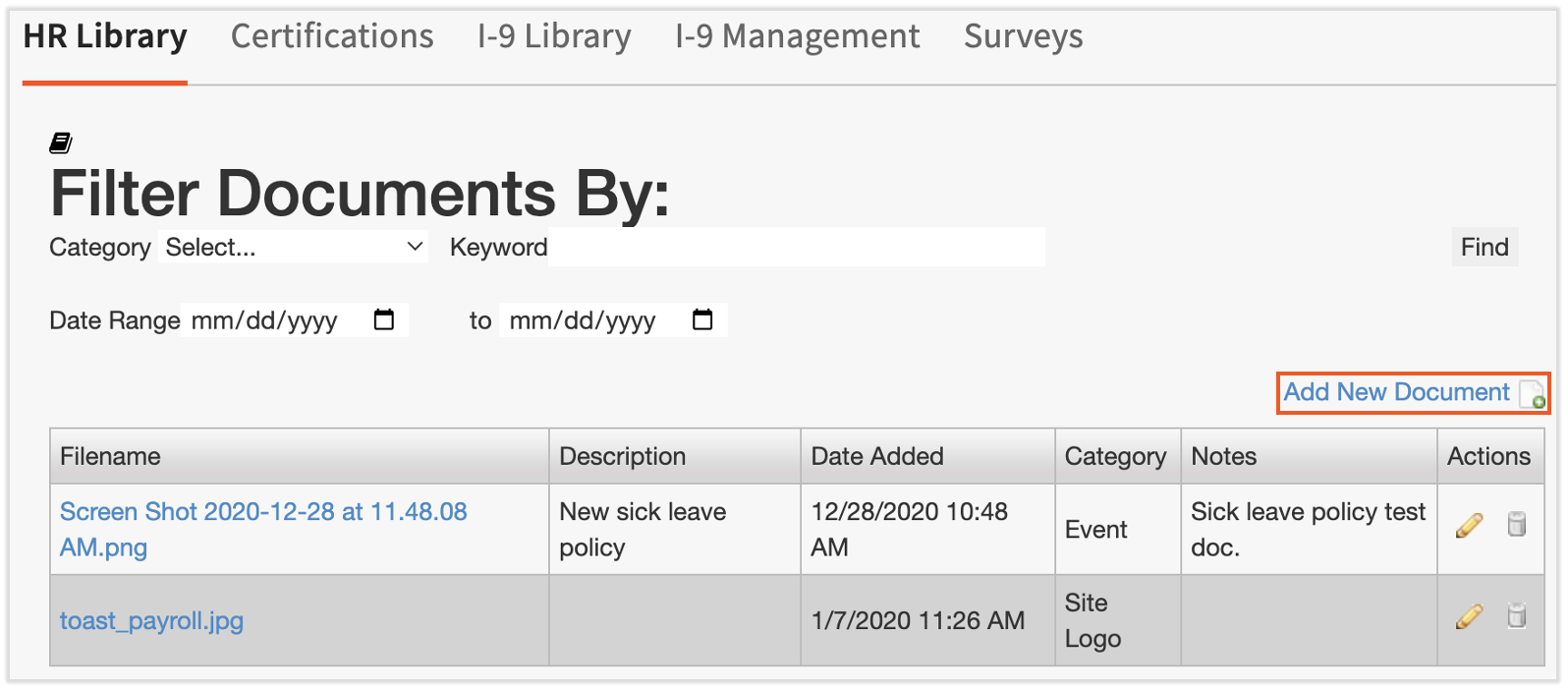
- Selecciona Agregar nuevo documento.
- Comienza cargando el archivo en la parte superior de la página.
- Elige una categoría y agrega una descripción o notas opcionales, aunque estos campos son útiles para distinguir diferentes documentos de la empresa.
- En este caso, asegúrate de revisar Mostrar en documentos de la empresa.
- Luego, elige el rol de seguridad O los puestos a los que debería ser accesible este documento. Marca una o más de las casillas de Acceso opcional O desmarca todas las casillas y selecciona las posiciones correspondientes para este documento. Mantener presionado Ctrl/comando mientras haces clic te permite seleccionar más de una posición. Presiona Enviar cuando hayas terminado.
- Los empleados siempre pueden encontrar este documento en Mi perfil > Impuestos y documentos > Documentos de la empresa.
Empleado para hacer informes
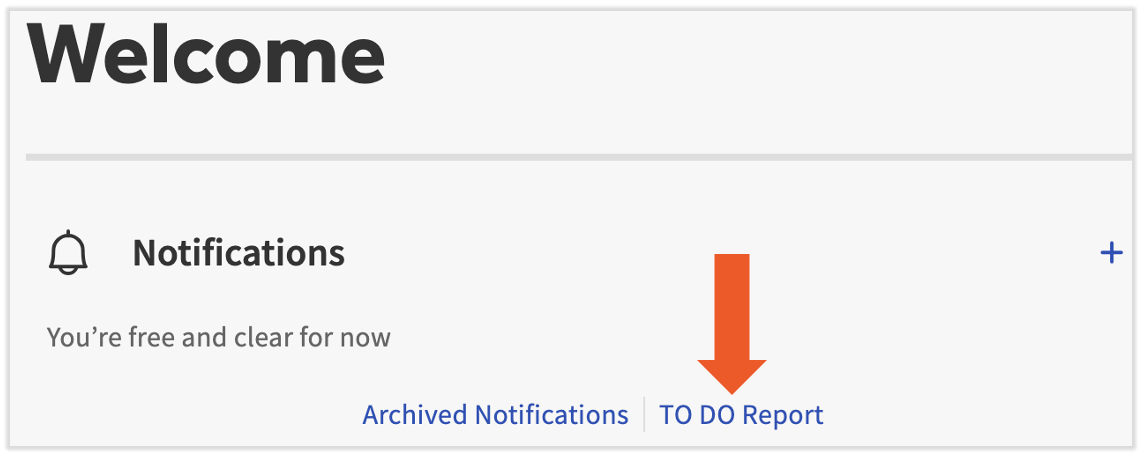
Para revisar la finalización de las tareas, selecciona el informe de tareas desde el panel de Nómina Toast.
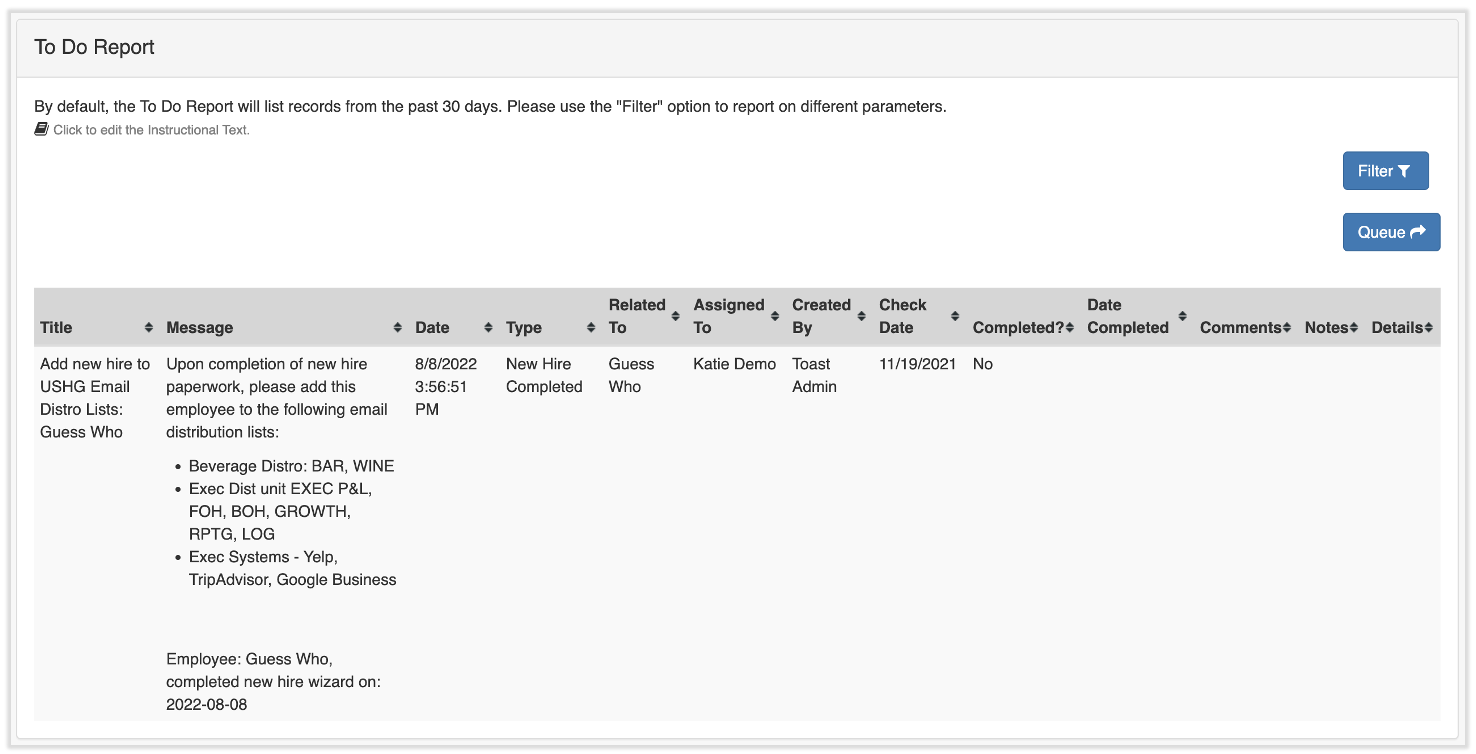
Esta página se filtra automáticamente a los últimos 30 días. Usa el botón Filtro para cambiar fechas o buscar tareas específicas. Usa el botón Cola para exportar los datos a un archivo .CSV.
Este contenido se publica con fines informativos y no tiene como propósito brindar asesoramiento legal, fiscal, de recursos humanos ni ningún otro tipo de recomendación profesional. Ponte en contacto con un abogado u otro profesional para recibir asesoramiento.