Nómina Toast: Número federal de identificación del empleador (FEIN)
Última actualización: 13 oct 2026, 5:19 p.m.
- Resumen del FEIN
- FEIN vs. Otros números de identificación
- Localiza tu FEIN
- Actualiza los detalles de tu FEIN
Resumen de FEIN
El IRS emite los Números Federales de Identificación del Empleador (FEIN) a asociaciones, corporaciones, organizaciones sin fines de lucro y otras entidades comerciales. Estos números de identificación se pueden obtener en el IRS. Por lo general, los negocios necesitarán un nuevo FEIN cuando haya cambiado su titularidad o estructura, pero el IRS puede ayudarte a determinarlo. Nómina Toast no puede cambiar tu FEIN.
Los FEIN se ingresan en Nómina Toast durante el proceso de incorporación. Los clientes no pueden iniciar operaciones con Nómina Toast sin un FEIN.
FEIN vs. Otros números de identificación
Un FEIN se emite en el siguiente formato: XX-XXXXXXX. En cambio, los números de seguro social (SSN) se emiten como XXX-XX-XXXX. Ambos números son números de identificación del contribuyente. Nómina Toast requiere que cada entidad comercial tenga un FEIN; no se pueden usar otros números similares (por ejemplo, SSN e ITIN) en su lugar.
Los estados y localidades también emiten números de identificación de contribuyente, comúnmente conocidos como Números de Identificación del Empleador (EIN). Puede ser diferente de tu FEIN, pero a veces puede coincidir. Obtén más información sobre los números de cuenta estatales en Nómina Toast: Obtener ayuda con los números de cuenta fiscal estatal.
Localiza tu FEIN
Los usuarios de RR. HH.+ pueden localizar un FEIN en Nómina Toast en Configuración > Nómina > Cuentas fiscales. Selecciona un FEIN en el menú desplegable de la izquierda o usa los campos Todo y/o Activo para filtrarlo. Selecciona el botón Ver detalles para abrir una pantalla con los detalles de la cuenta fiscal federal de tu FEIN.
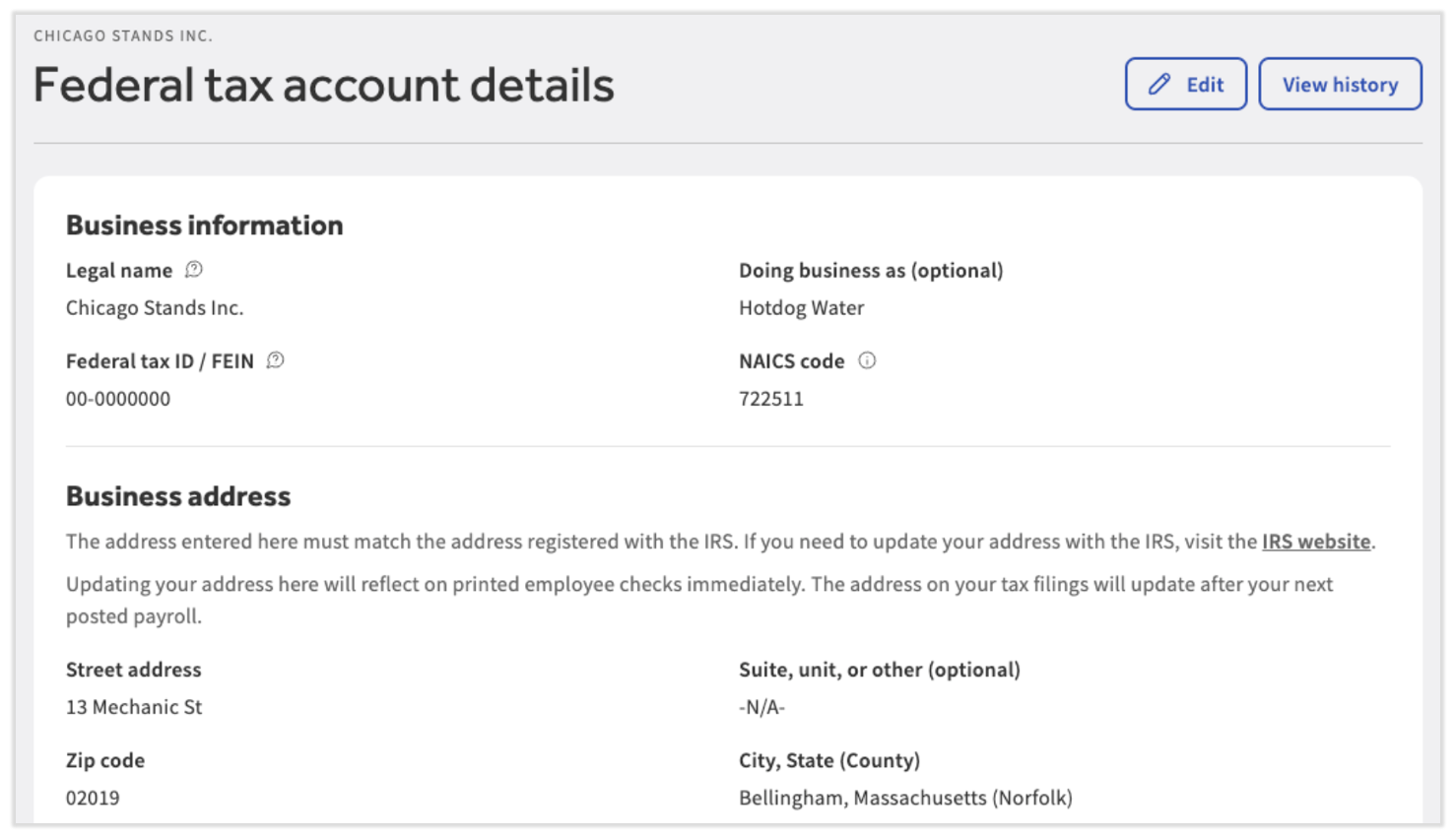
Cada FEIN está asociado con cuentas fiscales estatales en cada estado en el que opera el negocio. Consisten en una cuenta de impuesto del seguro de desempleo y una cuenta de retención cuando corresponde (los estados sin impuesto sobre la renta no tendrán una cuenta de retención). Para determinar si a Nómina Toast le falta información de una cuenta fiscal estatal, consulta el Centro de Impuestos, al que se puede acceder a través de Impuestos. Completar todas las tareas de esta página cada trimestre es fundamental para evitar posibles penalizaciones o cargos en las declaraciones de impuestos trimestrales o anuales.
Actualiza los detalles de tu FEIN
Si vas a Configuración > Nómina > Cuentas fiscales y seleccionas Ver detalles del FEIN seleccionado, puedes seleccionar Editar para actualizar el nombre del DBA, la dirección postal y la información de contacto fiscal de los FEIN en tu base de datos. Esto te permite mantener la visibilidad de lo que Nómina Toast tiene archivado y actualizar tu información en cualquier momento que lo necesites.
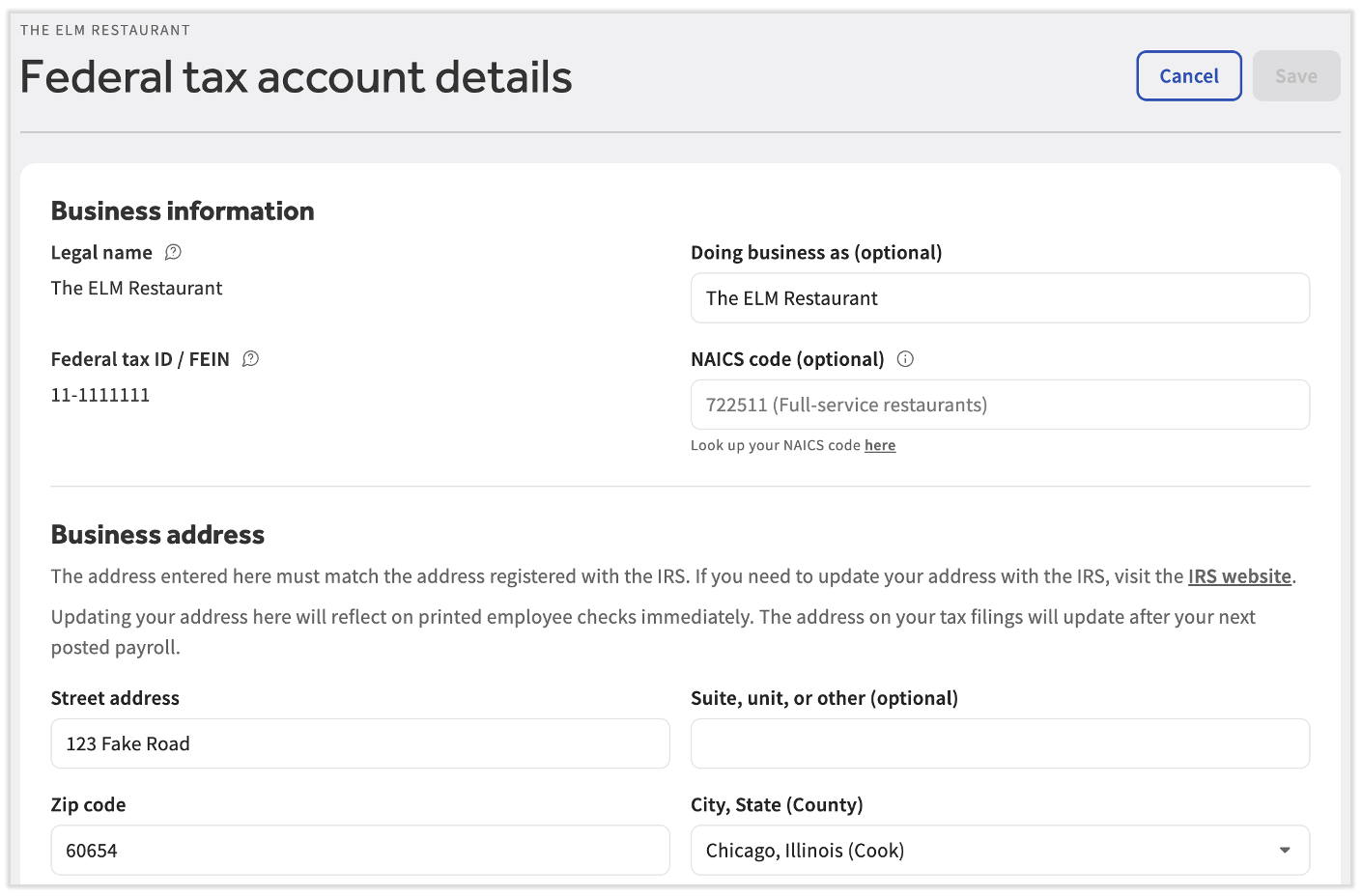
Nota: Si tu FEIN o nombre legal son incorrectos, avisa a Nómina Toast de inmediato para corregirlos y determinar los pasos posteriores. Los clientes no pueden editar los números federales de identificación del empleador (FEIN) y los nombres legales del negocio en Nómina Toast. Además, si crees que otros campos no editables son incorrectos, comunícate con nosotros.
Nota: Si deseas un nuevo FEIN, comienza completando el formulario de solicitud y enviándonoslo a través del punto azul en la esquina inferior derecha de cualquier página de Nómina Toast. Un representante de ventas se pondrá en contacto contigo pronto para continuar con este proceso. Nota: Por el momento, Nómina Toast no está disponible en Quebec. Una versión en francés de este formulario estará disponible cuando el producto se lance en tu región.
Este contenido se publica con fines informativos y no tiene como propósito brindar asesoramiento legal, fiscal, de recursos humanos ni ningún otro tipo de recomendación profesional. Ponte en contacto con un abogado u otro profesional para recibir asesoramiento.