Toast Retail: Importar facturas
Última actualización: 28 sept 2026, 4:33 p.m.
Aprenda a ahorrar tiempo y garantizar un inventario preciso importando sus facturas de proveedores a Toast Retail.
- Descripción general de la importación de facturas
- Cargue su factura en Toast Retail
- Escaneo de facturas con IA
- Ingesta (importación) de facturas por correo electrónico
- Recursos adicionales
Toast Retail: Descripción general de la importación de facturas
La función de importación de facturas para Toast Retail simplifica la gestión de facturas al permitirle cargar sus archivos de factura directamente en Toast Web. Esto minimiza la entrada manual de datos y los errores, y garantiza registros financieros y de inventario precisos.
Aunque Toast Retail cuenta con plantillas de importación para proveedores específicos (actualmente UNFI, Kehe y Hackney), puede importar facturas de cualquier proveedor utilizando una plantilla genérica.
- Los formatos de archivo admitidos incluyen CSV y Excel (.xlsx).
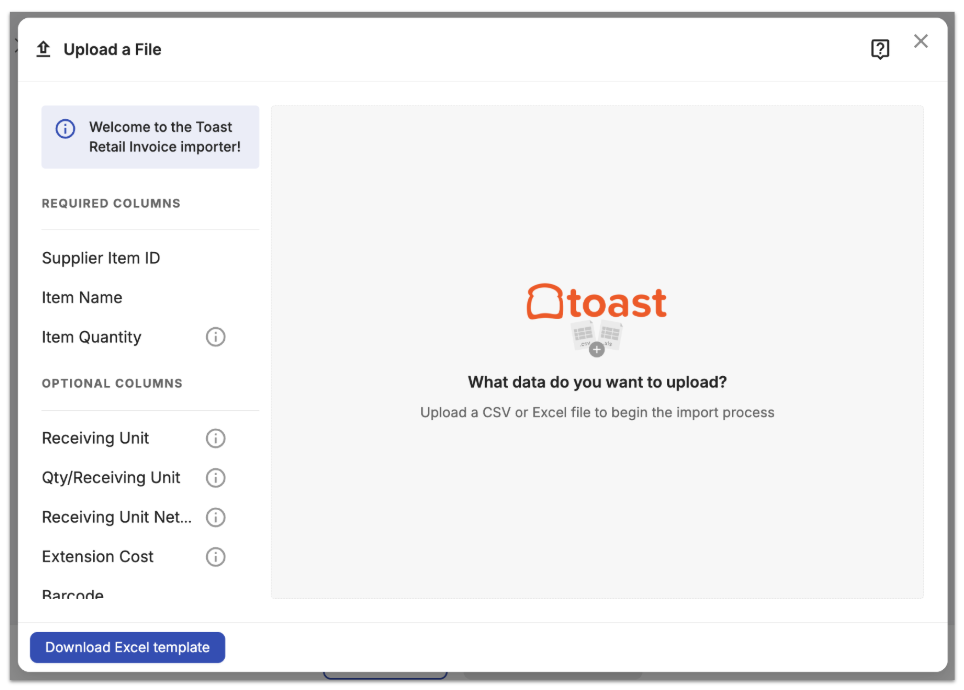
- Asegúrese de que su archivo incluya encabezados de columna claros para estos campos obligatorios:
- ID de artículo del proveedor
- Nombre del artículo
- Cantidad del artículo
- La herramienta de importación de facturas también reconocerá los siguientes encabezados de columna:
- Unidad de recepción
- Cant./Unidad de recepción
- Costo neto de la unidad de recepción
- Costo de extensión
- Código de barras
- PLU
- Precio (minorista)
Si lo desea, puede descargar y utilizar esta plantilla de Excel para la importación de su factura: Plantilla de factura de Toast Retail.
Cuando importe una factura, Toast Retail procesará el archivo y lo validará con su catálogo de artículos en Toast. El sistema intentará hacer coincidir los artículos de la factura por el ID de artículo del proveedor, pero también buscará coincidencias secundarias utilizando una coincidencia exacta de código de barras o coincidencias parciales de ID de artículo del proveedor/código de barras (sin ceros iniciales ni dígitos de control). Si hay artículos sin coincidencia u otros problemas potenciales, tendrá la oportunidad de revisarlos y resolverlos antes de finalizar su importación.
Cargue su factura en Toast Retail
Para cargar su factura en Toast Retail, siga estos pasos:
- En Toast Web, navegue a Toast Retail > Purchasing > Purchasing & Receiving.
- Seleccione Receive via invoice.
- Ingrese su Supplier.
- Seleccione Import file, luego seleccione Next en la ventana emergente Import invoice.
- Si hay una plantilla de proveedor específica disponible para el proveedor seleccionado, verá la opción para usarla. Si tiene problemas al usar la plantilla con su factura, siempre puede desactivar la plantilla y usar una plantilla genérica en su lugar.
- Si hay una plantilla de proveedor específica disponible para el proveedor seleccionado, verá la opción para usarla. Si tiene problemas al usar la plantilla con su factura, siempre puede desactivar la plantilla y usar una plantilla genérica en su lugar.
- Arrastre y suelte el archivo que desea importar en el centro de la pantalla, o haga clic en el centro de la pantalla para ver el selector de archivos de su computadora.
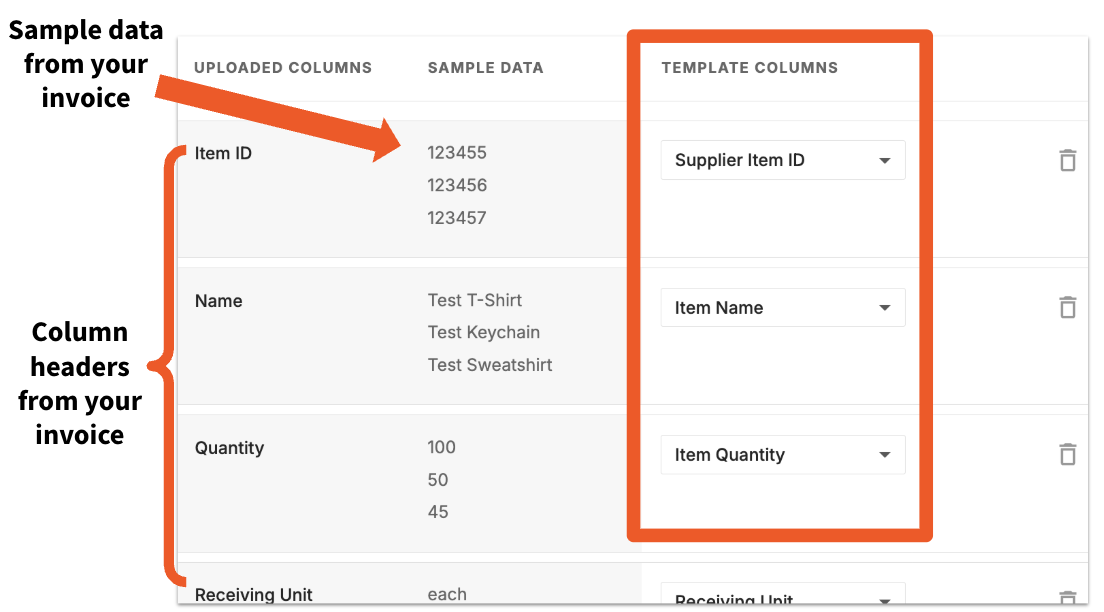
- Revise sus asignaciones de columnas. Toast intentará asignar automáticamente las columnas de su factura a las Template columns, pero si hay columnas sin asignar, puede usar el menú desplegable para seleccionar la coincidencia adecuada. También puede usar el trash can icon para excluir una columna de su importación. Si hay algún problema con su archivo de importación, aparecerá un mensaje con detalles adicionales. Seleccione Next cuando haya terminado.
- Toast Retail hará coincidir los artículos entrantes con su catálogo de artículos.
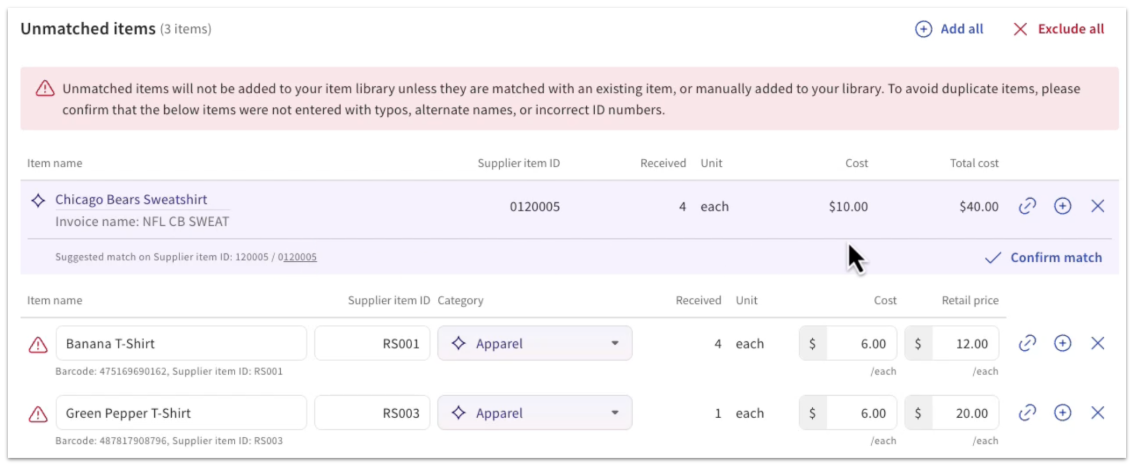
Cualquier Unmatched items se mostrará en la parte superior de la página de creación de facturas.
- Si hay una coincidencia suggested disponible (por ejemplo, para artículos que ya están en su catálogo de artículos pero que aún no se han comprado a este proveedor), Toast mostrará la información del artículo. Seleccione Confirm match si la coincidencia sugerida es correcta.
- Si no se muestra ninguna coincidencia sugerida pero un artículo sin coincidencia debe vincularse a un artículo existente en su catálogo de artículos, seleccione el chain link icon junto al nombre del artículo. Aparecerá una ventana emergente donde puede buscar el artículo correspondiente por nombre, PLU o código de barras para seleccionar una coincidencia manual.
- También se pueden crear artículos nuevos rápidamente desde este flujo de trabajo antes de recibirlos, utilizando los detalles de su factura. Seleccione el icono de signo más (+) junto al nombre del artículo. Confirme los detalles del artículo en la ventana emergente y luego seleccione Crear artículo.
- Revise y ajuste las cantidades o los costos de los artículos coincidentes según sea necesario. Cuando termine, puede seleccionar Guardar como borrador o Marcar como recibido.
Nota:
- Los artículos marcados como no disponibles o sin existencias (cantidad = 0) no se importarán.
- Los precios de venta al público no se actualizan desde las facturas. Estos valores provienen del catálogo de artículos existente y se pueden ajustar manualmente.
Escaneo de facturas con IA para Toast Retail
Permisos requeridos:
- 4.5 Menú de edición completa
Paso 1: Cargar una factura
Siga los pasos a continuación para cargar una factura mediante el escaneo con IA. Puede elegir entre cargar de la siguiente manera:
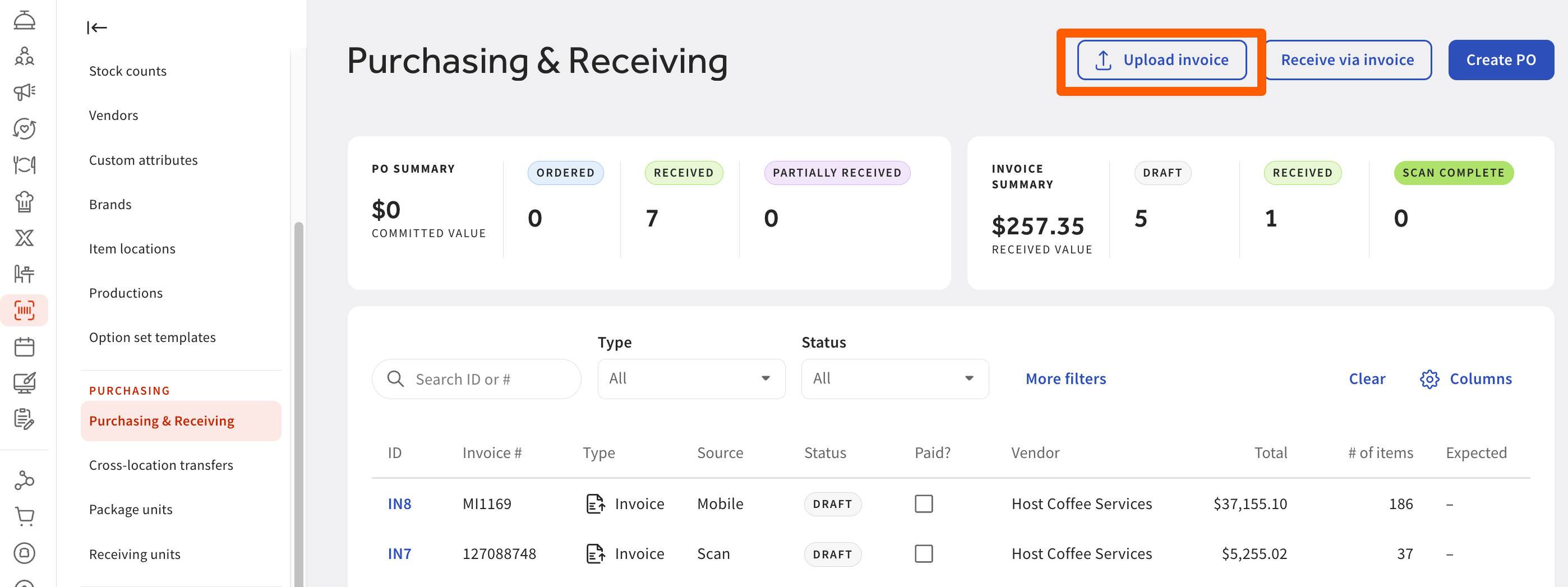
- Suba o capture su factura
- En Toast Web, navegue a Retail > Purchasing & Receiving.
- Seleccione Next para iniciar el escaneo. Nota: El escaneo puede tardar hasta 2 minutos.
- En Toast Web, navegue a Retail > Purchasing & Receiving.
Opción 2: Subir desde su dispositivo móvil en la aplicación Toast Now
- Abra Toast Retail en la aplicación Toast Now en su dispositivo móvil.
- Toque Add Invoice y permita el acceso a la cámara.
- Tome una foto clara de su factura (puede agregar varias páginas).
- Toque Submit: su factura se cargará y comenzará el escaneo.
Espere a que se complete el escaneo
- Una vez finalizado el procesamiento, la factura mostrará un estado de "Escaneo completo".
Paso 2: Revise los detalles extraídos
Verifique la información extraída de su factura para asegurar su precisión.
- Una copia digital de su factura original a la izquierda. Los artículos de línea extraídos a la derecha.
- Realice las ediciones necesarias
- Pase el cursor sobre cada campo para resaltar dónde aparece en la factura. Actualice cualquier detalle incorrecto o faltante. Esto puede ser necesario si partes de la factura no estaban claras, estaban cortadas u obstruidas.
- Después de confirmar los detalles escaneados:
- Seleccione Siguiente para pasar a la pantalla familiar de creación de facturas.
- Toast completará automáticamente.Nota: Si algo no se completa automáticamente, puede ajustarlo manualmente aquí:
- Detalles del proveedor
- Número de factura
- Nombres de artículos, cantidades y costos
Paso 3: Cree y revise la factura en Toast
Después de confirmar los detalles escaneados:
- Seleccione Siguiente para pasar a la pantalla familiar de creación de facturas.
- Toast completará automáticamente:
- Detalles del proveedor
- Número de factura
- Nombres de artículos, cantidades y costo
Nota: Si algo no se completa automáticamente, puede ajustarlo manualmente aquí.
Paso 4: Haga coincidir o agregue sus artículos
El sistema utilizará IA para reconocer y categorizar los artículos.
- Si un artículo ya existe en su inventario, Toast sugerirá una coincidencia. Seleccione lamarca de verificación de confirmar coincidencia para confirmar.
- Si un artículo es nuevo, seleccione elicono + junto al nombre del artículo para crearlo.
- Complete los detalles faltantes como el costo, la categoría o el precio de venta.
- Use Agregar todo para crear en masa varios artículos nuevos.
Nota: Los primeros escaneos pueden requerir agregar varios artículos nuevos. Con el tiempo, Toast “aprende” su catálogo y la coincidencia se vuelve más rápida.
- Guardar y vincular artículos
- Los detalles finalizados se guardan como un artículo de proveedor, el cual puede vincularse a un producto en Toast. Esto ayuda a agilizar la recepción futura al mejorar la velocidad y la precisión al actualizar el inventario.


Paso 5: Reciba su factura
Una vez que haya verificado toda la información cargada y/o haya realizado los cambios necesarios:
- Revise sus artículos coincidentes y recién agregados. Seleccione Guardar en la parte superior de la página para guardar su borrador de factura.
- (Opcional) Marque cualquier artículo no vendible (como artículos de limpieza) como Excluir; Toast recordará esto la próxima vez para ese proveedor.
- Seleccione Marcar como recibido para mover la factura del estado Borrador o Recibido. Esto actualizará el conteo de inventario disponible para los artículos en su catálogo de artículos.
Limitaciones del escaneo de facturas por IA
- Escaneo solo de facturas: Puede escanear facturas, pero no aplicarlas a órdenes de compra (PO) en este momento.
- Experiencia móvil: Puede capturar facturas en dispositivos móviles a través de Toast Web y Toast Now Retail y continuar recibiéndolas, pero la experiencia de revisión es mejor en computadoras de escritorio debido a las tablas detalladas y la visualización de imágenes.
Ingesta de facturas (importación) por correo electrónico
La ingesta de facturas por correo electrónico permite recibir facturas directamente a través de una dirección de correo electrónico dedicada para la ubicación, eliminando las cargas manuales y simplificando el procesamiento de facturas.
Beneficios:
- Elimina la carga manual de facturas
- Admite el Envío directo por correo electrónico del proveedor
- Funciona con flujos de trabajo de escáner a correo electrónico
- Proporciona visibilidad de los correos electrónicos recibidos y los archivos adjuntos procesados
- Simplifica la recepción de facturas para operaciones comerciales distribuidas
- En Toast Web, navegue a Retail > Settings > Email Import.
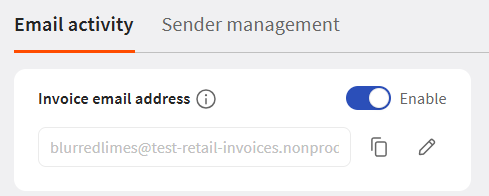
- En Email activity, cambie la dirección de correo electrónico de facturas a Enable.
- Ingrese un nombre de correo electrónico único. Ese nombre, combinado con el dominio de Toast, forma una dirección de correo electrónico de factura única para esa ubicación.Nota:Los correos electrónicos son por ubicación y por tipo de documento.
- Comparta la nueva dirección de correo electrónico con proveedores, sistemas de escáner y reglas de reenvío automático. Nota: Envíe solo correos electrónicos de facturas a esta dirección.
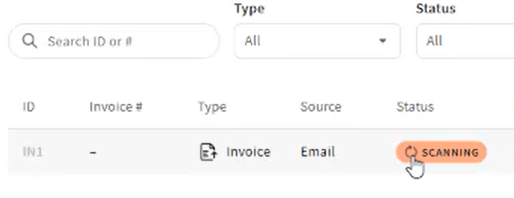
- Los correos electrónicos se validarán automáticamente una vez recibidos. Se mostrará como Escaneando en la página de compras y recepción.
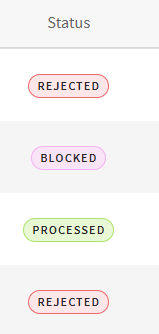
- Puede realizar un seguimiento del progreso de la página de importación de correo electrónico con los siguientes estados:
- Correo electrónico recibido
- Escaneo completado
- Ingresado
- Rechazado
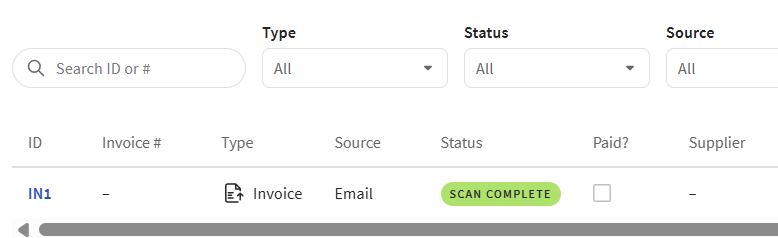
- Una vez que se complete el escaneo, se mostrará un estado de Escaneo completado
Administrar remitentes permitidos y bloqueados
De forma predeterminada, Toast acepta correos electrónicos de la mayoría de los dominios empresariales. Los correos electrónicos de dominios públicos (como Gmail, Hotmail, iCloud y otros proveedores de correo electrónico públicos comunes) se bloquean de forma predeterminada y deben permitirse manualmente antes de que se acepten.
Permitir a un remitente
Si se debe aceptar un correo electrónico de un remitente de dominio público bloqueado, vaya a Administración de remitentes y permita a ese remitente. Permitir a un remitente se aplica solo a esa dirección de correo electrónico específica, no a todo el dominio. Después de permitir a un remitente, pídale que vuelva a enviar la factura para confirmar que se procesa correctamente.
Notificación de remitente por primera vez
Cuando llega el primer correo electrónico de un nuevo remitente, recibirá una notificación para que pueda elegir permitir o bloquear futuros correos electrónicos de ese remitente o dominio. Si no se realiza ninguna acción, el remitente permanece permitido y el procesamiento continúa normalmente.

Bloquear un dominio o remitente
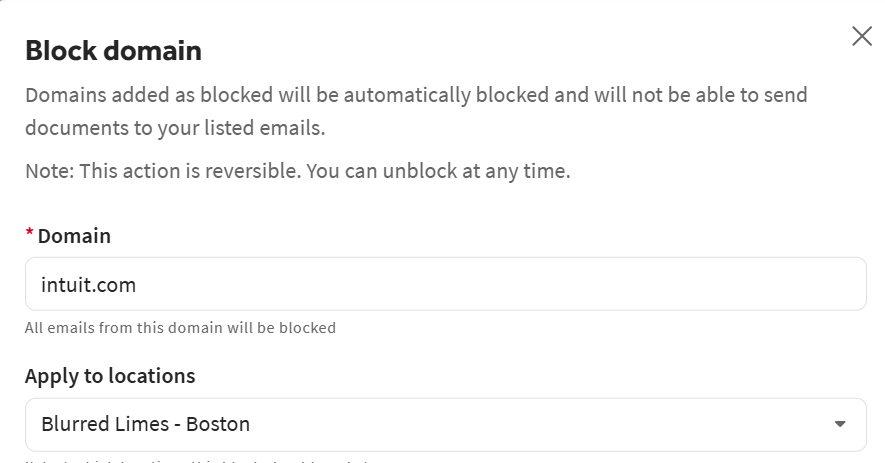
Puede bloquear un dominio para detener todos los correos electrónicos de una empresa, o bloquear a un remitente individual cuando solo se deba restringir una dirección. También puede bloquear previamente dominios o remitentes conocidos no deseados (por ejemplo, bucles de reenvío automático no deseados) antes de comenzar a recibir facturas.
Nota:Si se bloquea un remitente o dominio después de haber recibido una factura, la factura relacionada se anula automáticamente.

Para desbloquear a un remitente, navegue a la pestaña de gestión de remitentes, seleccione el menú de desbordamiento de tres puntos y seleccione Permitir remitente.
Recursos adicionales para Toast Retail