Informes de inventario de Toast Retail
Última actualización: 22 abr 2026, 6:32 p.m.
Aprenda sobre los informes de inventario disponibles para Toast Retail.
Informe de instantánea de inventario para Toast Retail
El informe de instantánea de inventario de Toast Retail te proporciona datos de inventario en un momento específico para cualquier fecha que selecciones. Esto te da la capacidad de ver fácilmente los conteos y valores históricos de inventario sin tener que depender de la exportación manual de datos en un día específico.
Para acceder a este informe, navega a Retail > Informes > Informe de instantánea de inventario.
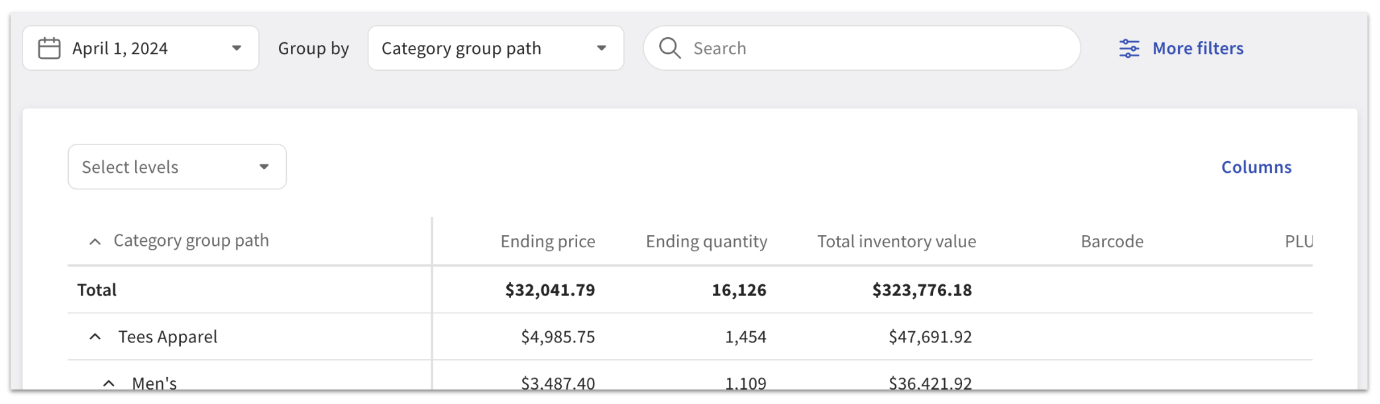
Las opciones de filtro, búsqueda y exportación son similares al informe de Ventas y COGS. Para tu instantánea de inventario, puedes agregar columnas para el precio final, la cantidad final, el valor total del inventario, el código de barras y el PLU.
Ten en cuenta que los datos en este informe comienzan el 1 de enero de 2023, o la fecha de tu primera venta minorista (lo que sea más reciente).
Informe de prórroga de inventario para Toast Retail
El Informe de prórroga de inventario está diseñado para proporcionar información profunda y granular sobre los ajustes de inventario dentro del sistema Toast. Ofrece una vista detallada de los movimientos de inventario durante un período de tiempo específico que puedes usar para analizar fluctuaciones inesperadas de inventario (¿alguien olvidó recibir inventario para un artículo específico?) o crear informes personalizados de ajustes de inventario (¿con qué frecuencia se transfirió el inventario de alcohol hacia/desde mi ubicación?)
Para acceder a este informe, navega a Retail > Informes > Informe de prórroga de inventario.
En la parte superior de la página puedes personalizar tu informe seleccionando el período de tiempo deseado, utilizando el menú desplegable Agrupar por para organizar tu lista de inventario, y utilizando la barra de búsqueda o el botón Más filtros para reducir los elementos mostrados en la tabla.
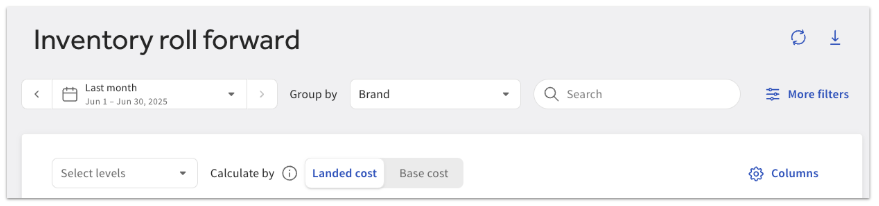
El Calcular porinterruptor te permite alternar entre cálculos de costo de destino y costo base. Los costos utilizados para los cálculos afectarían el costo total del inventario, el cambio en el costo total del inventario, COGS y el costo promedio y total de los ajustes. El costo base refleja solo el costo inicial del artículo, mientras que el costo de destino incluye ajustes como impuestos, tarifas y descuentos.
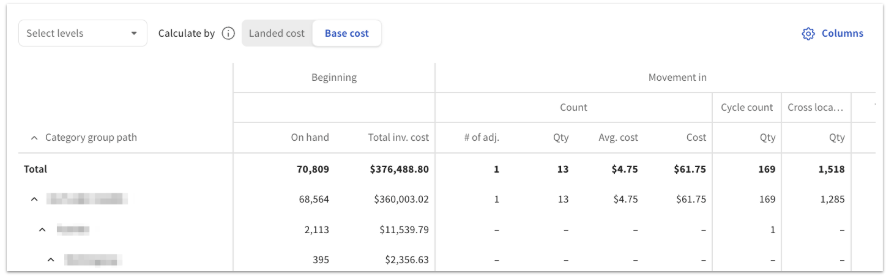
Una vez que seleccione el período deseado en la parte superior de la página, el informe de Inventario Roll Forward le mostrará la siguiente información para el período elegido:
- Inventario inicial
- Movimiento de entrada
- Movimiento de salida
- Inventario final
Para cada tipo de ajuste de inventario (por ejemplo, recibir, pérdida, expirado, etc.), el informe rastrea los ajustes de cantidad y las métricas de costo, incluyendo el costo promedio y el costo total de los ajustes.
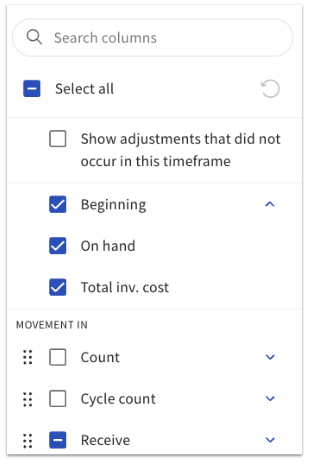
El botón Columnas le permite seleccionar y reordenar los datos de inventario y artículo que se incluyen en el informe. El informe de Inventario Roll Forward está configurado automáticamente para ocultar ajustes que no ocurrieron en el período seleccionado, pero puede elegir incluir esas columnas en el informe si lo prefiere.
Puede exportar el informe de Inventario Roll Forward seleccionando el icono de descarga (flecha hacia abajo) en la esquina superior derecha.
Recursos adicionales para Toast Retail