Get Help With Toast Payroll Error: Please Enter a Valid Social Security Number

上次更新时间:2026年4月8日 10:19

问题

I got the error message "Please enter a valid Social Security number." What do I need to do to fix this?

回答

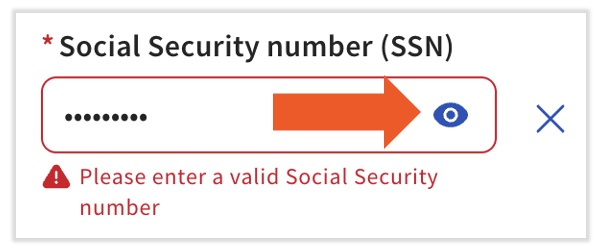
When you're entering or updating a Social Security number (SSN), this error code can appear for two reasons: the format is incorrect or the system is recognizing the asterisks (dots) as the SSN.


The Format is Incorrect

We do not require dashes or spaces when entering an SSN. Additionally, Toast recognizes these SSNs as invalid:


  • An SSN that starts with "9", "000", or "666"
  • An SSN with the middle two digits of "00"
  • An SSN where the last four digits are "0000"
  • An SSN with a numerical sequence such as 123-45-6789 or 987-65-4321
  • Toast Payroll: Get Help With Social Security Numbers has more information on this topic.


Asterisks/Dots Are Recognized as the SSN

This error occurs on the employee's profile > Profile > Edit page. When you add or edit the SSN while it is hidden and you're "typing asterisks", Toast Payroll may see this entry as asterisks instead of numbers and will not accept the format. To fix this, simply select the eye icon so that it now has a slash through it and you see numbers instead of asterisks. Selecting Save changes will let you proceed.


Please enter a valid Social Security number error


This content is for informational purposes and is not intended as legal, tax, HR, or any other professional advice. Please contact an attorney or other professional for advice.