Toast配送服务® 账单常见问题解答
上次更新时间:2026年10月2日 11:25
Toast配送服务®账单常见问题解答。
Toast配送服务® (TDS) 付款由Toast自动处理。一旦您的TDS模块启用了自动账单功能,每当有TDS订单配送给您的顾客时,Toast就会从您的每日信用卡付款中预扣所有适用的TDS费用,包括配送费、Toast固定服务费和司机小费。您不会收到或支付来自Uber Direct、DoorDash Drive或Toast的单独账单或发票。
注意:对于加利福尼亚州、纽约市和华盛顿州西雅图的订单,您需要支付每笔配送的固定费用以及适用的监管费用。有关完整的费用明细,请参阅 Toast配送服务® 自动账单概览。
常见问题
“预扣费用和司机小费”是什么意思?
预扣费用和司机小费是指Toast从您的每日信用卡付款中扣除您的TDS配送费、Toast固定服务费和司机小费。当您的信用卡销售额由您的信用卡处理机构处理时,这些金额会在剩余款项结算并存入您的银行账户之前被扣除。
例如,假设您的餐厅周一在6英里半径内有十笔40.00美元的TDS订单,没有监管费用,且每笔订单有2.50美元的小费:
-
- 扣除任何费用前的订单价值:10 x $40.00 = $400.00
- TDS配送费和Toast固定服务费:10 x $6.99 = $69.90
- 司机小费:10 x $2.50 = $25.00
- 扣除费用后存入您银行账户的金额:$400.00 − $69.90 − $25.00 = $305.10
注意:上述显示的存入金额不包含信用卡处理费。
TDS 账单预扣功能适用于哪些对象?
TDS 账单预扣功能适用于每一家使用 Toast配送服务® 的餐厅。所有 TDS 餐厅都参与此项自动预扣。
这些费用可以按月扣除而不是按日扣除吗?
这些费用无法按月扣除。目前,预扣仅按日进行。
我的资金何时会存入我的银行账户?
您的资金会在销售完成后约 1–2 个工作日内存入您的银行账户。以上述为例,周一销售的资金最迟会在周三存入您的银行账户。在您的财务报告中,预扣的 TDS 金额显示在“其他”列中,其中包括预扣的 TDS 配送费、Toast 固定服务费以及前 1–2 个工作日的消费。
当我取消 TDS 订单时会发生什么?
若要取消您不再希望完成的 TDS 订单,您必须直接联系您的配送服务商。请致电 (866) 987-3750 联系 Uber Direct 或致电 (855) 222-8111 联系 DoorDash Drive 以取消配送。
注意:Uber Direct 预约配送只能在订单生效后取消。订单无法提前取消,即在订单发送至厨房前无法取消。
Uber Direct 的取消费用:
| 配送状态 | 取消费用 |
| 尚未为配送分配司机 | 无取消费用 |
| 已为配送分配司机 | $5.00取消费用 |
| 司机已取走配送订单 | 配送费 |
DoorDash Drive的取消费用:
| 配送状态 | 取消费用 |
| 尚未为配送分配司机 | 无取消费用 |
| 已为配送分配司机 | 无取消费用 |
| 司机已取走配送订单 | 配送费 |
当我重新派送TDS订单时会发生什么?
当您重新派送TDS订单时,Toast会在每次使用Toast POS上订单中心中的“重新派送”按钮重新派送订单时,预扣一笔配送费和司机小费。每笔预扣金额都会显示在您的TDS账单报告中,并附带其预扣和结算日期。有关时间安排的详细信息,请参阅上方的“我的资金何时会存入我的银行账户?”。
当我收到配送服务商针对TDS订单的退款时会发生什么?
当您收到配送服务商针对TDS订单的退款时,该退款将通过您的信用卡付款退还给您的餐厅。如果TDS订单出现问题且责任在于配送服务商的司机,请继续通过 uberdirect@uber.com 联系Uber Direct或通过 drive-support@doordash.com 联系DoorDash Drive申请退款。如果Uber Direct或DoorDash Drive根据其退款矩阵被认定有过错,他们将提供配送费、固定服务费和/或司机小费的退款。一旦服务商确认退款,他们会将信息发送给Toast,由Toast处理订单调整。退款调整将抵扣后续每笔订单的预扣费用和小费,直到全额退还给您的餐厅。
退款流程如下:
-
- 您的餐厅联系配送服务商申请退款。
- 配送服务商审核退款申请。
- 配送服务商会根据其退款矩阵发放退款。
- 您的餐厅将以抵扣金的形式在下一次信用卡付款中收到退款。
注意:Uber Direct 和 DoorDash Drive 绝不会直接向您的顾客退款。若要向您的顾客退款,您必须在 Toast POS 上处理退款,然后单独向配送服务商为您的餐厅申请退款。有关哪些项目符合退款条件的详细信息,请参阅 Uber Direct 退款矩阵 或 DoorDash Drive 退款矩阵,或查看下方内容。
Uber Direct 退款矩阵
| 区域 | 类别 | 场景描述 | 责任方 | 商品是否可退款?1,2 | 小费是否可退款?3 | 配送服务费是否可退款?4 |
| 订单已取消 | Uber已取消订单 | 配送员在完成取餐后因未知原因取消订单,且订单未送达(也未退回) | Uber | 100% 或上限金额 | 是 | 未开票 |
| 订单已取消 | Uber已取消订单 | [如符合退货条件] 配送员在前往取货点途中或到达取货点后,在未受客户提示的情况下取消订单;配送员发起退货且退货成功 | Uber | 100% 或上限金额 | 是 | 是 |
| 订单已取消 | Uber已取消订单 | 配送员在取货点等待超过 10 分钟后取消订单 | 商家 | 否 | 未开票 | 未开票 |
| 订单已取消 | 未找到配送员 | 商家无法找到配送员,且 Uber 在接受订单请求后将该配送标记为失败(且未分配配送员,或配送员在取货点等待超过 10 分钟)。包括(但不限于):Uber 接受订单请求,一名或多名配送人员在到达商店前取消订单,导致 Uber 无法找到配送人员;或 Uber 接受订单请求,配送人员到达商店但在到达后 10 分钟内取消行程,且 Uber 无法找到新的配送人员 | Uber | 100% 或上限(仅限食品已准备好的情况) | 未开票 | 未开票 |
| 订单已取消 | 商家/客户取消订单 | 合作伙伴或客户取消:未分配配送员 | 商家 | 否 | 未开票 | 未开票 |
| 订单已取消 | 商家/客户取消订单 | 合作伙伴或客户取消:已分配配送员但尚未完成取货 | 商家 | 否 | 未开票 | 在发票层面收取取消费用 |
| 订单已取消 | 商家/客户取消订单 | 合作伙伴或客户取消:配送员已完成取货 | 商家 | 否 | 未开票 | 否 |
| 订单已取消 | 商家/客户取消订单 | [如符合退货条件] 商家/客户取消订单并发起退货(或配送员在尝试配送后发起退货)且退货成功。包括(但不限于):合作伙伴或客户取消订单,取货已完成,配送员退回商品;合作伙伴或客户取消订单,配送员到达配送点,配送员退回商品;或配送员因最终客户在配送点不在场或无法接收商品而发起退货行程 | 商家 | 否 | 否 | 否 |
| 订单延迟 | 订单延迟 – 商家责任 | 订单延迟时间超过 Uber 预计配送时间 (ETD) + 20 分钟,且任何已分配的配送员在取货点的等待时间超过 10 分钟 | 商家 | 否 | 否 | 否 |
| 订单延迟 | 订单延迟 – Uber 责任 | 订单在Uber预计送达时间(ETD)后20至30分钟内延迟,且配送员在取货地点的等待时间少于10分钟 | Uber | 15%或上限 | 是 | 是 |
| 订单延迟 | 订单延迟 – Uber 责任 | 订单在Uber预计送达时间(ETD)后30至60分钟内延迟,且配送员在取货地点的等待时间少于10分钟 | Uber | 50%或上限 | 是 | 是 |
| 订单延迟 | 订单延迟 – Uber 责任 | 订单在Uber预计送达时间(ETD)后60分钟以上延迟,且配送员在取货地点的等待时间少于10分钟 | Uber | 100% 或上限金额 | 是 | 是 |
| 从未配送 | 未找到客户/客户不可用 | 配送员因客户信息错误而配送至错误地点,或无法将物品交给客户。包括(但不限于):配送说明未提供足够信息让配送员进入封闭式社区、公寓、综合大楼或共管公寓;客户提供的地址错误;配送员因终端客户在8分钟后仍不可用且配送员已尝试联系而取消订单;或客户未能满足身份证明要求或因醉酒无法接收订单(且该行程不符合退货条件) | 商家 | 否 | 否 | 否 |
| 从未配送 | 订单被标记为已完成但从未收到 | 终端客户声称订单未配送,但配送员已拍摄照片证明商品已在正确地点配送,或者有条形码/签名/PIN码/身份验证确认;或者客户的配送备注与商家的配送说明冲突(例如,客户在“当面配送”的配送中要求“放在门口”) | 商家 | 否 | 否 | 否 |
| 从未配送 | 订单被标记为已完成但从未收到 | 终端客户声称订单未配送,且配送员未到达配送地点或未按要求收集证明(或者如果行程符合退货条件,配送员未退回商品)。包括:配送员完成了取货但未到达配送地点,且配送显示为已完成;配送员未到达取货地点但配送显示为已完成;或者配送员已配送但无法提供按要求收集的证明 | Uber | 100% 或上限金额 | 是 | 是 |
| 质量不佳 | 商品损坏 | 商品损坏,或所有商品在运输途中部分损坏但仍可使用/食用 | Uber | 否 | 是 | 否 |
| 质量不佳 | 商品损坏 | 商品损坏,或所有商品在运输途中部分损坏且无法使用/食用,且客户提供了证明(损坏商品的图片) | Uber | 100%商品或上限 | 是 | 是 |
| 质量不佳 | 配送体验 | 配送员表现不佳,客户希望更改小费金额 | Uber | 否 | 是 | 否 |
| 订单错误/缺少商品 | 订单错误 | 配送员因同时处理来自商家的多个订单并将其混淆(通过食品袋上的收据确认),或提供了其他商家的订单,导致配送了错误的订单。 | Uber | 100% 或上限金额 | 是 | 是 |
| 订单错误/缺少商品 | 订单错误 | 配送员配送了错误的订单,原因可能是单一订单本身有误,或者包装内的物品有误,亦或是替代商品不符合客户要求。 | 商家 | 否 | 否 | 否 |
| 订单错误/缺少商品 | 缺少商品 | 整体订单正确但缺少部分商品 | 商家 | 否 | 否 | 否 |
1 如果可退款,则必须通过收据或 API 与 Uber 分享金额。退款金额不包含销售税。2 对于按商品级别的退款,必须提供与每件商品相关的明细金额,并通过收据或 API 与 Uber 分享。3 小费不由 Uber 退还,但应由最终客户在调整窗口期内进行调整。4 配送服务费是指在期限内为所提供的配送服务而收取的费用,包括适用的退货费用。
除非另有说明,退款金额上限为 200 美元,取消费用设定为 5 美元。退款请求必须在订单创建日期后的 14 天内提交,任何关于退款决定的申诉必须在决定日期后的 14 天内提出;在此期限之后提交的请求或申诉将不予受理。Uber 有权自行决定更改本政策。
DoorDash Drive 退款矩阵
| 原因(一级) | 原因(二级) | 描述 | 原因(三级) | 退款原因 | 责任方 | 订单金额已退款 | 配送费已退款 | 小费已退款 |
| 订单已取消 | DoorDash过失 | 任何导致订单取消的DoorDash相关故障,包括:订单延迟;DoorDash服务中断;配送员供应不足导致订单未被分配或分配非常晚;无配送员分配;订单被错误的配送员取走;或由于技术问题导致的配送时间/日期错误 | DoorDash过失 – 食物未制作 | 由DoorDash取消 | DoorDash | 0% | 未开票 | 未开票 |
| 订单已取消 | DoorDash过失 | 任何导致订单取消的DoorDash相关故障,包括:订单延迟;DoorDash服务中断;配送员供应不足导致订单未被分配或分配非常晚;无配送员分配;订单被错误的配送员取走;或由于技术问题导致的配送时间/日期错误 | DoorDash过失 – 食物已制作 | 由DoorDash取消 | DoorDash | 100% | 未开票 | 未开票 |
| 订单已取消 | 商家请求 | 顾客或商家不再需要DoorDash配送订单,和/或任何与商家相关的故障导致订单取消,包括:商家无法完成(门店关闭、门店未收到订单、商品缺货);或顾客下单时地址和/或配送时间错误 | 配送员分配前商家请求 | 已取消订单 | 商家 | 0% | 未开票 | 未开票 |
| 订单已取消 | 商家请求 | 顾客或商家不再需要DoorDash配送订单,和/或任何与商家相关的故障导致订单取消,包括:商家无法完成(门店关闭、门店未收到订单、商品缺货);或顾客下单时地址和/或配送时间错误 | 配送员分配后商家请求 | 已取消订单 | 商家 | 0% | 0% | 0% |
| 订单已取消 | 顾客请求 | 顾客或商家不再需要DoorDash配送订单,和/或任何与商家相关的故障导致订单取消,包括:商家无法完成(门店关闭、门店未收到订单、商品缺货);或顾客下单时地址和/或配送时间错误 | 配送员分配前顾客请求 | 已取消订单 | 商家 | 0% | 未开票 | 未开票 |
| 订单已取消 | 顾客请求 | 顾客或商家不再需要DoorDash配送订单,和/或任何与商家相关的故障导致订单取消,包括:商家无法完成(门店关闭、门店未收到订单、商品缺货);或顾客下单时地址和/或配送时间错误 | 配送员分配后顾客请求 | 已取消订单 | 商家 | 0% | 0% | 0% |
| 订单送达延迟 | 订单未准备好且配送员准时到达 | 门店未准备好取餐,导致延迟超过了规定的送达时间 | 订单配送延迟 15–30 分钟 | 配送延迟 | 商家 | 0% | 0% | 0% |
| 订单送达延迟 | 订单未准备好且配送员准时到达 | 门店未准备好取餐,导致延迟超过了规定的送达时间 | 订单配送延迟 30–45 分钟 | 配送延迟 | 商家 | 0% | 0% | 0% |
| 订单送达延迟 | 订单未准备好且配送员准时到达 | 门店未准备好取餐,导致延迟超过了规定的送达时间 | 订单配送延迟 45–60 分钟 | 配送延迟 | 商家 | 0% | 0% | 0% |
| 订单送达延迟 | 订单未准备好且配送员准时到达 | 门店未准备好取餐,导致延迟超过了规定的送达时间 | 订单配送延迟 60 分钟以上 | 配送延迟 | 商家 | 0% | 0% | 0% |
| 订单送达延迟 | 订单已准备好但配送员延迟 | 配送员在取餐或送餐时延误,导致订单延迟 | 订单配送延迟 15–30 分钟 | 配送延迟 | DoorDash | 15% | 0% | 0% |
| 订单送达延迟 | 订单已准备好但配送员延迟 | 配送员在取餐或送餐时延误,导致订单延迟 | 订单配送延迟 30–45 分钟 | 配送延迟 | DoorDash | 25% | 0% | 0% |
| 订单送达延迟 | 订单已准备好但配送员延迟 | 配送员在取餐或送餐时延误,导致订单延迟 | 订单配送延迟 45–60 分钟 | 配送延迟 | DoorDash | 80% | 0% | 0% |
| 订单送达延迟 | 订单已准备好但配送员延迟 | 配送员在取餐或送餐时延误,导致订单延迟 | 订单配送延迟 60 分钟以上 | 配送延迟 | DoorDash | 100% | 100% | 100% |
| 订单提前送达 | 提前配送 | 配送员比预计时间提前 30 多分钟到达客户处 | 提前配送 | 提前配送 | DoorDash | 15% | 0% | 0% |
| 从未配送 | 客户信息错误 | 配送员因配送地址错误、客户信息错误等原因无法完成配送。 | 客户信息错误 | 从未配送 | 商家 | 0% | 0% | 0% |
| 从未配送 | 从未配送:配送员失误 | 配送员因故未进入客户的地理围栏和/或未拍摄照片(例如:配送员车辆故障、系统错误、沟通失误、配送员欺诈等) | 配送员失误 | 从未配送 | DoorDash | 100% | 100% | 100% |
| 从未配送 | 从未配送:客户过错 | 配送员越过了客户位置的地理围栏,并拍摄了高质量照片、扫描了条形码或获得了签名。无法联系到客户。 | 从未送达 – 客户原因 | 从未配送 | 商家 | 0% | 0% | 0% |
| 缺失与错误 | 缺少主菜:商家责任 | 商家未提供主菜 | 缺少主菜 | 缺少/错误的商品 | 商家 | 0% | 0% | 0% |
| 缺失与错误 | 缺少配菜:商家责任 | 商家未提供配菜 | 缺少配菜 | 缺少/错误的商品 | 商家 | 0% | 0% | 0% |
| 缺失与错误 | 部分商品错误:商家责任 | 商家未提供部分商品,或未遵循特殊说明 | 部分商品错误 | 缺少/错误的商品 | 商家 | 0% | 0% | 0% |
| 缺失与错误 | 整单错误:配送员失误 | 配送员向客户提供了错误的订单 | 整单错误 – 配送员失误 | 缺少/错误的商品 | DoorDash | 100% | 100% | 100% |
| 缺失与错误 | 整单错误:商家责任 | 客户收到了错误的订单 | 整单错误 – 商家责任 | 缺少/错误的商品 | 商家 | 0% | 0% | 0% |
| 缺失与错误 | 缺少主菜:配送员失误 | 配送员未提供所有商品;商家需入库以将其归类为配送员失误 | 缺少主食 – 配送员失误 | 缺少/错误的商品 | DoorDash | 50% | 0% | 0% |
| 缺失与错误 | 缺少配菜:配送员失误 | 配送员未提供所有商品;商家需入库以将其归类为配送员失误 | 缺少配菜 – 配送员失误 | 缺少/错误的商品 | DoorDash | 15% | 0% | 0% |
| 糟糕的配送体验 | 糟糕的食品质量 | 顾客反馈食品质量糟糕 | 糟糕的食品质量 | 糟糕的食品质量 | 商家 | 0% | 0% | 0% |
| 配送体验不佳 | 订单部分损坏 | 运输过程中内容物部分损坏 | 订单部分损坏 | 配送草率 | DoorDash | 25% | 100% | 100% |
| 配送体验不佳 | 整个订单损坏 | 整个订单在运输过程中损坏 | 整个订单损坏 | 配送草率 | DoorDash | 100% | 100% | 100% |
| 配送体验不佳 | 订单被篡改 | 顾客反馈订单已被拆封和/或被篡改 | 订单被篡改 | 配送草率 | DoorDash | 100% | 100% | 100% |
| 配送体验不佳 | 小费调整 | 顾客因配送员表现不佳和/或行为不当,希望取消小费 | 小费调整 | 配送草率 | DoorDash | 0% | 0% | 100% |
| 配送体验不佳 | 食品不安全 | 在食物中发现头发、异物等 | 食品不安全 | 食品质量不佳 | 商家 | 0% | 0% | 0% |
| 配送体验不佳 | 新冠相关投诉 | 配送员未佩戴口罩,或未遵守建议的安全规程 | COVID相关投诉 | 配送草率 | DoorDash | 15% | 0% | 100% |
所有退款请求必须由顾客或商户在下单后14天内提出。
注意:如果顾客直接联系Toast顾客支持寻求退款,Toast将与Uber Direct或DoorDash Drive对接,代表您确保退款,将其退还给顾客,并随时通知您。欲了解更多信息,请参阅 Toast配送服务条款与条件。
有关退款联系方式的更多信息,请参阅 获取Toast配送服务®相关帮助。
TDS预扣款会影响我的每日结账流程吗?
TDS预扣款不会影响您的每日结账流程。配送费和小费不会影响现金条目和存款,也不会改变在向餐厅员工发放小费前扣除配送小费的方式。
为什么我的预扣款超过了每单$6.99?
您的预扣款可能超过每单$6.99,这是由于监管费用或超出了配送半径。基础配送费涵盖一定的半径范围;超出该半径的配送将收取超半径费用,且加利福尼亚州、纽约市和华盛顿州西雅图市的订单包含额外的监管费用。有关完整的按半径收费和监管费用表,请参阅 Toast配送服务®自动结算概览。
要核实订单是否超出了您的标准配送半径,请在Google地图等地图工具中输入取餐地址和送餐地址,并查看距离。
注意:默认的配送半径为10英里。如需更改配送半径,请直接联系您的配送服务商。任何半径变更均由您的餐厅与服务商协商确定。
报告
我该如何查看每日信用卡付款中扣除了多少金额?
您可以在Toast Web中三个财务报告的“其他”列中查看每日信用卡付款中扣除的金额:
-
- 存款总额概览:查看已结算和待处理信用卡存款批次的总额。
- 已结算存款每日明细:按地点查看已结算的信用卡存款批次。
- 每日信用卡活动:按天查看信用卡费用、结算和银行账户转账活动。
您也可以使用“付款概览”报告,该报告将这三个报告合并为一个视图。
注意:如果您的餐厅有Uber Direct或DoorDash Drive确认的未结退款调整,则“其他”列中的金额可能与您当天的配送费、Toast固定服务费和司机小费不符。在全额退款退还至您的餐厅之前,不会向您收取费用和小费。
欲了解更多信息,请参阅Toast配送服务®自动账单概览的报告部分。
为什么“其他”列的金额并不总是与当天我的TDS订单中扣除的配送费和司机小费相符?
由于时间差异和调整,其他列的金额并不总是与当天的配送费和司机小费相符。金额可能存在差异的原因有以下几点:
-
- 结算时间。由于扣除的资金需要最多两个工作日才能结算,“其他”列中的金额反映的是最多两个工作日前的TDS订单。“已结算存款每日明细”报告显示了每个结算日期扣除费用和小费的订单的销售日期。
- 未结退款调整。如果您有Uber Direct或DoorDash Drive确认的未结退款调整,Toast在全额退款退还至您的餐厅之前,不会扣除后续的费用和小费。
- 取消、重新派送和退款。如果您取消配送、从Toast POS重新派送司机,或从您的服务提供商处收到退款,Toast会在服务提供商确认后扣除或存入相应金额。这些交易会显示在TDS账单报告中,并同时包含扣款日期和结算日期。
- 同一列中的其他扣款。“其他”列还可能包含与TDS无关的扣款,例如市场促进者税、Toast Capital贷款、即时存款金额或Easy Pay租赁费用。这些金额会加总到总额中,可能导致其与您的TDS费用和小费总额不符。
- 电话订单小费。使用Toast配送服务用餐选项在Toast POS上下达的订单,其司机小费仅在包含在原始支付授权中时才会被扣除。有关详细信息,请参阅Toast配送服务®的小费与开票。
我会收到哪些账单报告?
如果您在某个月内处理了至少一笔TDS订单,Toast会在该月底向您发送一封Toast配送服务账单电子邮件。该电子邮件会发送至您的财务联系人邮箱,并包含两个附件:
-
- 月度TDS费用汇总报告 — 一份包含当月扣除的所有TDS费用的PDF摘要。
- 月度TDS费用明细报告 — 一份CSV文件,其中包含当月扣除的订单、重新派送订单和退款的逐单明细。
注意:要更新您的财务联系人邮箱,请按照优化沟通偏好中的说明进行操作。
欲了解更多信息,请参阅Toast配送服务®自动账单概览的报告部分。
我如何在Toast Web中查看我的TDS账单报告?
您可以在Toast Web的“Toast配送服务账单”页面上查看您的TDS账单报告。请按照以下步骤操作:
-
- 在Toast Web中,导航至外带与配送 > Toast配送服务账单。
- 选择设置时间范围并下载。
- 使用日期选择器选择特定日期或自定义日期范围。
- 选择 下载。
该报告将下载为包含您餐厅历史预扣数据的 .csv 文件。
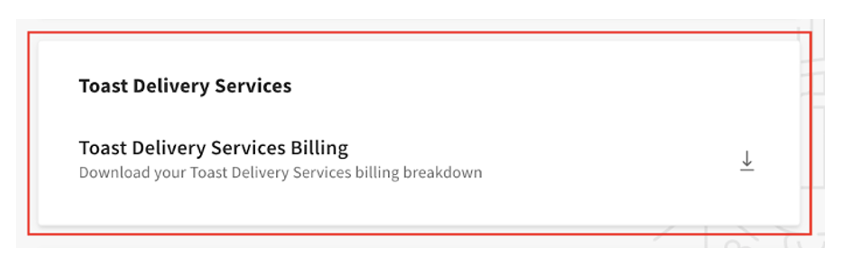
注意:从下单到订单出现在 Toast Web 生成的 TDS 账单报告中,存在 48 小时的滞后。
注意:TDS 账单报告中的费用并非按顺序排列。您可以根据需要,在 Google 表格或 Microsoft Excel 中按“开单日期”、“预扣日期”或“结算日期”对报告进行筛选和排序。
要访问此报告,您必须拥有与您的员工职位相关联的“餐厅运营设置”权限。要授予员工访问权限:
-
- 在 Toast Web 中,导航至 团队 > 设置 > 职位。
- 选择 职位。
- 导航至 权限 选项卡。
- 启用 权限 6.6餐厅运营设置 的开关。
- 保存 并 发布。
有关权限的更多信息,请参阅 权限参考指南。
我该如何核对我的 TDS 配送费和司机小费与从我的付款中扣除的金额?
您可以通过将 TDS 订单与 TDS 配送账单报告及财务报告进行比较,来核对您的 TDS 配送费和司机小费与从您的付款中扣除的金额。请使用以下步骤。
首先,通过导航至 报告 > 销售 > 订单 在 Toast Web 中查看您的 TDS 订单,然后按 Toast 配送服务用餐选项进行筛选。例如,同一天的两笔 TDS 订单可能是:
-
- 订单 3:$6.99 配送费 + $15.00 司机小费 = $21.99
- 订单 10:$6.99 配送费 + $7.35 司机小费 = $14.34
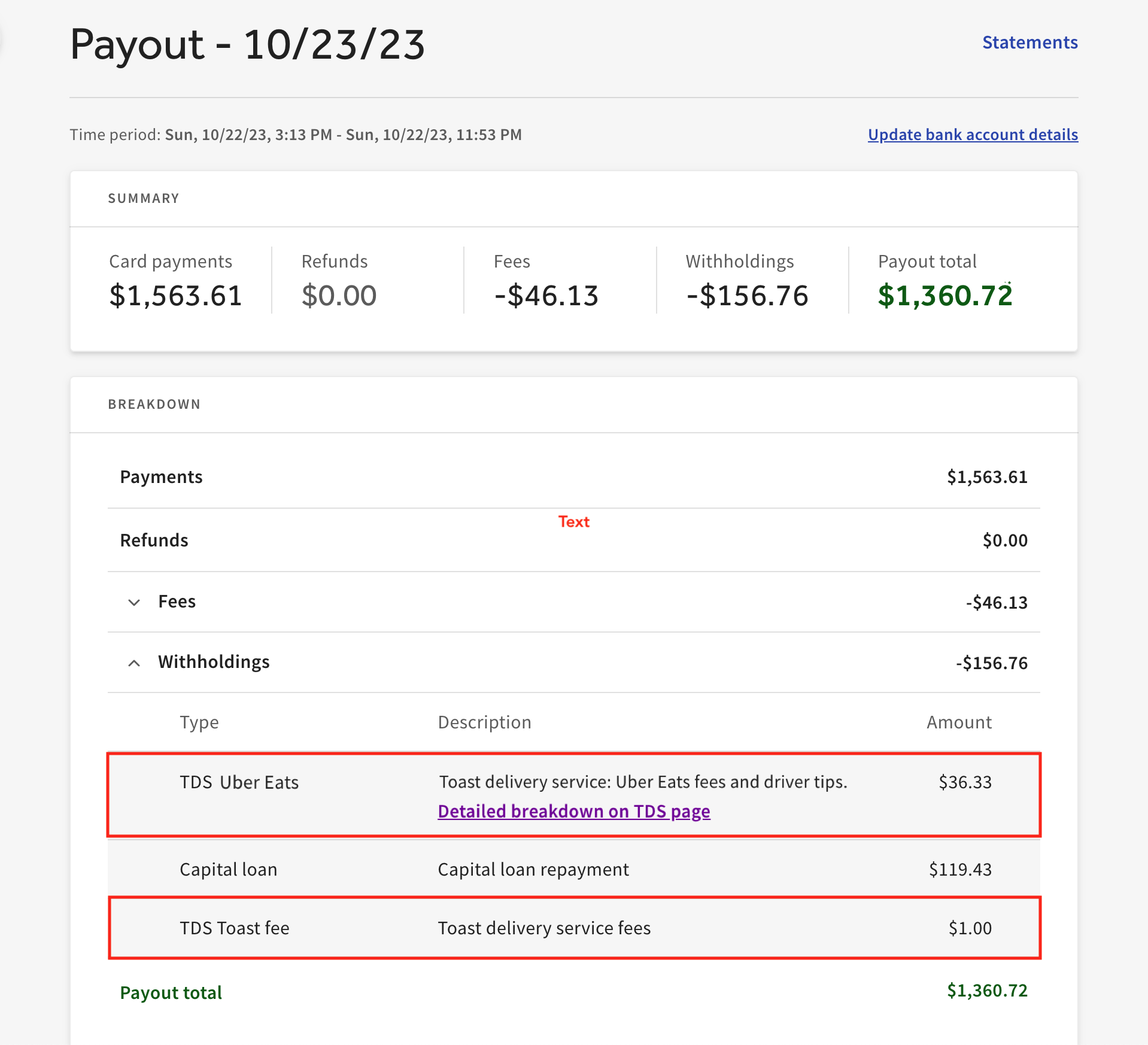
- 当日预扣款总额:$36.33
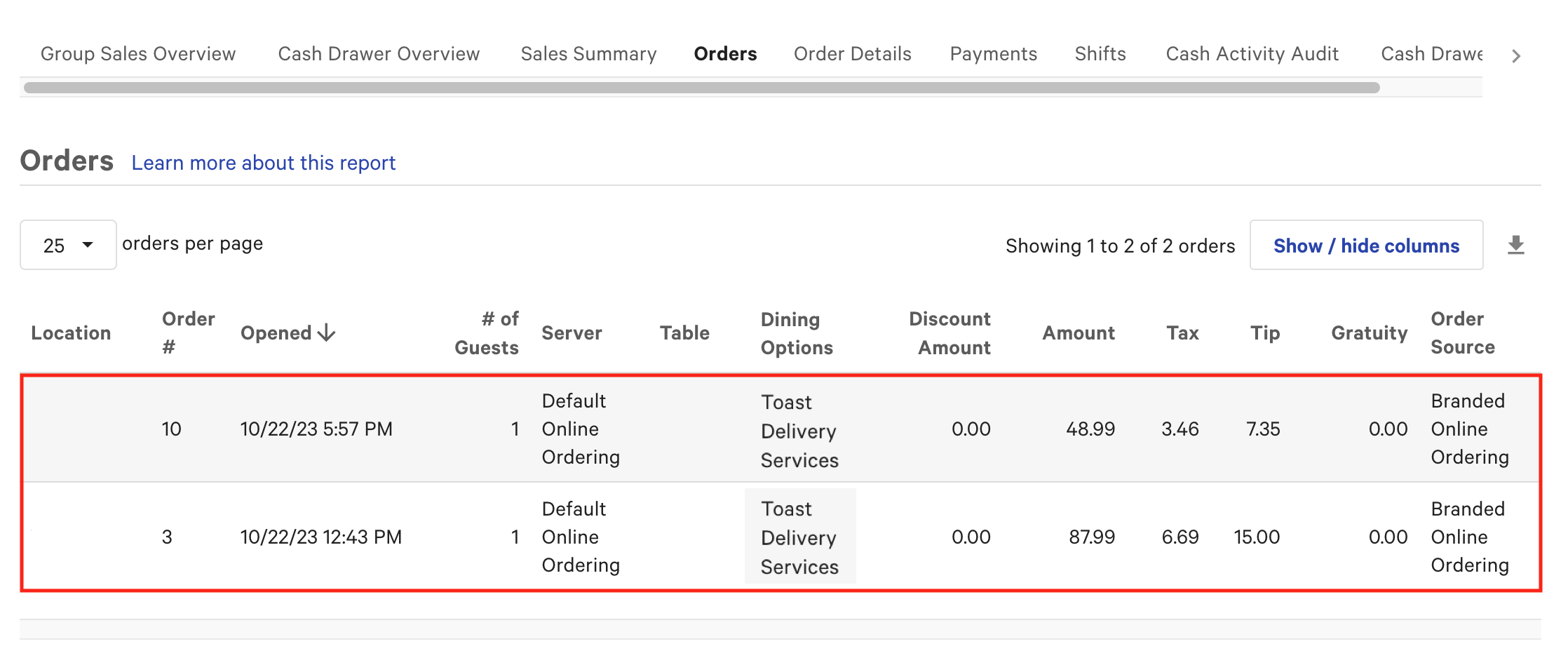
这些配送费和司机小费会显示在 Toast Web 中“外带与配送”页面上的 TDS 计费明细报告中。
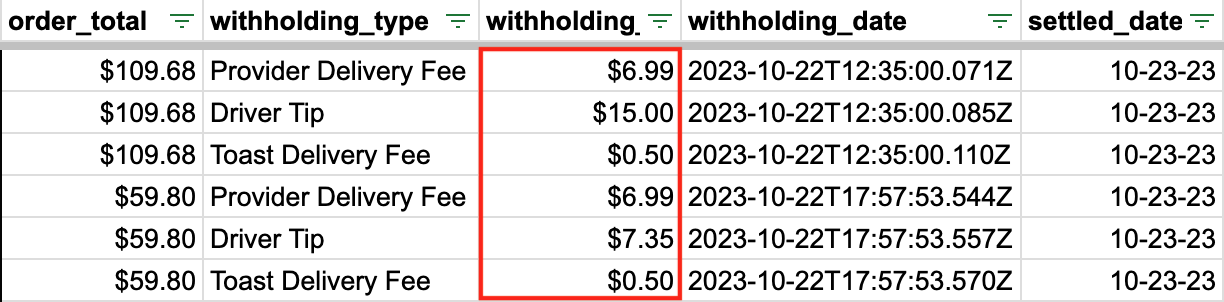
然后,您可以在“已结算存款每日明细”报告的“其他”列中查看预扣的总金额。由于预扣资金最多需要两个工作日才能结算,例如,周日处理的订单资金会在随后的周二结算到您的银行账户中。
注意:如果您有未结清的退款调整,或者有来自市场促进者税、Toast Capital 贷款、即时存款金额或 Easy Pay 租赁的预扣款,“其他”列中的金额可能与您的配送费、Toast 固定服务费和司机小费不符。
如需查看每笔付款和预扣款的明细,请使用“对账”报告及相关的“付款详情”报告。在“对账”报告中,使用顶部的日期和地点筛选器,并选择预设范围(例如昨天、今天或本周)或自定义日期范围。
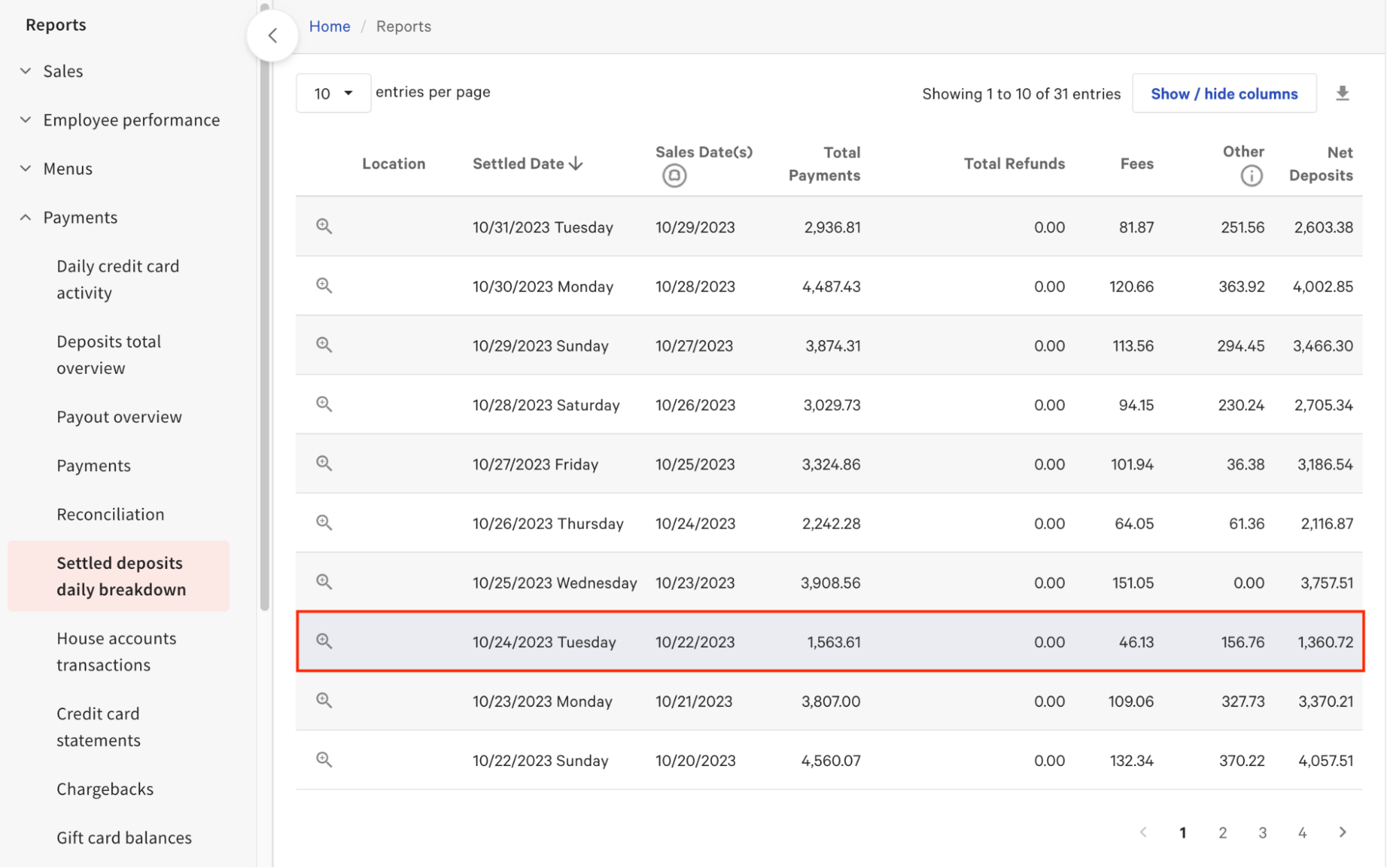
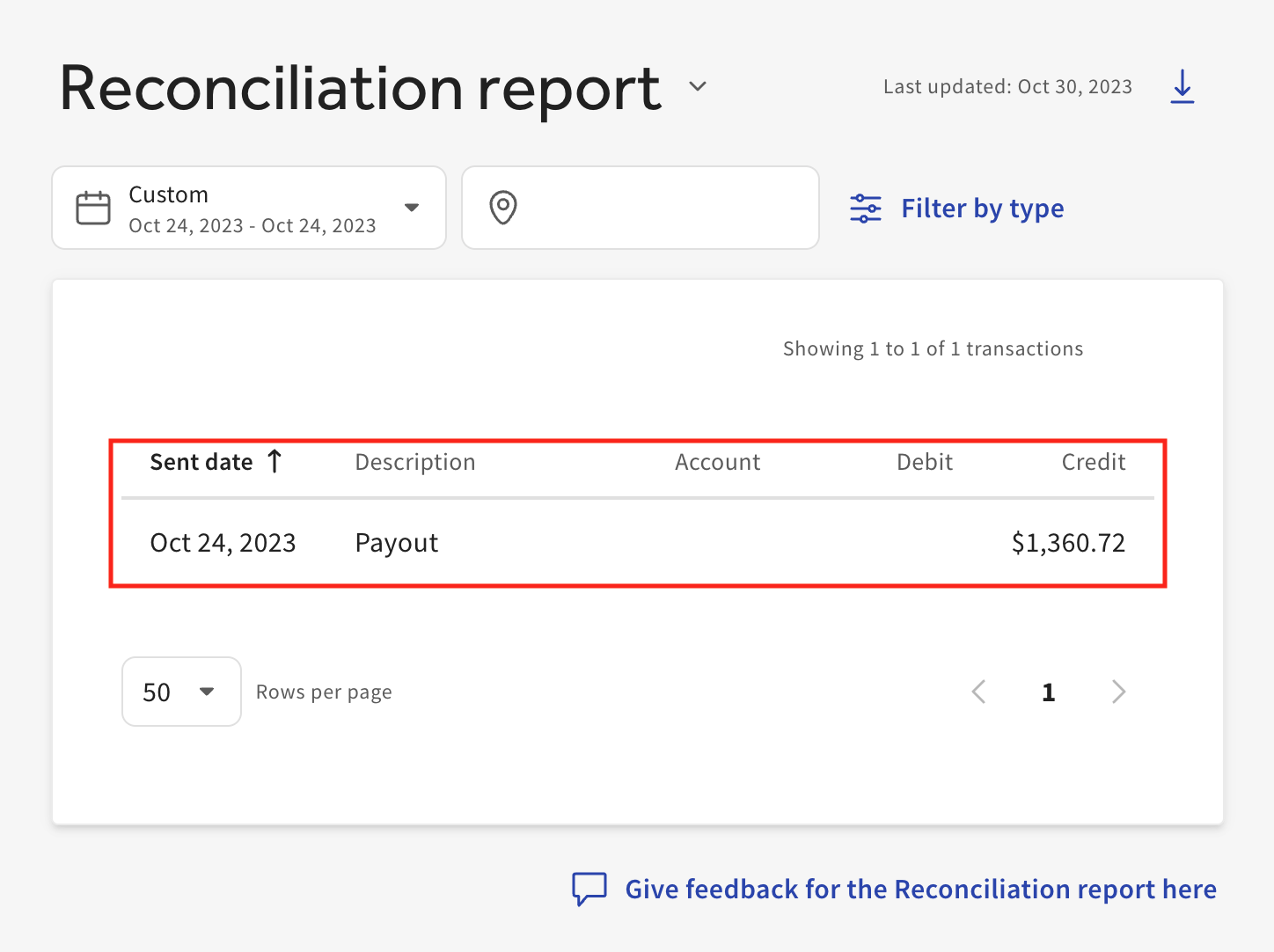
在“对账”报告中选择一笔付款即可打开“付款详情”视图,其中显示了该笔付款中预扣的 TDS 配送费和司机小费,以及所有相关交易。对于预扣款,明细表会显示预扣类型、说明和总金额。
如果我对 TDS 自动计费有疑问或需要支持,可以联系谁?
您可以提交一张票,联系 Toast 客户服务部,获取有关 TDS 自动计费的支持或咨询问题。有关说明,请参阅 如何向客户服务部提交票。
相关文章