获取有关 Toast配送服务® 小费支付的帮助
上次更新时间:2026年10月2日 13:49
您如何核算Toast配送服务®订单上的司机小费?请在本文中了解具体方法。
Toast配送服务® 小费报告
您的配送服务提供商会收取客人在每笔 Toast配送服务® (TDS) 订单中留下的小费。在向您的餐厅员工支付小费之前,应先从信用卡/非现金小费中扣除 Toast配送服务® 小费。请继续阅读,了解如何使用 POS 上的“日结”功能或 Toast Web 中的“销售汇总报告”和“劳动力汇总报告”来执行此操作。
一旦您启用 Toast配送服务®,Toast 会自动生成一名名为“TDS 配送员”的员工,其职位类型为“配送服务配送员”。客人在 Toast配送服务® 订单中留下的一切小费都将分配给“TDS 配送员”。您不应编辑“TDS 配送员”的员工姓名,因为这样做将无法再预留您代表 TDS 配送员收取的小费。
注意:当配送订单分配给职位设置为“TDS配送员”的员工时,他们将收到分配给该账单的所有小费。因此,即使服务员和配送员被分配到同一个TDS订单,作为配送员分配的TDS配送员员工也将收到分配给该账单的小费。
Toast配送服务®销售摘要报告
请按照以下步骤查看在轮班结束时或在任何特定时间段(例如:今天、昨天、本周、上周或自定义)应付给Toast配送服务®配送员的小费金额。
- 登录Toast Web并导航至报告 > 销售摘要。
- 接下来,从员工下拉菜单中,选择TDS配送员。选择更新以应用此筛选器。您将在收入摘要中看到净销售额和Toast配送服务小费订单。
回到顶部
Toast配送服务®劳动力报告
若要查看在轮班结束时或在任何特定时间段(例如:今天、昨天、本周、上周或自定义)应付给TDS配送员的小费金额,请按照以下步骤操作。
- 登录Toast Web并导航至报告 > 劳动力摘要。
- 接下来,从员工下拉菜单中,选择TDS配送员。选择更新以应用此筛选器。 您将在员工摘要部分看到Toast配送服务配送的净销售额和小费。
Toast配送服务®日结
如果您的餐厅在POS设备上使用日结来确定应向员工支付多少信用卡/非现金小费,请按照以下说明操作,以确保您正确扣除TDS配送员赚取的小费。
- 在Toast Web中,导航至团队 > 设置 > 经理每日结束报告。
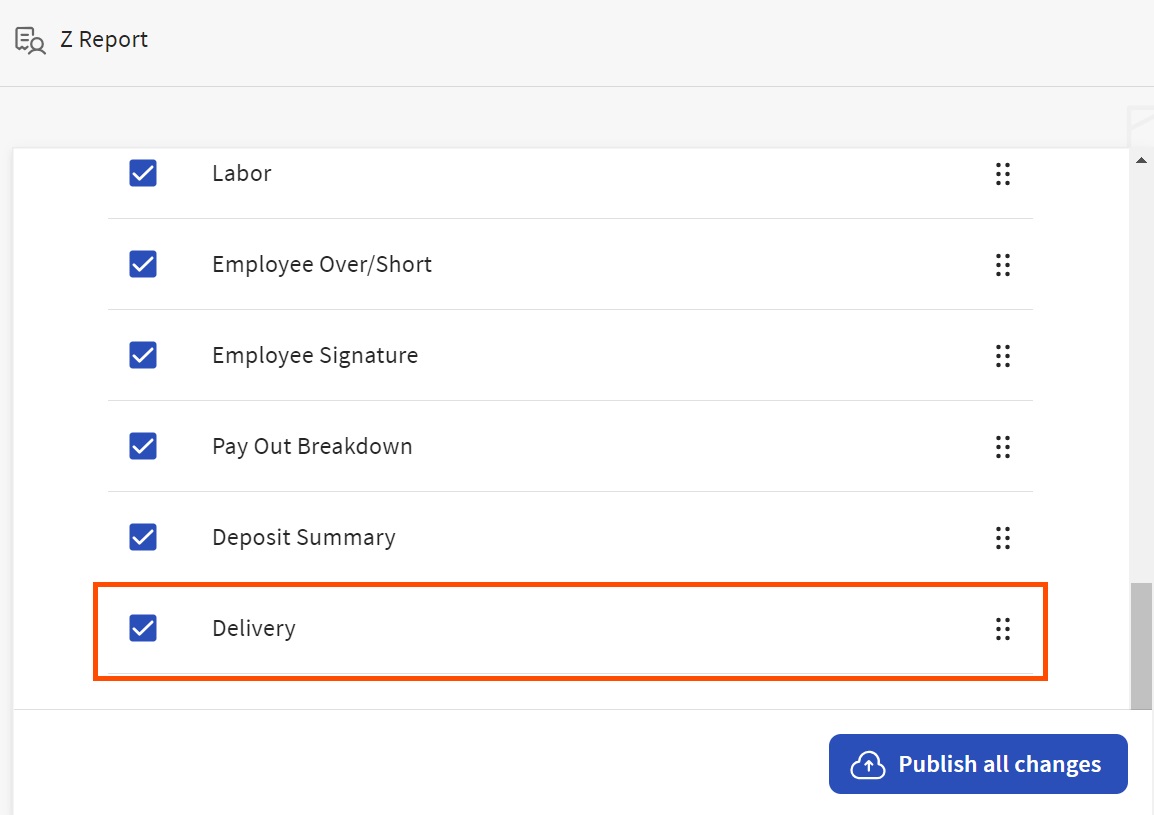
- 在Z报告页面上,使用显示?复选框列来启用配送选项。 这将使您能够快速从 POS 中识别与配送相关的小费。
- 然后,选择页面底部的 发布所有更改 按钮。
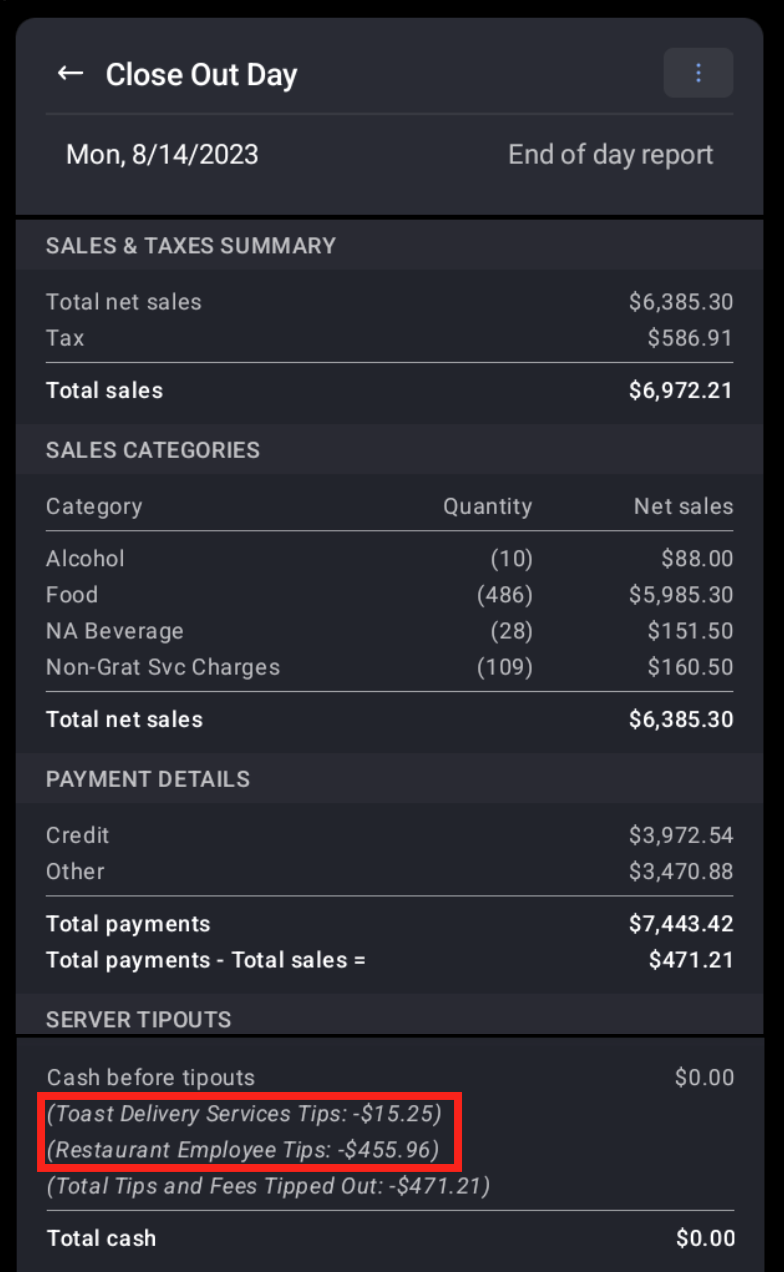
- 接下来,从 POS 设备访问 结束营业,通过从信用卡/非现金小费中扣除 Toast 配送服务小费,来确定向餐厅员工支付了多少信用卡/非现金小费总额。
完成轮班审查 (可选)
拥有 轮班审查 员工权限的用户可以从 POS 设备导航至 轮班审查,并为员工 TDS Driver 完成轮班审查。下方的屏幕截图显示用户可以通过 结束营业 报表识别匹配的小费总额。
在为 TDS 司机 和其他获得小费的员工完成轮班审查并为所有现金抽屉完成 结算流程后,结算现金报表现在将包括扣除 TDS 司机小费。
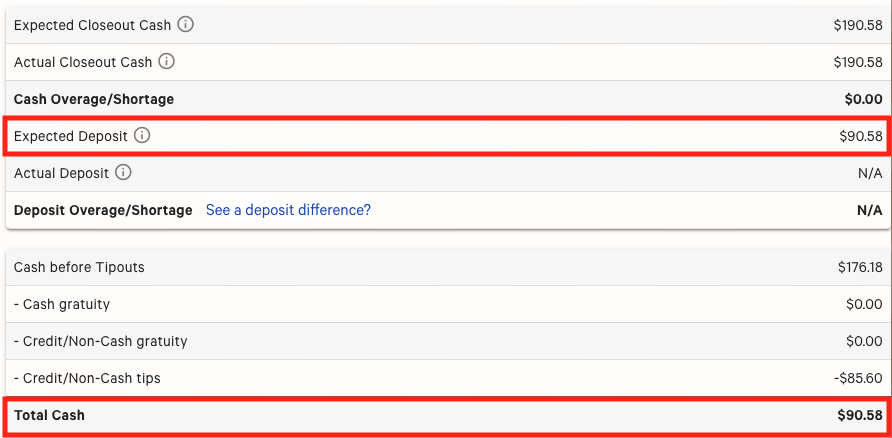
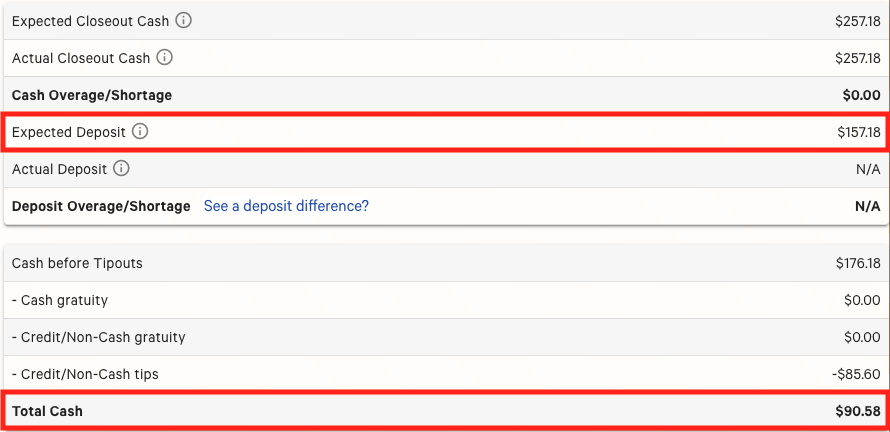
选择不对用户 TDS Driver 完成轮班审查,将不会在 预期存款 总额中扣除 TDS Driver 小费。预期存款 表格仅反映通过 轮班审查 工作流程收取的现金和支付的小费。现金总额 表示收到的所有现金付款和小费,无论订单来源如何。
如果餐厅倾向于不完成轮班审查,预期存款 与 现金总额 之间的差额即为 Toast 配送服务小费的总额。
如果我使用 Toast 小费管理工具,应如何核算分配给 TDS 司机的小费?
Toast 小费管理工具会在计算任何资金池之前自动排除 TDS 小费。因此,如果您使用小费管理工具,则无需考虑从信用卡/非现金小费中扣除 Toast 配送服务小费。
如果我使用 Toast 薪资系统,应如何核算分配给 TDS 司机的小费?
假设TDS司机未在Toast Payroll中获得报酬,他们“赚取”的小费将不会作为工资在Toast Payroll中处理。因此,工资计算引擎不会计算这些收入的税款,客户和TDS司机都不会为这些小费支付任何税款或工资。
我们通常将Toast Payroll员工档案映射到他们的POS档案,这使得工时和小费能够从POS流向工资单。对于这些非W-2员工的TDS司机,客户有权“忽略”映射,这意味着该被忽略的TDS司机所工作的任何工时或赚取的小费都不会流向工资单,因此也不会在工资发放中支付。
在开始使用Toast配送服务®中,您仅在Toast Web中为您的TDS司机创建了员工档案。如果您同时也使用Toast Payroll,请记住,在Toast Web中创建的员工档案不会同步并在Toast Payroll中创建映射档案。这意味着您不应看到来自此Toast Web档案的任何小费同步到Toast Payroll中。
如果由于某种原因您也为该TDS司机拥有Toast Payroll档案,您可以轻松禁用这些小费金额,使其不再进入未来的工资发放。请参阅Toast Payroll的第7步:管理员工映射以获取更多信息。
如果TDS司机在已提交的工资单中错误地记录了小费,HR+用户应通过任何Toast Payroll页面右下角的蓝色圆点联系客户服务团队,请求作废这些收入。
我们的TDS小费被关联到了错误的服务器。我该如何解决这个问题?
Toast会自动生成一名名为TDS Driver的员工,其职位类型为Delivery Services Driver。您的顾客在Toast配送服务®订单上留下的所有小费都将分配给TDS Driver。如果您希望更新此设置,请导航至Toast Web中的外带 & 配送 > 服务器选择部分。选择在线订单服务器旁边的下拉菜单,并从列表中选择您希望将TDS小费关联到的位置。从下拉菜单中选择TDS Driver,以便将您的小费发送到正确的位置。