Toast Payroll: Export Employee Data
上次更新时间:2026年10月22日 16:11
Export employee demographics, position data, pay history, tax packages, and benefits reports from Toast Payroll by export type.
- Before You Begin
- Export Employee Demographic and Position Data
- Pull a Report of Employee Pay History
- Download Tax Packages and Form W-2 Packages
- Export Benefits and ACA Enrollment Data
- Frequently Asked Questions
- Related Articles
Before You Begin
Applies to: Toast Payroll
Permissions needed:
- HR+ security role to access the full Standard reports library and the employee data export
- Manager security role to view Standard reports filtered to your direct reports only
What you'll accomplish: Download a file containing the employee or payroll data you need — demographics, positions, pay history, tax forms, or benefits — for records, audits, or your own analysis.
Different exports live in different places in Toast Payroll. Use the section that matches the data you need.
Export Employee Demographic and Position Data
To export a list of employees with their demographic and position information — name, address, status, position, hire date, and termination date — use the employee data export under Settings. This is the right export when you want an employee roster or a spreadsheet of current and archived employee details rather than payroll dollar amounts.
- Log into Toast Payroll and navigate to Settings > General Setup > Employees.
- If you do not see Settings on the left side of the screen, select Payroll from the Toast Web navigation rail on the left to make the Toast Payroll navigation rail appear.
- Under Update existing employees, select Start. You will not be updating any employees — this flow is also how you download existing employee data.
- Choose which categories to include. The export defaults to demographics, settings, position, and termination. Toggle any category you do not need to No.
- Select Next.
- Select Download to retrieve the file.
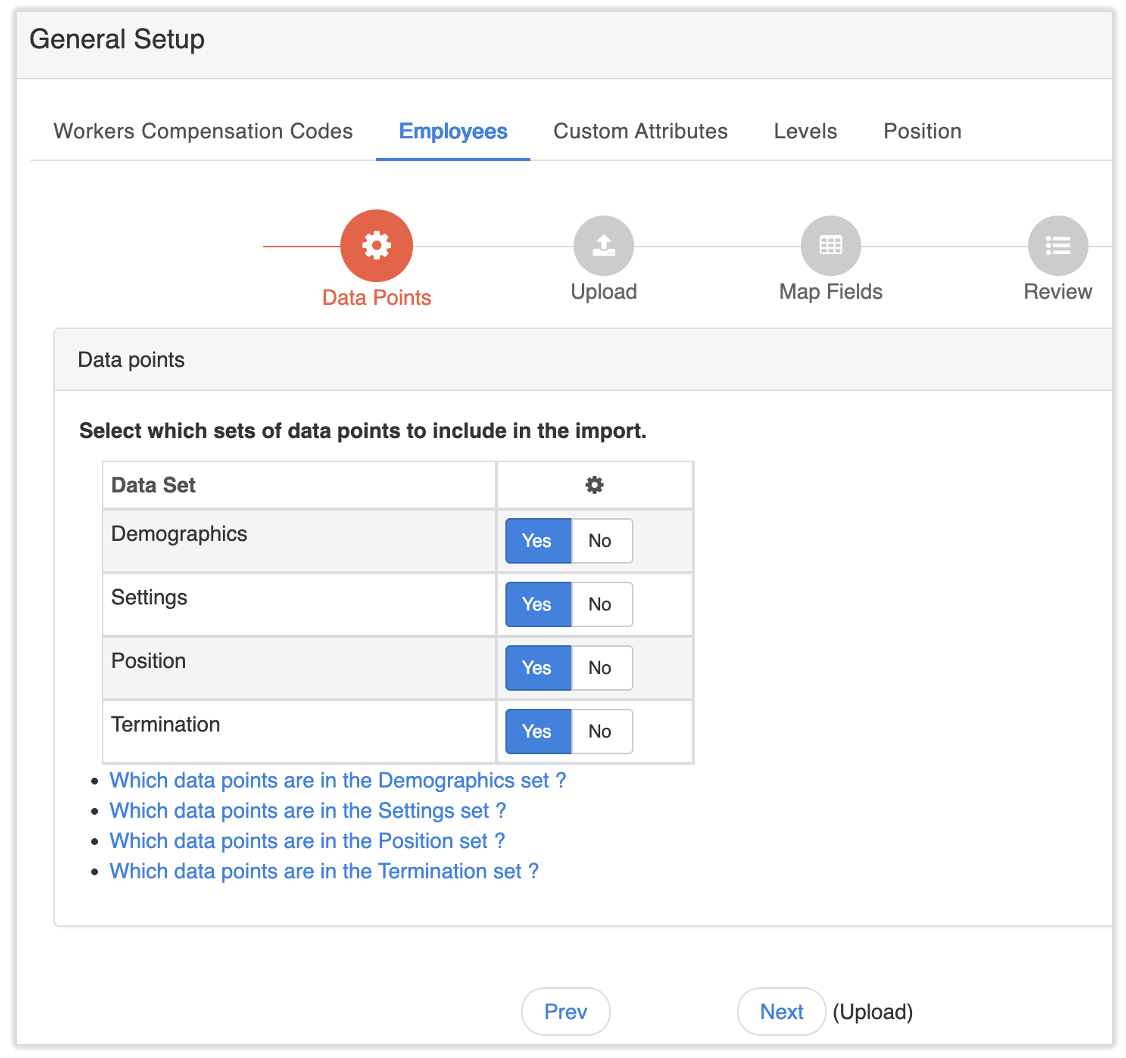
Expected outcome: A file downloads to your device containing the employee categories you selected.
Note: This export reflects the data currently entered on each employee's profile. If a field such as an address is blank or out of date in the profile, it will be blank or out of date in the export.
Pull a Report of Employee Pay History
To pull a report of historical payroll data per employee — earnings, taxes, deductions, and demographics — run the Per Pay Period Employee Payroll Audit Report (PEPAR). It gives a close look at what each employee was paid and can be viewed by FEIN, check date, and pay period.
To run it, log into payroll.toasttab.com and navigate to Reports > Standard. (When you select Reports in Toast Payroll, you should see a URL that begins with payroll.toasttab.com. Visit Navigate Toast Payroll Within Toast Web to learn how the new Toast Payroll navigation works.) Search for the "Per Pay Period Employee Payroll Audit Report". Before running it, choose which data fields to include: taxes, earnings, deductions, and demographics. To include more than one pay period, hold the Ctrl key (Windows) or Command key (Mac) and select each pay period you want.
For a longer audit window, or to map other common payroll tasks to the right report — gross wages by employee, an employee roster, a single paystub, or quarterly and year-to-date totals — see Toast Payroll: Review Common Payroll Reports.
Note: If the Per Pay Period Employee Payroll Audit Report returns a blank file across a wide date range or for all employees, try running it for a shorter range or one location at a time. If it is still blank, contact Toast Customer Care.
Download Tax Packages and Form W-2 Packages
To download your tax packages and Form W-2 packages, log into payroll.toasttab.com and navigate to Reports > Tax filing. (When you select Reports in Toast Payroll, you should see a URL that begins with payroll.toasttab.com. Visit Navigate Toast Payroll Within Toast Web to learn how the new Toast Payroll navigation works.) You may need to set the Year and FEIN to view the correct tax package or Form W-2 package.
For help reading the contents of a quarterly tax package, see Toast Payroll: Read Your Quarterly Tax Package.
Export Benefits and ACA Enrollment Data
If your company uses the Toast Payroll Classic Benefits module, you can download the Enrollment Results report. To do this, log into Toast Payroll, navigate to Benefits > View benefits module, select the settings at the top, and once the page populates, select Download. (If you do not see Benefits on the left side of the screen, select Payroll from the Toast Web navigation rail on the left to make the Toast Payroll navigation rail appear.)
If your company uses both the Classic Benefits and ACA modules, you can retrieve ACA filing information by navigating to Benefits > View and manage health benefits > ACA Reporting.
For more on the Classic Benefits module, see Toast Payroll: Get Started With the Classic Benefits Module.
Frequently Asked Questions
How do I pull a report with employee demographics in Toast Payroll?
To pull a report with employee demographics in Toast Payroll, use the employee data export under Settings > General Setup > Employees. (If you do not see Settings on the left side of the screen, select Payroll from the Toast Web navigation rail on the left to make the Toast Payroll navigation rail appear.) Select Start under Update existing employees, keep the Demographics data points set to Yes, select Next, and then select Download. This export includes fields such as name, address, status, position, hire date, and termination date.
Also asked as:
-
- What report do I pull for employee demographics and annual salary?
- Is there a report that shows employee demographics?
- Where can I find employee demographics and info?
How do I export a list of active and archived employees?
To export a list of active and archived employees, use the employee data export in Toast Payroll under Settings > General Setup > Employees. (If you do not see Settings on the left side of the screen, select Payroll from the Toast Web navigation rail on the left to make the Toast Payroll navigation rail appear.) Select Start under Update existing employees, choose the data points you need, select Next, and select Download. The export covers your existing employee records so you can review current and archived employees in one file.
Also asked as:
-
- How do I export my list of employees?
- How do I export a list of active employees?
- Can I export all of my employees from all locations in one file?
Can I export employee pay history?
Yes, you can export employee pay history by running the Per Pay Period Employee Payroll Audit Report in Toast Payroll under Reports > Standard. (If you do not see Settings on the left side of the screen, select Payroll from the Toast Web navigation rail on the left to make the Toast Payroll navigation rail appear.) Select the pay periods and the data fields you need — earnings, taxes, deductions, and demographics — before running the report. For other pay-history options across different time ranges, see Toast Payroll: Review Common Payroll Reports.
Also asked as:
-
- Can you export an employee pay history report?
- Can I print or export an employee pay history detail report?
Can I export payroll data for one employee only?
To export data for one employee, run the report or export that covers your full team and then filter the downloaded file to the employee you need. The employee data export and the Per Pay Period Employee Payroll Audit Report both pull all employees, and you can narrow the results in the downloaded spreadsheet.
Also asked as:
-
- How do I export data for a specific employee?
- Can I pull a report for just one employee?
What file format does the export download as?
The employee data export and the payroll audit report download as a file you can open in a spreadsheet program, where you can sort and filter the data. If you need a clean printout, open the file in your spreadsheet program and use its print or save-as options to produce a PDF.
Also asked as:
-
- What kind of file is the export?
- Can I get the export as a PDF?
Related Articles
- Toast Payroll: Review Common Payroll Reports
- Toast Payroll: Employee Detail and Payroll Register Report
- Toast Payroll: EEO-1 Reporting Guide
- Download the Payroll Export Report in Toast Web
- Toast Payroll: Get Started With the Classic Benefits Module
This content is for informational purposes and is not intended as legal, tax, HR, or any other professional advice. Please contact an attorney or other professional for advice.