翻译仅供参考。您与 Toast 签署的任何法律协议(包括但不限于《商户协议》和《终端用户许可协议》),其订立语言可能不同于以上页面所使用的语言,无论是否提供本页面其他语言的译文,均应以您所签署的协议条款为准
Toast Payroll:对工作缺勤时间(TAFW)进行调整
上次更新时间:2026年10月9日 15:40
需要帮助调整父母假、假期、PTO或其他请假请求的工作时间外的休假(TAFW)吗?了解如何在本文中更改TAFW。
查看和编辑TAFW(工作缺勤时间)余额
要查看和编辑TAFW余额,请按照以下步骤操作:
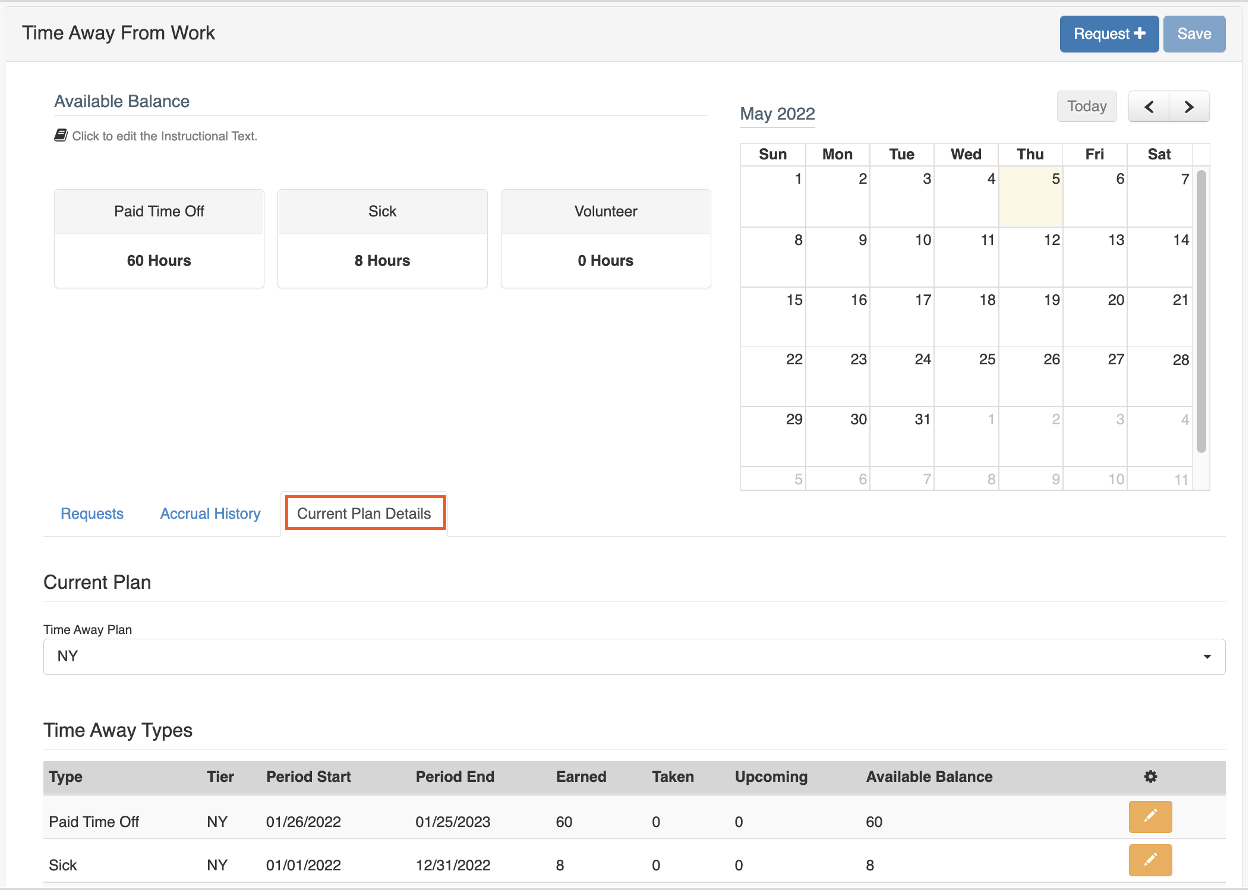
- 导航到员工的个人资料并选择缺勤 > 当前计划详情选项卡。
- TAFW余额类型也称为桶。这些桶列描述了TAFW内小时数的流动:
- 已赚取: 员工在期间开始日期和期间结束日期之间累计的TAFW小时数。
- 已请假: 员工在同一时间段内请假的小时数。
- 即将到来: 员工已请求(并已批准)的小时数,但请求的日期尚未过去。
- 可用: 已赚取 减去 已使用 减去 即将到来 是当前可请求TAFW的余额。
- 选择需要调整的请假类型,通过选择黄色编辑铅笔。
alt在当前计划详情标签上突出显示的编辑铅笔alt
- 填写以下字段。
- 修改日期: 此日期规格是必需的,并将始终默认为更新进行的当天。
- 小时: 输入调整的小时数。
- 类型: 可以是 增加整体余额 或 减少整体余额。这些调整将影响 已赚取 和 可用 余额。
- 描述: 这是可选的,但Toast强烈建议利用此字段添加说明手动更新原因的备注。
- 更新已使用: 是否需要更新已使用桶?
- 当这里选择了是,并且之前选择了增加整体余额时,输入的小时将从已使用桶转移到可用桶。
- 当这里选择了是,并且之前选择了减少整体余额时,输入的小时将从可用桶转移到已使用桶。
alt在选择编辑铅笔后弹出的编辑余额alt
- 完成字段后,选择完成以确认更改。您可以刷新页面以验证余额是否已更新。
常见的TAFW调整场景
- 一名员工请求休假,并且请求获得批准。一旦日期过去,将被视为已休时间。如果员工没有请假(即他们请求休假但实际上来上班),则需要手动调整以将标记为已休的小时数添加回来。在这种情况下,选择增加整体余额并将更新已休设置为是。
- 一名员工有可用的TAFW并请了一天假,但没有在Toast Payroll中请求。要在系统中手动更新此TAFW,您需要选择减少整体余额并将更新已休设置为是。
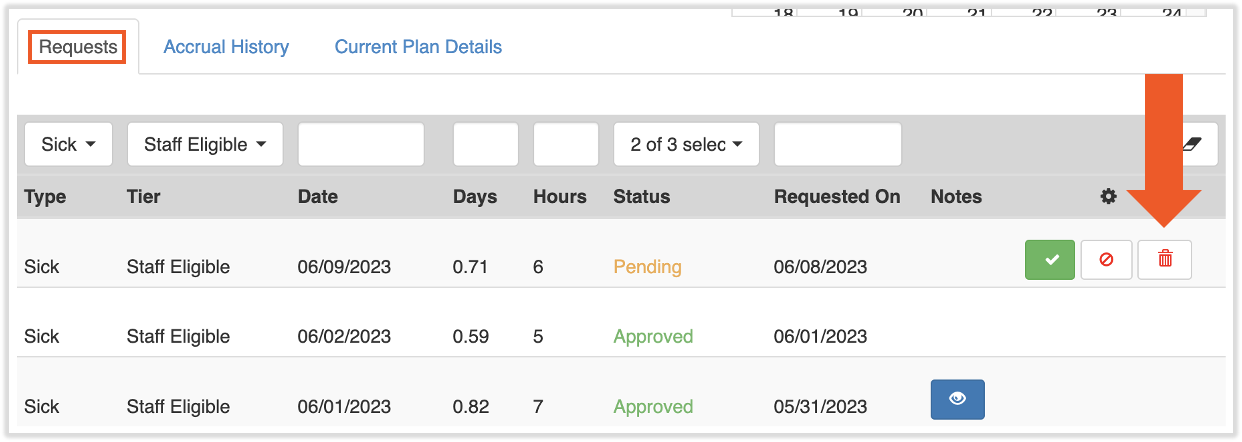
- 一名员工请求休假(无论是否获得批准),但他们决定不请假。员工或HR+用户可以通过在垃圾桶图标上选择来删除即将到来的请求,位于请求选项卡上(见下文)。这些小时将自动从即将到来的桶中扣除,并重新添加到可用的桶中。不需要进行调整。
TAFW调整的重要事项
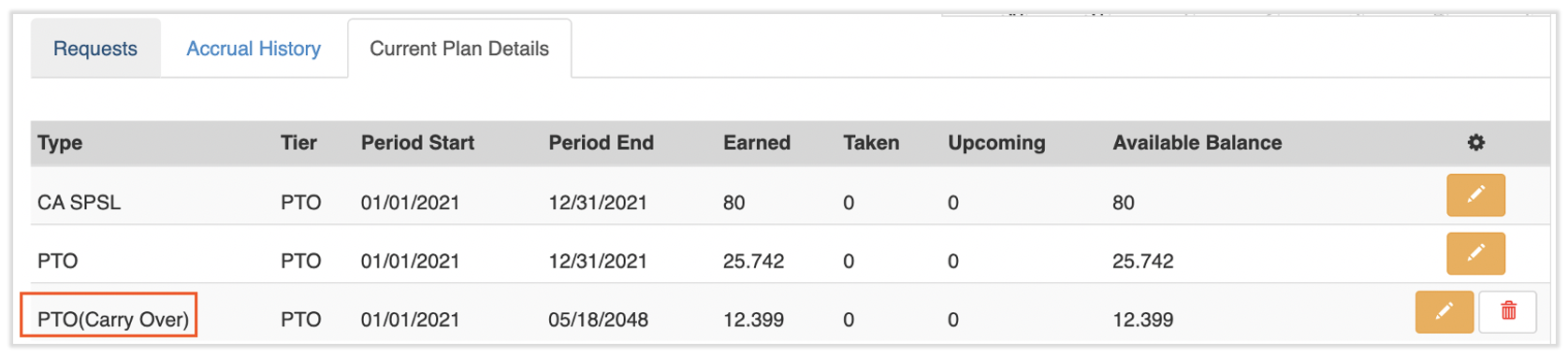
结转: 类型下拉菜单的例外(见上面的第5步)是PTO/TAFW结转。PTO(带薪休假)结转将在此调整页面上显示为类型"PTO"。只要您在上一页选择了PTO结转桶,任何编辑将仅影响结转余额。
安全访问: 默认情况下,只有HR+用户可以访问纯粹增加员工的TAFW额度(例如,增加他们的假期时间10小时)。默认情况下,经理安全角色可以调整已使用额度或减少员工的余额。
注意:无论安全角色如何,用户都无法在Toast Payroll系统中编辑他们的可用余额。
附加资源
此内容仅供参考,不应视为法律、税务、人力资源或任何其他专业建议。请联系律师或其他专业人士以获取建议。