Toast Payroll:经典福利模块开放注册指南
上次更新时间:2026年10月13日 17:55
员工应按照本文中的步骤在开放注册期间进行选择,或处理符合条件的重大生活事件 (QLE)。
| 本文仅适用于其公司使用Toast Payroll 经典福利模块(仅限旧版客户)的员工。 如果员工有资格通过 Toast Payroll 经典福利模块获得福利,他们或许可以通过 Toast Payroll 进行注册。 |
开放注册
开放注册是指福利合格员工进行选择的时间段。一旦此期间结束,员工只能通过处理合格生活事件来更新其选择。
本视频介绍了总薪资周期成本与月度成本、需要家属的承保选项以及“查看计划文档”部分。
- 登录 Toast Payroll并导航至我的个人资料 > 福利 > 福利开放注册。
- 如果您在屏幕左侧没有看到我的个人资料,请从左侧的 Toast Web 导航栏中选择薪资,以显示 Toast Payroll 导航栏。
- 选择注册福利。如果您没有看到此选项,则您目前可能没有资格注册福利。请联系您的经理或人力资源部门以获取更多信息。
- 查看或编辑地址信息。
- 查看或编辑受益人信息。
- 您无法通过开放注册向导编辑或删除现有的受抚养人信息。受抚养人和受益人 部分详细说明了如何编辑或删除现有受抚养人。
- 请选择您是否要加入或退出每项福利,并选择您所选的承保级别。总月保费以及您将在每张工资单上看到的扣除额均已列出。
- 请在每项福利旁签名以确认您的选择。
- 最后,选择 提交 以发送电子签名。
- 完成后,您将在 福利 页面下看到您的福利选择记录在您的个人资料中,它也将记录在雇主的 开放注册 页面上。
受抚养人和受益人
- 受抚养人:有资格在员工所获福利计划下获得承保的人员。
- 受益人:由员工指定以领取人寿保险等福利的个人或法人实体。
如果您需要在开放注册期之外添加或更改您的受抚养人或受益人,您可以在 Toast Payroll 中通过导航至 我的个人资料 > Benefits > 受抚养人和受益人 页面进行操作。(如果您在屏幕左侧没有看到 我的个人资料,请从左侧的 Toast Web 导航栏中选择 薪资,以显示 Toast Payroll 导航栏。)您可以通过选择 添加+ 并填写其人口统计信息来添加或编辑受抚养人和受益人。员工需要经理或 HR+ 用户来删除现有实体(只需在员工个人资料的此页面上选择 垃圾桶图标 即可)。
回到顶部
合格生活事件
合格生活事件 (QLE):当员工发生诸如孩子出生或结婚等事件,从而允许其在开放注册期之外更改福利时。
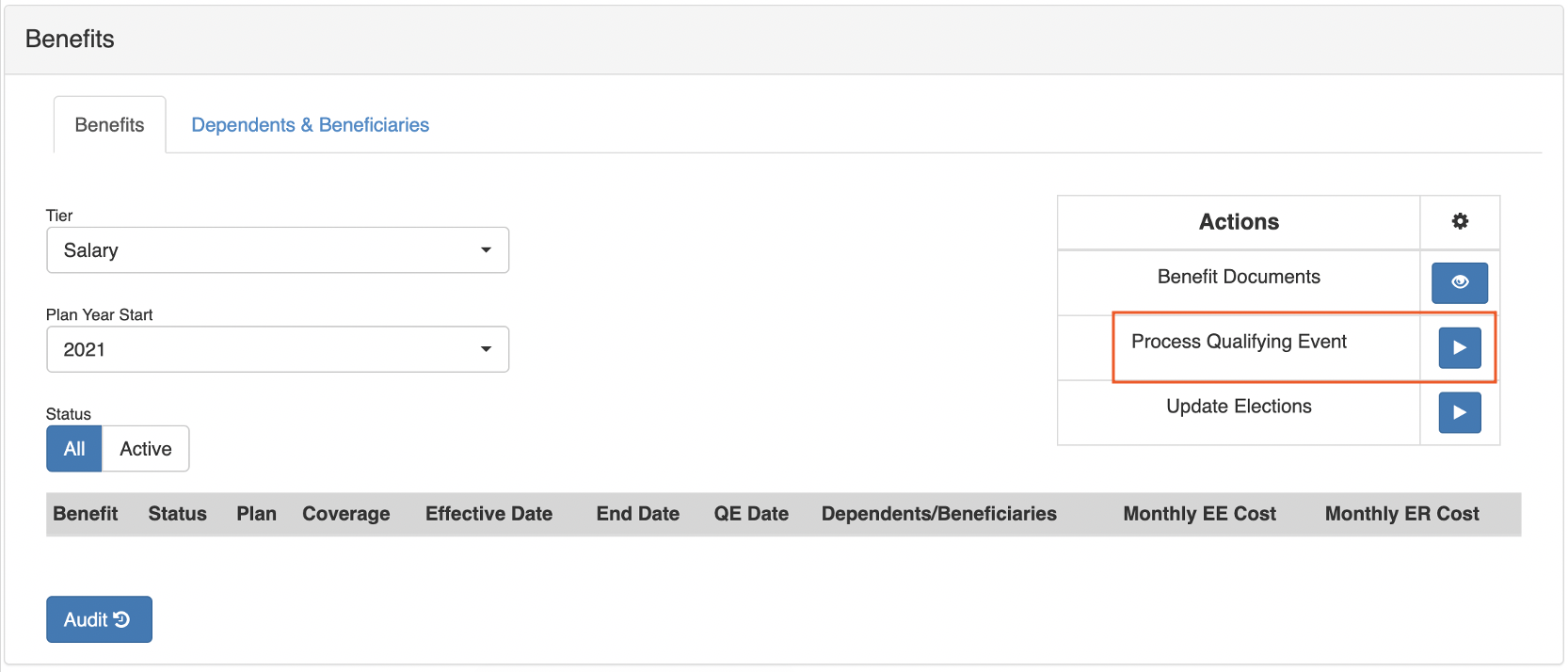
如果您需要在开放注册期之外处理符合条件的重大生活事件,请登录 payroll.toasttab.com,导航至 我的个人资料 > 福利,然后选择 处理重大生活事件。如果您在屏幕左侧没有看到 我的个人资料,请从左侧的 Toast Web 导航栏中选择 薪资,以显示 Toast Payroll 导航栏。
输入处理符合条件的重大生活事件的认证 事件/原因 以及变更的法定 日期。然后上传任何 证明文件 供您的雇主审核。必须提供所有这三项内容才能处理此变更。
为您想要更新的福利方案选择 修改,然后选择 开始。您将被带到开放注册向导以进行更改(如上方的视频所示)。
完成后,请将福利变更通知您的经理,以确保您的保险公司处理该注册。
此内容仅供参考,不作为法律、税务、人力资源或其他任何专业建议。请联系律师或其他专业人士以获取建议。