Get Help With the Toast Now App
Last updated: Mar 25, 2026, 1:49 PM
For an introduction of the Toast Now app and an overview of its features and navigation, see Get Started With the Toast Now App.
- Troubleshoot the Toast Now App
- Account & Login
- Reporting & Data
- Why don’t I see any data when I log in to Toast Now?
- Why are some reports not showing up in the Toast Now app?
- Why am I only being shown data up to a certain date?
- Why are the comparison dates off by one day?
- Why can’t I see data for one of my locations on the Toast Now app?
- Can I change the reporting time period on the Toast Now app? Can I view a custom date range?
- Is it possible to see the total sales and information for the whole company in the Toast Now app?
- What does the "Error fetching data" message mean?
- Can I view cash drop or deposit amounts on the Toast Now app?
- Other Questions
- How do I send a product suggestion or feedback about the Toast Now app?
- What do I do if I get an "invalid number" error when trying to log in to a specific location?
- How do I get back to my support chat conversations in the Toast Now app?
- Can I see which tables are open or occupied on the Toast Now app?
- Can I find and view open checks and other check information on the app?
- Additional Resources
Toast Now App Troubleshooting
If your Toast Now app isn’t working properly or isn't loading at all, try the following troubleshooting methods:
-
- Restart your phone or device.
- Make sure your Toast Now app is updated to the latest version.
- Delete and reinstall the Toast Now app.
Account & Login Questions About Toast Now
Can I create a separate Toast Now login for other employees at my business?
Yes, you can create a separate Toast Now login for other employees. To provide someone access to the app, set them up with an account in Toast Web and assign the necessary permissions. The email address and password used to log in to Toast Web are the same credentials you use to log in to the Toast Now app. See the Add Employees to Toast section of this Support Center article, Add and Edit Employees and Wages for Toast POS, for more information.
My email address is a generic one with lots of numbers and letters. Can I still log into Toast Now?
If an employee has a generic or an @example.com email address, Toast Now may not allow access. Check for a duplicate profile in Toast Web under Employees > Employee management > Employees. Search for the user's name.
-
- If they do not have a duplicate profile, replace the generic email address with the user's true email address and have them log into Toast now again.
- If they have a duplicate profile with a generic email address, archive this profile during a time the employee is not clocked in and instruct the user to login to Toast Now with their true email address attached to the other Toast Web profile. This may have a different passcode for logging onto the POS, so be sure to check that.
Note: If you use Toast Payroll and you've archived a profile, be sure to verify the employee's mapping so tips and timesheet data will continue syncing to Toast Payroll. Use the Individual Employee Mapping section of Toast Payroll: Manage Employee Mapping to map your employee between Toast Payroll and Toast Web.
What's my password for the Toast Now app?
The email and password you use to log in to the Toast Now app are the same credentials you use to log in to Toast Web or the Toast app on your POS device. If you don't remember your password, select the Forgot password? link that appears on the sign-in screen after you enter your email.
Reporting & Data Questions About Toast Now
Why don’t I see any data when I log in to Toast Now?
If you're unable to see certain data within the app), or a certain location you should have access to isn't showing, you might not have all of the proper permissions. Have your admin provide you with the permissions needed for Toast Now.
For a list of the required permissions for each feature on the Toast Now app, see the Required User Permissions section of this Support Center article, Get Started With the Toast Now App.
Why are some reports not showing up in the Toast Now app?
If reports are not showing up, it's likely that you don’t have the required permissions to see the associated data. You will need these permissions for each location that you wish to see in the Toast Now app. See the Required User Permissions section of this Support Center article, Get Started With the Toast Now App, for more information.
Why am I only being shown data up to a certain date?
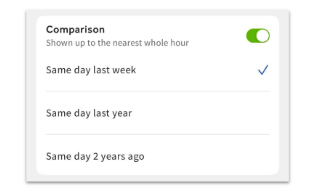
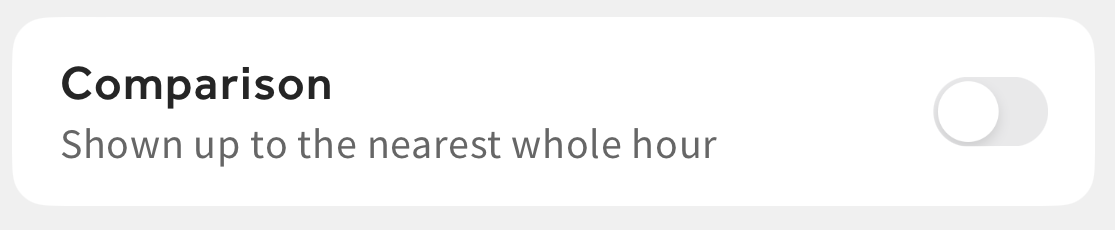
You may have toggled the Comparison tool on. When toggled on, the Comparison tool will compare data from the present day against a past day of your choosing. To view the full date range of data, toggle Comparison off.
Why are the comparison dates off by one day?
Year-to-year comparisons are based on the day of the week. For that reason, the date may be off by one number, but it would compare Monday to Monday.
"Today" will always refer to the current date. The date listed for the comparison range is the corresponding day of the previous time frame. For example, if you use the Same day last year comparison on Wednesday, March 6, 2024, you'll see: "Today vs Wed, Mar 8, 2023".
Why can’t I see data for one of my locations on the Toast Now app?
If you can’t see data for one of your locations, it’s likely that you don’t have the required permissions at that location. An administrator at your restaurant should log in to Toast Web and assign you the required permissions for each location that you wish to access in the Toast Now app. See the Required User Permissions section of this Support Center article, Get Started With the Toast Now App, for more information.
If you've confirmed you have the correct permissions at the location in question, try these troubleshooting steps:
-
- Try logging out and back in.
- Check for any updates for the app.
- If there is no update required, delete the app and redownload it (as a last resort).
The restaurant location might not be visible on your app because it's not in the same restaurant group as your other locations. You can request the Toast support team to move it into the correct restaurant group so you can view it on your app.
Can I change the reporting time period on the Toast Now app? Can I view a custom date range?
What does the "Error fetching data" message mean?
If you see a message stating "error fetching data," try force-closing the app and reinstalling it. This may also appear as not being able to view today's info or data. If the error persists:
-
- Force-close the app and any apps running in the background.
- Swipe up, left, or right depending on your device to view all running apps.
- Swipe up to close the Toast Now app.
- Select the App Store icon on your device.
- Select your profile icon near the upper right of the screen. This will have your first and last initials. If you have any apps that need to be updated, they will display towards the bottom of your device. Select Update All or select the individual app you want to update.
If the issue continues, contact Customer Care and share a screenshot of the issue.
Is it possible to see the total sales and information for the whole company in the Toast Now app?
No there isn't a way to see a combined view of the sales for all locations together in the Toast Now app. In the multi-location picker view, you can see the net sales, labor percentage, and SPLH percentage for each location separately.
Can I view cash drop or deposit amounts on the Toast Now app?
Back to top
Other Questions About Toast Now
How do I send a product suggestion or feedback about the Toast Now app?
Select the Account button on the bottom right corner of your screen. On this page, you can send us feedback to improve the app experience, or feature requests and product improvements. Our development team reviews every request sent through this channel and works on new app updates accordingly.
What do I do if I get an "invalid number" error when trying to log in to a specific location in Toast Now?
If you see an "invalid number" error in the Toast Now app, you may not have the necessary permissions for the specific location. To access this location, you'll need to have someone who has permissions for this location grant you the required permissions.
How do I get back to my support chat conversations in the Toast Now app?
To view your previous support conversations or start a new support chat in the Toast Now app, select the Support button at the bottom of the page.
Can I see which tables are open or occupied on the Toast Now app?
No, the Toast Now app will not show you which tables at your restaurant are open or occupied.
Is it possible to find and view open checks and other check information such as order item details, guest, and payment information in Toast Now?
Yes, Toast recently released a new feature that allows Toast Now users to be able to search and view their restaurants' open checks and other check information for whichever day they choose.
This new feature helps Toast users to:
-
-
- Monitor and manage table/turnover/pacing
- Track and manage kitchen capacity/firing orders
- Find and view open delivery checks to monitor deliveries
- Find and view pickup checks to organize orders for pickup
-