Toast Payroll: Manage Employee Mapping
Last updated: Aug 20, 2026, 1:36 PM
If tips won't send to payroll, hours aren't pulling over, or you see a red alert icon on a POS Mapping tab, an employee's Toast Payroll profile is probably not linked to the right Toast Web profile. Use this article to fix it.
- Before You Begin
- Quick Fix
- What This Article Covers vs. Where to Go Next
- Map Employees in Toast Payroll
- Resolve Common Mapping Problems
- Tips Won't Send to Payroll: "1 Employee Is Unmapped"
- Tip Pool Says "Unmapped" but the Mapping Page Is Clean
- Time Entries or Hours Not Pulling Over to Payroll
- Red Alert Icon on POS Mapping After Adding a New Job
- Hired in Toast Web First
- Duplicate Toast Web Profiles
- Duplicate Toast Payroll Profiles
- Rehiring an Employee
- Resolve Unpaid Employees on the Team Page
- Before You Contact Customer Care
- Frequently Asked Questions
- Related Articles
Before You Begin
Applies to: Toast Payroll, Toast Web, Toast POS
Permissions needed:
- HR+ user role in Toast Payroll (required to access the mapping module)
What you'll accomplish: Link an employee's Toast Payroll profile to the correct Toast Web profile so time entries, tips, jobs, pay rate, and employee status sync automatically between Toast Payroll and Toast Web.
Quick Fix
The table below maps the most common mapping symptoms to their cause and the fastest fix. Each row links to the matching branch below.
| Symptom | Most Common Cause | Quick Fix | Self-Service? |
|---|---|---|---|
| "1 employee is unmapped. Map this employee." when sending tips to payroll | An employee on the tip pool is not linked between Toast Payroll and Toast Web | To fix "1 employee is unmapped" blocking tips from sending to payroll: map the unlinked employee between Toast Payroll and Toast Web under Settings > Toast > Employees. Full steps: see Tips Won't Send to Payroll: "1 Employee Is Unmapped" below. | Yes |
| Tips won't send because of an unmapped employee, but the mapping page shows everyone is mapped | A tip-receiving employee is marked Ignored in Payroll at the bottom of the Unmapped POS Employees tab | To fix tips showing unmapped even though the mapping page looks clean: check the bottom of the Unmapped POS Employees tab for a tip-receiving employee marked Ignored in Payroll, and map that profile. Full steps: see Tip Pool Says "Unmapped" but the Mapping Page Is Clean below. | Yes |
| Hours or time entries not pulling over to Toast Payroll after the employee clocked in | The Toast Payroll profile is mapped to the wrong Toast Web profile (or unmapped) | To fix hours or time entries not pulling into Toast Payroll: correct the employee's mapping — remap the Toast Payroll profile to the right Toast Web profile, or map it if unmapped. Full steps: see Time Entries or Hours Not Pulling Over to Payroll below. | Yes |
| Red alert icon on the POS Mapping tab with the message "Job pending sync. After the next sync, this employee's jobs in Payroll will be added to their profile in Toast POS." | A new job was added in Toast Payroll and has not synced to Toast POS yet | To fix the red alert icon and "Job pending sync" message on the POS Mapping tab: this appears after adding a new job in Toast Payroll and clears once the job syncs to Toast POS. Full steps: see Red Alert Icon on POS Mapping After Adding a New Job below. | Yes — for the resync; agent-only if Email Support link is missing |
| The Toast Web profile in the mapping list shows (archived) next to the employee's name | The active Toast Web profile was archived, or the employee was hired in Toast Web first and a duplicate was created | To fix a Toast Web profile showing as "(archived)" in the mapping list: this happens when the active profile was archived, or when the employee was hired in Toast Web first and a duplicate profile was created. | Yes |
| Banner on Team page: "One or more employees are unmapped. You must map them before proceeding." | A Toast Web profile has no matching Toast Payroll profile, or vice versa | To fix the Team page banner "One or more employees are unmapped": this means a Toast Web profile has no matching Toast Payroll profile (or the reverse) — map them to each other. Full steps: see Resolve Unpaid Employees on the Team Page below. | Yes |
| "Sorry! We couldn't approve 2 days." / "The following days failed to send:" | Tips Manager could not send because of one or more unmapped employees | To fix "Sorry! We couldn't approve [X] days" or "The following days failed to send" in Tips Manager: this means one or more employees are unmapped — map them before resending. Full steps: see Tips Won't Send to Payroll: "1 Employee Is Unmapped" below. | Yes |
| "Employees Are Not Mapped" error on payroll | One or more profiles are not linked between Toast Payroll and Toast Web | To fix an "Employees Are Not Mapped" error on payroll: link the affected profiles between Toast Payroll and Toast Web. Full steps: see Map Employees in Toast Payroll below. | Yes |
| Two Toast Payroll profiles for the same employee — labor and tip data is split between them | Duplicate Toast Payroll profile created during onboarding | If an employee has two Toast Payroll profiles with labor and tip data split between them: this is a duplicate profile created during onboarding, and Customer Care must reconcile it — this isn't self-service. Full steps: see Duplicate Toast Payroll Profiles below. | No — Customer Care reconciliation required |
| Rehired employee not appearing or not mapped | Rehire process was not used; old Toast Web profile is still archived | To fix a rehired employee not appearing or not mapped: use the proper rehire process rather than creating a new profile — the old Toast Web profile just needs to be unarchived and remapped. Full steps: see Rehiring an Employee below. | Yes |
What This Article Covers vs. Where to Go Next
This article focuses on linking Toast Payroll profiles to Toast Web profiles. For adjacent topics:
- Detailed time entry and tip sync troubleshooting (beyond mapping): see Toast Payroll: Sync Information With Toast Web.
- Archiving duplicate Toast Web profiles step-by-step: see Duplicate Employee Profiles in Toast Web.
- Tip pool errors that are not caused by mapping: see Get Help With Toast Tips Manager.
- Unpaid Employee three-dots menu detail (Assign Payroll profile / Ignore in Payroll / Add employee to Payroll): see Toast Payroll: Team Page.
- Hiring or rehiring an employee: see Toast Payroll: Rehire Guide.
Map Employees in Toast Payroll
Mapping is the process of linking an employee's Toast Payroll profile to their Toast Web profile. When employees are correctly mapped, their data syncs automatically — including tips, jobs, position, pay rate, employee status, and time entries from Toast POS devices showing up on Toast Payroll timesheets.
To avoid most cases of manual mapping, hire employees in Toast Payroll, not in Toast Web. When an employee is hired in Toast Payroll, a Toast Web profile is immediately created and mapped automatically.
Use the Mapping Tool
- In Toast Payroll, navigate to Settings > Toast > Employees.
- Use the Location drop-down menu to switch between locations when necessary. The mapping page is scoped to one location at a time.
- Choose the tab that matches what you need:
- Payroll Employees — match Toast Payroll employee profiles to Toast Web employee profiles. This tab lists all Payroll employee profiles and how (or if) they are mapped to a corresponding Toast Web profile. Unmapped employees show a red alert icon. It is best practice to ensure all hourly employees are mapped.
- Unmapped POS Employees — map a Toast Web employee profile to a Toast Payroll employee profile. Unmapped profiles here may be duplicates or the result of creating a Toast Web profile first. Archived Toast Web profiles are stored at the bottom.
- Payroll Employees — match Toast Payroll employee profiles to Toast Web employee profiles. This tab lists all Payroll employee profiles and how (or if) they are mapped to a corresponding Toast Web profile. Unmapped employees show a red alert icon. It is best practice to ensure all hourly employees are mapped.
- If you see an Accept Suggestion button next to an employee's name, the system has identified a suggested match based on partial first name, partial last name, email address, nickname, and/or employee number. Select Accept Suggestion if the match is correct.
- If the suggestion is incorrect, select the edit pencil and choose the correct profile from the Map to POS Employee drop-down menu. Any changes made on this page save automatically.
- If no suggestion appears, select the Map to POS Employee box and make your selection from the drop-down menu. Type part of the name to narrow the list, or use the Last Clock-in date to identify the right profile.
- If the individual is not a Toast Web user, select Ignore this Employee.
- Reasons to ignore in Payroll: the employee does not get paid from this location but still requires Toast Web access (for example, a corporate persona); or the profile is a generic, non-human profile, such as Bar Drawer AM or a communal cashier login.
- Reasons to ignore in POS: the individual only needs Toast Payroll access (for example, a bookkeeper or accountant); or you want to limit POS access to that location while still paying the employee (for example, a salaried or corporate employee).
- If a Toast Web profile shows (archived) next to the employee's name, follow the Unarchive an Employee instructions in Add and Manage Employees in Toast Web. This is the case if the employee was rehired.
- After the profile is correctly mapped, you must resubmit existing time entries (otherwise the time entries already in Toast Web will not sync to the newly mapped Toast Payroll profile):
- In Toast Web, navigate to Reports > Labor > Time entry management.
- Choose the desired date range and employee using the drop-down menus at the top.
- Select each time entry (outside of the editable fields) to open the Shift details sidebar. For each time entry, select Save changes.
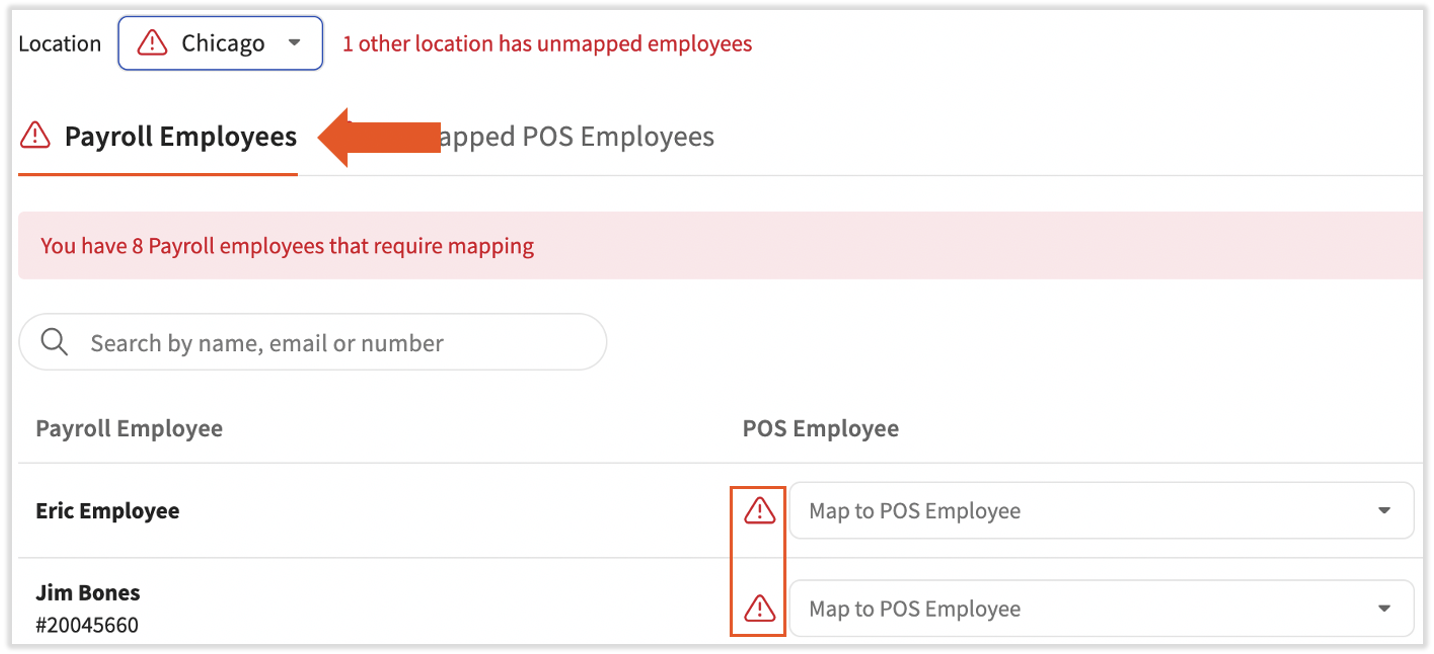
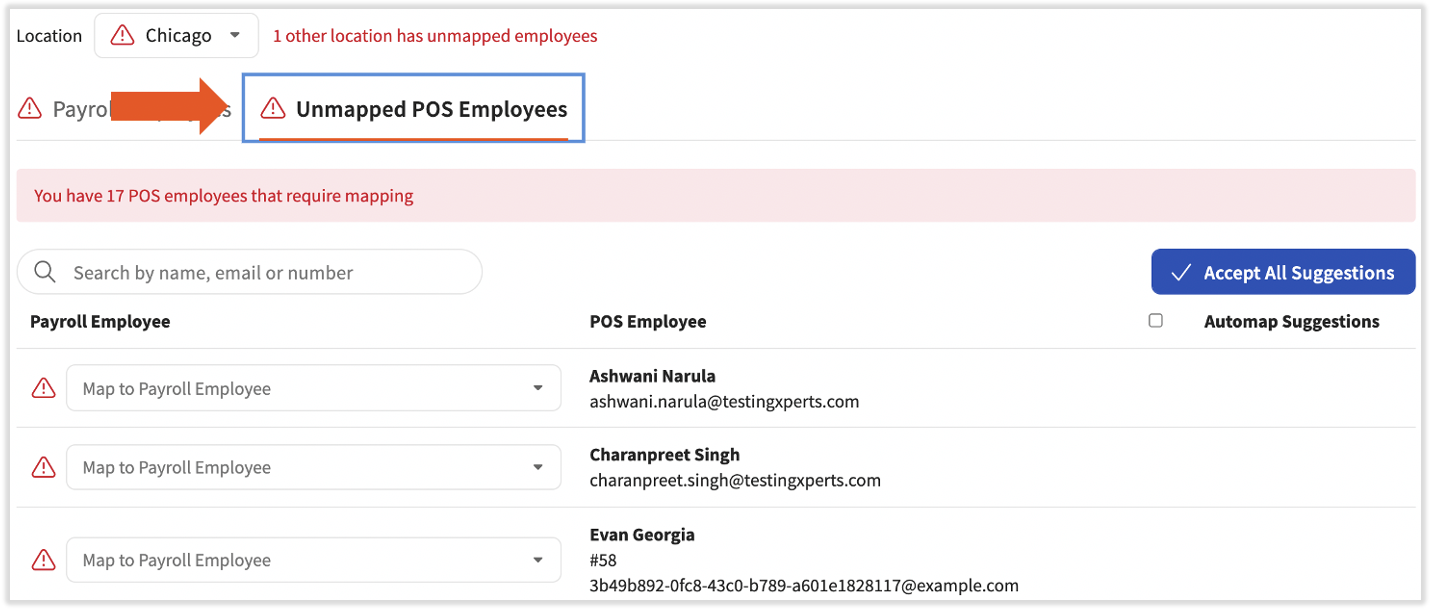
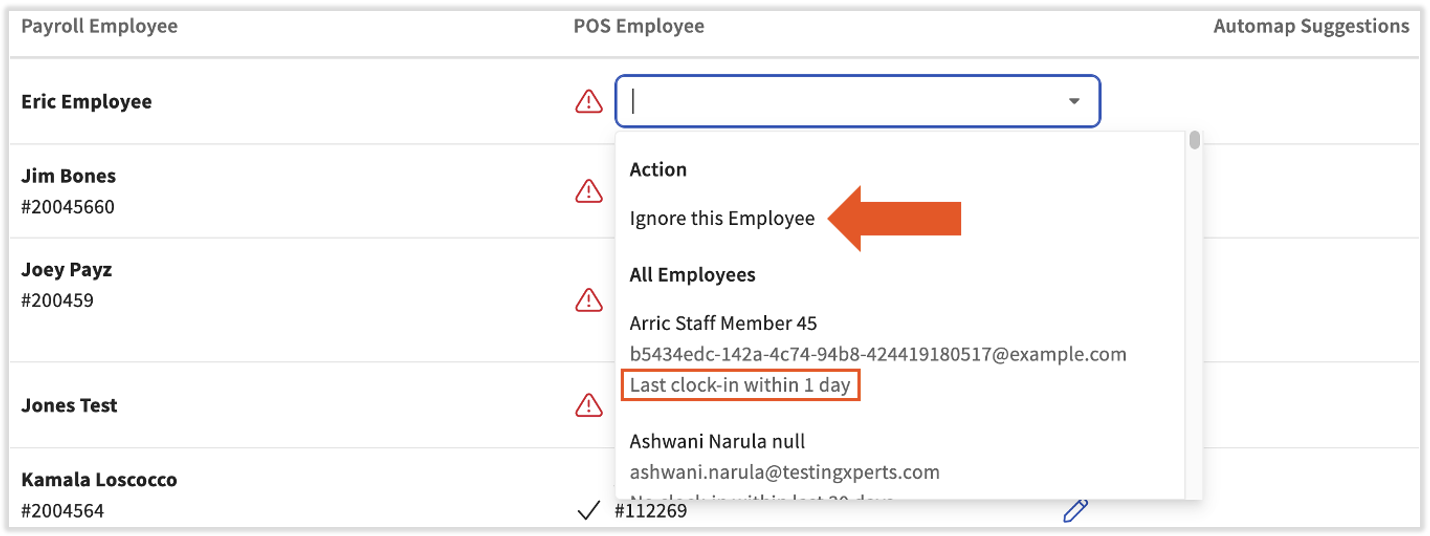
Expected outcome: The employee's Payroll Employees tab no longer shows a red alert icon next to their name, and time entries appear on their Toast Payroll timesheet.
Map a Single Employee From Their Profile
Toast Payroll lets you see and fix mapping for one employee directly from their profile.
- Open the employee's Toast Payroll profile and look at the POS Mapping tab on the left. If the tab has a red alert icon next to it, this employee's mapping needs attention.
- Select the red alert icon to open the mapping view. You'll see whether the payroll profile and payroll job are unmapped.
- Select Edit to open the mapping tool for this employee. From the drop-down menu, choose the correct Toast Web profile, then select the check mark to confirm. You may also select Ignore Mapping if this payroll user does not track time entries or tips from Toast Web. Changes save instantly.
- Wait up to three minutes for the job to sync automatically. To speed up the sync, open the employee's Toast Payroll profile and select Sync to POS in the lower-left corner.
- If the employee's Job is still unmapped after profile mapping and clicking Sync to POS, select the Email Support link. A pop-up offers to create a case with Toast Payroll Customer Care for the job mapping. Add any relevant details and select Send.
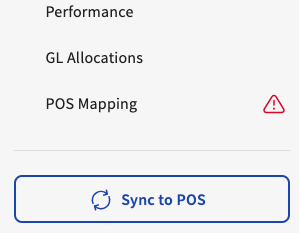
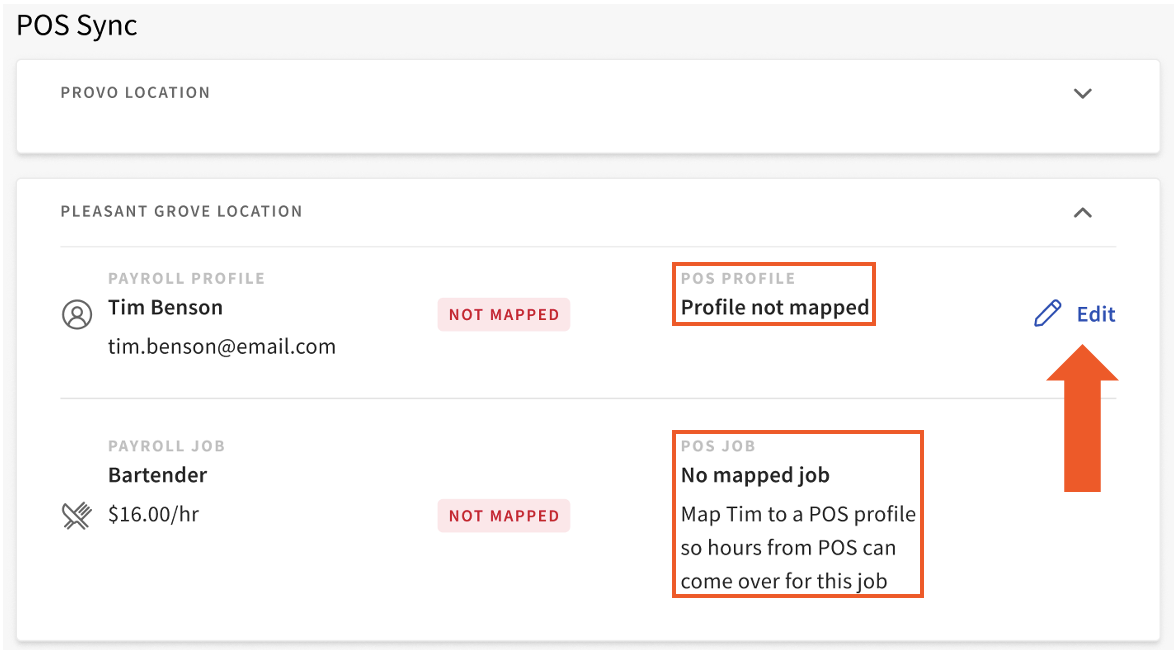
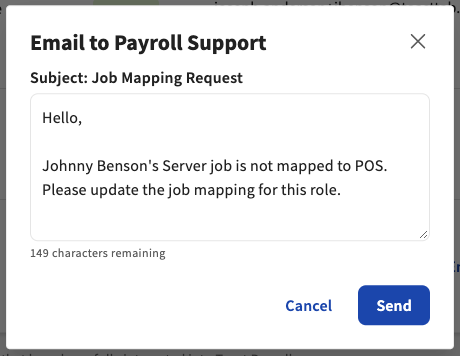
Mapping jobs can only be done by Toast Admins. In many cases, mapping the employee's profile also maps their job. Secondary jobs are not visible on this page — Toast will notify you once job mapping is complete.
Expected outcome: The red alert icon on the POS Mapping tab is cleared after the profile is mapped (and after the job mapping case is resolved by Toast Payroll Customer Care, if a job mapping case was created).
Resolve Common Mapping Problems
The branches below cover the symptoms most often reported by Toast Payroll users. Each branch tells you the cause and the fix.
Tips Won't Send to Payroll: "1 Employee Is Unmapped"
You may see one or more of these errors when sending tips to payroll:
- "1 employee is unmapped. Map this employee."
- "Sorry! We couldn't approve 2 days."
- "The following days failed to send:"
If tips won't send because of an unmapped employee:
- In Toast Payroll, navigate to Settings > Toast > Employees.
- On the Payroll Employees tab, look for unmapped employees (marked with a red alert icon). Map each unmapped Toast Payroll profile to the correct Toast Web profile by selecting the edit pencil and choosing the right profile from the Map to POS Employee drop-down.
- Return to Tips Manager and try sending tips again.
- If tips still won't send, see Tip Pool Says "Unmapped" but the Mapping Page Is Clean — the unmapped employee is often hidden at the bottom of the Unmapped POS Employees tab.
Expected outcome: Tips send successfully and the error message clears.
Tip Pool Says "Unmapped" but the Mapping Page Is Clean
If Tips Manager says an employee is unmapped but the mapping page shows that all employees are currently mapped, the unmapped employee is usually a tip-receiving profile marked as Ignored in Payroll. Those entries can still block tips.
- In Toast Payroll, navigate to Settings > Toast > Employees.
- Open the Unmapped POS Employees tab and scroll to the bottom of the list.
- Look for any active, tip-receiving employees marked as Ignored in Payroll. Common examples include generic POS profiles like a communal bartender, online ordering, or a takeout-only profile that is on the tip pool.
- For each profile in this section that is on the tip pool, select the edit pencil and choose the correct Toast Payroll profile from the drop-down. The change saves automatically.
- If the profile is genuinely a non-employee (for example, a generic bartender drawer used only for pooling), the profile must be removed from the tip pool itself in Toast Web — see Get Help With Toast Tips Manager.
- Return to the Tips Management report and try sending tips again.
Expected outcome: Tips Manager no longer reports an unmapped employee, and the day's tips send successfully.
Time Entries or Hours Not Pulling Over to Payroll
If an employee clocked in on a Toast POS device but their hours don't appear on their Toast Payroll timesheet, the Toast Payroll profile is most likely mapped to the wrong Toast Web profile (or unmapped completely).
- In Toast Payroll, navigate to Settings > Toast > Employees and open the Payroll Employees tab.
- Find the employee. If their row shows a red alert icon, map their Toast Payroll profile to the correct Toast Web profile. Use the Last Clock-in date to identify which Toast Web profile is the active one.
- If the row already shows a mapped Toast Web profile but no time entries are appearing, the profile may be mapped to the wrong Toast Web profile. Confirm the POS access code the employee uses to clock in matches the profile they are mapped to. See Duplicate Employee Profiles in Toast Web for finding the right profile.
- Resubmit existing time entries from Toast Web — they will not sync to Toast Payroll until they are resubmitted:
- In Toast Web, navigate to Reports > Labor > Time entry management.
- Choose the date range and employee.
- Select each time entry to open the Shift details sidebar. For each entry, select Save changes.
- If you were running payroll when you noticed the missing hours, the payroll must be reset before mapping changes will take effect — see Toast Payroll: Sync Information With Toast Web. If you do not use automatic timesheet approval, reopen the timesheet before resubmitting time entries.
Expected outcome: Time entries appear on the Toast Payroll timesheet within a few minutes of resubmitting them in Toast Web.
Red Alert Icon on POS Mapping After Adding a New Job
After you add a new job or position to an employee's Toast Payroll profile, you may see a red alert icon on the POS Mapping tab with the message "Job pending sync. After the next sync, this employee's jobs in Payroll will be added to their profile in Toast POS."
- Wait up to three minutes for the job to sync automatically.
- To speed up the sync, open the employee's Toast Payroll profile and select Sync to POS in the lower-left corner.
- On the Toast POS device, refresh the device data so the new job appears:
- On the passcode screen, switch user if needed.
- The exact resync steps depend on your Toast POS device version. If unsure, see Resync All Data on Your Devices — confirm device status is online and there are no payments still in Processing before resyncing.
- If the red alert icon persists after the resync, return to the employee's Toast Payroll profile, select the red alert icon, and look for the Email Support link. Select it to create a case with Toast Payroll Customer Care for the job mapping.
- If the Email Support link is not visible, see Before You Contact Customer Care — a Toast Admin must complete the job mapping for you.
Expected outcome: The red alert icon clears once the new job has synced to Toast POS and any required Toast Admin job mapping is complete.
Hired in Toast Web First
Cause: The employee was hired in Toast Web first and in Toast Payroll second. The Toast Web profile the employee is using to clock in is unmapped, and the auto-generated Toast Web profile (created during the Toast Payroll hire) is mapped instead. Time entries do not sync to Toast Payroll.
Fix:
- In Toast Web, navigate to Employees > Employee management > Employees.
- Find both Toast Web profiles for the employee. The auto-generated profile (the one Toast created during the Toast Payroll hire) typically does not have a POS access code and has the same employee number as the Toast Payroll profile. Archive that profile — see Add and Manage Employees in Toast Web.
- Return to Toast Payroll and navigate to Settings > Toast > Employees.
- On the Payroll Employees tab, remap the employee to the original Toast Web profile that contains their time entry and tip data. Use the Last Clock-in date to identify the right one.
Expected outcome: Time entries and tips from the original Toast Web profile flow into the Toast Payroll timesheet.
Duplicate Toast Web Profiles
Cause: When employees have more than one Toast Web profile, only one will typically contain time entries. Employees with multiple Toast Web profiles often need remapping — and the unused profile must be archived to prevent recurring issues.
Note: In Toast Web, profiles are archived rather than permanently deleted. Customers sometimes describe the archive action as "delete."
Fix (high-level):
- Identify which Toast Web profile contains the active time entries and tip data — use the POS access code, labor reporting, or Last Clock-in date.
- Archive the extra Toast Web profile(s).
- Use the mapping tool to confirm the Toast Payroll profile is linked to the correct (active) Toast Web profile.
For step-by-step archival and identification instructions, see Duplicate Employee Profiles in Toast Web.
Expected outcome: Only one Toast Web profile is active for the employee, and the Toast Payroll profile is mapped to it.
Duplicate Toast Payroll Profiles
Cause: When an employee has more than one Toast Payroll profile, their timesheets and tips may be split between the profiles. They may also have duplicate Toast Web profiles.
Fix: Mapping alone will not fix this — duplicate Toast Payroll profiles must be reconciled by the Toast Payroll Customer Care Expert team to keep wage and labor data on a single profile and to avoid duplicate tax documents. See Before You Contact Customer Care before opening the case.
Expected outcome: Payroll Customer Care Expert reconciles the duplicate profiles. They will tell you whether a wage amendment or fees apply.
Rehiring an Employee
When you rehire an employee through the Toast Payroll rehire process, Toast automatically unarchives the old Toast Web profile and remaps the two profiles. No manual mapping is required.
If a rehired employee is not mapped, follow the rehire process in Toast Payroll: Rehire Guide rather than mapping manually — the rehire flow handles the unarchive and remap together.
Expected outcome: The rehired employee's old Toast Web profile is unarchived and mapped to their Toast Payroll profile automatically.
Resolve Unpaid Employees on the Team Page
In Toast Payroll, the Team page shows employees with the Unpaid Employee tag when their Toast Web profile has no matching Toast Payroll profile (or vice versa). You may also see the banner "One or more employees are unmapped. You must map them before proceeding."
The fix depends on the employee:
- Already has a Toast Payroll profile but isn't mapped — use the three-dots menu next to their name and choose Assign Payroll profile. This brings you to the mapping page to link them.
- Will never need to be paid (for example, a non-employee or generic profile) — use the three-dots menu and choose Ignore in Payroll.
- Needs to be paid but doesn't have a Toast Payroll profile yet — use the three-dots menu and choose Add employee to Payroll to create a Toast Payroll profile.
For the full three-dots menu walkthrough, including filter behavior and security-role visibility, see Toast Payroll: Team Page.
Before You Contact Customer Care
This section applies only to two scenarios that require Toast Payroll Customer Care to resolve — they cannot be self-served:
- Duplicate Toast Payroll profiles must be reconciled. Mapping alone will not fix this; backend reconciliation is required.
- A primary Job remains unmapped after Sync to POS, and the Email Support link is not visible. A Toast Admin must complete job mapping.
For all other mapping scenarios, the branches above will resolve the issue without an agent.
Before opening a case, gather:
- The employee's name and Toast Payroll employee number.
- POS passcode and company code.
- The exact error message you see (for example, "1 employee is unmapped. Map this employee." or "Job pending sync").
- The date or pay period the issue affects.
- The impacted location and/or job.
- A screenshot of the POS Mapping tab on the employee's profile, if relevant.
- Any steps you've already attempted (for example, Sync to POS, resubmit time entries, or remapping the profile).
To open a case, contact Toast Payroll Customer Care via the chat support channel inside Toast Payroll.
Frequently Asked Questions
What's the difference between the Payroll Employees and Unmapped POS Employees tabs?
The Payroll Employees tab lists all Toast Payroll profiles and the Toast Web profile each one is mapped to. The Unmapped POS Employees tab lists Toast Web profiles and the Toast Payroll profile each is mapped to. Splitting the view by product lets you see if an employee exists in only one of the two systems.
What causes an employee to be in Toast Payroll but not in Toast Web?
The most common cause is that the employee was archived in Toast Web while their Toast Payroll profile remained active. To unarchive the Toast Web profile, follow the Unarchive an Employee instructions in Add and Manage Employees in Toast Web.
What causes an employee to be in Toast Web but not in Toast Payroll?
This usually happens when the employee was added directly in Toast Web and never new-hired in Toast Payroll. Always new-hire employees in Toast Payroll — that step automatically creates a matching Toast Web profile and maps them. The same applies when adding an employee to a second location: do it in Toast Payroll. See Toast Payroll: Assign or Change Employee Jobs or Locations.
Do I need to map a Toast Payroll employee who is not clocking in on the POS?
The employee will still appear as unmapped on the mapping page. Instead of mapping them to a Toast Web profile, select Ignore this Employee in the mapping tool steps.
Why is there a red triangle with an exclamation mark on the POS Mapping tab?
Also asked as:
-
- what's the red ! icon on POS mapping?
- POS mapping has a red triangle with a ! in it
- red exclamation mark on payroll profile
The red alert icon on the POS Mapping tab means the employee's profile or job is unmapped. Open the employee's Toast Payroll profile, select the red alert icon, and follow the steps in Map a Single Employee From Their Profile. If the icon is for a job pending sync after adding a new job, see Red Alert Icon on POS Mapping After Adding a New Job.
Can I view employees at all locations at once?
Profiles are scoped by location and are viewed one location at a time. Use the Location drop-down on the mapping page to switch between locations.
What are the automap suggestions?
Automap suggestions are pairings the system identifies based on a partial match of first name, last name, email address, nickname, or employee number. If a suggestion is correct, select Accept Suggestion.
Why does an employee show "(Archived)" next to their name under the POS Employee column?
This means the Toast Web profile has been archived. To unarchive it, follow the Unarchive an Employee instructions in Add and Manage Employees in Toast Web.
Will an employee's existing punches automatically flow from the POS to Payroll after they are mapped?
No. To push existing time entries from Toast Web to Toast Payroll, navigate to Reports > Labor > Time entry management in Toast Web and resubmit each time entry by opening the Shift details sidebar and selecting Save changes.
My employee is getting an "Invalid passcode" error — is that a mapping issue?
Possibly. An "Invalid passcode" error can occur when the employee's Toast Web and Toast Payroll profiles are not mapped, among other causes. Note that an employee number and a POS access code are two different numbers — POS access codes are visible only in Toast Web, and they are used to clock into the POS. See Toast Payroll: Employee Number and POS Access Code FAQ for the difference.
Related Articles
- Toast Payroll: Get Help With Employee Mapping
- Toast Payroll: Sync Information With Toast Web
- Duplicate Employee Profiles in Toast Web
- Toast Payroll: Team Page
- Get Help With Toast Tips Manager
This content is for informational purposes and is not intended as legal, tax, HR, or any other professional advice. Please contact an attorney or other professional for advice.