Create Device Groups
Last updated: Sep 16, 2026, 3:40 PM
 | Toast is phasing out support for device groups.
Note: If you are currently using device groups but delete all of them and save, the system will treat it as if you have no device groups and you will no longer be able to edit these configurations. Looking to segment your front of house & kitchen flows for different areas of your restaurant? Please explore these options instead for an optimized experience:
|
Device Groups Overview
Device groups are typically used by large, high-volume locations with multiple service areas to improve performance. By limiting the amount of data and the number of orders each tablet must maintain in its memory, device groups help speed up service.
When you assign a device to a group, it will only sync information and share orders with other tablets within that same group.
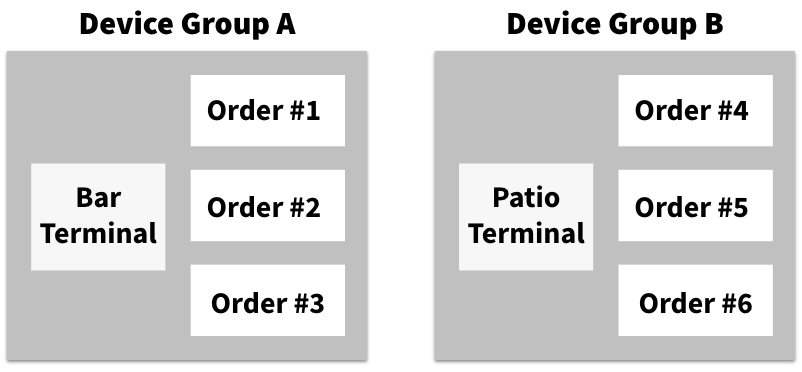
- Terminals in group A cannot see or make changes to orders made on terminals in group B.
- Terminals in group B cannot see or make changes to orders made on terminals in group A.
Orders in different device groups will NOT be seen on other devices in the following areas of Toast:
- Payment Terminal
- Previous Checks
- Kitchen Display Screen
- Pending Orders
- Find Checks
Online orders are not attached to any device group. To ensure your auto-fire device receives online ordering updates, it must not be assigned to a device group. Any other devices that need to see those online orders must also remain unassigned.
To complete a shift review, a server must close all of their orders. If a server has an open order in Group A but tries to close out on a device in Group B, they will not see the open order, preventing their shift review. Servers should close all orders across all groups before starting a shift review.
If your restaurant uses device groups, the group name will appear as a prefix to your restaurant name on the POS home screen, device setup screen, and access code screen for easy identification.
Create a Device Group
To create a device group, follow the steps below:
- In Toast Web, navigate to Toast account > Groups > Device Groups.
- Select + Add to create a new group.
- Name your group.
- Save and publish your changes.
Assign a Device to a Group
To assign a device to a group, Follow the steps below:
- On your device's main menu, navigate to Setup > Device Setup.
- Scroll down and select the Device Group setting.
- Select your desired device group.
- Select Save to assign the current device to that group.