Set Different Menu Prices for Third-Party Ordering Integrations
Last updated: Sep 25, 2026, 11:21 AM
Question
Answer
Use the instructions below to set up your third-party ordering menus so that you can change the prices without affecting your in-store menu:
- If you haven't set up a third-party ordering menu yet:
- Make a deep copy of the menu you want to make available on the integration so that you can keep one set of pricing for in-store orders and change your pricing for third-party ordering. If this is for DoorDash or Uber Eats, you'll then update these menu prices on their respective configuration pages (DoorDash, Uber Eats) within Toast Web. For Grubhub, Skip, and all other third-party ordering platforms, use the Price Editor tool. Skip does not have a dedicated pricing page in Toast Web.
If a menu is already shared between Skip and another third-party ordering platform, make a deep copy of that menu for Skip before you make Price Editor changes. Without a separate menu, the same price increase applies twice — once for each platform — and doubles the increase.
- If you've already set up a menu for third-party ordering and want to increase menu prices across the board:
- First, ensure you have the correct menus pointing towards the integration in question. For example, if you want to check menu prices for DoorDash, navigate to the DoorDash page in Toast Web by navigating to Takeout & delivery > Third party ordering > DoorDash Menu settings > Edit.
- First, ensure you have the correct menus pointing towards the integration in question. For example, if you want to check menu prices for DoorDash, navigate to the DoorDash page in Toast Web by navigating to Takeout & delivery > Third party ordering > DoorDash Menu settings > Edit.
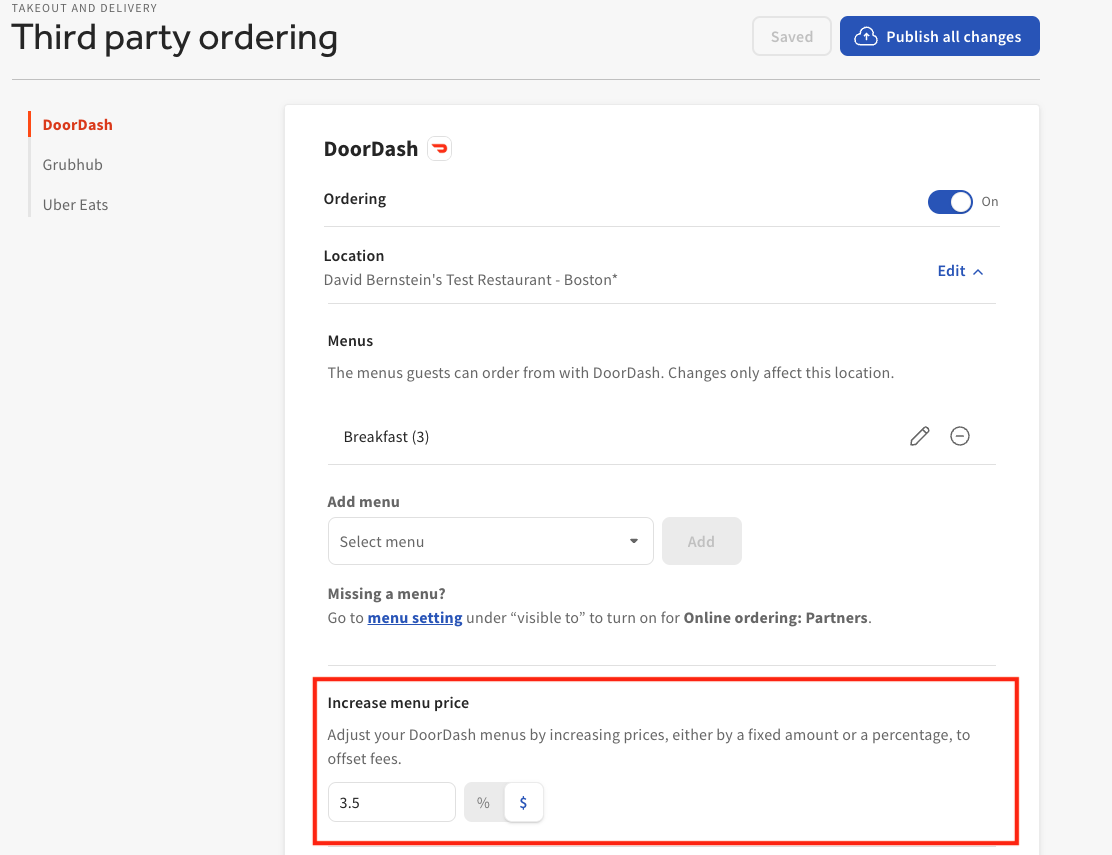
If everything still looks configured as intended, check that the menu and/or individual items within the price editor have your intended prices set. Note: For DoorDash and Uber Eats, this pricing configuration will apply price increases on top of the base price selected on your menu.
Lastly, verify that your Toast Web changes have been published.
- If you've already set up a menu for third-party ordering and want to increase a single item's price:
- Check out Change the Price of a Single Item or Menu With the Price Editor. Make sure you're only changing this item's price on the deep copy you made for the specific third-party partner.
If this does not resolve your issue, please call Customer Care for assistance.