Get Started With SMS Marketing
Last updated: Sep 28, 2026, 3:52 PM
- SMS Marketing Overview
- Enable SMS Marketing
- Grow Your SMS Marketing Following
- SMS Marketing Bulk Subscribers Upload
- Create an SMS Marketing Campaign
- Track SMS Text Usage
- SMS Marketing Text Limit Notifications
- SMS Marketing Reporting
- Additional Resources
SMS Marketing Overview
SMS Marketing makes it easy to connect with guests in real time and keep them coming back. With Toast SMS Marketing, you get:
- A unique, verified toll-free phone number for your restaurant group
- The ability to grow a list of SMS marketing subscribers
- One-time and automated SMS campaigns
- The ability to insert shortened links, emojis, and promo codes in your SMS marketing campaigns
- Campaign reporting to see the results of your SMS marketing campaigns
SMS Marketing is included in the Marketing Essentials suite; no other Toast modules are required to leverage SMS Marketing. Your account also needs to be linked to an active and live website on a domain you own, which can be a Toast Website but does not have to be.
Get started with SMS marketing overview video.
Enable SMS Marketing
Follow the steps below to enable SMS Marketing:
- Log in to Toast Web and navigate Marketing > SMS marketing.
- Select Let’s do it on the SMS marketing dashboard, then complete and confirm your business information to register for a dedicated, verified toll-free number for your restaurant or restaurant group.
- Phone number registration is at the restaurant group level. Restaurant group business information should be provided if multilocation.
- Sender Name: This name will appear at the beginning of each text message you send. It should be a short (15 characters maxinmum), distinct version of the Restaurant Group's name that your guests will easily recognize.
- Website: In order to register for an SMS marketing phone number, you must have a live, functioning (no coming soon banner) website. If your website sells or promotes alcohol, it must have a robust age gate in place. Appropriate age-gating technology requires the guest to input their birthday before they can view or purchase alcohol-related content; a simple yes/no to “Are you 21?” is not sufficient.
- Note: As of February 2026, the SMS marketing phone number registration process includes new required fields to comply with updated toll-free number (TFN) carrier registration requirements. Ensure you have all the required business information ready before beginning registration. If your registration was rejected, contact Toast Customer Care for guidance on resubmission.
- Once confirmed, select Request.
- Note: Once all required information has been submitted on the SMS marketing onboarding page, your restaurant or business group will receive a unique, verified toll-free number for SMS marketing. It can take up to 14 business days to receive your dedicated toll-free phone number.
Grow Your SMS Marketing Following
You can encourage guests to sign up for SMS marketing to receive texts from your restaurant across any touchpoints you have with your guests. Leverage the available resources and programs to promote SMS marketing. To view your subscriber list, select the numeric link to SMS Subscribers.
- Share via email marketing: Convert your email marketing subscribers into SMS subscribers. Include information about how to join your texting program in all of your emails, or create a specific campaign to promote your new texting program.
- Share on social media: Promote your new texting program by sharing a post on all your social media channels, converting your followers into SMS subscribers.
- Promote your texting program in your restaurant:
- Print out a sign or QR code for your restaurant to promote your new texting program. Train your staff to promote the program, and be ready to answer any questions from guests! Guests have the option to text JOIN to your dedicated toll-free number to join your text messaging program.
- Toast Online Ordering: When ordering online through Toast Online Ordering channels, guests will be prompted to subscribe to your SMS marketing program.
- Toast Loyalty Sign-up: Guests will be prompted to subscribe to your SMS marketing program on your online Toast Loyalty sign-up page and while checking in for loyalty on your POS.
- Toast POS text receipt: In-store, guests who choose to receive a digital via text will be prompted to subscribe to your SMS marketing program.
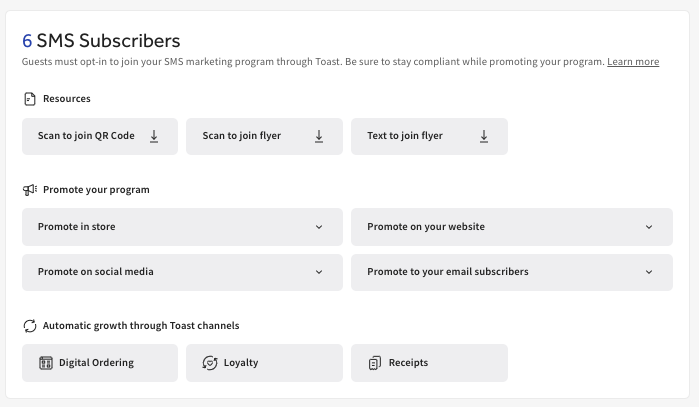
In-product content are provided as examples and not intended as legal or other professional advice. You are responsible for your SMS program promotion including compliance, content and offers.
SMS Marketing Bulk Subscribers Upload
If you're actively and compliantly using a third-party SMS marketing provider and meet the requirements, bring your existing SMS subscribers to Toast by following the steps below. To upload these contacts, you must have a record of their prior SMS marketing consent, as required by the Telephone Consumer Protection Act (TCPA) and any and all applicable laws and regulations. You may not upload contacts for recipients who have revoked their consent.
- In Toast Web, navigate to Marketing > SMS Marketing.
- Next, select Settings, scroll down to Subscriber import history, and select the Upload subscribers link.
- Please review the terms and conditions and frequently asked questions. Once you have done so, confirm and select each checkbox, then select Get started.
- Review and consent to all terms by selecting each checkbox.
- Select Agree and continue.
- In this step, ensure that your file is ready for upload with the following requirements:
- Table format: Label the first column “Subscriber number” and format each row as [+][country code][subscriber number]. Label the second column, “SMS marketing consent,” and format each row as "Yes" to confirm consent.
- File format: Use CSV format with a maximum of 5,000 rows per file.
- Validation: Duplicates, invalid entries, unsubscribed, and non-US numbers will be removed.
- Once confirmed, select My file is ready.
- Here, you can manually enter your subscriber list or upload the approved CSV file.
- Once the subscriber information is entered and/or uploaded, select Submit.
- Confirm your upload by selecting Confirm upload.
Once uploaded, these subscribers will be added to your Restaurant Group list and cannot be removed. Make sure that you have enough texts to reach your list, and if needed, increase your limit in Settings.
Note: It is not possible to import phone numbers from other Toast products (Guestbook, Toast Online Ordering) as SMS Marketing subscribers.
- Due to federal regulations and industry standards, guests must explicitly opt-in for your SMS marketing program through Toast. Having their phone number is not enough.
- Once you activate SMS marketing, guests will have the option to subscribe while placing an online order and on other Toast-powered surfaces. See SMS Marketing Special Terms for Restaurants for more details.
- Similarly, you can't import your existing Toast Loyalty program phone numbers into SMS Marketing. However, once you activate SMS marketing, guests will be prompted to opt in when they sign up or sign in to their loyalty account.
Create an SMS Marketing Campaign
Encourage repeat business with SMS marketing campaigns with one-time and automated campaigns.
| Toast’s SMS marketing tool allows you to send and schedule text campaigns between 8 a.m. and 9 p.m. in your time zone. SMS compliance laws require that marketing text messages are only sent between 8 a.m. and 9 p.m. in the recipient’s time zone, and certain states have more restrictive rules. You are responsible for ensuring you only send campaigns outside of quiet hours in your recipient’s time zone. See SMS Marketing Special Terms for Restaurants for more details. |
SMS Marketing One-Time Campaign
To create a one-time SMS marketing campaign, follow these steps:
- In Toast Web, navigate to Marketing > SMS Marketing.
- Select Create new campaign from the SMS marketing dashboard.
- Edit the campaign name as needed.
- Enter your Text message copy.
- Note: SMS marketing campaigns are subject to Toast’s SMS Marketing Special Terms, applicable laws, and industry and carrier guidelines. The following is a non-exhaustive list of examples of restrictions that apply to your use of SMS Marketing:
- No promotion via SMS of content known as “SHAFT-C” content (which is short for sex, hate, alcohol, firearms, tobacco/cannabis), any federally illegal substance, debt collection, high-risk loans, and/or gambling.
- **Promotion of alcohol is allowed only IF your website has appropriate age-gating technology that requires the visitor to input their birthday before they can view or purchase alcohol-related content. A simple yes/no to “Are you 21?” is not sufficient.
- Toast is not responsible for messages blocked by mobile carriers or SHAFT-C enforcement. Accordingly, Toast cannot tell you how to modify any specific campaign or practices in order to be compliant with SHAFT-C rules.
- Note: SMS marketing campaigns are subject to Toast’s SMS Marketing Special Terms, applicable laws, and industry and carrier guidelines. The following is a non-exhaustive list of examples of restrictions that apply to your use of SMS Marketing:
- If desired, toggle on any of the following to include in your message:
- Promotion: Once you create a promo code in your Offers Dashboard or the discounts and promotions codes page, that promo code will be available to use in an SMS marketing campaign via a drop-down of your active Offers. To learn more about creating Offers, visit Get Started With the Offers Dashboard.
- Link
- Image
- Select Advanced send settings from the drop-down next to the send button, then choose Smart segments from the Audience drop-down to target a behavior-based audience instead of your full subscriber list. For example, Big spenders, Lapsed, Super fans, New, Regulars, House accounts, or Loyalty members.
- Select your Send date.
- Once all fields are complete, you can choose to send the message now, or select the drop-down next to the send button for more options: Save as draft, or Send test SMS to preview the message on a phone before sending it to your full list. Test messages can only be sent to phone numbers already subscribed to your SMS list, and each campaign has a limited number of test sends available.
A few things to note:
- When creating your text message, you can leverage Toast’s Generative AI-Powered Marketing Assistant.
- Toast’s Generative AI-Powered Marketing Assistant allows you to provide inputs, which (combined with information we know about your restaurant on the back end) will generate prompts that automatically output content.
- You can then add additional edits and send the campaign to your guests.
- Please review our article, Toast Generative AI Tools: Responsible Usage for Customers, to understand this tool's risks and benefits better.
- If you choose to add pictures or GIFs to your text messages, each message counts as three SMS messages. For example, if you send an SMS campaign message including a GIF to 400 recipients, it will count as 1,200 total SMS messages.
- Images and GIFs for SMS marketing messages must be a jpg, jpeg, png, or gif file with a max size of 1MB
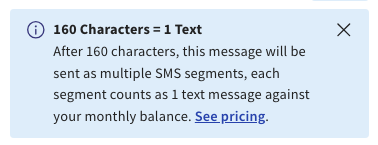
- There is a 160-character count limit for SMS marketing messages without emojis and 70 with emojis. Our multisegment SMS feature allows you to send campaigns with up to 4 message parts. See SMS Marketing Multisegment Messaging in this article for more information.
SMS Marketing Automated Campaigns
Send SMS marketing texts to qualified segments based on dining behavior.
Welcome offer Campaigns: Create an automated welcome campaign with a special offer that will be sent to all new SMS marketing subscribers. Promote this welcome offer through email, social, or in-store to encourage SMS signups (e.g., sign up for SMS marketing to access 10% off your next order).
- Select a preview of the campaign you wish to send to your guests.
- Select your Offer.
- If you choose a Custom offer, select your Offer type, Amount, and Promo code.
- Once complete, select Turn on and Publish.
We Miss You Campaigns: Automatically send a "Miss you" text to SMS marketing subscribers who haven’t dined with or ordered from you in a certain number of days.
- Enter and save the information for the following fields:
- Trigger - Select the days since the last visit.
- Action - Customize the content of the campaign.
- Optional: Add an incentive.
- Start date
- Once complete, select Turn on.
Big Spender Campaigns: Automatically send messages to your top-spending SMS marketing subscribers.
- Enter and save the information for the following fields:
- Trigger - Choose your audience, location, and amount
- Action - Guest incentive or messaging
- Start date
- Once complete, select Turn on.
Repeat Guest Campaigns: Automatically send messages to thank your guests and encourage their continued visits once they have hit your desired visit threshold.
- Enter and save the information for the following fields:
- Trigger - Choose your audience, number of visits, and location
- Action - Guest incentive or messaging
- Start date
- Once complete, select Turn on.
Post-Purchase Campaigns: Automatically send messages one day after a guest visits to thank them for their order and encourage their next visit.
- Enter and save the information for the following fields:
- Action - Guest incentive or messaging
- Start date
- Once complete, select Turn on.
SMS Marketing Multisegment Messaging
SMS multi-segment messaging allows you to build campaigns with up to four message parts, each counting as a separate text. If you exceed 160 characters, the message will be sent as multiple SMS segments, which are strung together on the recipient’s end device as a single message.
- For multi-segment texts, the character limit is 153 per segment or 67 characters per segment if special characters/emojis are included.
- Each segment counts as 1 text towards your usage.
- If you choose to add pictures or GIFs to your text campaign, your message is converted into an MMS, which counts as three texts towards your usage. For example, if you send a text campaign message including a GIF to 400 recipients, it will count as 1,200 total texts.
Short Links for SMS Marketing Campaigns
When adding a link to an SMS marketing campaign, the link will automatically be shortened and replaced in the message guests receive. Example: toasttab.com/r/xxxxxxxx. If a shortened link is added to a campaign, Clicks and Click rate will be tracked and displayed on the reporting details page.
Accepted SMS marketing URLs:
- Toast domain links: Toast Online Ordering page, Toast Loyalty sign-up page, Toast Tables™ page, Toast Gift Card Purchase page
- Social media links: Instagram, Facebook, etc.
- Restaurant Platforms: Yelp, OpenTable, etc.
- Your restaurant’s website: the website domain you registered for your SMS marketing phone number with
Note: Only one URL can be added per SMS marketing campaign.
Track SMS Marketing Text Usage
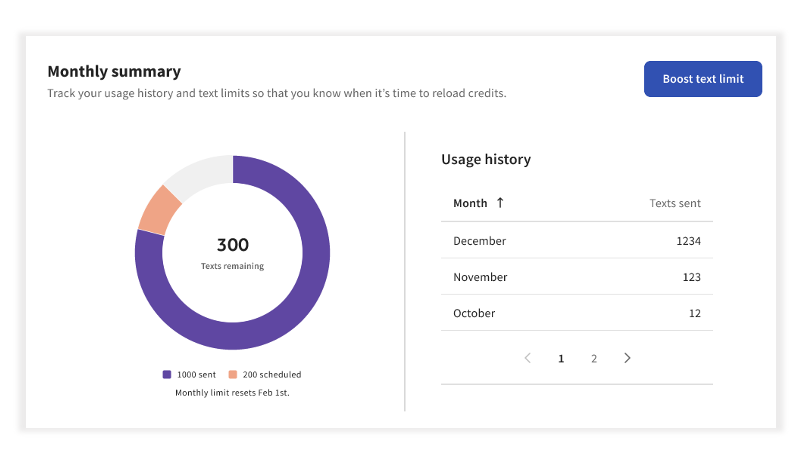
Easily track SMS message usage directly in Toast Web by navigating to the SMS messaging dashboard and selecting Settings. Here, you'll get an overview of the following:
- Your business information: This information will appear in your SMS messages
- Monthly summary: Track your usage history and text limits
- Boost text limit: Want to increase your message amount? Select Boost text limit to purchase additional monthly texts.
SMS Marketing Text Limit Notifications
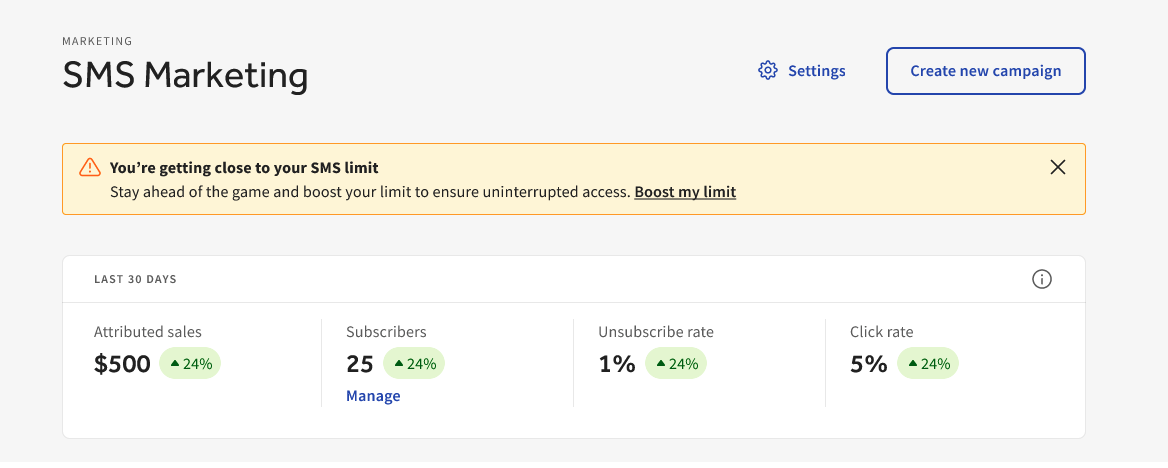
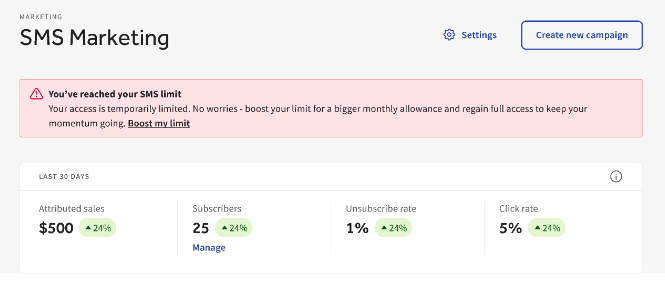
If you are close to your SMS marketing text limit, you'll see notification banners notifying you that you are getting close to or maxed out your allotted limit.
Note: You cannot exceed the purchased text limit and will be prompted with a banner that points out how to add more to your recurring Toast agreement via Toast Shop. You can select the Boost my limit link in the banner notification to purchase additional messaging. Purchases are available immediately. The link will direct you to Toast Shop to manage your purchase. See SMS Marketing Pricing for more information. You must be logged in to Toast Web to view this article.
SMS Marketing Reporting
You can monitor the results of SMS marketing campaigns, including sends, delivery rate, and unsubscribes, by selecting a specific Campaign name from the All campaigns list on the SMS marketing dashboard. Once selected, you can track the performance of your campaign.
- Sends: The count of recipients who were sent the campaign.
- Delivers: The count of recipients who received the campaign.
- Unsubscribers: The count of recipients who unsubscribed after receiving the campaign.
- Bounces: The count of recipients the campaign did not deliver to due to hard or soft bounce.
- Clicks: The total count of clicks on the link in the campaign. Note: Clicks are only tracked for campaigns using our link shortener.
- Click rate: The total count of clicks on the link in the campaign/ delivers. Note: Clicks are only tracked for campaigns using our link shortener
- *$ Sales: Revenue generated from guests who received the campaign and placed an order within 14 days.
- *# Orders: Total unique guests who placed an order within 14 days of receiving the campaign.
For one-time campaigns, you can also view three new breakdowns of your attributed sales: Attributed sales by day (a chart showing when attributed orders were placed during the 14-day attribution window), Attributed sales by order source (the top 5 sources of attributed orders), and Attributed sales by guest type (a breakdown of guest types who placed attributed orders).
*Note:
- Estimated sales begin populating up to three days after the campaign is sent
- We do not estimate sales generated by text campaigns sent before January 22, 2025.
- If a guest is sent multiple emails or texts, the order will only be attributed to the last email or text sent to the guest.
- Only the first order will count if a guest orders multiple times within 14 days.
Additional Resources for SMS Marketing