Get Started With Toast Checking
Last updated: Aug 25, 2026, 11:33 AM
Learn how to get the most out of Toast Checking.†
- Log Into Toast Checking
- Get the Most Out of Toast Checking
- Start Earning Interest on Your Money
- Deposit Funds to Your Toast Checking account
- Set Up Auto Savings for Your Card Sales Processed Through Toast
- Use Jars to Reach Your Budgeting and Savings Goals
- Safeguard Your Toast Account With Multi-Factor Authentication (MFA)
- Connect Toast Checking to QuickBooks
- Start Using Your Debit Mastercard to Earn 1% Cash Back
- Deposit Cash Easily
- Write Checks in Toast Payroll
- Write Checks to Third Parties
- Send Wire Transfers
- Use Bill Pay via Toast Checking
- Toast Checking FAQ
- Where to Get Support
- Additional Resources
Log Into Toast Checking¹
If eligible, you'll have received a solicitation on your Toast Web homepage, or an invitation with additional information by physical mail. To log in, visit the Finance page in Toast Web, select Toast Checking¹, and authenticate your account. You can visit your Toast Checking dashboard by clicking here.
Note: Only owners can open and maintain access to an account on behalf of their business.
Get the Most Out of Toast Checking¹
Start Earning Interest on Your Money
If you opened your first account on or after March 3, 2025:
- Earn 1.50% APY (Annual Percentage Yield)* when your balances across your Toast Checking account¹ and Jars are $15,000 or higher.
- *Interest rate of 1.49% and Annual Percentage Yield (APY) of 1.50% for accounts with total balances of $15,000 or more is effective as of 11/4/2025. You will not earn any interest or APY if the total balance across your accounts is less than $15,000. The interest rates and APYs are variable and may change at any time. Fees may affect earnings on the account.
If you opened your first account before March 3, 2025:
- Earn 2.12% APY (Annual Percentage Yield)** when your balances across all of your Toast Checking accounts¹ and Jars are $25,000 or higher, or 1.92% APY when your balances are below $25,000.
- **Interest rate of 1.90% and Annual Percentage Yields (APY) of 1.92% for accounts with balances below $25,000, and interest rate of 2.10% and Annual Percentage Yield (APY) of 2.12% for accounts with balances $25,000 or higher, are effective as of 11/4/2025. The interest rates and APYs are variable and may change at any time. Fees may affect earnings on the account.
Deposit Funds to Your Toast Checking Account¹
Start earning interest by making your first deposit into your Toast Checking account¹.
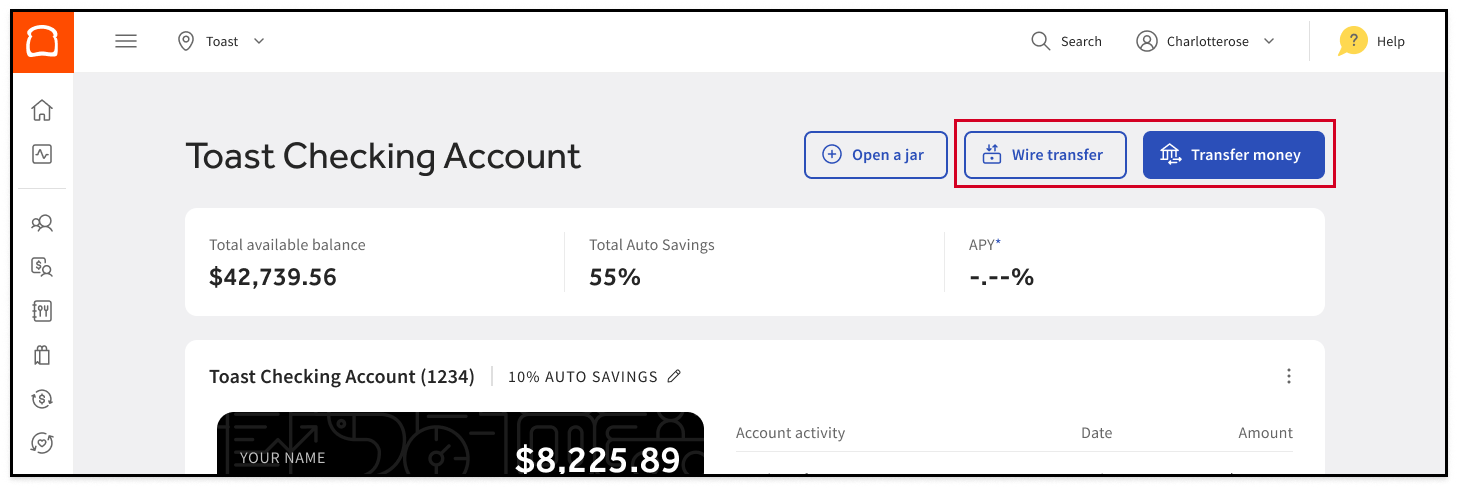
ACH transfer
You can easily add funds via ACH (automated clearinghouse) — plus, there’s no fee for ACH transfers. There is a $25,000 daily ACH deposit limit, and a $100,000 total monthly ACH deposit limit. If you want to transfer more than these amounts, consider using a wire transfer.
- Under Toast Checking, select Transfer money.
- Link your bank’s information through Plaid.
- Select the bank you just added.
- Enter the amount you would like to transfer to your Toast Checking account¹.
Wire transfer
You can also wire money into your Toast Checking account¹. Note that inbound wire transfers have a $5 fee. There is also no dollar limit for domestic inbound wire transfers.
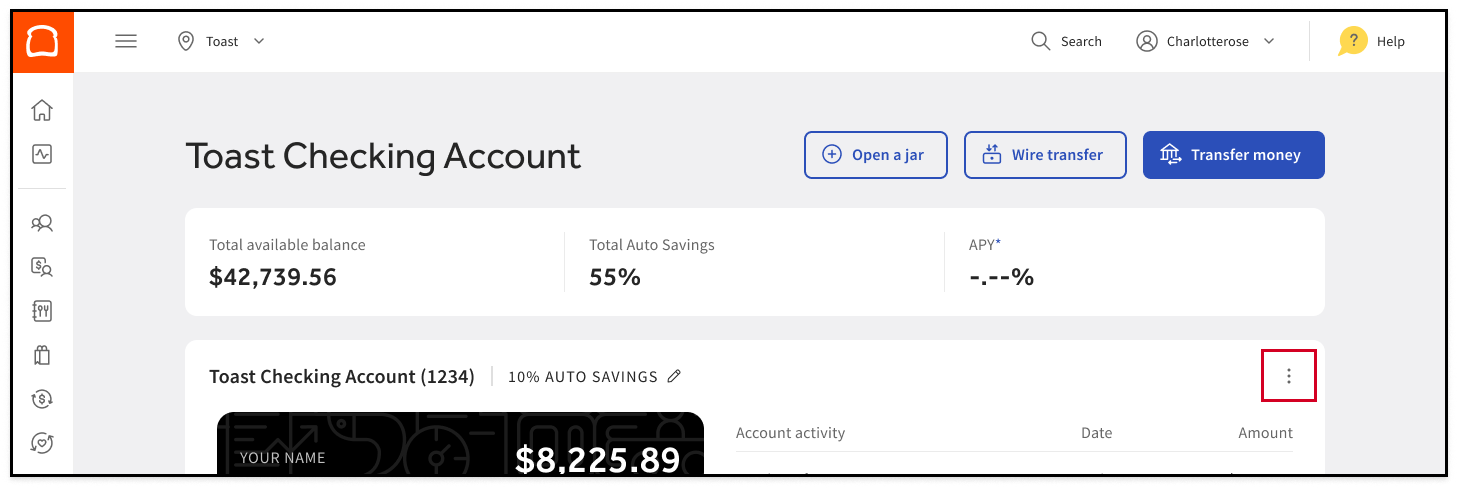
To find your Toast Checking account¹ and routing numbers, select the three dots ( ⋮ ) in the top right to view account details.
Set Up Auto Savings for Your Card Sales Processed Through Toast
Take the manual work of depositing funds into your Toast Checking account¹ out of your day-to-day. Maximize the return on your hard-earned sales by contributing a fixed percentage of your daily card sales processed through Toast into your Toast Checking¹ account.
Auto Savings deposits into your Toast Checking account¹ will occur each day after all other scheduled debits are withdrawn (e.g. card processing fees, Toast Capital Loan repayments, Easy Pay repayments, etc.).
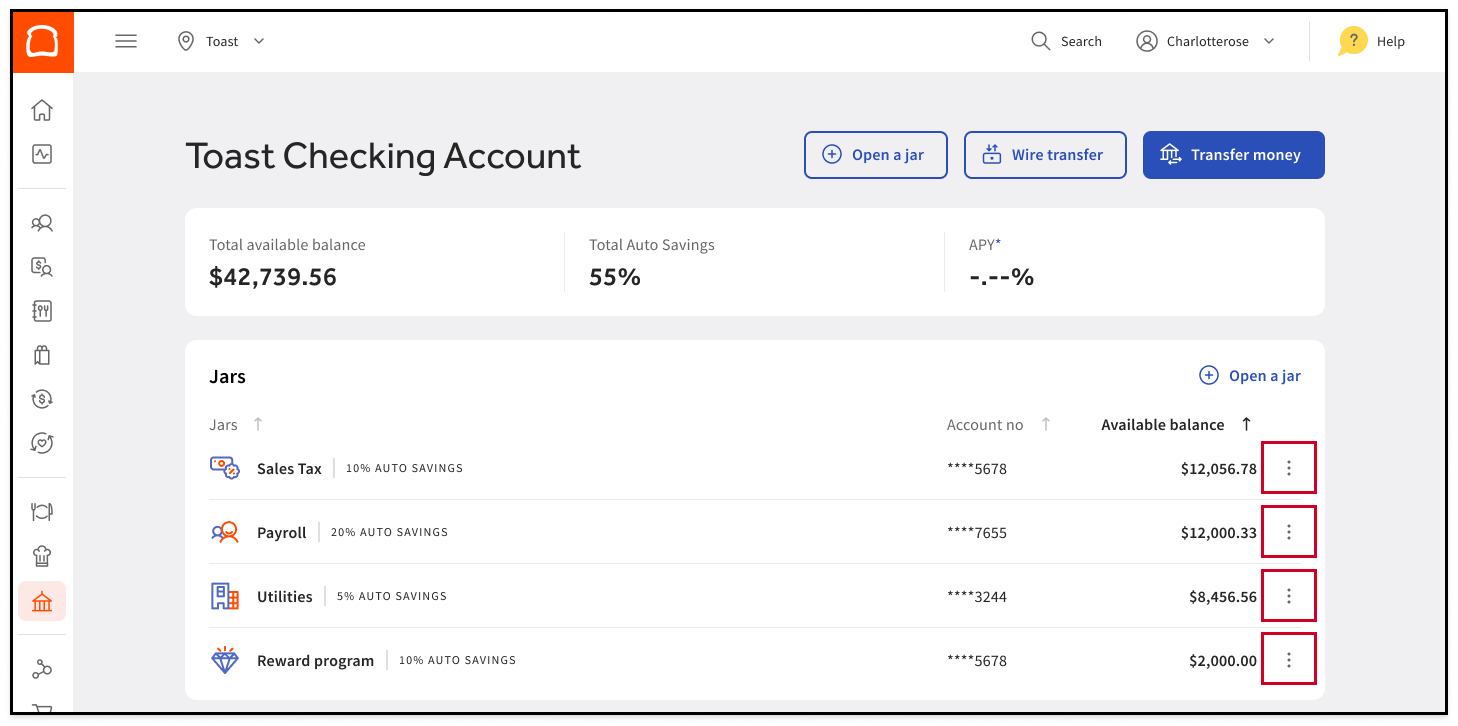
- On your Toast Checking dashboard¹, find the Toast Checking account¹ or Jar that you want to set up or update Auto Savings for.
- Under Auto Savings, select the Pencil Icon.
- Select a desired percentage of daily sales you would like to have automatically deposited into your Toast Checking account¹.
- It may take up to a day for Auto Savings to start working depending on your business’ payment capture and daily deposit settings.
- This percentage is applied across all businesses associated with your business.
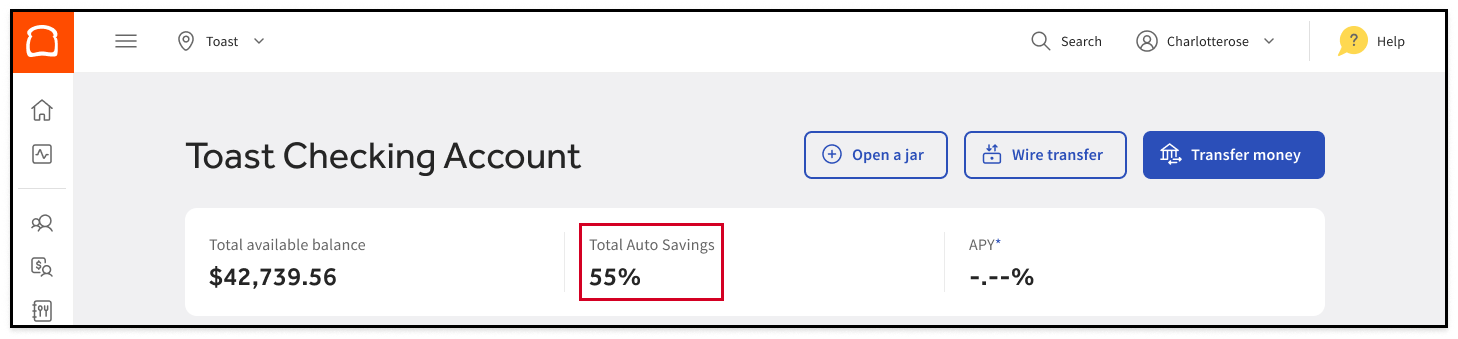
Your total Auto Savings percentage is displayed on your Toast Checking dashboard¹.
Use Jars to Reach Your Budgeting and Savings Goals
Each Jar is a Toast Checking account¹ that you can use for a specific purpose. Jars are a great way to help budget for operating expenses like payroll, invoices, and taxes; save for large purchases and business projects; and build a rainy day fund.
To open a Jar:
- At the top of your Toast Checking dashboard¹, select Open a Jar.
- Follow the instructions to personalize your new Account, set up Auto Savings, and deposit funds into your new Jar. Each Jar is a Toast Checking account¹, and the interest rate and annual percentage yield (“APY”) you earn is based on the total amount of deposits across all your Accounts with us.
- All of your Jars will appear on your Toast Checking Dashboard¹.
Note: Choose Bills as your Jar type to help pay vendors — see Use Bill Pay via Toast Checking for details.
Safeguard Your Toast Account With Multi-Factor Authentication (MFA)
MFA can help to protect your account by adding an extra layer of security to prove who you are when logging in. Visit this Support Center article, Set Up Multi-Factor Authentication, for detailed instructions.
Connect Toast Checking¹ to QuickBooks
- Log into the relevant Intuit product and select to connect a new bank account.
- Within the directory, search for and select the Toast Checking account¹, and enter the mobile phone number associated with your account.
- A verification code will be sent via SMS for you to authenticate your account.
- Your Toast Checking¹ information and other transaction data will be automatically published to Intuit.
- Mint will pull 90 days of transaction history.
- For Quickbooks, you can select a timeframe to import.
- You can revoke Intuit's access to your account at any time.
Start Using Your Debit Mastercard to Earn 1% Cash Back
Earn unlimited 1% cash back on eligible^ purchases! You can use your Toast Checking¹ Debit Mastercard to make purchases in-store or online, or withdraw cash at any ATM displaying the Mastercard logo. You also can withdraw money fee-free at over 55,000 Allpoint ATM locations.
Once you receive your debit card, you can activate it by visiting your Toast Checking dashboard¹. You will be required to set a four-digit numerical PIN during the activation process.
If you didn’t receive your debit card within 10 business days of opening your Toast Checking account¹, please email us at toastchecking@toasttab.com to request a new one.
If you need assistance with your debit card, please email us at toastchecking@toasttab.com. For more information, visit these Debit Card FAQs or download your Toast Mastercard Debit Cardholder Agreement.
^Only purchase transactions processed through the Mastercard network are eligible for cash back rewards. Ineligible transactions include transactions that are not processed through the Mastercard network, cash withdrawals, peer-to-peer debit transactions, refunds, or any transaction that is not consistent with lawful use of your Toast Checking Account. We reserve the right to modify or terminate this rewards program at any time.
Deposit Cash Easily
Find participating locations using the locator on your Toast Checking Dashboard¹.
Depositing cash at an Allpoint+ ATM
- Find an Allpoint+ ATM near you with Allpoint’s ATM locator page here
- Bring your Toast Checking¹ Debit Mastercard with you and follow the on-screen instructions at the Allpoint+ ATM
Adding cash^^ at a retailer
- Bring $20~$500 in cash and your Toast Checking¹ Debit Mastercard to any participating retailer.
- Hand your cash (plus any applicable retail service fee) to the cashier.
- They’ll swipe your card and give you a receipt as proof of the completed transaction — simple as that!
^^Retailer cash load service provided by Green Dot® ©2025 Green Dot Corporation. All rights reserved. Green Dot Corporation NMLS #914924; Green Dot Bank NMLS #908739.
Retail service fee up to $4.95 and limits on how much cash you can add at a retailer may apply. Keep the receipt as proof of your transaction. Funds will typically be available within 10 minutes.
Write Checks in Toast Payroll
You can run your Toast Payroll to produce payroll checks from your Toast Checking Account¹ simply by switching out your funding bank account.
This will reduce the risk of bounced payrolls and give you better control of your expenses.
Write Checks to Third Parties in Toast Checking¹
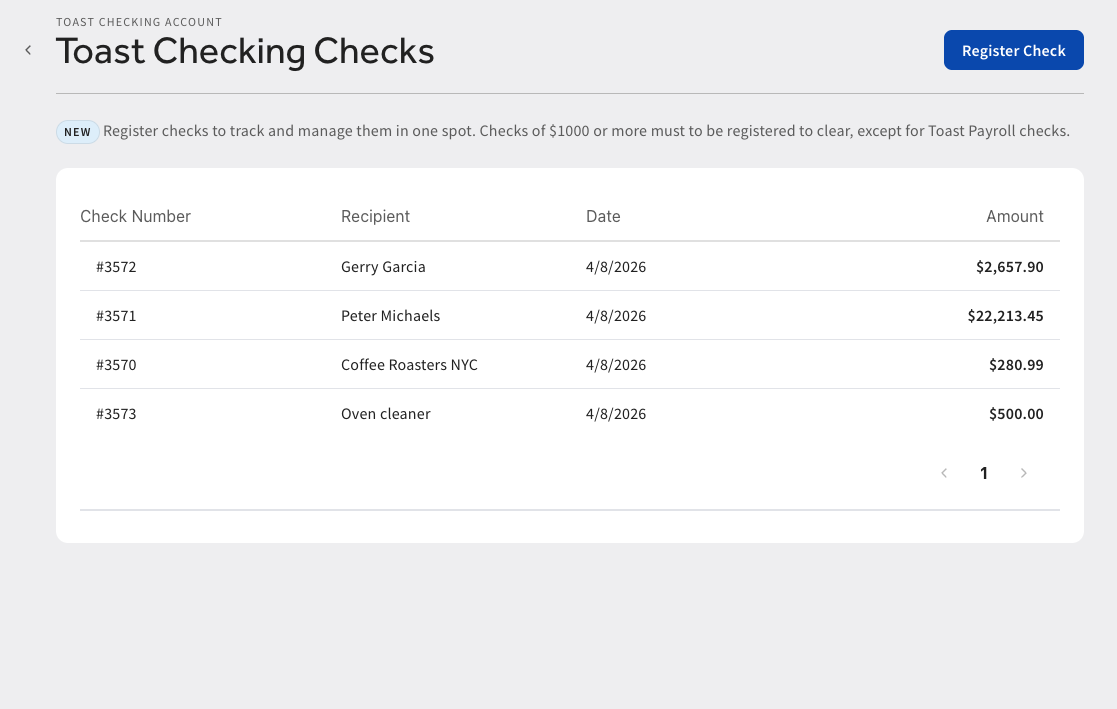
You can use your Toast Checking Account¹ to pay vendors, property owners, utilities, and more by writing checks the traditional way. Purchase blank checks from a third-party provider, and ensure they’ve been magnetic ink character recognition (MICR)-encoded with your Toast Checking Account¹ (or Jar) routing and account numbers.
You can then write checks by hand, or use check-writing software for a more uniform look. Note: When you write a check of $1,000 or higher, you’ll need to register the check on the Toast Checking dashboard¹ to ensure the check clears. Unregistered checks of $1,000 or more will be returned unpaid.
Send Wire Transfers
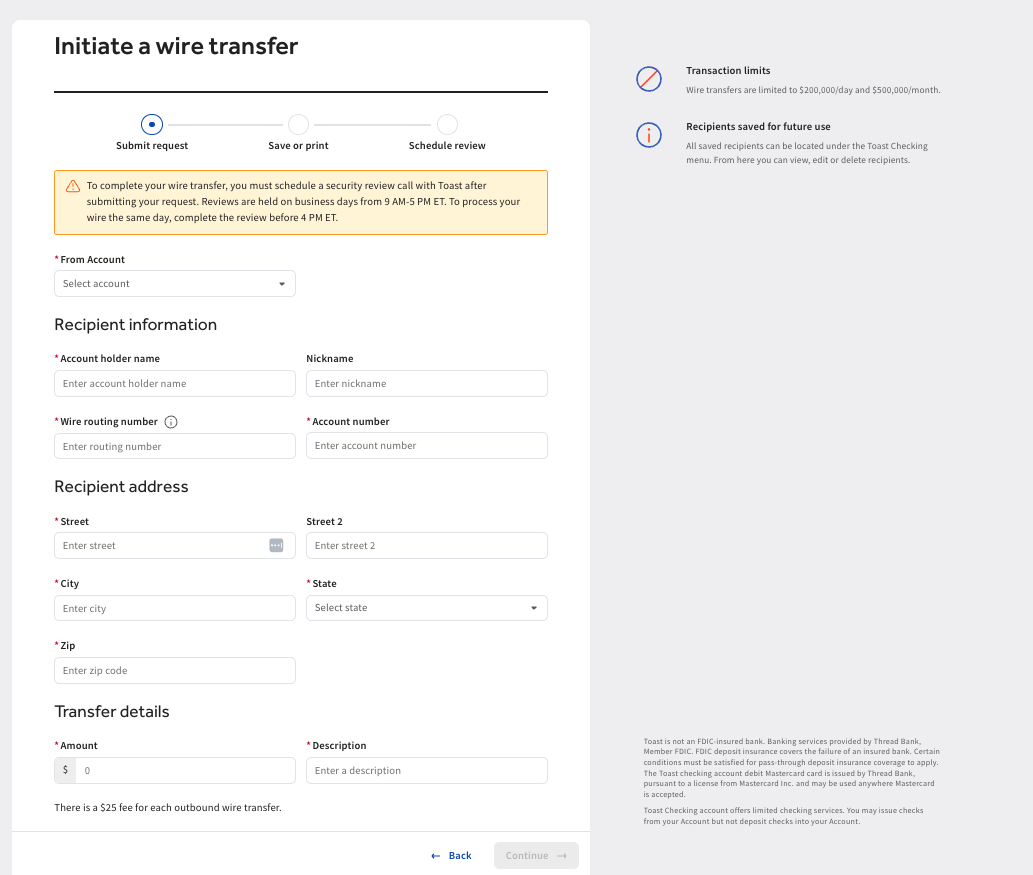
You can also send outbound wire transfers from your Toast Checking Account¹. These must be initiated from your Toast Checking dashboard¹ by selecting the Wire transfer button. There is a $25 fee for each outbound wire transfer.
Accuracy of information is crucial. Inaccurate information could result in the wire being rejected, failing, or routing to someone other than your intended recipient and you may not have recourse to get your money back in this scenario.
Additionally, please be sure the routing information submitted is usable for wire transfers as many large banks have a different routing number for wires than what is shown on your checks or used for ACH transfers.
Once you fill in the form, submit it and keep a copy handy. You can print the form or access it again from your dashboard by double-selecting the pending wire transfer listed at the top of your transactions list.
After the form is submitted, you will be automatically prompted to schedule a phone review with a Toast representative who will verify your identity and the transfer details. This last step is for your protection, reducing the risk of fraud and the chance the funds are mistakenly sent to the wrong account.
Once a wire that you have authorized is sent, it is not possible to get the funds back and you are responsible for any losses. Your call with Toast must occur before 4:45 p.m. ET for the wire to be processed the same day. Wire requests received after the cutoff or on weekends and holidays can be scheduled for review on the next business day.
Use Bill Pay via Toast Checking¹
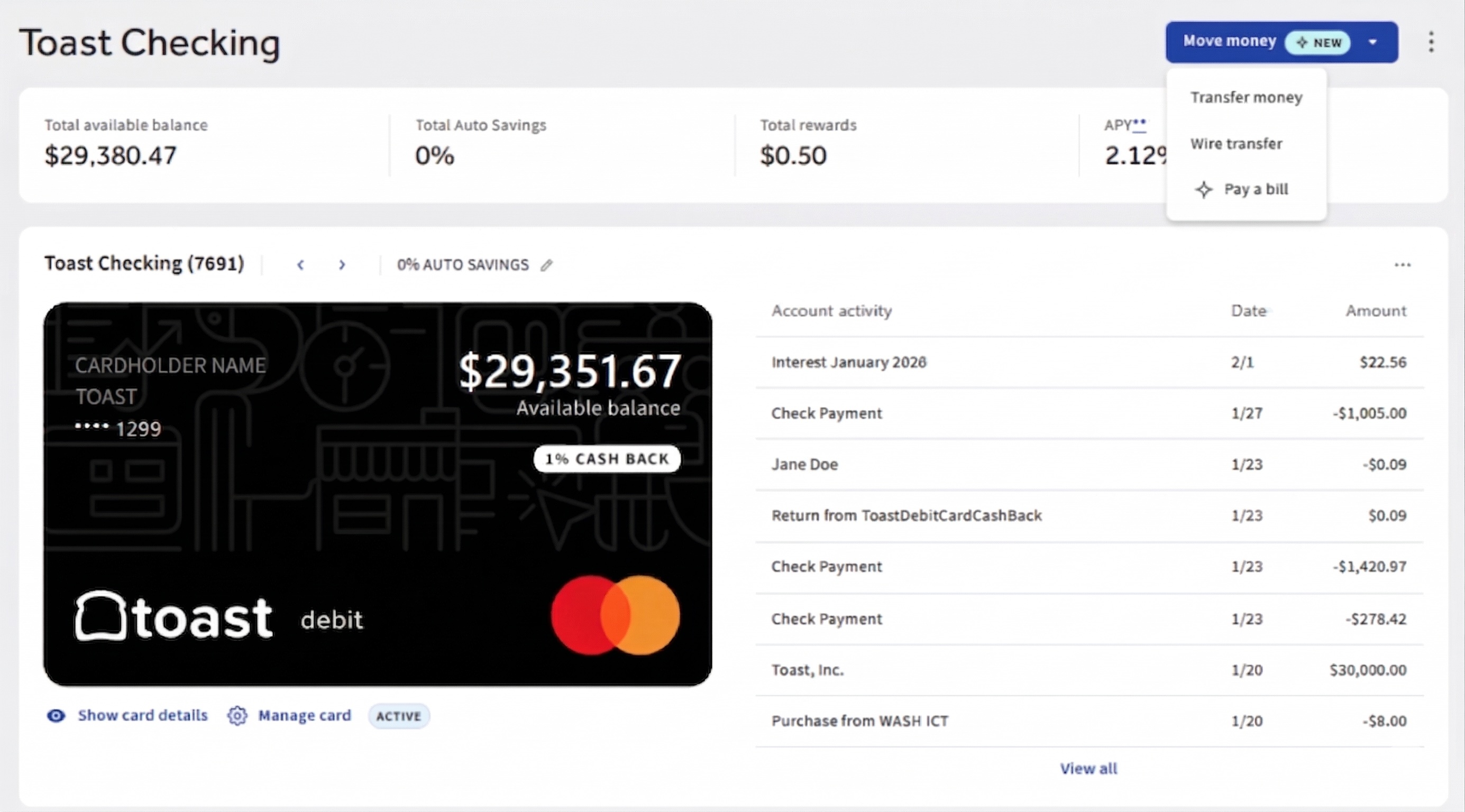
You can also use Toast Bill Pay via Toast Checking¹ to settle your bills and invoices. Select Move money > Pay a bill at the top of the dashboard to be taken to a simple Toast Bill Pay experience, where you’ll be able to enter details of an invoice and pay the bill.
Pay Bills From a Bills Jar
When you open a Jar, you can choose Bills as your Jar type. A Bills Jar makes it easy to pay vendors the way they prefer:
- ACH: Add your vendor's bank details in Toast Bill Pay and pay directly from your Bills Jar.
- Mailed check: Add your vendor's mailing address in Toast Bill Pay, and Toast mails a check funded by your Bills Jar.
- Auto pay: Share your Bills Jar's account and routing number with a vendor so they can pull payment directly.
- Physical check: Order a checkbook for your Bills Jar and write checks yourself.
Note: Only ACH and mailed check payments made through Toast Bill Pay create a corresponding Bill you can track. Auto pay and physical check payments aren't tracked as Bills.
When you pay through Toast Bill Pay from your Bills Jar, select View payment details on the transaction in your Jar to quickly reconcile it.
Toast Checking¹ FAQ
Visit our full Toast Checking¹ FAQs here.
Is there a monthly fee?
There is no monthly fee for Toast Checking¹, and there is no minimum balance required to avoid a fee.
How much does it cost to transfer funds to and from my account?
There is no fee for ACH transfers into or out of your account. For wire transfers, there is a fee of $5 for each inbound wire transfer. There is a fee of $25 for each outbound wire transfer.
Is there a maximum total Auto Savings percentage for Toast Checking?
There is no limit, but you cannot increase your Auto Savings percentage above 100%. The transfer will occur each day after all other scheduled debits are withdrawn (e.g. card processing fees, Easy Pay repayments, Toast Capital repayments, any Instant Deposits, etc.). If remaining funds after all scheduled debits are deducted equate to less than the percentage you set for your daily deposit transfer, all remaining funds will be swept to your Toast Checking account¹ effectively reducing the % of daily sales diverted.
Here’s an example of how Auto Savings works:
Let’s say you you have 10% Auto Savings set up and $1,000 in card sales today, with the following scheduled debits:
-
- $30.00 in card processing fees
- $17.50 in Easy Pay repayments
- $52.50 in Toast Capital repayments
After these debits, you have $900 left to settle. Your 10% Auto Savings will be collected based on that amount, so $90 will be deposited into your Toast Checking¹ account, and the remaining $810 will settle to your bank account on file with Toast.
Can I overdraft my Toast Checking account¹ with a purchase?
No. We don’t currently offer overdraft protection. If you attempt a transaction for more money than you have in your primary Toast Checking account¹ or Jar, it will get declined. Funds will not be pulled from other Jars or your primary Toast Checking account¹ to cover the transaction. If you have an upcoming purchase or an automated payment from your Jar, it’s best to make sure your Jar has sufficient funding first.
Where to Get Support
Please reach out to toastchecking@toasttab.com if you encounter any issues or have questions. Our customer service hours are Monday - Friday between 9 a.m. - 5 p.m. ET.
Additional Resources
- Toast Checking: FAQ
- Toast Checking: Jars FAQ
- Toast Checking: Debit Mastercard FAQ
- Toast Checking: Depositing Cash FAQ
Legal disclosures
1 - TCA.01. Toast is not an FDIC-insured bank. Banking services provided by Thread Bank, Member FDIC. FDIC deposit insurance covers the failure of an insured bank. Pass-through insurance coverage is subject to conditions.
TCA.02. The Toast Checking Account Debit Mastercard is issued by Thread Bank pursuant to a license from Mastercard Inc. and may be used anywhere Mastercard is accepted.
TCA.03. Only purchase transactions processed through the Mastercard network are eligible for cash back rewards. Ineligible transactions include transactions that are not processed through the Mastercard network, cash withdrawals, peer-to-peer debit transactions, refunds, or any transaction that is not consistent with lawful use of your Toast Checking Account. Toast reserves the right to modify or terminate this rewards program at any time.
TCA.04. Your deposits qualify for up to $3,000,000 in FDIC insurance coverage when Thread Bank places them at program banks in its deposit sweep program. Your deposits at each program bank become eligible for FDIC insurance up to $250,000, inclusive of any other deposits you may already hold at the bank in the same ownership capacity. You can access the terms and conditions of the sweep program at https://thread.bank/sweep-disclosure/ and a list of program banks at https://thread.bank/program-banks/. Please contact customerservice@thread.bank with questions on the sweep program. Pass-through insurance coverage is subject to conditions.