Understand Your Toast Invoice
Last updated: Sep 15, 2026, 10:05 AM
Learn what each field on your Toast invoice means, where to find your invoice, and how to read line items.
About Toast Invoices
Your Toast invoice is a monthly or annual statement showing what you owe for Toast software subscriptions, hardware, and services. Invoices are found in Toast Web and are also emailed to the financial contact on your account before the due date.
What this applies to: Toast Web. You need the 8.1 Financial Accounts permission to access invoices. Looking for your Toast Payroll invoice? See Toast Payroll: Invoice and Billing Information. Have a question about a specific charge or billing policy? See Toast Invoice FAQ.
Find Your Invoice
- Log in to Toast Web.
- Navigate to Toast account > Billing > Billing & Invoicing.
- Use the tabs at the top of the invoice list to filter by Hardware Fees, Software, or Other, or select All to view everything.
- Locate your invoice by month and select it to view details, or select Download All Invoices to download all available invoices at once.
Expected outcome: A list of invoices by type appears for the selected location. Select any invoice to view its full details.
Invoices are also emailed to the financial contact on the account before the due date. To see how much you pay for each Toast module, check the Subscriptions page. For more information, see Review and Manage Your Toast Subscriptions.
Invoice Field Reference
Use the table below to understand what each section of your Toast invoice means.
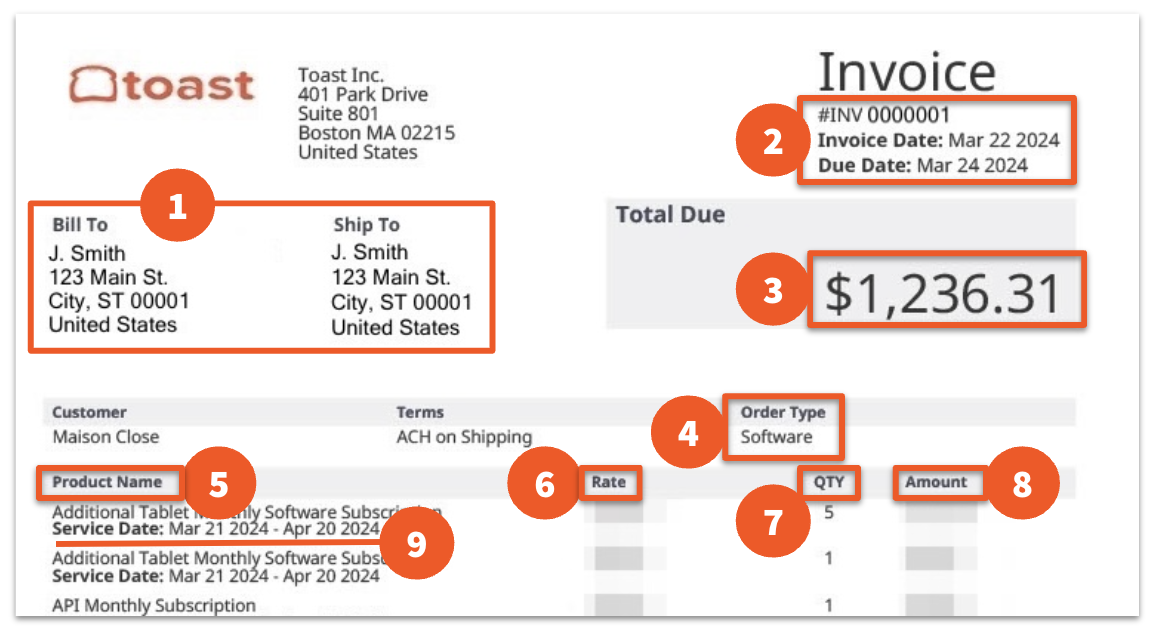
| # | Field | What it means |
| 1 | Bill to / Ship to address | Ship to reflects the restaurant location. Bill to shows which location Toast is charging the invoice to. |
| 2 | Invoice number, Invoice Date, Due Date | Invoice date = when the invoice was created. Due date = when payment is owed to Toast. |
| 3 | Total Due | The total amount owed on the invoice. |
| 4 | Order Type | What the invoice covers: software fees, install hardware, credit card repurchases, etc. |
| 5 | Product Name | The subscription, hardware item, or service being billed. See "Understanding product names" below for details. |
| 6 | Rate | The cost for one individual item or subscription. |
| 7 | QTY | The quantity of the line item. |
| 8 | Amount | The total cost (Rate x QTY). If the amount appears in parentheses, it is being deducted from the total — this means a subscription was removed or downsold. |
| 9 | Service Date | The time period the subscription covers. |
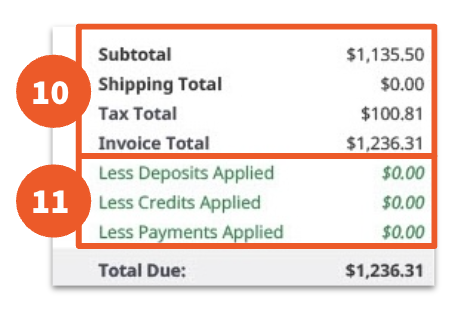
| 10 | Subtotal, Shipping Cost, Tax Total | Subtotal = amount due before shipping and taxes. |
| 11 | Credits and deposits applied | Less Deposits Applied = initial hardware deposit. Less Credits Applied = credit memos. Less Payments Applied = previously applied payments. |
Understanding Product Names
Subscriptions are monthly SaaS fees. Common examples include Online Ordering, Gift Cards, Loyalty, Sling, and xtraCHEF.
Every device you use has an associated hardware subscription fee:
- Your first terminal is labeled Software Subscription.
- Additional terminals are labeled Additional Tablet Monthly Subscriptions.
- All handhelds have a Handheld Monthly Subscription.
For more information, see Review and Manage Your Additional Tablet Monthly Subscriptions.
Note: Your invoice layout may differ. Read the full invoice to understand how subscription packages are broken down on your specific account.
Exceptions
Removed or Downsold Items
When a subscription is removed or downsold, it appears twice on the invoice. A negative quantity ("-") in the QTY column means the subscription has been removed and its price is not included in the total due.
If you see the same product listed with both a positive and negative QTY, the charges cancel each other out — you are not being double-charged.
Prorated Charges
If a subscription is added or removed mid-billing cycle, the charge is prorated — you are only billed for the portion of the cycle the subscription was active. This means the amount may be less than the standard rate.
Related Articles
- Toast Invoice FAQ — Answers to common billing questions (charges, credits, payments, missing invoices)
- Manage Your Invoices With Billing & Invoicing
- Review and Manage Your Toast Subscriptions
- Review and Manage Your Additional Tablet Monthly Subscriptions
- Toast Payroll: Invoice and Billing Information
This content is for informational purposes and is not intended as legal, tax, HR, financial, or any other professional advice.