Toast Payroll: Invoice and Billing Information
Last updated: Oct 15, 2026, 12:04 PM
| Toast Payroll is available to customers in the US only. |
- TL;DR About Toast Payroll Billing
- Monthly SaaS Costs
- Per Employee Per Month (PEPM) Billing
- Invoice Structure Examples
- Tips Manager SaaS Costs
- Other Payroll Fees
- Find Your Toast Payroll Invoices
- ACH Authorization
- Transactions on Your Bank Statement
- Frequently Asked Questions
- Related Articles
TL;DR About Toast Payroll Billing
Toast Payroll bills a monthly SaaS fee (software-as-a-service fee) once per month, on the payroll run that contains the first check date of the month. The fee is the higher of your monthly minimum, your per employee per month (PEPM) rate times your active employees, or a base fee plus PEPM—whichever rule your contract uses. Active employees on the first check date determine the count, even if those employees aren't paid in that run. Leave-of-absence (LOA) and Demo Employee profiles are not counted.
Looking for your Toast Web invoice (hardware, software subscriptions, and other Toast products)? That is a separate invoice—see Understand Your Toast Invoice. This article covers Toast Payroll invoices only.
Monthly SaaS Costs
SaaS stands for Software as a Service. This is the monthly charge for using the Toast Payroll system. Your company is charged the greater of three amounts: the monthly minimum, the per employee per month (PEPM) fee, or the base fee plus PEPM—whichever model your contract uses.
The monthly minimum applies to each pay group you use, regardless of the number of locations within that pay group. See Toast Payroll: Review Pay Groups.
Per employee per month (PEPM) is based on the number of active employees in your Toast Payroll database (company code) on the date you run your first payroll of the month. An active employee is one whose employment status is Active on their profile. This does not include leave-of-absence (LOA) employees.
The base fee plus PEPM is another pricing model that does not have a worked example below—it combines a flat base with a PEPM rate.
Toast Payroll bills SaaS fees on the first check date of the month, with the amount determined by the rules above. This means that unless you run payroll on a monthly check frequency, some payroll runs include your monthly SaaS costs and some do not. Shipping fees, if applicable, are charged on a one-month lag and are debited from your account the following month. To learn when your account is debited, see Toast Payroll: Manage Debit and Withdrawal Schedules.
Per Employee Per Month (PEPM) Billing
If your restaurant is on the PEPM model and an employee is part of more than one pay group, Toast Payroll does not double-count that employee. Employees are counted once regardless of how many pay groups they belong to.
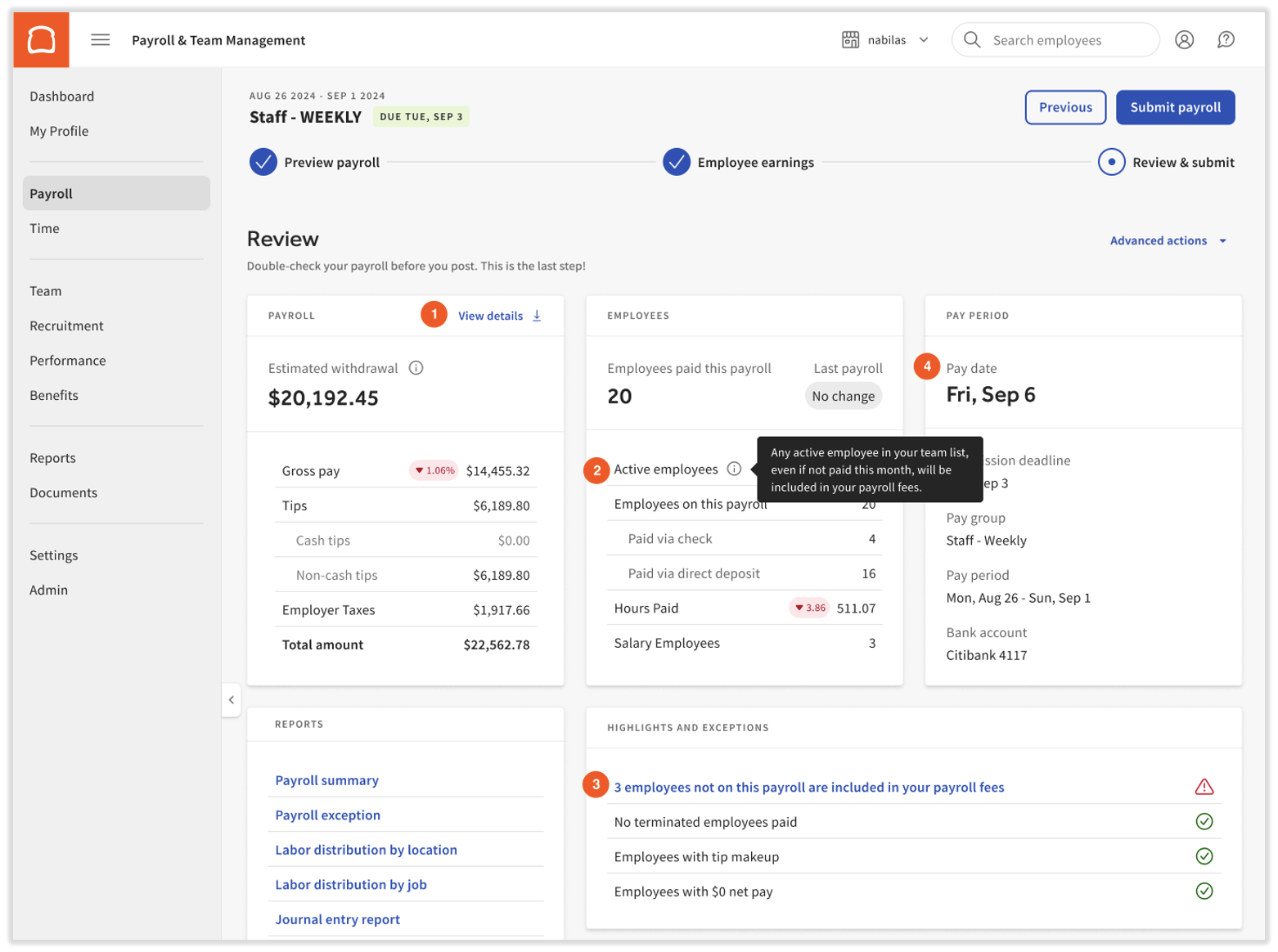
You can view the number of active employees from the Review and Submit step of a payroll run. After you submit payroll, you can view your total monthly SaaS fees plus sales tax. Match each item below to the screenshot that follows:
- The Payroll Summary report is accessible from the View Details link in the Payroll tile of a payroll run. This report shows your cash requirements for each payroll run in each pay group. See Toast Payroll: Payroll Summary Report for a full field reference.
- The number of active employees appears in the Employees tile, with a tooltip explanation. If you are billed on the PEPM model, this number is a quick estimate of your fee—the full breakdown with sales tax appears on the Confirmation step after you select Submit Payroll.
- The number of employees included in your SaaS fees but not paid on this run is highlighted in the Highlights and Exceptions tile. Select the link there to see the specific employees. If needed, use Toast Payroll: Make an Employee Status Change to change a profile's status before submitting payroll.
Items 2 and 3 above appear only on the first payroll run(s) of each month.
Note: The field formerly labeled Check date is now labeled Pay date.
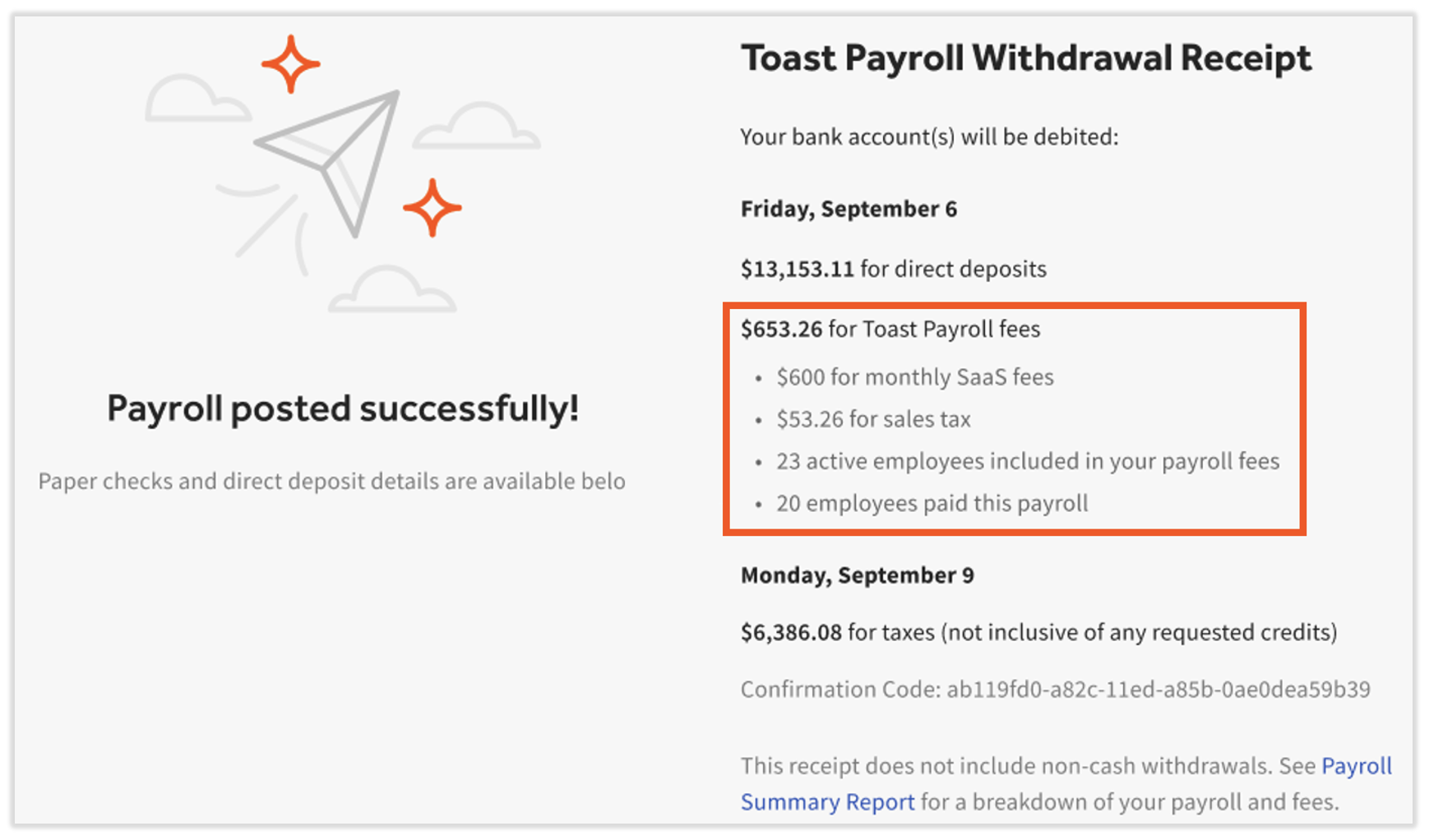
After you select Submit Payroll, the Confirmation step shows the breakdown of SaaS fees and sales tax for each first-of-the-month payroll run. The Toast Payroll fees section shows the monthly SaaS fees plus sales tax, the count of active employees included in your fees, and the count of employees paid on this payroll. Tracking these two numbers—and making employee status changes when appropriate—helps you manage your fees.
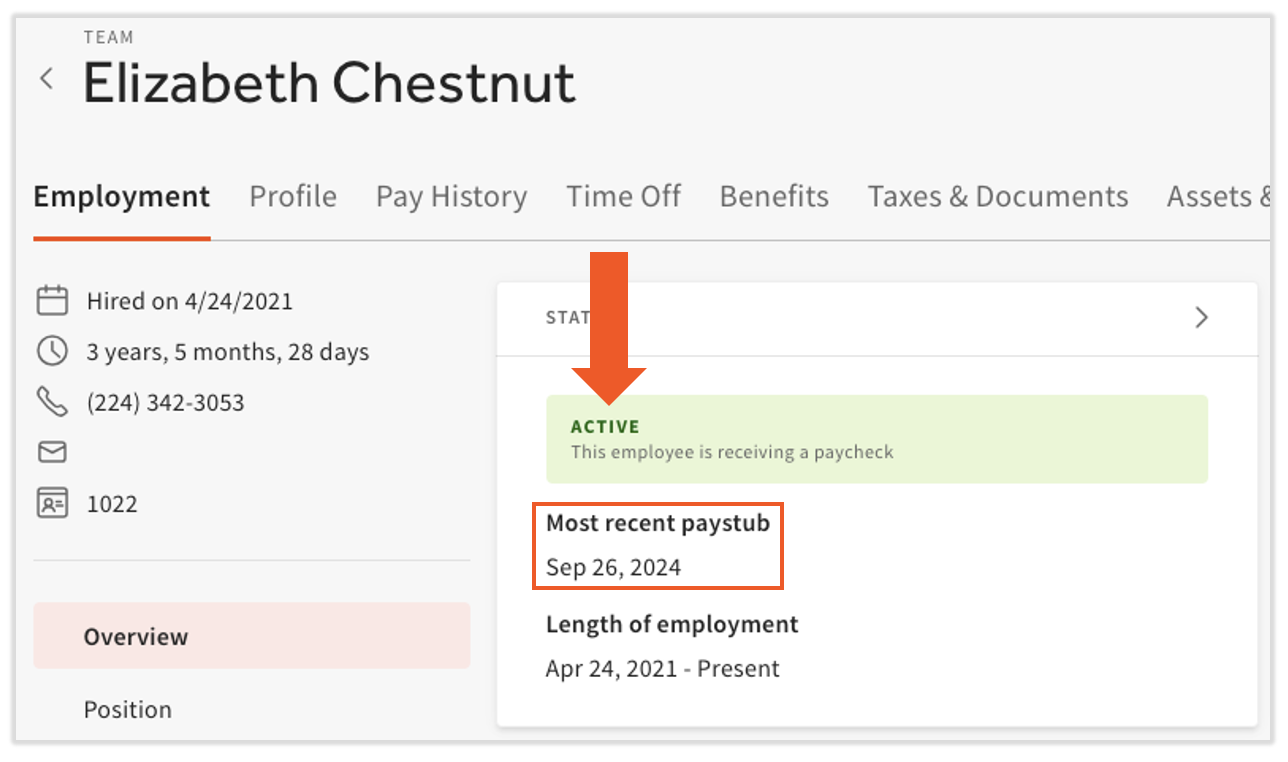
Example. Take a sample profile in October 2024. The profile is set to Active on the Status tile, even though the most recent paystub was in September 2024. This employee is still included in your per-employee-per-month billing for October. If you know they will not receive a paycheck in the near future, you can move them to an inactive state by terminating them or placing them on a leave of absence (LOA). See Terminate or Archive an Employee in Toast Web or Toast Payroll and Toast Payroll: Get Help With Leave of Absence.
Invoice Structure Examples
The two scenarios below show how monthly minimums and PEPM interact with pay groups and FEINs.
Scenario A—One FEIN and one pay group
| Customer Contract Structure | Value |
| FEINs | 1 |
| Locations | 2 |
| Pay Groups (1 per location) | 1 |
| Monthly Minimum | $50 |
| PEPM | $10 |
Pay Group 1
- 2 employees on payroll
- 2 employees × $10 PEPM = $20
- $20 < $50 monthly minimum
- The customer is billed the $50 monthly minimum
- Even with 2 locations under a single pay group, the monthly minimum is charged once
Scenario B—Two FEINs and two pay groups
| Customer Contract Structure | Value |
| FEINs | 2 |
| Locations | 2 |
| Pay Groups (1 per location) | 2 |
| Monthly Minimum | $100 ($50 × 2 pay groups) |
| PEPM | $10 |
Pay Group 1 in FEIN 1
- 15 employees on payroll
- 15 employees × $10 PEPM = $150
- $150 > $100 monthly minimum
- The customer is billed $150 in PEPM fees
Pay Group 2 in FEIN 2
- 2 employees on payroll
- 2 employees × $10 PEPM = $20
- $100 monthly minimum > $20
- The customer is billed the $100 monthly minimum
Tips Manager SaaS Costs
Toast Tips Manager lets you set up a tip pooling or tip sharing policy for your staff. It calculates tip amounts you set and integrates from Toast Web to Toast Payroll to speed up payroll processing. See Get Started with Toast Tips Manager.
You may pay for Tips Manager on a PEPM basis or a per-location basis, depending on your contract.
Other Payroll Fees
The fees below apply when the listed event occurs. Amounts are accurate as of the article's last update; specific contract terms may override.
| Fee | Amount |
| Shipping (per package) — see Toast Payroll: Paycheck Delivery FAQ | $20 |
| Off-cycle payroll — see Toast Payroll: Set Up and Configure Off-Cycle Payrolls | No fee at this time (subject to change; the typical fee is $50) |
| Direct deposit reversal / ACH zero-out (per direct deposit account) — see Toast Payroll: Unsuccessful Direct Deposits | $25 |
| Printed Form W-2s (per copy) — see Toast Payroll: Manage the W-2 Experience | $5 |
| Missing EIN (per month) — see Toast Payroll: Review Missing Data | $100 |
| SaaS sales tax (where applicable, per month) | $30 |
| Wage amendments (per amendment request, any number of employees/quarters/FEINs) — see Toast Payroll: Get Help With Form W-2 Amendments | $250 |
| SSN/name change amendments (per amendment request, any number of employees/quarters/FEINs) — see Toast Payroll: Get Help With Form W-2 Amendments | $250 |
| Payroll calendar request after 12/15 (per calendar) — see Toast Payroll: Manage Payroll Calendars | No fee at this time |
| Insufficient funds for ACH or tax amounts | 2% of the insufficient amount, or $300 minimum |
| Stop payments (per stop pay) | $25 |
| Saturday paycheck delivery (where available, per package) | $30 |
Find Your Toast Payroll Invoices
Log into Toast Payroll and navigate to Reports > Standard. (When you select Reports in Toast Payroll, you should see a URL that begins with payroll.toasttab.com. Visit Navigate Toast Payroll Within Toast Web to learn how the new Toast Payroll navigation works.) Find the Invoice Detail Report to review billing details per payroll. The Payroll Summary Report and the Payroll Withdrawal Receipt also let you view charges for payroll fees, wages, and taxes. See Toast Payroll: Payroll Summary Report and Toast Payroll: Manage Debit and Withdrawal Schedules.
Note: Toast Payroll invoices are not shown in Toast Web > Toast account > Billing > Billing & Invoicing. That page is for Toast Web (hardware, software subscriptions, and other Toast products). For Toast Payroll fees, use the reports above. See Understand Your Toast Invoice for the Toast Web side.
ACH Authorization
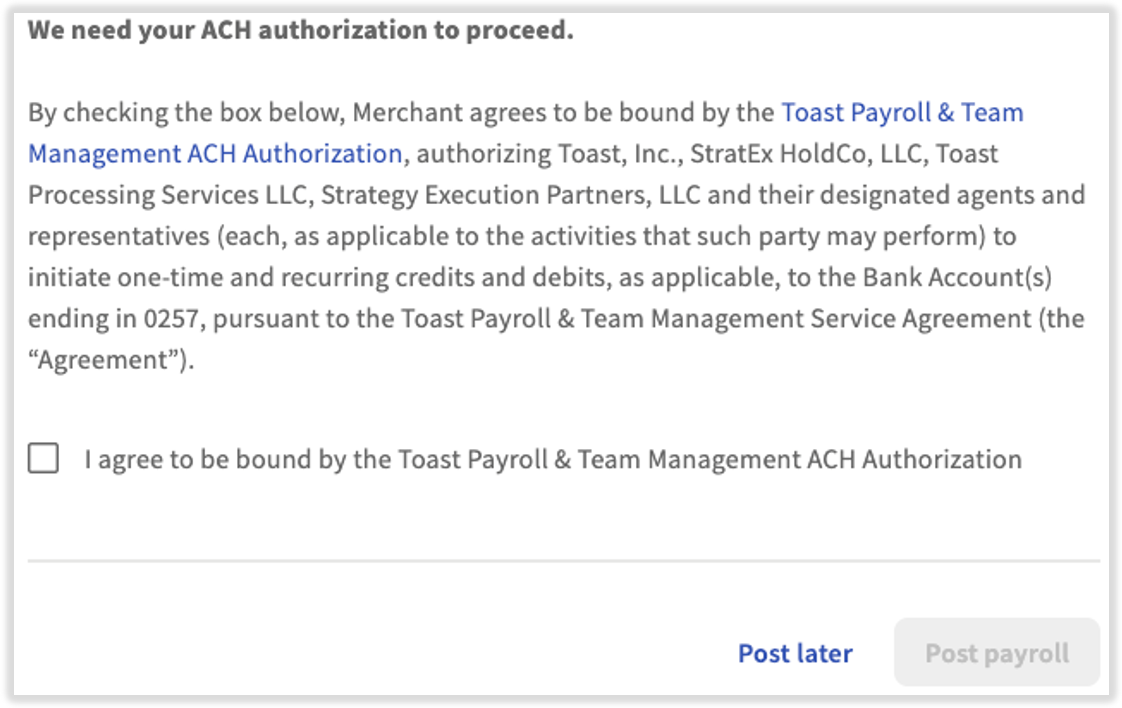
When you submit your first payroll, or when you have recently changed your bank account, Toast Payroll requires an authorization to make ACH transactions on the new bank account. After you select Submit Payroll on the last step of a payroll run, a one-time message appears. Select the checkbox and select Post Payroll to continue.
Transactions on Your Bank Statement
Transaction descriptors from Toast Payroll appear on your bank statement in a few different ways. The first two are often accompanied by a Bank ID. The two Bank IDs you may see are 1161630473 and 6161630473. Share these IDs with your financial institution to "whitelist" Toast Payroll's bank transactions.
Some payroll-related transactions appear as Toast Payroll TOAST PAYR. These cover net payroll cash liabilities (paying your employees) and invoices, where applicable. Invoices may include off-cycle payrolls, ACH reversals, or shipping costs. See Toast Payroll: Payroll Summary Report for invoiced charges.
In October 2025, Toast Payroll changed this descriptor so it no longer includes the customer name.
If you see older payroll transactions labeled as Strategy Executive Tax, these are typically standard payroll tax debits. They can also occasionally represent manual adjustments processed by our Toast Payroll Banking team.
Amendment or access fee debits appear as Toast, Inc. These take place only when you request a wage or tax amendment or need access to a closed account.
Frequently Asked Questions
What is the monthly SaaS fee on my payroll?
The Monthly SaaS fee is the monthly software charge for using Toast Payroll. SaaS stands for Software as a Service. You are charged the higher of a monthly minimum, a per-employee-per-month (PEPM) rate, or a base fee plus PEPM—whichever model your contract uses. The fee appears on the payroll run that includes the first check date of the month, so you only see it on one payroll per month.
Also asked as:
-
- What is the monthly SaaS fee?
- What is SaaS fees?
- What does SaaS mean?
- What is the SaaS fee I am being charged?
- What is monthly SaaS fee?
- In Toast Payroll, what is a monthly SaaS fee?
Why is the SaaS fee charged on some payrolls but not others?
The Monthly SaaS fee is billed once per month, on the payroll run that contains the first check date of the month. If you run payroll more than once a month—for example, biweekly plus a monthly off-cycle—only one of those runs in a calendar month should show the SaaS fee. If you see the SaaS fee on more than one payroll in the same calendar month, contact Customer Care to review your billing.
Also asked as:
-
- Why is the monthly SaaS fee charged every payroll?
- Why are we paying the same SaaS fees on our monthly and biweekly payrolls?
Why does my SaaS fee show more employees than I paid?
If you are on the PEPM model, your SaaS fee is based on the number of active employees in your Toast Payroll database on the first check date of the month—not the number of employees paid on that run. An employee who is Active in Toast Payroll but did not receive a paycheck still counts. To reduce the count, change inactive employees to Terminated, LOA, or Demo Employee status before the first check date of the next month.
To see exactly which employees are included, log into payroll.toasttab.com, navigate to Reports > Standard, and use the Active Employee List. (When you select Reports in Toast Payroll, you should see a URL that begins with payroll.toasttab.com. Visit Navigate Toast Payroll Within Toast Web to learn how the new Toast Payroll navigation works.) You can also open the Highlights and Exceptions tile during the Review and Submit step of payroll. See Toast Payroll: Employees Included in Invoicing and Toast Payroll: Make an Employee Status Change.
Also asked as:
-
- My Toast monthly SaaS fee shows 11 employees when I only have 5?
- Wondering why the monthly SaaS fee is for 92 employees when we are paying 40 employees?
- Do I need to make the non-working employees on non-active status?
Are leave-of-absence (LOA) employees included in the SaaS fee?
No. Employees with a Leave of Absence (LOA) status are not counted as active for PEPM billing and are not invoiced. Their earnings will not populate on payroll, but recurring deductions (for example, benefit costs) still appear so they can continue to be recorded. See Toast Payroll: Make an Employee Status Change.
Also asked as:
-
- If an employee is on leave of absence, do we still get charged a SaaS fee?
How should I handle seasonal or dormant employees?
Only employees whose employment status is Active on the first check date of the month contribute to the PEPM charge. For employees who are out of season or temporarily not working, you have three options:
- Terminate the profile when out of season and rehire when they return. This keeps reports accurate and is the cleanest option.
- Place the employee on a Leave of Absence (LOA) through the Status Change page. LOA profiles are not counted for PEPM and do not appear on the invoice.
- Leave the employee as Active. They will be included in PEPM billing even if they aren't paid that month.
See Toast Payroll: Seasonal Employees.
Also asked as:
-
- If I change an employee's status to dormant in payroll, will I be billed a SaaS fee for him?
- My business is seasonal?
- I had to re-activate them because they were seasonal?
Can I remove my owner, bookkeeper, or accountant from the SaaS fee?
Yes. For people who need access to Toast Payroll but are not paid through Toast Payroll—for example, owners, bookkeepers, or accountants—set their Employment Status to Demo Employee. Demo Employee profiles do not appear on monthly invoices, do not receive Form W-2s or Form 1095-Cs, and do not affect company totals for quarterly tax filings. See Toast Payroll: Give Access to a Non-Employee for the full setup procedure, including how to grant Toast Web access at the same time.
Also asked as:
-
- I need to remove myself as a paid EE. I am not paid and don't want myself counted as part of the SaaS fee?
- I'm being charged SaaS fees for my bookkeeper who needs access to the system but isn't an employee?
- How do I remove her from payroll calculations without taking away her access?
Where do I see my Toast Payroll invoices?
Toast Payroll invoices are not shown on the Toast Web Billing & Invoicing page. To find Toast Payroll fees:
- For per-payroll detail: in Toast Payroll, navigate to Reports > Standard and run the Invoice Detail Report.
- When you select Reports in Toast Payroll, you should see a URL that begins with payroll.toasttab.com. Visit Navigate Toast Payroll Within Toast Web to learn how the new Toast Payroll navigation works.
- For the cash breakdown of any payroll: run the Payroll Summary Report. The Invoices: Monthly SaaS Fee line appears on the run that contains the first check date of the month.
- For a year-over-year view: in Reports > Standard, run the Consolidated Payroll Summary Report with a custom date range covering the year you want.
- When you select Reports in Toast Payroll, you should see a URL that begins with payroll.toasttab.com. Visit Navigate Toast Payroll Within Toast Web to learn how the new Toast Payroll navigation works.
For the Toast Web invoice (hardware, software subscriptions, and other Toast products), see Understand Your Toast Invoice.
Also asked as:
-
- Where can I see all the SaaS fees in payroll? Is there a report or place I can look them all up?
- I am trying to figure out an easy way to see what I paid in 2025 for SaaS fees?
- I don't see these charges on the invoice?
How do I lower or adjust my monthly SaaS fee?
Two actions affect your monthly SaaS fee:
- Update your team list. Terminate employees who no longer work with your business, or place employees on Leave of Absence (LOA), Demo Employee, or Seasonal status as appropriate. Make these changes before the first check date of the month so they apply to that month's invoice. See Toast Payroll: Make an Employee Status Change.
- Renegotiate your contract. Pricing, monthly minimums, and PEPM rates are set in your contract. To discuss changes to your billing structure or request a fee waiver, Contact Customer Support.
Also asked as:
-
- How do I adjust my monthly SaaS fee?
- Can I renegotiate the fee?
- Update your team list to avoid fees for employees no longer with your business?
How are Toast Payroll shipping charges billed to me?
When Toast Payroll sends a package of paychecks or Form W-2s, the charges are billed to one pay group. You can view the bank account information for a pay group by navigating to Payroll > Pay group settings. (When the Toast Web and Toast Payroll navigation menus are both visible, select Payroll from the Toast Payroll navigation sub-menu. If you don't see the Toast Payroll sub-menu, selecting Payroll from the Toast Web navigation menu will expand it.) At this time, we cannot separate these shipping charges among multiple pay groups under one company code.
Related Articles
- Toast Payroll: Employees Included in Invoicing
- Toast Payroll: Make an Employee Status Change
- Toast Payroll: Give Access to a Non-Employee
- Toast Payroll: Manage Debit and Withdrawal Schedules
- Toast Payroll: Payroll Summary Report
- Understand Your Toast Invoice
This content is for informational purposes and is not intended as legal, tax, HR, financial, or any other professional advice. Please contact an attorney or other professional for advice.