Toast Payroll: Payroll Summary Report
Last updated: Jun 25, 2026, 4:49 PM
Look up what each Payroll Summary line item means and how Cash Requirements determines what Toast Payroll debits.
- What this report applies to
- How the Payroll Summary report works
- Where to find the Payroll Summary report
- Payroll Summary line items
- Cash Requirements and Non-Debit Items
- Consolidated Payroll Summary Report
- Why your Payroll Summary may not match your W-2 or QEPAR
- Frequently asked questions
What this report applies to
The Payroll Summary report applies to any pay group in Toast Payroll. It shows payroll totals for that pay group, including earnings, deductions, taxes, net pay, and the cash needed to fund payroll. There is no employee-specific information on this report — for per-employee detail, use the Employee Detail report instead.
The line item names on this report are fixed based on system configuration, so they cannot be changed or customized.
How the Payroll Summary report works
The Payroll Summary report answers one main question: how much will Toast Payroll debit from your bank account for this payroll, and what makes up that amount. The total Toast Payroll collects appears as the Cash Requirements line.
After a payroll is submitted, Toast Payroll debits the bank account on file for that pay group. The amount and timing of that debit are explained in Toast Payroll: Manage Debit and Withdrawal Schedules. In short, every submission creates a separate Payroll Debit and Tax Debit, and the funds typically leave your account on the business days after you submit.
Note: You can also view your finalized debit dates and amounts on the Toast Payroll Withdrawal Receipt, which becomes available after about 4:20 p.m. to 4:30 p.m. CST on the day you submit payroll. See Toast Payroll: Manage Debit and Withdrawal Schedules.
Where to find the Payroll Summary report
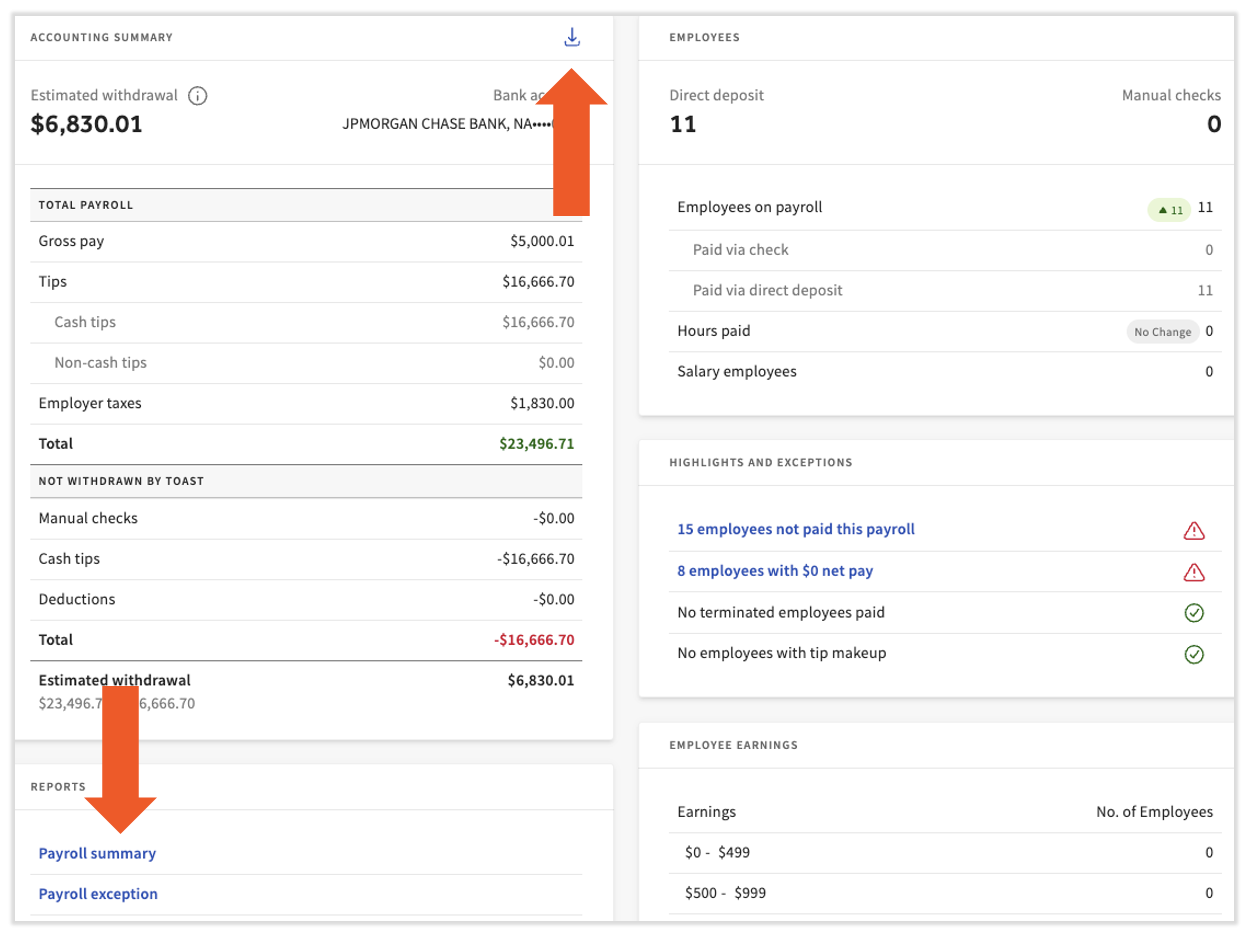
You can open the Payroll Summary report while running a payroll and after submitting it.
- During a payroll: On the Review and Submit step, select the report from the Reports tile, or select the download arrow at the top of the Accounting Summary tile.
- After submitting: In Toast Payroll, navigate to Payroll > Past Payrolls > View.
Note: A small number of users see a simplified Accounting Summary tile. This happens with certain deduction configurations or withdrawal timings where the individual line items are not available.
For informational purposes
Payroll Summary line items
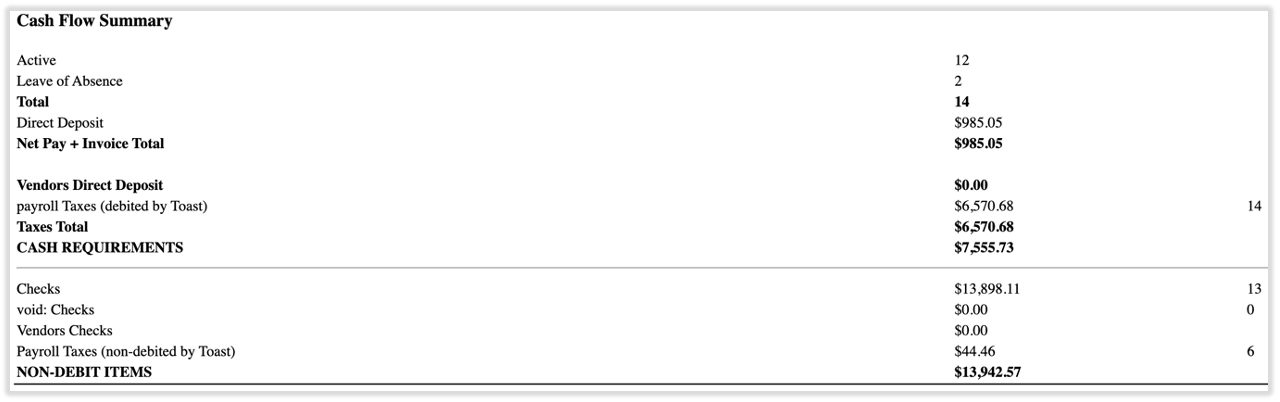
Each line on the Payroll Summary report is defined below. Use this table to look up what any single line item means and whether it is part of the Cash Requirements that Toast Payroll debits.
For informational purposes
| Line item | What it means | Part of Cash Requirements? |
| Active | Number of active employees in this pay group, per the Position page on each profile. Active employees is not the same as the number of employees paid. | No (informational count) |
| Leave of Absence | Number of employees on leave of absence (LOA) status. LOA employees are not part of the PEPM pricing model and are not included in your Toast Payroll invoice. This line does not appear if no employees are on LOA. | No (informational count) |
| Total | Total number of employees considered for the payroll. | No (informational count) |
| Direct Deposit | Total net amount for employees paid by direct deposit. Employees who entered direct deposit information are paid on the check date when the regular schedule is followed. | Yes |
| Invoices: Monthly SaaS Fee | Toast Payroll monthly service charge, billed on the payroll containing the first check date of the month, so it does not appear on every report. Based on the number of active records. See Toast Payroll: Invoice and Billing Information. | Yes |
| Invoices: Sales Tax (Monthly SaaS Fee) | Tax on the SaaS fee, calculated for the state of your FEIN address and paid to that state by Toast Payroll. Applies in: AL, AK, AZ, CT, DC, HI, KY, LA, MA, NM, NY, OH, PA, RI, SC, TN, TX, UT, WA, and WV. | Yes |
| Net Pay + Invoice Total | Direct deposit pay plus any invoice cost. | Yes (summary line) |
| Vendors Direct Deposit | Amount paid to vendors by direct deposit. Vendors are set up on certain employee deductions, usually benefits, garnishments, or child support. The amounts are deducted from employee pay and sent to the vendor. | Yes |
| Payroll Taxes | Taxes calculated on employee pay, including both employee and employer amounts for federal, state, and local agencies. Collected by Toast Payroll and paid to the agencies. | Yes |
| Taxes Total | Total amount of payroll taxes. | Yes (summary line) |
| Cash Requirements | Total cash Toast Payroll collects from your account when payroll is submitted. Equals Direct Deposit, Vendors Direct Deposit, Invoices (SaaS fee and sales tax), and Payroll Taxes. Standard process debits this amount the business day after you submit. | This is the total |
| Checks | Total for employees paid by paper check, printed by you or by Toast Payroll (charges may apply). If you write checks from your own account, this amount is not debited by Toast Payroll — it leaves your account as employees cash or deposit checks. | No (see Non-Debit Items) |
| Void Checks | Net amount of checks that were voided (canceled). Reconcile this amount with the employee or your bank. | No |
| Vendors Checks | Amount paid to vendors by check, usually for garnishments or child support. Printed and shipped by Toast Payroll, but if you write checks from your own account, not debited by Toast Payroll — the amount leaves your account when the vendor cashes the check. | No (see Non-Debit Items) |
| Non-Debit Items | Total of items Toast Payroll will not debit your account for after submission. These amounts leave your account as the checks are cashed. | No (by definition) |
Note: Fees for some other processes can be added to any payroll. They appear as a separate line item and are included in the Cash Requirements for that payroll. Examples include tax corrections, stop payments, Form W-2 printing, setup, and shipping.
Cash Requirements and Non-Debit Items
Cash Requirements is the single most important number on the report: it is the total amount Toast Payroll will debit from your bank account for the payroll. It combines direct deposit net pay, vendor direct deposits, the monthly SaaS fee and its sales tax (when they apply), and payroll taxes.
Non-Debit Items are amounts Toast Payroll does not debit — primarily paper checks and vendor checks when you write checks from your own account. These amounts leave your account later, as the checks are cashed.
To find the total funds you need to cover a payroll completely, add Cash Requirements and Non-Debit Items together. Cash Requirements alone tells you what Toast Payroll will pull; adding Non-Debit Items accounts for the checks that will clear separately.
Consolidated Payroll Summary Report
The Consolidated Payroll Summary Report combines multiple Payroll Summary reports into one PDF for totals across payrolls. Find it in the Standard Report Library at Reports > Standard.
You can queue this report two ways:
- Select a date range, which consolidates payrolls with check dates in that range.
- Select individual or multiple payrolls.
To select multiple payrolls in a row, select the first payroll, hold Shift, then select the last payroll to highlight the full range. To select only specific payrolls, hold Ctrl or Command as you select each one.
Note: The Consolidated Payroll Summary Report shows totals across payrolls but does not break out Cash Requirements by line item. If each pay group uses its own bank account, review each individual Payroll Summary report to see the funds needed per account.
Why your Payroll Summary may not match your W-2 or QEPAR
The Payroll Summary report only pulls data from payrolls posted within Toast Payroll. The Quarterly Employee Payroll Audit Report (QEPAR), Form W-2, and Form W-3 include payrolls posted with Toast Payroll plus prior records imported during implementation.
As a result, if you went live with Toast Payroll partway through a year, the Payroll Summary totals will differ from your QEPAR, W-2, and W-3 totals for that year. The difference is the pre-Toast payroll history that was imported during setup.
Frequently asked questions
What is included in the cash requirements amount on my payroll summary?
The cash requirements amount on your payroll summary is the total Toast Payroll debits from your bank account for that payroll. It includes direct deposit net pay, vendor direct deposits, the monthly SaaS fee and its sales tax when they apply, and payroll taxes. It does not include paper checks or vendor checks when you write checks from your own account — those appear under Non-Debit Items. To find the full amount needed to cover the payroll, add Cash Requirements and Non-Debit Items together.
Also asked as:
- Where can I find the cash requirements for a payroll, including the monthly fee?
- How much will Toast debit for this payroll?
- What is the total amount of cash requirements for each payroll?
What are non-debit items on the payroll summary?
Non-debit items on the payroll summary are amounts that Toast Payroll does not debit from your account after you submit payroll. They are mostly paper checks and vendor checks when you write checks from your own account. These amounts leave your account later, as employees and vendors cash or deposit the checks, rather than in the payroll debit. To see the total funds a payroll needs, add the Non-Debit Items total to the Cash Requirements total.
Also asked as:
- What does non-debited mean on payroll?
- Why are some items not debited by Toast?
- What is the non-debit items line?
Why doesn't my payroll summary match my W-2, W-3, or QEPAR?
Your payroll summary may not match your W-2, W-3, or QEPAR because the Payroll Summary report only includes payrolls posted within Toast Payroll, while the QEPAR, W-2, and W-3 also include prior records imported during implementation. If you went live with Toast Payroll partway through a year, that imported history explains the difference. For year-end and quarterly comparisons, the Consolidated Payroll Summary Report or the Quarterly Employee Payroll Audit report is a better match.
Also asked as:
- Why is my W-2 total different from my payroll report?
- Why don't my year-end payroll totals match?
- Which report should match my W-3?
Related articles
- Toast Payroll: Manage Debit and Withdrawal Schedules
- Toast Payroll: Review Payroll Reports
- Toast Payroll: Review Common Payroll Reports
- Toast Payroll: Invoice and Billing Information
- Toast Payroll: Optimize the Report Library
This content is for informational purposes and is not intended as legal, tax, HR, or any other professional advice. Please contact an attorney or other professional for advice.