Review and Manage Your Toast Subscriptions
Last updated: Sep 17, 2026, 10:05 AM
You can easily see what products and services you subscribe to from Toast on the Subscriptions page available in Toast Web.
The Subscriptions page in Toast Web lists every product, module, and device subscription you pay for, along with the monthly cost and any discounts applied. Use this page to check what you are paying for each month and to see the total cost of your active subscriptions.
- What This Applies To
- Open the Subscriptions Page
- What Each Element on the Subscriptions Page Means
- Frequently Asked Questions
- Related Articles
What This Applies To
Applies to: Toast Web | Permissions needed: 8.1 Financial Accounts
What you'll see: A list of every active Toast subscription on your account, the monthly cost of each, any discount applied, and the total subscription cost for the current billing period.
Open the Subscriptions Page
The Subscriptions page lives in Toast Web. There are two ways to open it.
- Navigate to Toast Web > Toast account > My Products > Subscriptions.
- Search "subscriptions" in the Toast Web search bar.
What Each Element on the Subscriptions Page Means
The table below explains the elements that appear on the Subscriptions page. The first two rows describe the totals shown at the top of the page. The remaining rows describe what appears for each individual subscription line item.
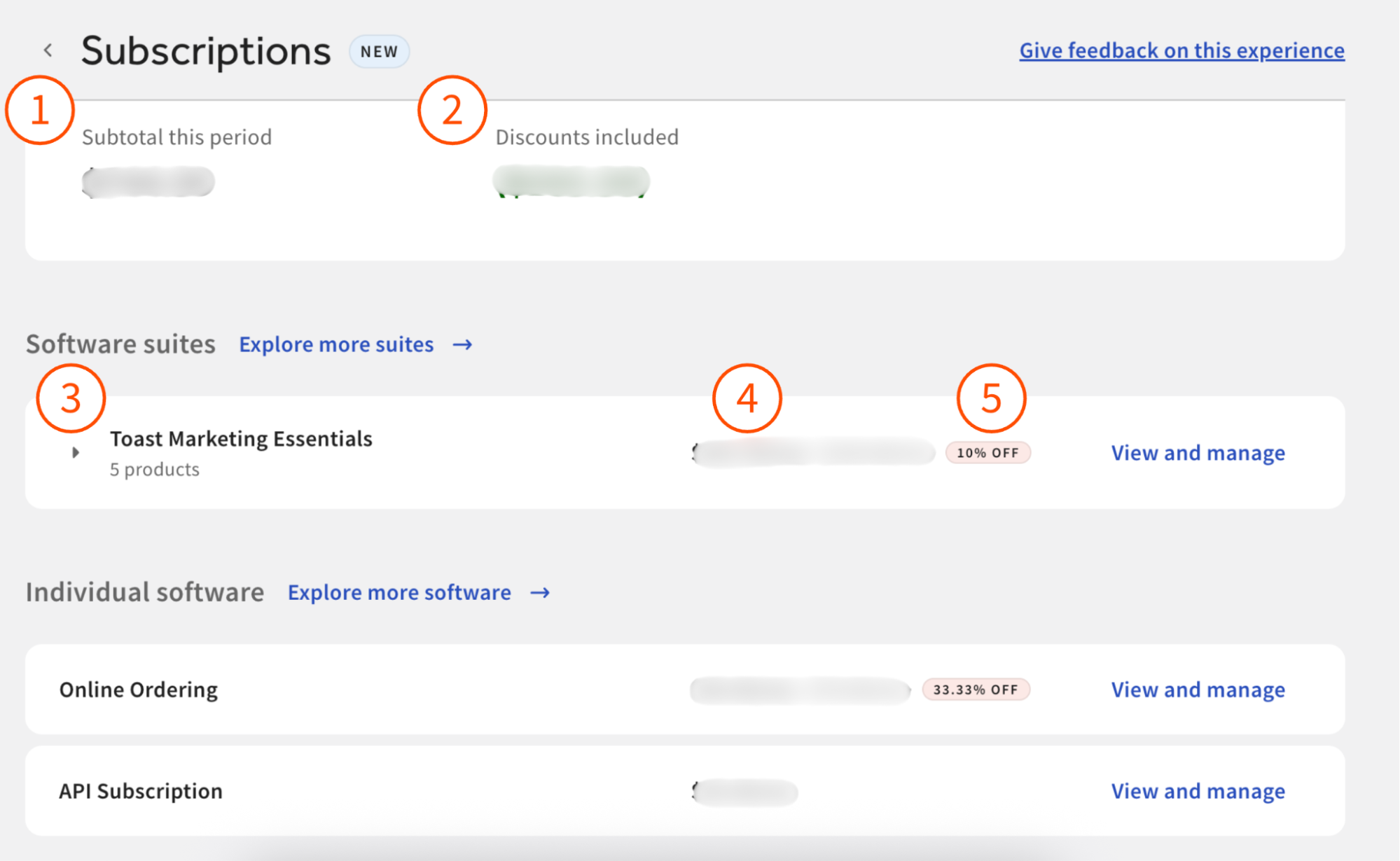
| Element | What it means |
| Subtotal this period | The total cost of all your active subscriptions for the current billing period. This figure already accounts for any discounts shown in the next row. |
| Discounts | The total amount of discounts taken off your cost for the current period. Already reflected in the Subtotal this period total. |
| Subscription name | The name of the individual subscription (for example, "Toast Online Ordering," "Additional Tablet Monthly Subscriptions," "Handheld Monthly Subscription"). |
| Monthly cost | How much this subscription costs per month. |
| Discount | If applicable, the percentage discount you receive off this subscription — for example, when the subscription is part of a bundle or has an introductory rate. |
Frequently Asked Questions
How do I cancel, remove, downgrade, or unsubscribe from a Toast subscription?
To cancel, remove, downgrade, or unsubscribe from a Toast subscription, see Remove a Product From Your Toast Account. That article covers requesting a cancellation from the Subscriptions page, adjusting device subscription counts, handling bundled subscriptions, and what to do when the product you want to remove isn't on the Subscriptions page.
Also asked as:
-
- How do I cancel a Toast subscription?
- How do I remove a product from my Toast account?
- How do I discontinue a subscription?
- How do I unsubscribe from a Toast product?
- How do I downgrade a subscription?
My device shows a "subscription needed" message but I already have a subscription. What does that mean?
If a Toast device shows a "subscription needed," "activate a subscription," or "purchase a software subscription" message, the message comes from Toast's device Licensing system, not from the Subscriptions page itself. The device is not currently linked to an active software subscription.
For why this happens, how the 14-day grace period works, and how to activate a subscription for the affected device, see Device Licensing FAQ.
Which device is each device-subscription tied to?
Device subscriptions (Additional Tablet Monthly Subscriptions, Handheld Monthly Subscription, Kitchen Display Screen) are tied to specific device serial numbers rather than to a total device count. Each subscription is tied to a specific device serial number, and the Subscriptions page identifies the individual subscribed devices. You are billed based on the quantity of subscriptions, and you can request increases or decreases to your subscription counts.
To see which devices are licensed and which are not, use Device Hub in Toast Web. For details, see Device Hub Overview. For how device subscriptions are billed, see Review and Manage Your Additional Tablet Monthly Subscriptions.
How do I find my Toast Payroll subscription?
Toast Payroll subscriptions are managed separately and do not appear on the Subscriptions page in Toast Web. For Toast Payroll billing and invoice questions, see Toast Payroll: Invoice and Billing Information.
I don't see the Subscriptions page in my Toast Web. Why?
If the Subscriptions page doesn't appear in your Toast Web, the most common cause is a missing permission — you need the 8.1 Financial Accounts permission to view this page. Toast Retail customers have view-only access by default; see Remove a Product From Your Toast Account for the Toast Retail note. If you have the right permission and still don't see the page, contact Toast Customer Care.
Related Articles
- Remove a Product From Your Toast Account
- Review and Manage Your Additional Tablet Monthly Subscriptions
- Understand Your Toast Invoice
- Device Licensing FAQ
- Device Hub Overview