Promote Your Restaurant through Social Media and Email Marketing
Last updated: Sep 23, 2026, 3:38 PM
Promoting your restaurant can help keep you top of mind for customers and drive orders for your business. We suggest you start your promotion efforts with email and social media to quickly reach new and returning customers at little to no cost.
Think from your customer's perspective. Choose marketing channels based on where your customers are, and send content that will be useful and relevant for your customers.
Strike a balance on frequency. Regular marketing efforts can keep your customers engaged, but there's no need to create new promotional content constantly. Find a cadence that works for you and your customers.
- Get Started With Email Marketing
- Get Started With Social Media Marketing
- Connect Your Social Media Accounts to Toast
- Content Ideas for Social Media and Email
- Guest Social Media Sharing
Get Started with Email Marketing
- Consider an email marketing tool if you don't already have one.
- This will help you manage your email list and build email messages. Interested in adding Email Marketing to your Toast Suite? Let us know, and our team will be in touch soon.
Watch the following video for more information about Email Marketing.
- This will help you manage your email list and build email messages. Interested in adding Email Marketing to your Toast Suite? Let us know, and our team will be in touch soon.
- Craft your message.
- Start simple, with messages that resonate with a broad audience. For example, share information on how your customers can order online or highlight new menu items.
- Spend some time writing an email subject line and preview text that will attract your customers' attention in their cluttered inboxes.
- Use images to help engage your customers. Consider showing a few images of your favorite menu items.
- Make sure your key messages are close to the top of the email so that your customers don't miss your most important messages, even if they're only giving your email a quick glance on their phone.
- To take your email marketing up a notch, consider customizing your content to specific segments of your customer base. For example, you may wish to send an email to welcome new customers or encourage customers who haven't ordered recently to return. Looking for some more ideas? Consider these 5 email marketing ideas.
Get Started with Social Media
| Social Media Marketing is not yet available in Australia, Canada, Ireland, and the UK. |
- Focus on the most relevant social media platforms.
- Consider where your customers will most likely be looking for updates from you. Facebook, Instagram, and Twitter are great places to start.
- Create promotional assets that work across social platforms.
- Start creating content that will work across multiple social media platforms. While best practices vary slightly between platforms, many apply to most social media platforms. Follow our recommended steps below to get started crafting content!
- Have a clear, concise message.
- Choose an eye-catching image that helps you convey your message.
- Add a clear call-to-action indicating what action you would like the customer to take (ex. "Order now," "Try now"). If your call-to-action is to place orders, include a link to take customers directly to a page or app where they can place orders. Check out how to create call-to-actions using your Toast Online Ordering and E-Gift card links on Instagram and Facebook.
- Need more inspiration? Check out these examples of awesome restaurant social media marketing.
- Start creating content that will work across multiple social media platforms. While best practices vary slightly between platforms, many apply to most social media platforms. Follow our recommended steps below to get started crafting content!
- To take it up a notch, consider boosting posts.
- Spending money to boost posts can quickly become expensive, but it can also help you reach more potential customers, so be thoughtful with choosing a relevant audience and carefully monitor how much you're spending.
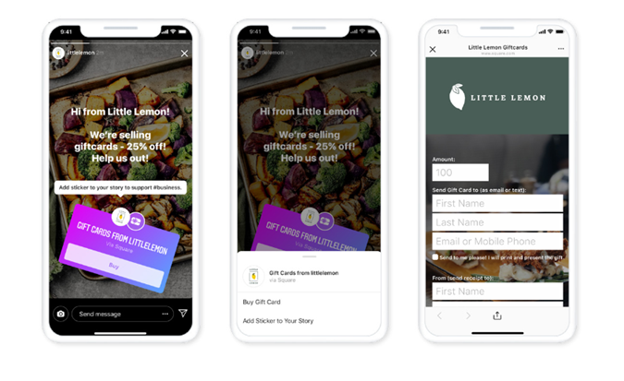
Note: This functionality is accessible to business profiles on Facebook or Instagram.
Connect Your Social Media Accounts to Toast
|
To connect your Meta accounts (Facebook + Instagram) to Toast, follow these steps:
- In Toast Web, navigate to Marketing > Brand Hub > Public Profiles > Social media.
- Review the Toast terms and conditions indicated in the Merchant Agreement, Privacy Statement, AI Terms, and Acceptable Use Policy.
- Select the Connect Meta Business Account button to accept the indicated terms.
Note: You are only able to connect one Meta account to your Restaurant Group’s toastweb account at a time. To ensure all your Facebook & Instagram Businesses and Pages are connected, choose the Opt in to all current and future businesses/ pages/ instagram accounts option during the connection process.
Once completed, you can now leverage Toast’s AI Writing Assistant to generate content ideas, and you can now track and manage your social media marketing campaigns directly through Toast Web via the Marketing hub (Marketing > Assistant and Marketing > Campaigns). Once your Meta account is connected, Toast's Generative AI-Powered Marketing Assistant can also include Instagram posts in the marketing plans it generates for you, alongside Email, SMS, and Facebook campaigns. The Assistant drafts the post copy and proposes an image for each Instagram campaign, and you can review, edit, or replace both in the Campaign Builder before scheduling. For more information, see Get Started With Toast's Generative AI-Powered Marketing Assistant. Note: Instagram campaigns in the marketing plan are available to Marketing Essentials customers and are rolling out in phases, so they may not appear in your plan yet.
To disconnect a linked Meta account, see Remove Social Media Accounts from Toast Marketing.
Create a Social Media Post
| Social Media Marketing is not yet available in Australia, Canada, Ireland, and the UK. |
You can start creating posts for your social media accounts by generating content ideas using the AI Input Bar found in Marketing > Assistant or selecting any of the pre-built holiday social media campaigns in Toast Web.
To create a social media post, follow these steps:
- In Toast Web, navigate to Marketing > Assistant.
- Use the drop-down menu to select the content that you wish to create.
- Next to the drop-down menu, enter your social media campaign’s goal and/or indicate if you’re crafting a campaign for a holiday or an event.
- Alternatively, you can select any of the pre-built holiday campaigns for timely and relevant content ideas.
- Then, select the arrow button to navigate to the next page.
- Fill out the provided fields accordingly.
- Message: Enter the content that you wish to post here. Alternatively, you can select the “Create with AI” option to generate content ideas and modify your post according to your liking.
- Image: Use this toggle to configure and select the image that you wish to include in your post.
- Promotion: Use this toggle to configure and select your pre-configured promotion, if applicable.
- Post Date: If you wish to publish your post immediately, select Now. If you wish to publish your post at a later time, select Custom post date and enter a specific date for when you want your post to be published.
- Once completed, select Post to Facebook/Instagram.
You do not have to finish a post in one sitting. Save it as a draft and come back to it later. You can also duplicate an existing post to reuse its content as the starting point for a new one.
Track Your Social Media Posts
| Social Media Marketing is not yet available in Australia, Canada, Ireland, and the UK. |
To track your social media posts, navigate to Marketing > Campaigns in Toast Web. Scroll down to the All campaigns section to view all published and scheduled posts.
Scheduled posts can be cancelled before they go out. Select the post from the All campaigns list and cancel it there.
Select a published post to open its details page, which shows the post itself alongside its engagement:
- Impressions: Total views of the post, including repeat views.
- Interactions: Comments, shares, and reactions added together.
- Reactions: Total reactions on the post.
Content Ideas for Social Media and Email
Now that you're set up with social media and email, it's time to create content that you can repurpose across all your marketing platforms. See below for a list of suggested content you can post about:
1. How to order online - Let your customers know whether to order from your website or an app, what pickup and delivery options you offer, and what your hours are. If Toast Online Ordering is enabled, you will find your Online Ordering link on your Restaurant Info page in Toast Web. Learn more here.
2. Popular or new menu items - Highlight a favorite dish or an enticing new addition to your menu. Be sure to include an image of your dish.
3. Promotions - Consider running a promotion to help boost orders. Promotions are often a useful tool in driving more orders but can also be costly, so carefully consider the duration and cost of the promotion. To learn more about creating promotions in Toast, check out Configure Discounts or Add Promotions to an Email Marketing Campaign.
4. Toast Tables - You can now send guest emails from Toast Tables - Waitlist and Reservations into email marketing. Toast even provides you with an easy-to-use, reservation-focused email template. Toast Tables guest emails will feed your automated email marketing subscribers. To learn more check out Use Toast Tables.
5. eGift cards - If you offer gift cards, consider promoting them as an easy and enjoyable gift for friends and family. If you have Toast Gift Cards enabled, you will find your eGift card purchase link on the Restaurant Info page in Toast Web. Learn more here.
6. Loyalty Program - If you have a loyalty program, let customers know how to join and what rewards you offer. If Toast Loyalty is enabled, you will find your Rewards Signup link and Rewards Lookup link on your Restaurant Info page in Toast Web. Learn more here.
7. Share your story - Connect with your customers on a more personal level by sharing how you started, which menu items are personal favorites, or how you developed a new dish.
Guest Social Media Sharing
Social media channels have been the #1 driver of orders to online ordering sites. This feature capitalizes on this behavior to drive more online business. This feature does not require any setup.
What is Social Media Sharing?
When a guest places an order via Toast Online Ordering or Toast Local, their confirmation screen will prompt them to share a post on Facebook and/or Twitter, encouraging their friends to support the restaurant as well.
How does it benefit your restaurant?
This feature expands the audience and reach of your restaurant by generating social media exposure from guests making purchases helping to keep your restaurant top of mind when customers are deciding where to order takeout or delivery!
How does it work?
On the order confirmation screen, guests are shown an option to share a post on various social media platforms.
Here is what the prompts on the confirmation screens look like:
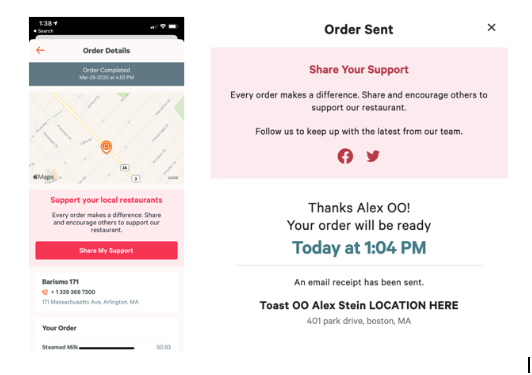
The posts include pre-populated text AND links to your location’s online ordering page OR a link to download Toast Local, depending on where the order is made.
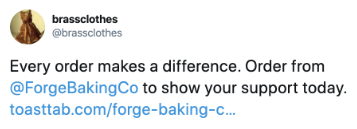
Here is what the shareable post will look like: